Skip to content

TechDirectArchive

Hands-on IT, Cloud, Security & DevOps Insights

  • Home
  • About
  • Advertise With US
  • Reviews
  • Contact
  • Toggle search form
Home » Windows » Stuck at Start PXE over IPv4: PXE-E18 Server response timeout
  • filezilla 1
    Connect to a FileZilla Server: How to install and configure a FileZilla Server on Windows Windows Server
  • ext
    How to install a standalone DriveLock Encryption software on Windows Security | Vulnerability Scans and Assessment
  • feature photo quit vim
    How to Exit Linux Vim or Vi Editor Linux
  • windows 10 technical preview windows 10 logo microsoft 97543 1920x1080
    How to Remove the All Apps Option from Windows Start Menu via GPO /Registry Windows
  • Telegram
    Integrate a WordPress site with WP Telegram Network | Monitoring
  • How to Disable TLS 1.0, TLS 1.1 and TLS 1   banner
    How to Disable TLS 1.0, TLS 1.1 and TLS 1.2 in Windows Using GPO Security | Vulnerability Scans and Assessment
  • windows server
    How to backup and restore a Windows DHCP Server via the DHCP Manager and PowerShell Windows Server
  • oracle virtualbox
    Fix VirtualBox Virtual Machine Encountered a Non-Fatal problem Virtualization

Stuck at Start PXE over IPv4: PXE-E18 Server response timeout

Posted on 22/12/202101/01/2026 Christian By Christian 2 Comments on Stuck at Start PXE over IPv4: PXE-E18 Server response timeout
PXE E18 Server response timeout

In this blog post, we will discuss the fx to “Stuck at Start PXE over IPv4: PXE-E18 Server response timeout”. Secure Boot is a security feature included in the latest generation of the Unified Extensible Firmware Interface (UEFI) in Windows. You may also want to see this guide: Windows 11 System Requirements: Why does Microsoft require additional system requirements? How to check if you have Secure Boot and TPM enabled.

Secure Boot replaced the aging and flawed BIOS architecture. With UEFI comes the feature of “secure boot” which boots only those bootloaders that are signed in to UEFI firmware. It was developed to protect your system from threats and is enabled by default in Windows, but not in Linux. In some cases, you may want to disable it.

For some other articles, I have written WDS, see the following guides: No bootable media found system halted: Unable to PXE boot WDS to Virtualbox, WDS/DHCP scenarios: How to configure DHCP Server option 60, 66 and 67 for Windows Deployment Services, Uninstall WDS: How to remove Windows Deployment Services role via the GUI and PowerShell.

PXE-E18 Server response timeout

However, the feature prevents rootkit malware and provides an additional layer of security. The downside of secure boot is that if you want to boot from a Linux USB or if you want to use a bootable Windows USB, it won’t allow that. Sometimes, it may also create problems in dual booting with Linux.

When imaging your device via WDS/MDT, you may be prompted quickly with the following error below "PXE-E18: Server response timeout". 
IPv4 network issue

When you search on the internet for this error without actually understanding some key features of Windows, you will never be able to resolve this issue. If you’re not careful, you might even break your MDT/WDS server.

You may want to learn more about SecureBoot in order to resolve this issue. Kindly refer to this guide for more information: Measured Boot, Secure Boot, Trusted Boot, and Early Launch Anti-Malware: How to secure the Windows 10 boot process.

Ensure SecureBoot is disabled

If you don’t know what you’re doing and leave it disabled, it’s possible that malware or malicious code could execute on your system before other protective measures can boot up, leaving you vulnerable.

To resolve these issues, plug in the ethernet cable correctly and establish network connectivity.
– Ensure you set the boot order correctly!
– Ensure during deployment (imaging) that secure boot is disabled. See the image below on how to disable secure boot. On an existing Windows device, here is one of the ways to disable secure boot: How to Disable Or Enable Secure Boot on Windows 10 & 11.

Furthermore, Here’s how to disable secure boot: How to clear, enable or disable TPM in Windows via the BIOS or UEFI, and Windows 11 Feature-specific, Hardware and Software Requirements: How to upgrade to Windows 11 from Windows 10 as a Windows Insider.

How to disable Secure Boot in BIOS?

The steps below actually depend on your device model (type). Open the PC BIOS menu. You can often access this menu by pressing a key while your PC is booting, such as F1, F2, F12, or Esc.

  1. Find the Secure Boot setting in your BIOS menu and set it to Disabled. This option is usually in either the Security tab, the Boot tab, or the Authentication tab. See the image below for a similar process.
  2. Save changes and exit. The PC reboots.
Server communication problem

Henceforth, you should be able to deploy the operating system to the new device.
– Note: I am not saying these are the only solutions to this issue, but at least this was what I checked that fixed mine.

For some other articles, I have written WDS. See the following guides: What happens when WDS and DNS is installed on the same server: DNS issues with WDS, and how does WDS work: How to configure Windows Deployment Services on Windows Server 2019.
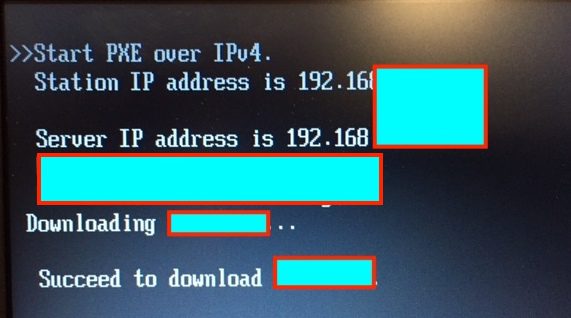
Boot process error

After experiencing the Stuck at Start PXE over IPv4 issue, proceed to select an operating system for installation. From the provided list of available operating systems, please choose the one that suits your needs.

Screenshot 2020 05 31 at 20.21.22
Screenshot 2020 05 31 at 20.21.55

The files will be loaded, and please follow the rest of the process. Kindly visit this guide: Install ADK, MDT, and WDS: How to deploy Windows images via Microsoft Deployment Toolkit and Windows Deployment Services.

Enable Secure Boot

Open the PC BIOS menu. You can often access this menu by pressing a key while your PC is booting, such as F1, F2, F12, or Esc. From Windows, hold the Shift key while selecting Restart. Go to Troubleshoot > Advanced Options: UEFI Firmware Settings.

When stuck at Start PXE over IPv4, one potential solution is to locate the Secure Boot setting. Enable it within the Security, Boot, or Authentication tabs if possible.

Alternatively, consider loading the PC’s integrated Secure Boot keys under Custom settings. This approach can help address the PXE-E18 error and server response timeout, facilitating a smoother boot process.

I hope this blog post addressed the issue “Stuck at Start PXE over IPv4: PXE-E18 Server response timeout”. Please, feel free to leave a comment below. We greatly appreciate your engagement.

5/5 - (2 votes)

Thank you for reading this post. Kindly share it with others.

  • Click to share on X (Opens in new window) X
  • Click to share on Reddit (Opens in new window) Reddit
  • Click to share on LinkedIn (Opens in new window) LinkedIn
  • Click to share on Facebook (Opens in new window) Facebook
  • Click to share on Pinterest (Opens in new window) Pinterest
  • Click to share on Tumblr (Opens in new window) Tumblr
  • Click to share on Telegram (Opens in new window) Telegram
  • Click to share on WhatsApp (Opens in new window) WhatsApp
  • Click to share on Pocket (Opens in new window) Pocket
  • Click to share on Mastodon (Opens in new window) Mastodon
  • Click to share on Bluesky (Opens in new window) Bluesky
  • Click to share on Threads (Opens in new window) Threads
  • Click to share on Nextdoor (Opens in new window) Nextdoor
Windows Tags:Boot process error, deployment, IPv4 network issue, Microsoft Deployment Tool kit, Microsoft Deployment Toolkit (MDT), PXE-E18 error, Server communication problem, WDS, Windows 10, Windows 11, Windows Deployment Services

Post navigation

Previous Post: Install and manage IP Address Management on Windows Server
Next Post: How to Configure Advanced PAM in Linux

Related Posts

  • QueryBitLocker1
    Query Windows BitLocker status remotely Windows
  • Azure Virtual Desktop
    How to deploy Azure Virtual Desktop in Azure Portal Virtualization
  • WCD
    Join Bulk Devices using a Provisioning Package to Azure AWS/Azure/OpenShift
  • Bitllockerextdrives
    Manage TPM Protector: How to encrypt additional drives on an MBAM-protected device Windows
  • Windows 11 Taskmanager
    Create Task Manager Shortcuts: How to add access, pin the Task Manager on Windows 11 Windows
  • Featured image RAM requirement for PC
    How much RAM does your Windows PC really need? Windows

More Related Articles

QueryBitLocker1 Query Windows BitLocker status remotely Windows
Azure Virtual Desktop How to deploy Azure Virtual Desktop in Azure Portal Virtualization
WCD Join Bulk Devices using a Provisioning Package to Azure AWS/Azure/OpenShift
Bitllockerextdrives Manage TPM Protector: How to encrypt additional drives on an MBAM-protected device Windows
Windows 11 Taskmanager Create Task Manager Shortcuts: How to add access, pin the Task Manager on Windows 11 Windows
Featured image RAM requirement for PC How much RAM does your Windows PC really need? Windows

Comments (2) on “Stuck at Start PXE over IPv4: PXE-E18 Server response timeout”

  1. Avatar photo Sam says:
    31/03/2022 at 2:29 PM

    I had this problem , which made one of my comps unusable. This article helped me to solve the problem. Now my comp is bootable. Thank you !

    Log in to Reply
    1. chris Christian says:
      31/03/2022 at 2:46 PM

      You are welcome, and I am glad you found this guide useful.

      Log in to Reply

Leave a Reply Cancel reply

You must be logged in to post a comment.

Microsoft MVP

VEEAMLEGEND

vexpert-badge-stars-5

Virtual Background

GoogleNews

Categories

veeaam100

sysadmin top30a

  • filezilla 1
    Connect to a FileZilla Server: How to install and configure a FileZilla Server on Windows Windows Server
  • ext
    How to install a standalone DriveLock Encryption software on Windows Security | Vulnerability Scans and Assessment
  • feature photo quit vim
    How to Exit Linux Vim or Vi Editor Linux
  • windows 10 technical preview windows 10 logo microsoft 97543 1920x1080
    How to Remove the All Apps Option from Windows Start Menu via GPO /Registry Windows
  • Telegram
    Integrate a WordPress site with WP Telegram Network | Monitoring
  • How to Disable TLS 1.0, TLS 1.1 and TLS 1   banner
    How to Disable TLS 1.0, TLS 1.1 and TLS 1.2 in Windows Using GPO Security | Vulnerability Scans and Assessment
  • windows server
    How to backup and restore a Windows DHCP Server via the DHCP Manager and PowerShell Windows Server
  • oracle virtualbox
    Fix VirtualBox Virtual Machine Encountered a Non-Fatal problem Virtualization

Subscribe to Blog via Email

Enter your email address to subscribe to this blog and receive notifications of new posts by email.

Join 1,839 other subscribers
  • RSS - Posts
  • RSS - Comments
  • About
  • Authors
  • Write for us
  • Advertise with us
  • General Terms and Conditions
  • Privacy policy
  • Feedly
  • Telegram
  • Youtube
  • Facebook
  • Instagram
  • LinkedIn
  • Tumblr
  • Pinterest
  • Twitter
  • mastodon

Tags

AWS Azure Bitlocker Microsoft Windows PowerShell WDS Windows 10 Windows 11 Windows Deployment Services Windows Server 2016

Copyright © 2025 TechDirectArchive


Loading Comments...
 

You must be logged in to post a comment.