Skip to content

TechDirectArchive

Hands-on IT, Cloud, Security, Veeam & DevOps

  • Home
  • About
  • Advertise With US
  • Contact
  • Reviews
  • Toggle search form

Tag: Windows Deployment Services

Fix Operating System Loader failed signature verification” on Dell Safe BIOS Systems via PXE [Part 3]

Posted on 08/05/202603/06/2026 IT Expert By IT Expert No Comments on Fix Operating System Loader failed signature verification” on Dell Safe BIOS Systems via PXE [Part 3]
Fix Operating System Loader failed signature verification” on Dell Safe BIOS Systems via PXE [Part  3]

This technical deep-dive stems from the guide Update WinPE Boot Images with Windows UEFI CA Certificates [Part 2]. In this guide, we shall discuss “Fix Operating System Loader failed signature verification” on Dell Safe BIOS Systems via PXE [Part 3]”. Since I observed a critical discrepancy during deployment. The devices that had not yet been…
Read More “Fix Operating System Loader failed signature verification” on Dell Safe BIOS Systems via PXE [Part 3]” »

Windows, Windows Server

How to fix Domain Join Error during Windows Deployment

Posted on 11/03/202625/03/2026 IT Expert By IT Expert No Comments on How to fix Domain Join Error during Windows Deployment
How to fix Domain Join Error during Windows Deployment

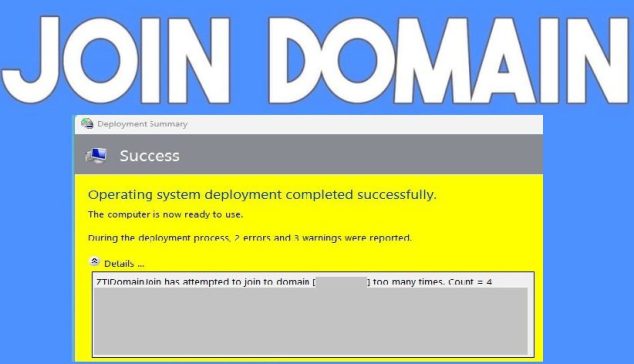
The message “ZtiDomainJoin has attempted to join to domain” comes from Microsoft Deployment Toolkit (MDT). This happens during an automated or Lite touch OS deployment as shown in the image below. Therefore, in this guide, we shall discuss How to fix Domain Join Error during Windows Deployment. Please see how to fix the following errors…

Read More “How to fix Domain Join Error during Windows Deployment” »

Windows Server

Install Windows Server 2025 via iDRAC Virtual Media or PXE

Posted on 18/06/202504/04/2026 IT Expert By IT Expert No Comments on Install Windows Server 2025 via iDRAC Virtual Media or PXE
Install Windows Server 2025 via iDRAC Virtual Media or PXE

In this article, we shall discuss the steps to install Windows Server 2025 via iDRAC Virtual Media or PXE. Windows Server 2025 delivers advanced security, enhanced performance, and greater cloud agility. Designed to meet diverse customer needs, it provides a secure, high-performance platform for deploying applications across on-premises, hybrid, and cloud environments. Wish to learn…

Read More “Install Windows Server 2025 via iDRAC Virtual Media or PXE” »

Windows Server

Error 0x800f0823: Wizard.hta Screen stuck during WDS Deployment

Posted on 12/01/202413/11/2025 IT Expert By IT Expert No Comments on Error 0x800f0823: Wizard.hta Screen stuck during WDS Deployment
Error 0x800f0823: Wizard.hta Screen stuck during WDS Deployment

Windows Deployment Services (WDS) enables you to deploy Windows operating systems over the network, so you do not have to install the operating system directly from a CD or DVD. This article will discuss how to fix “Wizard.hta Screen stuck during WDS Deployment”. please see MDT deployment failed and Stuck at Command Prompt: Windows installation…

Read More “Error 0x800f0823: Wizard.hta Screen stuck during WDS Deployment” »

Windows Server

OOBEZDP: Something went wrong during the Windows deployment

Posted on 19/04/202319/04/2023 IT Expert By IT Expert No Comments on OOBEZDP: Something went wrong during the Windows deployment
OOBEZDP: Something went wrong during the Windows deployment

Windows Deployment Services (WDS) enables you to deploy Windows operating systems over the network, which means that you do not have to install each operating system directly from a CD or DVD. I have written some interesting guides on WDS, please take a look: ADK|WinPE|MDT: Deploy Windows with WDS, and how to set up and…

Read More “OOBEZDP: Something went wrong during the Windows deployment” »

Windows, Windows Server

MBAM Policy was detected: Verify the OU used for pre-deployment does not apply MBAM policy

Posted on 03/02/202321/12/2023 IT Expert By IT Expert No Comments on MBAM Policy was detected: Verify the OU used for pre-deployment does not apply MBAM policy
MBAM Policy was detected: Verify the OU used for pre-deployment does not apply MBAM policy

The Microsoft BitLocker Administration and Monitoring (MBAM) client enables administrators to enforce and monitor BitLocker drive encryption on computers in the enterprise. In this guide, you will learn how to fix the following error “MBAM Policy was detected: Verify the OU used for pre-deployment does not apply MBAM policy”. Please see the effects of renaming an…

Read More “MBAM Policy was detected: Verify the OU used for pre-deployment does not apply MBAM policy” »

Windows Server

How to deploy MBAM Client as part of a Windows Deployment

Posted on 19/10/202211/03/2026 IT Expert By IT Expert No Comments on How to deploy MBAM Client as part of a Windows Deployment
How to deploy MBAM Client as part of a Windows Deployment

The Microsoft BitLocker Administration and Monitoring (MBAM) client enables administrators to enforce and monitor BitLocker drive encryption on computers in the enterprise. Kindly refer to some of these related guides: How to query MBAM to display the report for BitLocker Recovery for a specified period of time, What are the effects of renaming an MBAM…

Read More “How to deploy MBAM Client as part of a Windows Deployment” »

Windows Server

An error has occurred in the script on this page: HTA applications report a Script error after upgrading to ADK for Windows 11, version 22H2

Posted on 17/10/202220/03/2024 IT Expert By IT Expert 4 Comments on An error has occurred in the script on this page: HTA applications report a Script error after upgrading to ADK for Windows 11, version 22H2
An error has occurred in the script on this page: HTA applications report a Script error after upgrading to ADK for Windows 11, version 22H2

Microsoft Deployment Toolkit (MDT) is a unified collection of tools, processes, and guidance for automating desktop and server deployment. And this in turn reduces deployment time and standardizes desktop and server image deployment. In this article, you will learn how to fix an error has occurred in the script on this page: HTA applications report…

Read More “An error has occurred in the script on this page: HTA applications report a Script error after upgrading to ADK for Windows 11, version 22H2” »

Windows Server

How to uninstall and upgrade ADK, WinPE, and MDT

Posted on 29/09/202212/05/2026 IT Expert By IT Expert No Comments on How to uninstall and upgrade ADK, WinPE, and MDT
How to uninstall and upgrade ADK, WinPE, and MDT

The Windows Assessment and Deployment Kit (Windows ADK) and Windows PE add-on have the tools you need to customize Windows images for large-scale deployment and to test the quality and performance of your system. In this article, we shall discuss How to uninstall and upgrade ADK, WinPE, and MDT. The Windows ADK includes the Windows…

Read More “How to uninstall and upgrade ADK, WinPE, and MDT” »

Windows Server

Workaround and Permanent fix for this snap-in performed a non-valid operation and has been unloaded: To continue using this snap-in restart MMC or try loading the snap-in again

Posted on 29/09/202228/08/2023 IT Expert By IT Expert No Comments on Workaround and Permanent fix for this snap-in performed a non-valid operation and has been unloaded: To continue using this snap-in restart MMC or try loading the snap-in again
Workaround and Permanent fix for this snap-in performed a non-valid operation and has been unloaded: To continue using this snap-in restart MMC or try loading the snap-in again

The Windows Assessment and Deployment Kit (Windows ADK) and Windows PE add-on have the tools you need to customize Windows images for large-scale deployment, and to test the quality and performance of your system, its added components, and the applications running on it. Here are some interesting guides on how to set up and install the…

Read More “Workaround and Permanent fix for this snap-in performed a non-valid operation and has been unloaded: To continue using this snap-in restart MMC or try loading the snap-in again” »

Windows Server

Stuck at Start PXE over IPv4: PXE-E18 Server response timeout

Posted on 22/12/202101/01/2026 IT Expert By IT Expert 2 Comments on Stuck at Start PXE over IPv4: PXE-E18 Server response timeout
Stuck at Start PXE over IPv4: PXE-E18 Server response timeout

In this blog post, we will discuss the fx to “Stuck at Start PXE over IPv4: PXE-E18 Server response timeout”. Secure Boot is a security feature included in the latest generation of the Unified Extensible Firmware Interface (UEFI) in Windows. You may also want to see this guide: Windows 11 System Requirements: Why does Microsoft…

Read More “Stuck at Start PXE over IPv4: PXE-E18 Server response timeout” »

Windows

Failed to run the action install Operating System: Lifetouch deployment failed, Return Code = -2147467259 0x80004005 when installing Windows image via MDT

Posted on 03/11/202130/09/2023 IT Expert By IT Expert No Comments on Failed to run the action install Operating System: Lifetouch deployment failed, Return Code = -2147467259 0x80004005 when installing Windows image via MDT
Failed to run the action install Operating System: Lifetouch deployment failed, Return Code = -2147467259 0x80004005 when installing Windows image via MDT

Image deployment in MDT is defined by task sequences, which are a set of instructions that tell the program how to create or deploy an image. For example, a task sequence can be created that will deploy an operating system and perform Windows updates on a reference virtual machine. Task sequences are the heart and…

Read More “Failed to run the action install Operating System: Lifetouch deployment failed, Return Code = -2147467259 0x80004005 when installing Windows image via MDT” »

Windows

How to check the version of Windows ADK

Posted on 12/03/202128/09/2023 IT Expert By IT Expert No Comments on How to check the version of Windows ADK
How to check the version of Windows ADK

Windows Assessment and Deployment Kit (ADK) contains core assessment and deployment tools and technologies which includes Deployment Image Servicing and Management (DISM), Windows Imaging and Configuration Designer (Windows ICD). In addition, the ADK Windows encompasses System Image Manager (Windows SIM), User State Migration Tool (USMT), Volume Activation Management Tool (VAMT), Windows Preinstallation Environment (Windows PE),…

Read More “How to check the version of Windows ADK” »

Windows

Posts pagination

1 2 … 5 Next

Microsoft MVP

VEEAMLEGEND

vexpert-badge-stars-5

Virtual Background

GoogleNews

Categories

veeaam100

Veeam Vanguard

  • System Center
    Integrate Hyper-V: Install System Center Virtual Machine Manager Virtualization
  • Open Outlook links from your default browser
    How to stop Outlook from opening links in Edge Browser Network | Monitoring
  • zoominstallanduninstall
    How to uninstall, reinstall, and update Zoom on Mac JIRA|Confluence|Apps
  • powershell commands lede 1024x276 1
    Enable WinRM on Windows Servers and Windows PCs Scripts
  • goland
    How to install Golang on a Linux System Linux
  • Standby Mode
    Disable modern standby on Windows 10 and 11 Windows
  • the remote procedure call failed
    Error 0xc1420117: The directory could not be completely unmounted Windows Server
  • insufficientaccessright 1
    Azure AD Connect Permission issue: Error 8344 insufficient access rights to perform the operation AWS/Azure/OpenShift

Subscribe to Blog via Email

Enter your email address to subscribe to this blog and receive notifications of new posts by email.

Join 1,800 other subscribers
  • RSS - Posts
  • RSS - Comments
  • About
  • Authors
  • Write for us
  • Advertise with us
  • General Terms and Conditions
  • Privacy policy
  • Feedly
  • Telegram
  • Youtube
  • Facebook
  • Instagram
  • LinkedIn
  • Tumblr
  • Pinterest
  • Twitter
  • mastodon

Tags

Active Directory Azure Bitlocker Microsoft Windows PowerShell WDS Windows 10 Windows 11 Windows Deployment Services Windows Server 2016

Copyright © 2025 TechDirectArchive