Skip to content

TechDirectArchive

Hands-on IT, Cloud, Security & DevOps Insights

  • Home
  • About
  • Advertise With US
  • Reviews
  • Contact
  • Toggle search form
Home » Linux » How to install Redis on Linux System
  • fix Client Certificate Mapping Authentication error
    How to fix Client Certificate Mapping Authentication error Backup
  • s3versioning
    Hosting Static Website and Versioning on AWS S3 AWS/Azure/OpenShift
  • adfs
    Install and configure Active Directory Federation Service (ADFS) Windows Server
  • ssl
    SSL Encrypted Communications explained Web Server
  • posfix as an smtp server
    How to Install and Configure Postfix as a Send-Only SMTP Server Linux
  • intro to azure cloud shell
    The Overview of Azure Cloud Shell AWS/Azure/OpenShift
  • Windows server 2025 set up
    Install Windows Server 2025 via iDRAC Virtual Media or PXE Windows Server
  • command prompt powershell 670x335 1
    How to Start, Stop and Restart Windows Server Update WSUS Services via PowerShell and CMD Windows

How to install Redis on Linux System

Posted on 29/08/202230/07/2023 Raphael Gab-Momoh By Raphael Gab-Momoh No Comments on How to install Redis on Linux System
redisf

Redis, which stands for Remote Dictionary Server, is a key-value data store that is fast and open source. Furthermore, strings, lists, maps, sets, sorted sets, HyperLogLogs, bitmaps, streams, and spatial indices are all supported by Redis. This article will show you how to install Redis on a Linux system. You can find other similar guides here: How to install Unison on a Linux System and How To Install Nextcloud on a Linux system and How to upgrade from Ubuntu 20.04 LTS to 22.04 LTS, and How to Install MongoDB on a Linux System, and How to install Gradle on Ubuntu.

More guides can be accessed from here: How to create Desktop Windows stickers on Windows 11 and how to Create a Linux Virtual Machine Via Azure CLI, how to Install an Nginx Web-Server and Configure TCP Port and How to install and configure Apache Cassandra on Linux Server also How to Clear Cache in Windows 11 and How to change or reset your Microsoft account password via the Web or Windows Settings.

Why Install Redis on Linux

Performance: Redis data is entirely stored in memory, allowing low latency and high throughput data access. In-memory data stores, as opposed to traditional databases, do not require a trip to disk, reducing engine latency to microseconds. As a result, in-memory data stores can support orders of magnitude more operations and respond much faster. As a result, read and write operations take less than a millisecond on average, with support for millions of operations per second.

Open source: Redis is an open-source project with a thriving community.   Since Redis is open standards-based, supports open data formats, and has a diverse set of clients, there is no vendor or technology lock-in.

High availability and scalability: Redis provides a primary-replica architecture with either a single node primary or a clustered topology. Furthermore, this enables you to create highly available solutions with consistent performance and dependability. When it comes to cluster size, there are several options for scaling up as well as scaling in or out. Besides, this allows your cluster to scale in response to your needs.

Redis packages are available in the majority of major Linux distributions; for this article, we will focus on Ubuntu 22.04

Prerequisites to Install Redis on Linux System

Please see these vital links as well: How to Quickly Fix Windows Search Bar Not Working, and How to Hide Folders and Files from Search Results in Windows

  • A linux machine preferably Ubuntu 22.04
  • A user with sudo privileges
  • If you’re installing a very basic distribution you will need lsb

Step 1: install LSB

you can install lsb-release  using this:

sudo apt install lsb-release
How to install Redis on a Linux System-lsb
lsb-release

Step 2: Add repo to apt index

Then, add the repository to the apt index. SeeHow to Install and Use Minikube on a Linux System.

curl -fsSL https://packages.redis.io/gpg | sudo gpg --dearmor -o /usr/share/keyrings/redis-archive-keyring.gpg

echo "deb [signed-by=/usr/share/keyrings/redis-archive-keyring.gpg] https://packages.redis.io/deb $(lsb_release -cs) main" | sudo tee /etc/apt/sources.list.d/redis.list
aptindex
apt index

Step 3: Update the apt index

Afterwards, update apt index with the command. Please see How to remove OneDrive from Windows via DISM, and how to add Registry keys via DISM in Windows.

sudo apt-get update

Step 3: Install Redis

You can install Redis with the command :

sudo apt-get install redis
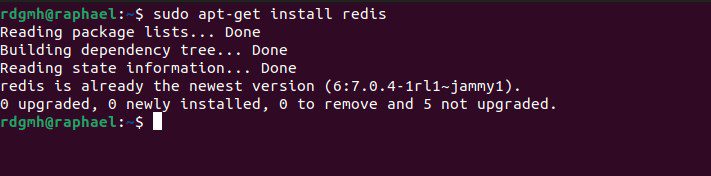
How to install Redis on a Linux System-redis
install redis

Step 4: Alternative way to install Redis On Linux System

Redis packages are available in the Snapcraft store and can be installed on operating systems that support snap.

sudo snap install redis
snap
snap install

Summary

Redis is an in- memory data store that is open source, highly available, and scalable. You can and it can install it by following the series of steps above. Bet you know how to install Redis on Linux system now.


Rate this post

Thank you for reading this post. Kindly share it with others.

  • Click to share on X (Opens in new window) X
  • Click to share on Reddit (Opens in new window) Reddit
  • Click to share on LinkedIn (Opens in new window) LinkedIn
  • Click to share on Facebook (Opens in new window) Facebook
  • Click to share on Pinterest (Opens in new window) Pinterest
  • Click to share on Tumblr (Opens in new window) Tumblr
  • Click to share on Telegram (Opens in new window) Telegram
  • Click to share on WhatsApp (Opens in new window) WhatsApp
  • Click to share on Pocket (Opens in new window) Pocket
  • Click to share on Mastodon (Opens in new window) Mastodon
  • Click to share on Bluesky (Opens in new window) Bluesky
  • Click to share on Threads (Opens in new window) Threads
  • Click to share on Nextdoor (Opens in new window) Nextdoor
Linux Tags:Performance

Post navigation

Previous Post: How to Set up Private Docker Registry
Next Post: How to Overlay two files with UnionFs in a Linux System

Related Posts

  • ntp server testen
    Enable or disable Linux System’s Clock Sync with NTP Server Linux
  • nextcloudfeature 1
    How To Install Nextcloud on a Linux system Backup
  • 1 pUEZd8z  1p 7ICIO1NZFA
    The package python-virtualenv has no installation candidate error Linux
  • centos feature
    How to change the system time zone under RedHat and CentOS Linux
  • physical
    Linux Machine: Is it Virtual or a Physical server Linux
  • Package1
    Install Synaptic Package Manager: Handle packages in Ubuntu Linux

More Related Articles

ntp server testen Enable or disable Linux System’s Clock Sync with NTP Server Linux
nextcloudfeature 1 How To Install Nextcloud on a Linux system Backup
1 pUEZd8z  1p 7ICIO1NZFA The package python-virtualenv has no installation candidate error Linux
centos feature How to change the system time zone under RedHat and CentOS Linux
physical Linux Machine: Is it Virtual or a Physical server Linux
Package1 Install Synaptic Package Manager: Handle packages in Ubuntu Linux

Leave a Reply Cancel reply

You must be logged in to post a comment.

Microsoft MVP

VEEAMLEGEND

vexpert-badge-stars-5

Virtual Background

GoogleNews

Categories

veeaam100

sysadmin top30a

  • fix Client Certificate Mapping Authentication error
    How to fix Client Certificate Mapping Authentication error Backup
  • s3versioning
    Hosting Static Website and Versioning on AWS S3 AWS/Azure/OpenShift
  • adfs
    Install and configure Active Directory Federation Service (ADFS) Windows Server
  • ssl
    SSL Encrypted Communications explained Web Server
  • posfix as an smtp server
    How to Install and Configure Postfix as a Send-Only SMTP Server Linux
  • intro to azure cloud shell
    The Overview of Azure Cloud Shell AWS/Azure/OpenShift
  • Windows server 2025 set up
    Install Windows Server 2025 via iDRAC Virtual Media or PXE Windows Server
  • command prompt powershell 670x335 1
    How to Start, Stop and Restart Windows Server Update WSUS Services via PowerShell and CMD Windows

Subscribe to Blog via Email

Enter your email address to subscribe to this blog and receive notifications of new posts by email.

Join 1,841 other subscribers
  • RSS - Posts
  • RSS - Comments
  • About
  • Authors
  • Write for us
  • Advertise with us
  • General Terms and Conditions
  • Privacy policy
  • Feedly
  • Telegram
  • Youtube
  • Facebook
  • Instagram
  • LinkedIn
  • Tumblr
  • Pinterest
  • Twitter
  • mastodon

Tags

AWS Azure Bitlocker Microsoft Windows PowerShell WDS Windows 10 Windows 11 Windows Deployment Services Windows Server 2016

Copyright © 2025 TechDirectArchive


Loading Comments...
 

You must be logged in to post a comment.