Skip to content

TechDirectArchive

Hands-on IT, Cloud, Security & DevOps Insights

  • Home
  • About
  • Advertise With US
  • Reviews
  • Contact
  • Toggle search form
Home » Windows Server » How to create a contact in Active Directory

How to create a contact in Active Directory

Posted on 25/01/202022/09/2023 Christian By Christian No Comments on How to create a contact in Active Directory
Active Directory

Active Directory contacts include information about a person or business, such as phone numbers, email addresses, and fax numbers. Creating and managing AD contacts is vital for organizations, as contacts can be listed in a Global Address List (GAL) or another address list, allowing users to access contact information and send messages. For a brief overview on the differences about Active Directory user account and contact, see https://techdirectarchive.com/2020/04/09/difference-between-a-contact-and-a-user-object/

Why would you want to create a contact in Active Directory (AD)?


– Contact is most times needed in AD when you have a member that is not a regular user in your organization, such as an external (3rd party contractor). This will ensure a user account is not created for the user.
– Contact accounts will also help maintain a high level of security in your organization.
– Lastly, it will help save contact and help email software access the contact details.

Note: Contact only contains details about a person and does not contain the SID enabled on the user
Noe: This is similar to contacts in O365

Create a contact in Active Directory
– Under Tools,
– Launch Active Directory Users and Computers
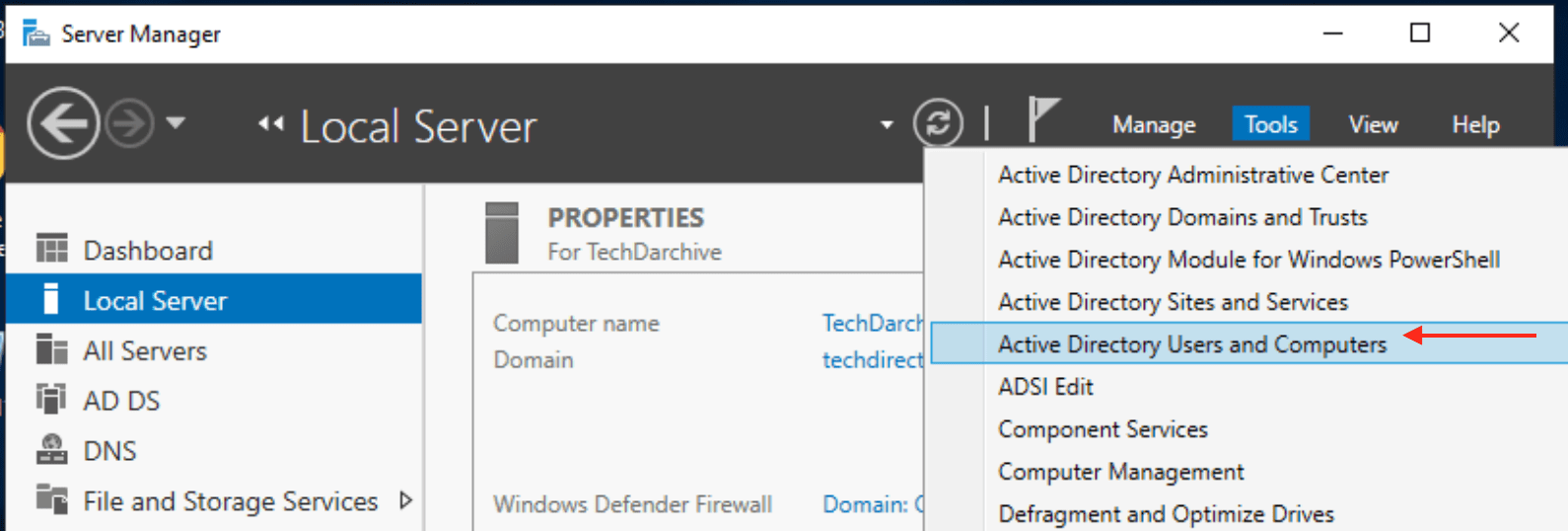
create contact

Right-click on the OU, where you want the contact to be created.
– Click on New
– Click on Contact
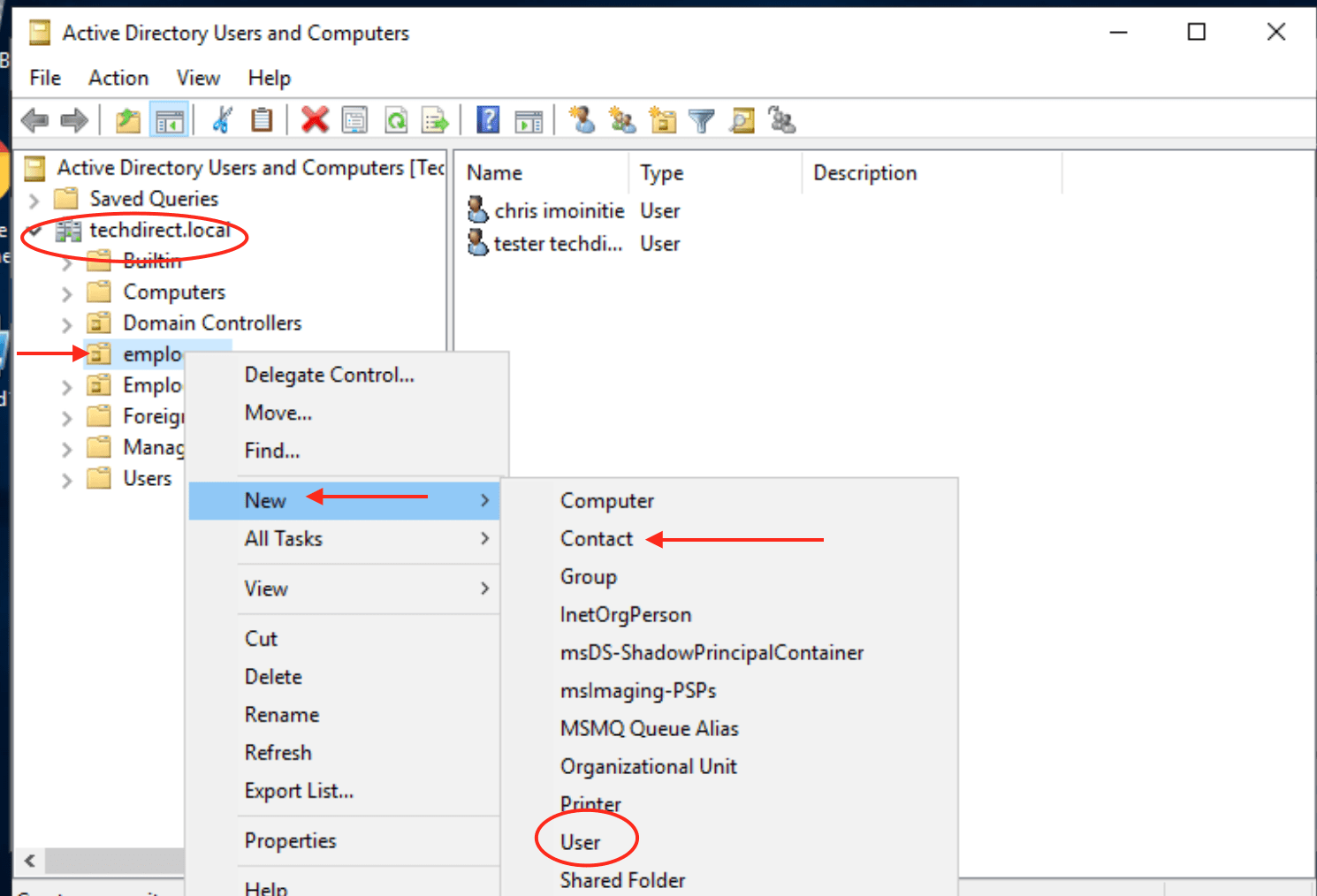
And follow the dialog box displayed to perform the tasks.

When you have it created here, there is no need creating it again an Exchange Server as the exchange server will be able to access the details.

– To configure additional properties
– Right-click on the contact and select properties

Note: You can add the contact to the group etc., despite not having a SID.
Because it does not have the SID enabled, they are not granted access to the group they belong to but only on getting emails sent to the group they belong to.

Rate this post

Thank you for reading this post. Kindly share it with others.

  • Share on X (Opens in new window) X
  • Share on Reddit (Opens in new window) Reddit
  • Share on LinkedIn (Opens in new window) LinkedIn
  • Share on Facebook (Opens in new window) Facebook
  • Share on Pinterest (Opens in new window) Pinterest
  • Share on Tumblr (Opens in new window) Tumblr
  • Share on Telegram (Opens in new window) Telegram
  • Share on WhatsApp (Opens in new window) WhatsApp
  • Share on Mastodon (Opens in new window) Mastodon
  • Share on Bluesky (Opens in new window) Bluesky
  • Share on Threads (Opens in new window) Threads
  • Share on Nextdoor (Opens in new window) Nextdoor
Windows Server Tags:Active Directory, users

Post navigation

Previous Post: Download and use Windows Sysinternals Tools locally
Next Post: Integrating on-premise AD with Azure Active Directory and MFA

Related Posts

  • image 16
    How to Fix Windows Error 0x80070057 Windows
  • Windows Admin Center v2   2401 install   2306 to 2311 upgrade
    Upgrade Windows Admin Center 2306 – 2311: Install WACmg 2410 Network | Monitoring
  • Download and apply Windows ADK Patch
    How to download and install the Windows ADK Patches Windows
  • shrink and create partition
    How to shrink and create new partition on Windows Server Windows Server
  • How to Change Active Directory Group Scope
    How to change Active Directory Group Scope Windows Server
  • wmic4
    How to find User Security Identifier (SID) in Windows [Part 1] Windows

More Related Articles

image 16 How to Fix Windows Error 0x80070057 Windows
Windows Admin Center v2   2401 install   2306 to 2311 upgrade Upgrade Windows Admin Center 2306 – 2311: Install WACmg 2410 Network | Monitoring
Download and apply Windows ADK Patch How to download and install the Windows ADK Patches Windows
shrink and create partition How to shrink and create new partition on Windows Server Windows Server
How to Change Active Directory Group Scope How to change Active Directory Group Scope Windows Server
wmic4 How to find User Security Identifier (SID) in Windows [Part 1] Windows

Leave a Reply Cancel reply

You must be logged in to post a comment.

Microsoft MVP

VEEAMLEGEND

vexpert-badge-stars-5

Virtual Background

GoogleNews

Categories

veeaam100

sysadmin top30a

  • image 42
    How to Install and Setup WordPress into a cPanel and Configure Your First WordPress Theme Configuration Management Tool
  • How to Make the Taskbar Transparent in Windows 11
    How to Make Your Taskbar Completely Transparent on Windows 11 Windows
  • windows 10 bjw3 1280x720 1
    How to Find the Pathname of a Mapped Network Drive Windows
  • How to Disable TLS 1.0, TLS 1.1 and TLS 1   banner
    How to Disable TLS 1.0, TLS 1.1 and TLS 1.2 in Windows Using GPO Security | Vulnerability Scans and Assessment
  • Exchange Admin Centre   EMC
    How to grant Access to User Mailbox Network | Monitoring
  • apply and install Veeam NFR Licence
    How to apply and install Veeam NFR License Backup
  • Screenshot 2020 12 29 at 04.08.43
    Enable or disable BitLocker Drive Encryption on Windows Security | Vulnerability Scans and Assessment
  • Windows11
    Windows 11 System Requirements Windows

Subscribe to Blog via Email

Enter your email address to subscribe to this blog and receive notifications of new posts by email.

Join 1,824 other subscribers
  • RSS - Posts
  • RSS - Comments
  • About
  • Authors
  • Write for us
  • Advertise with us
  • General Terms and Conditions
  • Privacy policy
  • Feedly
  • Telegram
  • Youtube
  • Facebook
  • Instagram
  • LinkedIn
  • Tumblr
  • Pinterest
  • Twitter
  • mastodon

Tags

Active Directory AWS Azure Bitlocker Microsoft Windows PowerShell WDS Windows 10 Windows 11 Windows Server 2016

Copyright © 2025 TechDirectArchive


Loading Comments...
 

You must be logged in to post a comment.