Skip to content

TechDirectArchive

Hands-on IT, Cloud, Security & DevOps Insights

  • Home
  • About
  • Advertise With US
  • Contact
  • Reviews
  • Toggle search form
Home » Reviews » Veles Software: MPA Tools Review and Product Details
  • mfa
    Microsoft Azure Multi-Factor Authentication (MFA) AWS/Azure/OpenShift
  • apache ubuntu 20 04
    How to Install Apache HTTP Server on Ubuntu 20.04 LTS Linux
  • image 43
    Configure GPS location “Google Map” on your Android Studio Emulator Windows
  • Configure Data Deduplication on Windows Server
    Video on how to Configure Data Deduplication on Windows Server Windows Server
  • Prevent OS Reinstallation When Switching from Legacy BIOS to UEFI
    Prevent OS Reinstallation: Change from legacy BIOS to UEFI Windows
  • Map and disconnect Virtual Disk in VMware Workstation
    Map and disconnect Virtual Disk in VMware Workstation Virtualization
  • elasticsearch error feature
    Elasticsearch: How to stop systemd service start operation from timing out Linux
  • yarnfinalfeature
    How to Install and Uninstall Yarn on Ubuntu Linux Linux

Veles Software: MPA Tools Review and Product Details

Posted on 08/01/202106/09/2023 Christian By Christian No Comments on Veles Software: MPA Tools Review and Product Details
Veles Software MPA Tools

Veles software is an innovative and leading provider of technology solutions for IT professionals and focuses on developing tools such as the MPA-Tools etc., to help improve IT businesses’ operations and processes thereby increasing productivity. Veles Software is based in Calgary, Alberta, Canada, and since 2008 served many clients around the globe. MPA Tools is a fully-featured IT Management Software designed to serve your IT needs. It helps simplify and improve IT administration tasks and minimizes problem resolution time for IT professionals. Below is the Graphical User Interface of the MPA-Tools. Kindly refer to the following guide on how to install and configure MPA Tools.

The installation and discovery process is very fast. For how to install and configure MPA-Tools, kindly visit this link. It has a very unique and intuitive Graphical User Interface (GUI).

MPA Tools Review and Product Details

MPA Tools Dashboard
Below are some features of the MPA Tools in a glance. 
- Reporting capability
- Troubleshooting
- Device management and troubleshooting
- Patch Management
- Compliance Management
- Remote Administration
- Admin Tasks Automation
- User Logs Management
- File Tree Troubleshooting
- Auditing (Audit Trail)
- Access Controls/Permissions
- SCCM client and collection Management
- Software Inventory
- Diagnostic Tools (Diagnostic Testing)
- Server Monitoring
- Device Auto Discovery
- Multi-Platform

It is worth nothing that the MPA tool combines AI logic and task automation to help IT Professionals manage their IT infrastructure in an efficient manner.

  • MPA Tool integrates with System Center Configuration Manager (SCCM), Azure Active Directory, Active Directory and Intune. This enables you to monitor remote devices from Active Directory (AD), Azure AD, Intune, SCCM.
  • It offers event logs, hardware inventory, patch management, and remote access capability.
  • Furthermore, MPA Tools simplifies and improves IT infrastructure administration tasks and minimises problem resolution time for HelpDesk, DeskSide, and System Administrators. Below are some of the features of this magnificent tool.
  • MPA Tools enables remote administration of tasks thereby improving consistency and reliability while simultaneously relieving personnel of tedious manual tasks.
  • MPA Tools help IT System Administrators in gathering detailed information about the environment (workstations / servers) they administer and thus help in troubleshooting these devices in a timely manner.
  • The MPA Tools also make it easy for users to compare device configurations so that troubleshooting can be performed much more quickly.

Note: MPA Tools also do not require to have an agent on remote computers to work. It is quite simple to use and do not require to perform any special installation steps. Please take a look at this link for some minimal requirements needed for the MPA Tool to work. Below are some features of the MPA Tool in one console with the ability to manage your Windows devices. The MPA Tool can be download from the following link, you will be will this tool just as I do.

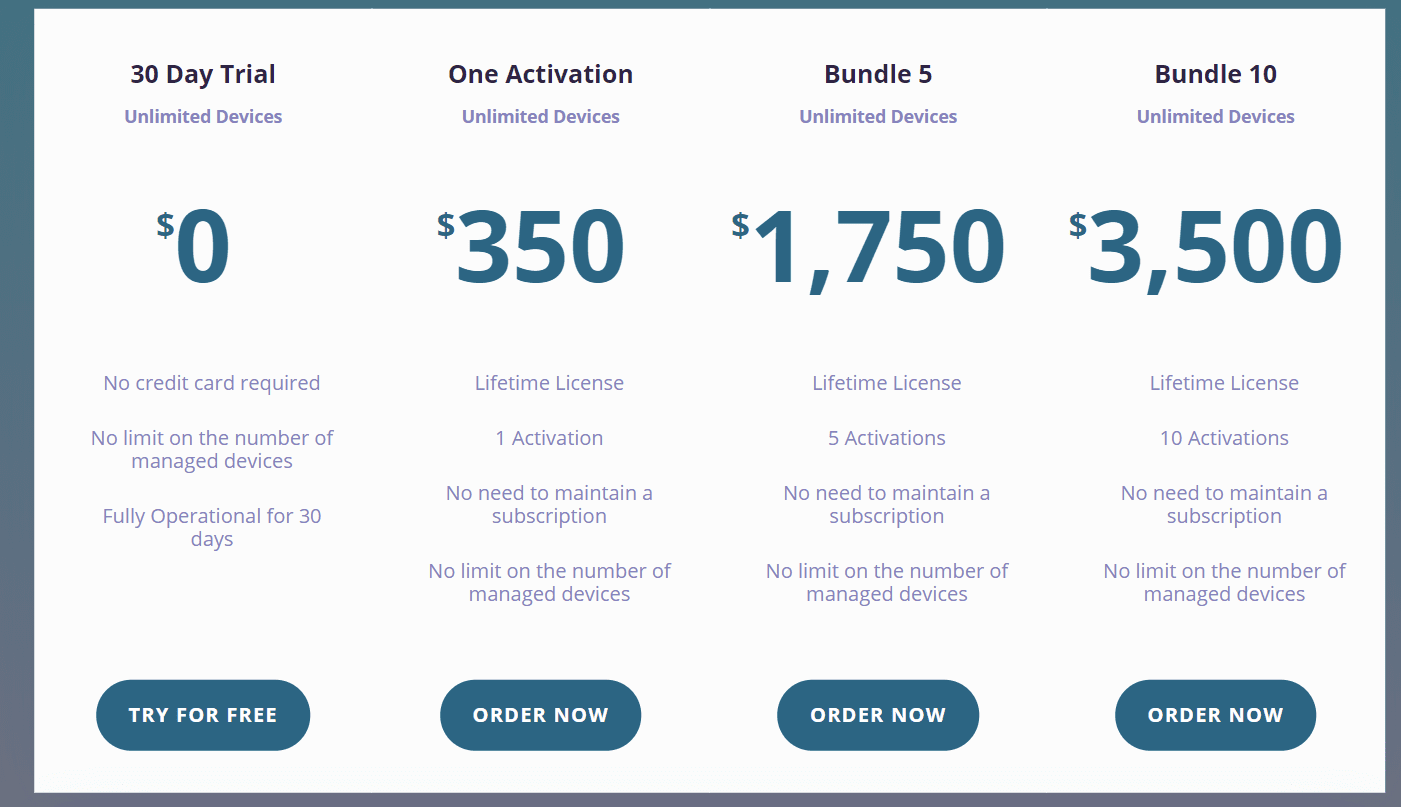
MPA Tools pricing is available in the following plans, “MPA Tools Pricing Packages (Perpetual Model) and the “MPA Tools Pricing Packages (Subscription Model). They have a flexible pricing model and is reasonable.

Below are the MPA Tools Pricing Packages (Perpetual Model). Click on the following nofollow link to get detailed pricing quotes and payment methods.
MPA Tools Pricing Packages
Perpetual Model
MPA Tools Pricing Packages
Perpetual Model

Also, to inquire more information about any of Veles Software’s product offerings, kindly contact them via the following contact page on their web page.

MPA Tools technical support details.

  • Devices Support: Windows
  • Language Support: English
  • Deployment Type: On-premise with integration capabilities as described above.

Available Support: The MPA Tools has amazing customer service and they can be reached via the following Email ([email protected]). You can also reach them directly from the MPA Tools console by clicking on the Support Menu and this will automatically open up the support home page

I hope you found this blog post on MPA Tools Review and Product Details helpful. If you have any questions, please let me know in the comment session.

Rate this post

Thank you for reading this post. Kindly share it with others.

  • Click to share on X (Opens in new window) X
  • Click to share on Reddit (Opens in new window) Reddit
  • Click to share on LinkedIn (Opens in new window) LinkedIn
  • Click to share on Facebook (Opens in new window) Facebook
  • Click to share on Pinterest (Opens in new window) Pinterest
  • Click to share on Tumblr (Opens in new window) Tumblr
  • Click to share on Telegram (Opens in new window) Telegram
  • Click to share on WhatsApp (Opens in new window) WhatsApp
  • Click to share on Pocket (Opens in new window) Pocket
  • Click to share on Mastodon (Opens in new window) Mastodon
  • Click to share on Bluesky (Opens in new window) Bluesky
  • Click to share on Threads (Opens in new window) Threads
  • Click to share on Nextdoor (Opens in new window) Nextdoor
Reviews Tags:Azure, Azure AD, Azure AD Tenant, Azure Domain Services, Windows 10, Windows Server 2016

Post navigation

Previous Post: Manage Windows Product key with Software Licensing Manager
Next Post: Veles Software: How to install and configure MPA Tools

Related Posts

  • mac2022df
    Best MacBook you can find in the year 2022 Reviews
  • Wyebot
    A comprehensive guide on Wyebot Wireless Intelligence Platform Reviews
  • Access Synology Remotely
    How to create a Tailscale VPN connection to Synology NAS Backup
  • aomei
    Best Free Disk Cloning Software to Clone a Hard Drive Reviews
  • Object First Appliance unboxing
    Object First OOTBI Appliance Unboxing and Quick Setup Backup
  • Configure Synology DS923+ NAS for File Sharing
    How to Configure Synology DS923+ NAS for File Sharing [Part 2] Reviews

More Related Articles

mac2022df Best MacBook you can find in the year 2022 Reviews
Wyebot A comprehensive guide on Wyebot Wireless Intelligence Platform Reviews
Access Synology Remotely How to create a Tailscale VPN connection to Synology NAS Backup
aomei Best Free Disk Cloning Software to Clone a Hard Drive Reviews
Object First Appliance unboxing Object First OOTBI Appliance Unboxing and Quick Setup Backup
Configure Synology DS923+ NAS for File Sharing How to Configure Synology DS923+ NAS for File Sharing [Part 2] Reviews

Leave a Reply Cancel reply

You must be logged in to post a comment.

Microsoft MVP

VEEAMLEGEND

vexpert-badge-stars-5

Virtual Background

GoogleNews

Categories

veeaam100

sysadmin top30a

  • mfa
    Microsoft Azure Multi-Factor Authentication (MFA) AWS/Azure/OpenShift
  • apache ubuntu 20 04
    How to Install Apache HTTP Server on Ubuntu 20.04 LTS Linux
  • image 43
    Configure GPS location “Google Map” on your Android Studio Emulator Windows
  • Configure Data Deduplication on Windows Server
    Video on how to Configure Data Deduplication on Windows Server Windows Server
  • Prevent OS Reinstallation When Switching from Legacy BIOS to UEFI
    Prevent OS Reinstallation: Change from legacy BIOS to UEFI Windows
  • Map and disconnect Virtual Disk in VMware Workstation
    Map and disconnect Virtual Disk in VMware Workstation Virtualization
  • elasticsearch error feature
    Elasticsearch: How to stop systemd service start operation from timing out Linux
  • yarnfinalfeature
    How to Install and Uninstall Yarn on Ubuntu Linux Linux

Subscribe to Blog via Email

Enter your email address to subscribe to this blog and receive notifications of new posts by email.

Join 1,839 other subscribers
  • RSS - Posts
  • RSS - Comments
  • About
  • Authors
  • Write for us
  • Advertise with us
  • General Terms and Conditions
  • Privacy policy
  • Feedly
  • Telegram
  • Youtube
  • Facebook
  • Instagram
  • LinkedIn
  • Tumblr
  • Pinterest
  • Twitter
  • mastodon

Tags

AWS Azure Bitlocker Microsoft Windows PowerShell WDS Windows 10 Windows 11 Windows Deployment Services Windows Server 2016

Copyright © 2025 TechDirectArchive


Loading Comments...
 

You must be logged in to post a comment.