Skip to content

TechDirectArchive

Hands-on IT, Cloud, Security & DevOps Insights

  • Home
  • About
  • Advertise With US
  • Contact
  • Reviews
  • Toggle search form
Home » Windows » Service and Network Port requirements for Active Directory
  • maxresdefault 2 3
    How to configure WatchGuard WebCenter Network | Monitoring
  • Microsoft Enterprise Root Certification Authority and Forest Domain to Azure migration
    Migrate Microsoft Enterprise Root Certification Authority and Forest Domain to Azure AWS/Azure/OpenShift
  • Gfeature
    How to install Googler on a Linux System Linux
  • windows sysinternals
    Sysmon from SysInternal: What is System Monitor and how to install and use it Windows Server
  • Windows 10 new Start menu
    Make Cortana search with a different web browser instead of Edge Windows
  • Grant Non Domain Admin Privileges to Manage Workstation
    Grant Non-Domain Admin Privileges to Manage Workstation Windows
  • Could not load file or assembly
    Unable to edit MDT XML unattended file: Could not load file Windows Server
  • Slide1
    Desktop Wallpaper and Screen Saver Management: Configure and apply Group Policy Objects on Windows Server Windows

Service and Network Port requirements for Active Directory

Posted on 04/06/202115/03/2024 Christian By Christian 1 Comment on Service and Network Port requirements for Active Directory
Active Directory

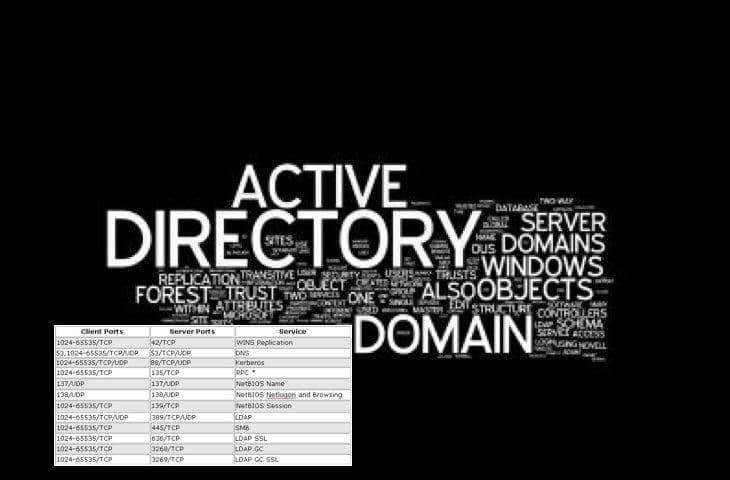
Active Directory communication involves the following ports and as a system administrator, you must be familiar with some of the following ports already. In this article, we will discuss the Service and Network Port requirements for Active Directory. You may want to see the following related guides: Pass-Through Authentication with on-Premise AD, reasons to deploy AAD, Microsoft Azure Active Directory: How to setup Azure AD Tenant, and how to set up an Azure AD Tenant,  and how to add a custom domain in the Azure Active directory.

Enterprises use Active Directory for authentication, server and workstation management, group policy management, etc. In this guide, the most important network ports, protocols, and services used by Microsoft client and server operating systems. And their subcomponents are listed in the table below.

If you enable the Windows Firewall or if there is an external Firewall for your Active Directory Domain Services (ADDS) in this case Domain Controller Server. You need to set up the allowed port for Domain Controller correctly. The table below will show you all ports that are needed for the domain controller.

Network Port Security for Microsoft Server Products

Microsoft server products use a variety of network ports and protocols to communicate with client systems and with other server systems over the network.

You need dedicated firewalls, host-based firewalls, and IPSec filters to secure your network. If you configure these technologies to block ports and protocols a specific server uses, it won’t respond to client requests.

Application protocolProtocolPorts
Active Directory Web Services (ADWS)TCP9389
Active Directory Management Gateway ServiceTCP9389
Global CatalogTCP3269
Global CatalogTCP3268
ICMPNo port number
Lightweight Directory Access Protocol (LDAP) ServerTCP389
LDAP ServerUDP389
LDAP SSLTCP636
IPsec ISAKMPUDP500
NAT-TUDP4500
RPCTCP135
RPC randomly allocated high TCP ports¹TCP1024 – 5000
49152 – 65535²
SMBTCP445

The LSASS process runs Active Directory. This requires specific port connections between domain controllers and client servers on TCP ports 1024 to 65535. You may want to learn more here.

I hope you found this blog post on the “Service and Network Port requirements for Active Directory” helpful. Please let me know in the comment session if you have any questions.

Rate this post

Thank you for reading this post. Kindly share it with others.

  • Click to share on X (Opens in new window) X
  • Click to share on Reddit (Opens in new window) Reddit
  • Click to share on LinkedIn (Opens in new window) LinkedIn
  • Click to share on Facebook (Opens in new window) Facebook
  • Click to share on Pinterest (Opens in new window) Pinterest
  • Click to share on Tumblr (Opens in new window) Tumblr
  • Click to share on Telegram (Opens in new window) Telegram
  • Click to share on WhatsApp (Opens in new window) WhatsApp
  • Click to share on Pocket (Opens in new window) Pocket
  • Click to share on Mastodon (Opens in new window) Mastodon
  • Click to share on Bluesky (Opens in new window) Bluesky
  • Click to share on Threads (Opens in new window) Threads
  • Click to share on Nextdoor (Opens in new window) Nextdoor
Windows Tags:Active Directory, Active Directory Domain Services, services

Post navigation

Previous Post: How to uninstall Veeam Backup and Replication from your server
Next Post: Configure new GPO settings and Security baseline for Windows

Related Posts

  • How to Lock the Find My Device Option in Windows 11
    How to Lock the Find My Device Option in Windows 11 Windows
  • windows 10 lock screen
    How to reset your lost or forgotten Windows 10 Password Windows
  • MicrosoftOneDrive32
    Microsoft OneDrive Setup: Files On-Demand & Key Features Backup
  • RDS Collection 1
    How to add and remove RDS Collection Windows
  • Determine GPO from GUID or Name
    How to determine GPO from GUID or Name Windows
  • ReasonsforBitLockerRecovery
    Reasons for BitLocker Recovery Prompt: Query the number of BitLocker recovery request Windows

More Related Articles

How to Lock the Find My Device Option in Windows 11 How to Lock the Find My Device Option in Windows 11 Windows
windows 10 lock screen How to reset your lost or forgotten Windows 10 Password Windows
MicrosoftOneDrive32 Microsoft OneDrive Setup: Files On-Demand & Key Features Backup
RDS Collection 1 How to add and remove RDS Collection Windows
Determine GPO from GUID or Name How to determine GPO from GUID or Name Windows
ReasonsforBitLockerRecovery Reasons for BitLocker Recovery Prompt: Query the number of BitLocker recovery request Windows

Comment (1) on “Service and Network Port requirements for Active Directory”

  1. Avatar photo reyhan says:
    15/09/2022 at 9:54 AM

    keren banget mantap

    Log in to Reply

Leave a Reply Cancel reply

You must be logged in to post a comment.

Microsoft MVP

VEEAMLEGEND

vexpert-badge-stars-5

Virtual Background

GoogleNews

Categories

veeaam100

sysadmin top30a

  • maxresdefault 2 3
    How to configure WatchGuard WebCenter Network | Monitoring
  • Microsoft Enterprise Root Certification Authority and Forest Domain to Azure migration
    Migrate Microsoft Enterprise Root Certification Authority and Forest Domain to Azure AWS/Azure/OpenShift
  • Gfeature
    How to install Googler on a Linux System Linux
  • windows sysinternals
    Sysmon from SysInternal: What is System Monitor and how to install and use it Windows Server
  • Windows 10 new Start menu
    Make Cortana search with a different web browser instead of Edge Windows
  • Grant Non Domain Admin Privileges to Manage Workstation
    Grant Non-Domain Admin Privileges to Manage Workstation Windows
  • Could not load file or assembly
    Unable to edit MDT XML unattended file: Could not load file Windows Server
  • Slide1
    Desktop Wallpaper and Screen Saver Management: Configure and apply Group Policy Objects on Windows Server Windows

Subscribe to Blog via Email

Enter your email address to subscribe to this blog and receive notifications of new posts by email.

Join 1,839 other subscribers
  • RSS - Posts
  • RSS - Comments
  • About
  • Authors
  • Write for us
  • Advertise with us
  • General Terms and Conditions
  • Privacy policy
  • Feedly
  • Telegram
  • Youtube
  • Facebook
  • Instagram
  • LinkedIn
  • Tumblr
  • Pinterest
  • Twitter
  • mastodon

Tags

AWS Azure Bitlocker Microsoft Windows PowerShell WDS Windows 10 Windows 11 Windows Deployment Services Windows Server 2016

Copyright © 2025 TechDirectArchive


Loading Comments...
 

You must be logged in to post a comment.