Skip to content

TechDirectArchive

Hands-on IT, Cloud, Security & DevOps Insights

  • Home
  • About
  • Advertise With US
  • Contact
  • Reviews
  • Toggle search form
Home » AWS/Azure/OpenShift » Repair or Uninstall Azure AD Connect: How to uninstall Azure AD Connect
  • Locate Find and Grep Required 1
    Locate, Find and Grep: Search for files and patterns in Linux or Unix-like OS Linux
  • hero activedirectory 1
    Active Directory Contact and a User Account Object Differences Security | Vulnerability Scans and Assessment
  • How to create blue screen using the Not my Fault tool from Sysinternals
    How to create blue screen using the Not my Fault tool from Sysinternals Windows
  • windows 11 desktop 1
    Windows 11 Hardware and Software Requirements: Upgrade to Windows 11 Windows
  • Clickable icons Edge Browser
    Remove clickable icons from the Edge browser JIRA|Confluence|Apps
  • Feature image  Error Code 0xC1900101 – 0x30018
    How to Fix Windows Update Error Code 0xC1900101 – 0x30018 Windows
  • Data drive is locked by BitLocker and not OS drive Fastboot Option
    Fast Boot Options: Fix specific Drive issue with BitLocker [MBAM] Windows
  • screenshot 2020 05 11 at 20.03.56
    How to remove printers from HP Utility Mac

Repair or Uninstall Azure AD Connect: How to uninstall Azure AD Connect

Posted on 09/08/202108/09/2023 Christian By Christian No Comments on Repair or Uninstall Azure AD Connect: How to uninstall Azure AD Connect
Azure AD Connect

Azure AD Connect is a tool for connecting on-premises identity infrastructure to Microsoft Azure AD. The wizard deploys and configures pre-requisites and components required for the connection, including sync and sign-on. Azure AD Connect encompasses functionality that was previously released as Dirsync and AAD Sync. Azure AD Connect as described in this guide is used to synchronize user accounts, group memberships, and credential hashes (when using PHS) from an on-premises AD DS environment to Azure AD. Attributes of user accounts such as the UPN and on-premises security identifier (SID) are synchronized. See the following articles for Azure AD Pass-Through Authentication with on-Premise AD, reasons to deploy AAD, and how to set up an Azure AD Tenant. Also, see the following article on how to add a custom domain in the Azure Active directory.

Azure AD Connect is the Microsoft tool designed to meet and accomplish your hybrid identity goals. It provides the following features:
- Password hash synchronization: A sign-in method that synchronizes a hash of a users on-premises AD password with Azure AD.
- Pass-through authentication: A sign-in method that allows users to use the same password on-premises and in the cloud, but doesn't require the additional infrastructure of a federated environment.
- Federation integration: Federation is an optional part of Azure AD Connect and can be used to configure a hybrid environment using an on-premises AD FS infrastructure. It also provides AD FS management capabilities such as certificate renewal and additional AD FS server deployments.
- Synchronization: Responsible for creating users, groups, and other objects. As well as, making sure identity information for your on-premises users and groups is matching the cloud. This synchronization also includes password hashes.
- Health Monitoring: Azure AD Connect Health can provide robust monitoring and provide a central location in the Azure portal to view this activity.

The first thing you need to do is remove Azure AD Connect from the server that the service is running on. Follow the steps below: Here is a guide on using the built-in Azure Active Directory Connect tool.
– On the server running Azure AD Connect, navigate to Control Panel.
– Click on Uninstall a Program. This will open the Programs and features window as shown below. As you can see in the window, you can either repair or uninstall Azure AD Connect depending on your need.
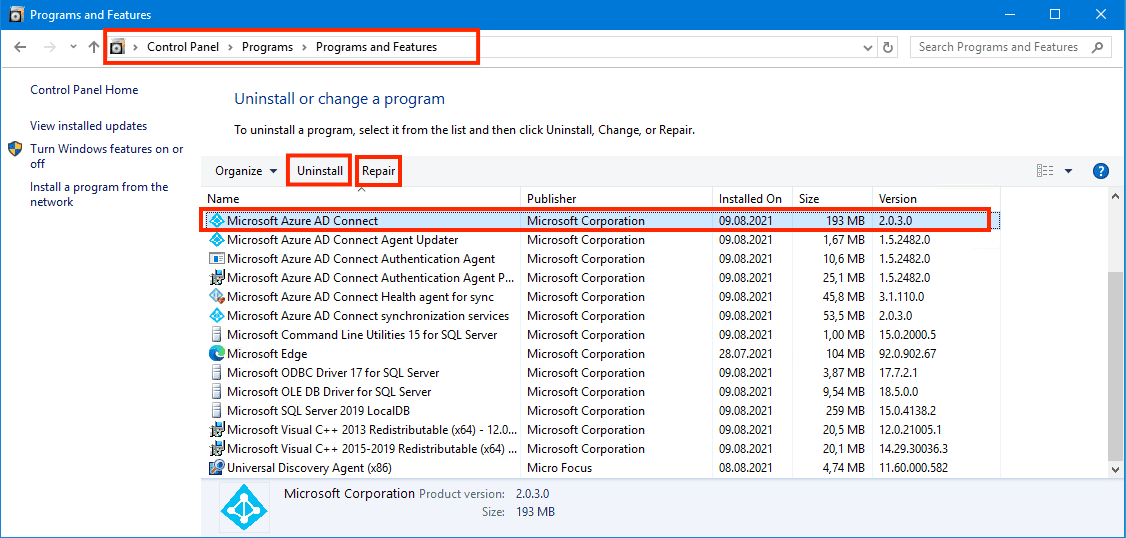
Azure AD Connect repair

Select Azure AD Connect and click on uninstall. When prompted for confirmation, click Yes.
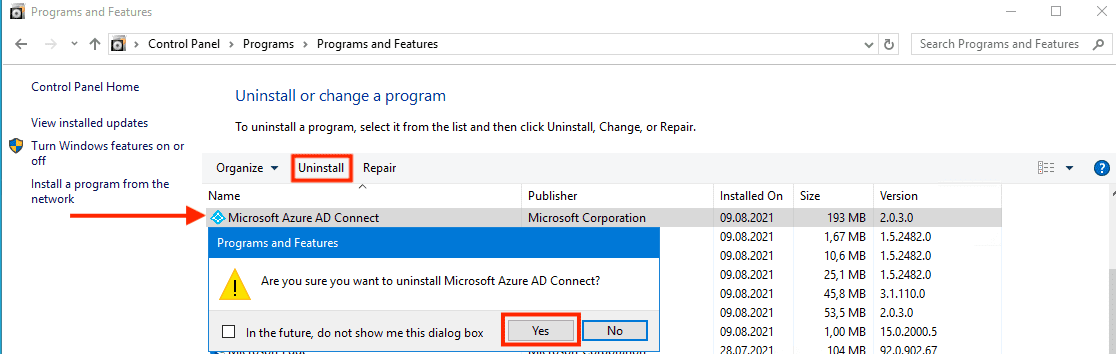
Azure AD Connect uninstall

After this confirmation, the Azure AD Connect screen is displayed. Click the Remove button .
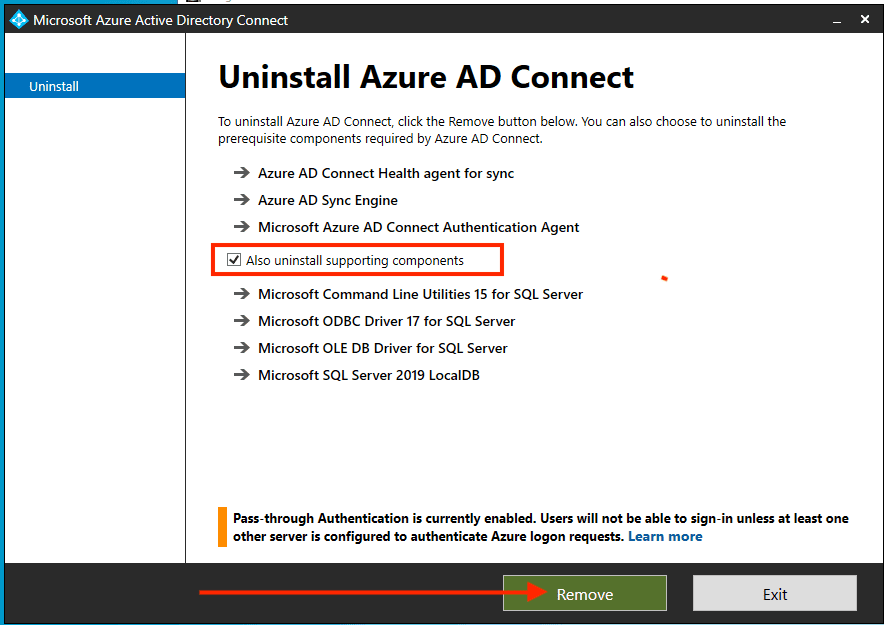
Uninstalling Azure AD Connect

As you can see below, Azure AD Connect is currently being uninstalled.
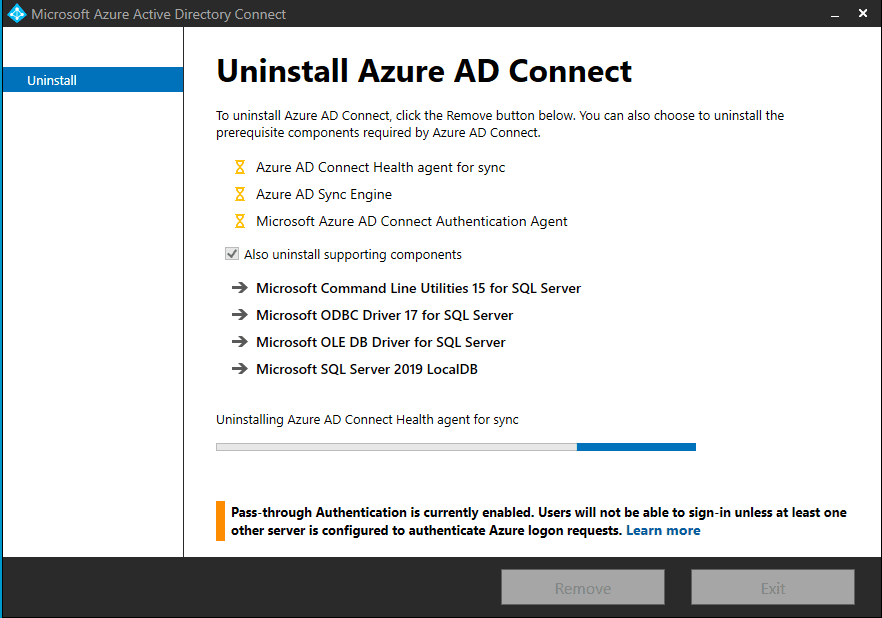
Uninstalling Azure AD Connect

However, the action is complete. Click on Finish to complete the uninstallation.
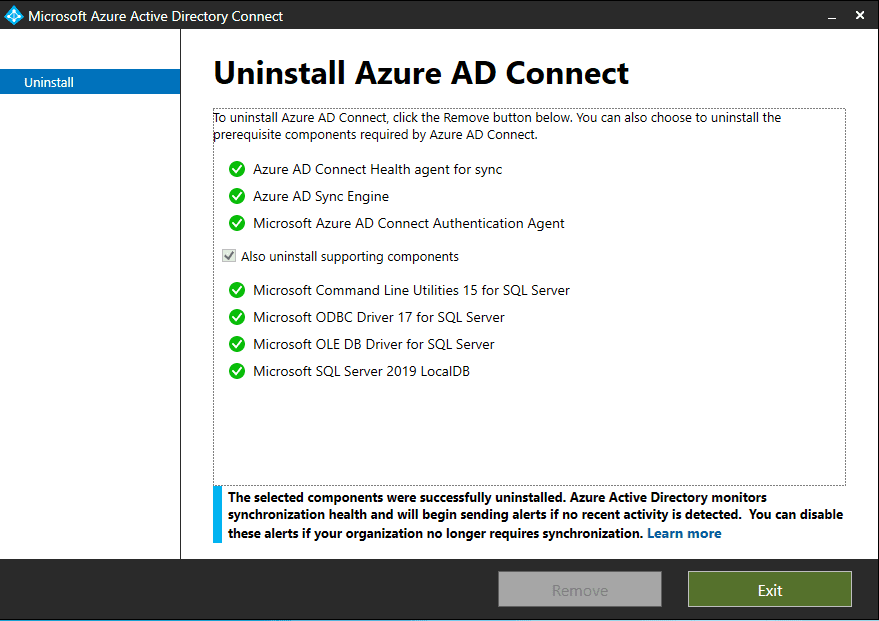
ADConnect5

I hope you found this blog post helpful. Furthermore, If you have any questions, please let me know in the comment session.

Rate this post

Thank you for reading this post. Kindly share it with others.

  • Click to share on X (Opens in new window) X
  • Click to share on Reddit (Opens in new window) Reddit
  • Click to share on LinkedIn (Opens in new window) LinkedIn
  • Click to share on Facebook (Opens in new window) Facebook
  • Click to share on Pinterest (Opens in new window) Pinterest
  • Click to share on Tumblr (Opens in new window) Tumblr
  • Click to share on Telegram (Opens in new window) Telegram
  • Click to share on WhatsApp (Opens in new window) WhatsApp
  • Click to share on Pocket (Opens in new window) Pocket
  • Click to share on Mastodon (Opens in new window) Mastodon
  • Click to share on Bluesky (Opens in new window) Bluesky
  • Click to share on Threads (Opens in new window) Threads
  • Click to share on Nextdoor (Opens in new window) Nextdoor
AWS/Azure/OpenShift Tags:AD Connect, Azure, Azure AD, Microsoft Azure Active Directory, Microsoft Windows, Windows Server 2016

Post navigation

Previous Post: BitLocker Back Door: Stolen laptop to inside the company network
Next Post: Unable to install Azure AD Connect, TLS 1.2 is required: How to enable or disable TLS 1.2 on a Windows Server via the Registry and PowerShell

Related Posts

  • images
    Fix the Synchronization service scheduler is suspended AWS/Azure/OpenShift
  • Secure Web Server
    How to secure a Web Server on a Windows VM in Azure using TLS/SSL Certificates Saved in Azure Key Vault AWS/Azure/OpenShift
  • Angular Azure
    How to deploy your Angular App to Azure from Visual Studio Code AWS/Azure/OpenShift
  • AWS Principals
    MFA on Root Account: Create a User on AWS and Register MFA AWS/Azure/OpenShift
  • banner2 1
    How to use GitHub as Source Provider for AWS CodePipeline AWS/Azure/OpenShift
  • unnamed
    Add or delete users and set permissions in Azure AD AWS/Azure/OpenShift

More Related Articles

images Fix the Synchronization service scheduler is suspended AWS/Azure/OpenShift
Secure Web Server How to secure a Web Server on a Windows VM in Azure using TLS/SSL Certificates Saved in Azure Key Vault AWS/Azure/OpenShift
Angular Azure How to deploy your Angular App to Azure from Visual Studio Code AWS/Azure/OpenShift
AWS Principals MFA on Root Account: Create a User on AWS and Register MFA AWS/Azure/OpenShift
banner2 1 How to use GitHub as Source Provider for AWS CodePipeline AWS/Azure/OpenShift
unnamed Add or delete users and set permissions in Azure AD AWS/Azure/OpenShift

Leave a Reply Cancel reply

You must be logged in to post a comment.

Microsoft MVP

VEEAMLEGEND

vexpert-badge-stars-5

Virtual Background

GoogleNews

Categories

veeaam100

sysadmin top30a
 
  • Locate Find and Grep Required 1
    Locate, Find and Grep: Search for files and patterns in Linux or Unix-like OS Linux
  • hero activedirectory 1
    Active Directory Contact and a User Account Object Differences Security | Vulnerability Scans and Assessment
  • How to create blue screen using the Not my Fault tool from Sysinternals
    How to create blue screen using the Not my Fault tool from Sysinternals Windows
  • windows 11 desktop 1
    Windows 11 Hardware and Software Requirements: Upgrade to Windows 11 Windows
  • Clickable icons Edge Browser
    Remove clickable icons from the Edge browser JIRA|Confluence|Apps
  • Feature image  Error Code 0xC1900101 – 0x30018
    How to Fix Windows Update Error Code 0xC1900101 – 0x30018 Windows
  • Data drive is locked by BitLocker and not OS drive Fastboot Option
    Fast Boot Options: Fix specific Drive issue with BitLocker [MBAM] Windows
  • screenshot 2020 05 11 at 20.03.56
    How to remove printers from HP Utility Mac

Subscribe to Blog via Email

Enter your email address to subscribe to this blog and receive notifications of new posts by email.

Join 1,841 other subscribers
  • RSS - Posts
  • RSS - Comments
  • About
  • Authors
  • Write for us
  • Advertise with us
  • General Terms and Conditions
  • Privacy policy
  • Feedly
  • Telegram
  • Youtube
  • Facebook
  • Instagram
  • LinkedIn
  • Tumblr
  • Pinterest
  • Twitter
  • mastodon

Tags

AWS Azure Bitlocker Microsoft Windows PowerShell WDS Windows 10 Windows 11 Windows Deployment Services Windows Server 2016

Copyright © 2025 TechDirectArchive


Loading Comments...
 

You must be logged in to post a comment.