How to secure access to your Virtual Machine with Just-in-Time (JIT) VM Access


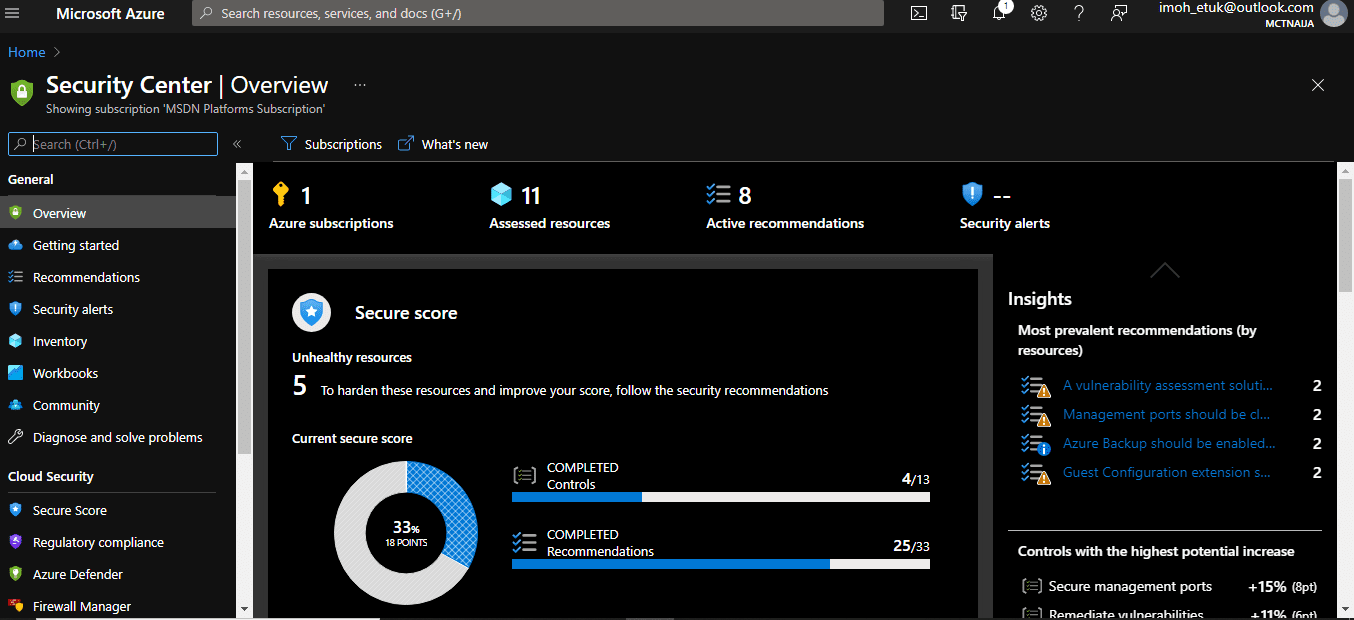
Just-in-Time (JIT) Access is one of the features of Azure Security Center. Azure Security Center by Microsoft is a solution that gives unified security management across hybrid cloud workloads. It offers threat protection for data centers within both cloud workloads and on-premises. The platform also works with hybrid clouds that aren’t a part of Azure. If you’re looking to learn how to secure access to Virtual Machine with Just-in-Time (JIT) Access VM Access? You’re in the right place.
The Azure Security Center works to resolve important issues when you start a cloud migration journey for your organization. The cloud customer has to take more responsibilities when upgrading to Infrastructure-as-a-Service (IaaS) as compared to cloud solutions like Platform-as-a-Service (PaaS) and Software-as-a-Service (SaaS), where the cloud service providers take care of most tasks related to securing the network and the services.
Just-in-Time (JIT) access is a fundamental security practice where the privilege granted to access applications or systems is limited to a period of time, thereby minimizing the risk of standing privileges that attackers or malicious insiders can exploit.Securing Access to Virtual Machine Through Just-in-Time (JIT)
Let’s get more in-depth into Azure Security Center (ASC):
What is Azure Security Center?
When moving to the IaaS solution in the cloud, securing your environment means securing your network ecosystem and the underlying services. Furthermore, you will do this solely just as the cloud provider takes responsibility for securing processes within the PaaS and SaaS solutions.
Azure Security Center offers a unified and dedicated portal for securing and managing your workloads to cope with the challenges of protecting your hybrid and cloud workloads.
Benefits of Azure Security Center
The platform provides your organization with the following:
- Enables your IT team to have a clearer view of all the statuses of your cloud resources after accessing your cloud environment. This type of assessment helps you to fully understand whether your resources are secured or not
- Helps in generating security alerts by providing threat preventive measures and make recommendations where neccessary. It constantly monitors your workloads to detect security vulnerabilities and rules violations.
- It automatically provisions services since the Security Center is a native part of the overall Azure Cloud System. By doing this, you can deploy a feature in the Security Center seamlessly within your Azure-powered cloud environments.
With Azure Security Center, you can easily control the security of an ever-growing and fast-changing number of cloud services under constant threat by a growing number of sophisticated malware activities.
Navigating Microsoft Azure
Keeping your systems safe is a joint effort between your cloud provider, Microsoft Azure, and you, the customer. You have to make sure your workloads are secure as you move to the cloud, and at the same time, when you move to IaaS (Infrastructure as a Service) there is more customer responsibility than there was in PaaS (platform as a service), and SaaS (Software as a Service). In addition, Azure Security Center provides you the tools needed to harden your network, secure your services and make sure you’re on top of your security scenarios.
Managing your IT systems both On-premises and in the Cloud can be very challenging. Hackers are constantly getting smarter than you on a daily basis, hence, one of the reasons why Microsoft has put together some important security features in Azure Security Center to help in preventing some tempered or unauthorized access to your workloads across hybrid and native cloud environments.
This will take us to explore what Just-In-Time (JIT) Access as a feature in Azure Security Center is all about.
What is Just-In-Time Access?
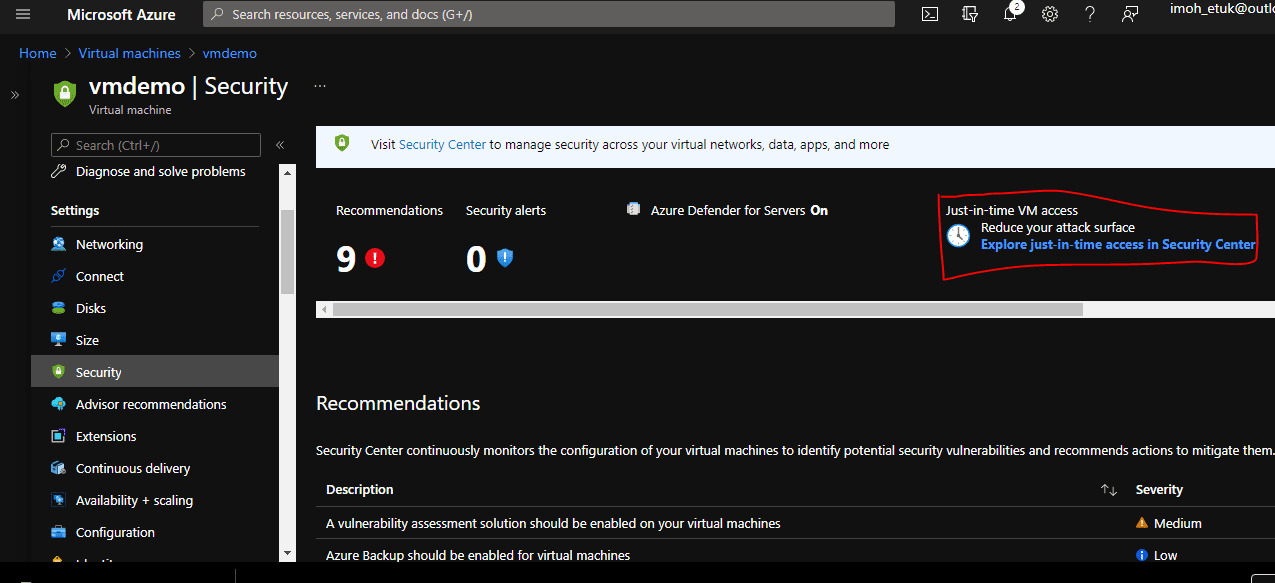
Just-in-time VM access enables you to lock down your VMs at the network level by blocking inbound traffic to specific ports. Furthermore, it enables you to control the access and reduce the attack surface to your VMs, by allowing access only upon a specific need.
It is a way to enforce the principle of least privilege to ensure users and non-human identities are given the minimum level of privileges. JIT access can also ensure that privileged activities are conducted in line with an organization’s Identity Access Management (IAM) policies along with its workflows as it is very essential that any JIT access strategy enables an organization to maintain a full audit trail of privileged activities.
How does it work? When a user made a request, based on Azure RBAC, Security Center will decide whether to grant access. If a request is approved, Security Center automatically configures the NSGs to allow inbound traffic to these ports, for the requested amount of time, after which it restores the NSGs to their previous states.
Ways of securing access to your Azure Virtual Machine (VM) with Just-in-Time
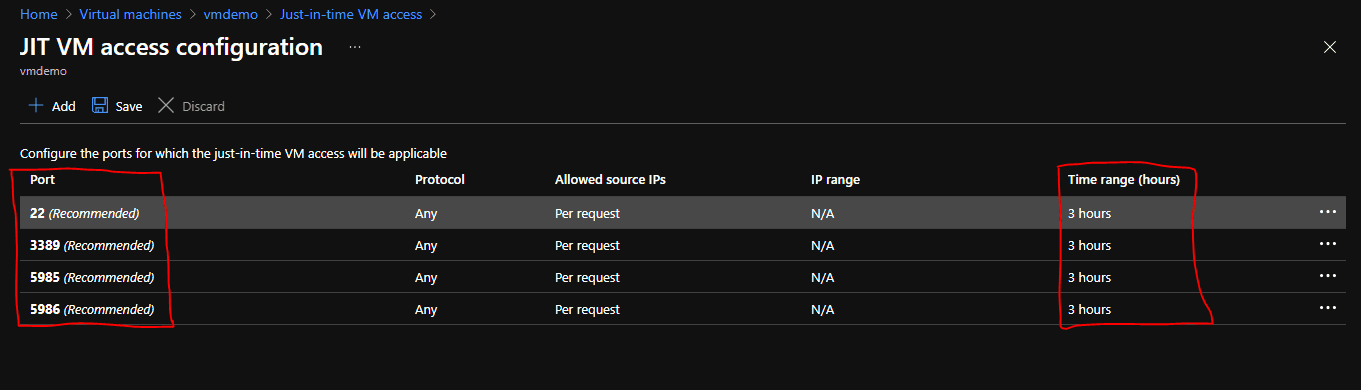
- Through Azure Security Center – You can enable JIT with your own custom options for one or more VMs using Security Center. Meanwhile, the recommended ports and 3 hours time range are given by default. These can be modified to suit your security needs.
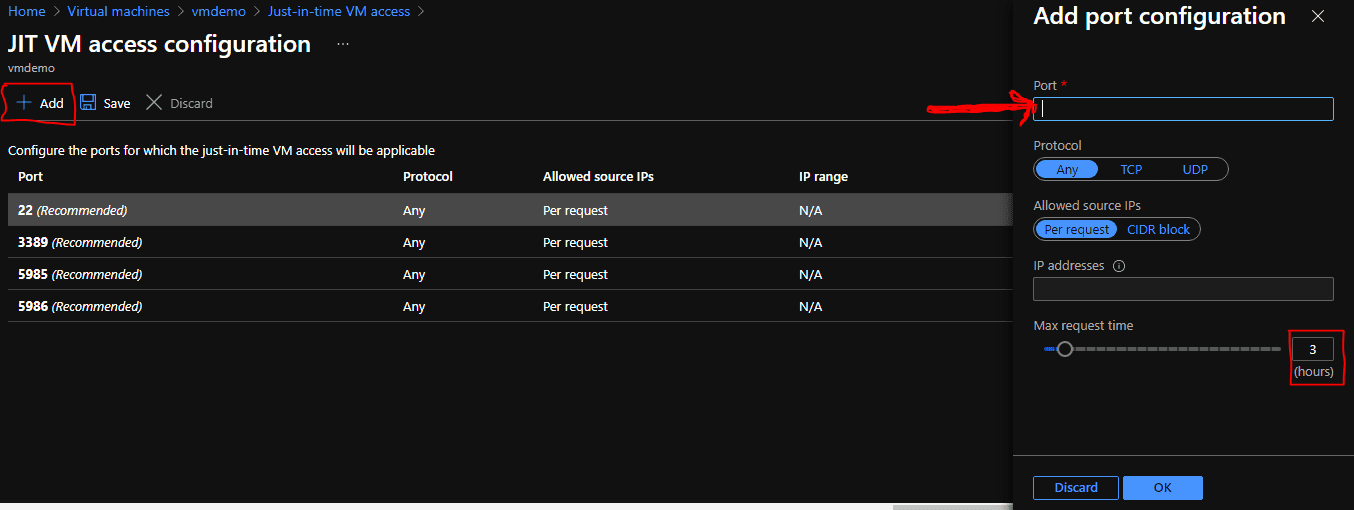
You can request JIT access for additional ports not listed among the default ports by clicking on the Add tab and providing your desired port number as shown in the screenshot below
- Through Azure Virtual Machine Blade – From the selected VM to enable JIT Access, i.e., -> Virtual Machine Name -> Configuration tab -> Enable just-in-time. Therefore, see the demo below:

Enable JIT on your VMs using PowerShell
The JIT VM access can be enabled using PowerShell, to do this use the official Azure Security Center PowerShell cmdlet Set-AzJitNetworkAccessPolicy. To have first-hand knowledge of what PowerShell cmdlet is about, see my previous post on Provisioning Azure Resources using Azure Az PowerShell Cmdlet from Cloud Shell.
Example – Enable just-in-time VM access on a specific VM with the following rules:
- Close ports 22 and 3389 (SSH and RDP port numbers)
- Set a maximum time window of 3 hours for each so they can be opened per approved request
- Allow the user who is requesting access to control the source IP addresses
- Allow the user who is requesting access to establish a successful session upon an approved just-in-time access request
The following PowerShell commands create this JIT configuration:
- Assign a variable that holds the just-in-time VM access rules for a VM:
$JitPolicy = (@{
    id="/subscriptions/SUBSCRIPTIONID/resourceGroups/RESOURCEGROUP/providers/Microsoft.Compute/virtualMachines/VMNAME";
    ports=(@{
         number=22;
         protocol="*";
         allowedSourceAddressPrefix=@("*");
         maxRequestAccessDuration="PT3H"},
         @{
         number=3389;
         protocol="*";
         allowedSourceAddressPrefix=@("*");
         maxRequestAccessDuration="PT3H"})})
2. Insert the VM just-in-time VM access rules into an array:
$JitPolicyArr=@($JitPolicy)3. Configure the just-in-time VM access rules on the selected VM:
Set-AzJitNetworkAccessPolicy -Kind "Basic" -Location "LOCATION" -Name "default" -ResourceGroupName "RESOURCEGROUP" -VirtualMachine $JitPolicyArrUse the –Name parameter to specify a VM. For example, to establish the JIT configuration for two different VMs, let’s say VMDEMO1 and VMDEMO2, use:
Set-AzJitNetworkAccessPolicy -Name VMDEMO1 and Set-AzJitNetworkAccessPolicy -Name VMDEMO2Establishing connection to a JIT-enabled VM
To secure access to your Virtual Machine with Just-in-Time (JIT) VM Access, you need to create a connection. Here’s how to go about it.
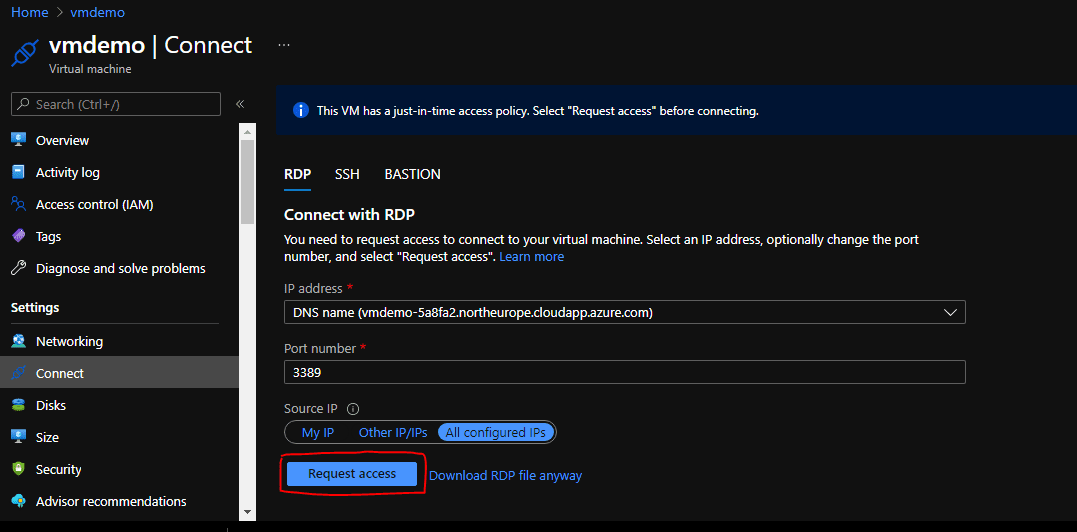
When you enable JIT access on a VM, you have to request access to connect to it. You can request access in any of the supported ways, regardless of how you enabled JIT. Request access by clicking Connect -> Select RDP connection type if it’s a Windows VM as shown below:

Click on Request Access as shown below
As you can see below, Just-in-time access is being requested.
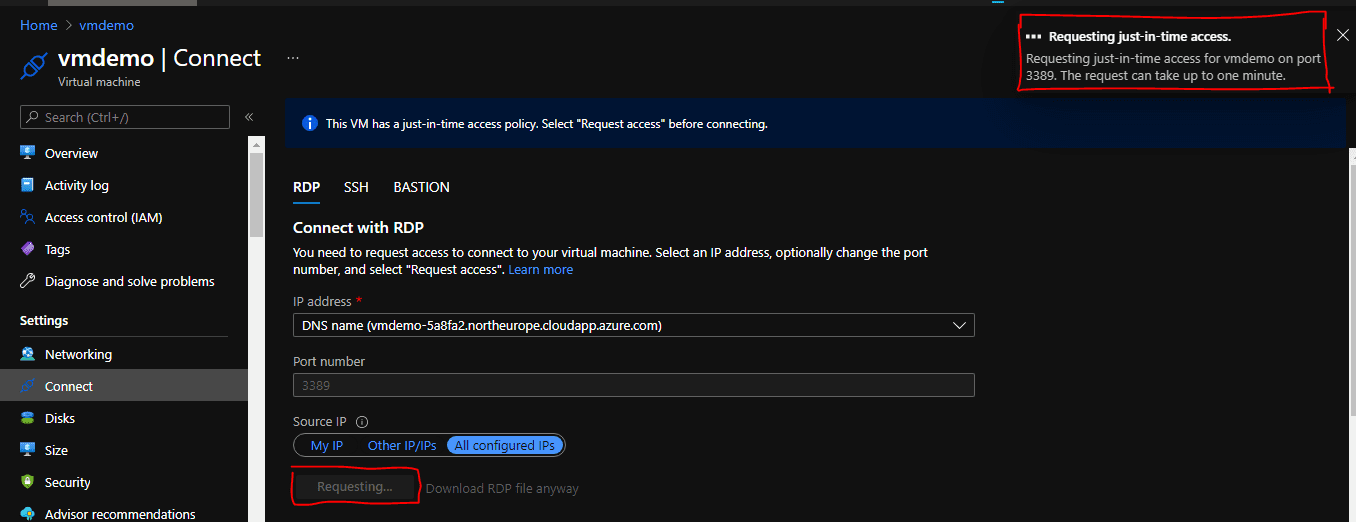
You’ll get a JIT access approval within few minutes and the screen will appear as the one below.

Where Does Just-in-Time (JIT) Fit In? When thinking about security challenges posed by malware vulnerabilities, I know from my professional point of view that it’s quite a herculean task, hence, the need to utilize a feature such as JIT access as it will help in:
- Reducing the number of attack surface on your hybrid and cloud workloads within your arganization.
- Reducing the risk associated with users having privileged access.
- Reducing the risk of having open management ports on a virtual machine
I will focus on point 2 – reducing the risk associated with users having privileged access. Meanwhile, this requirement is currently adopted, as digital transformation leads to technological changes. We now need to worry about the risk associated with systems, Networks, APIs, and Service Accounts having too much privilege, as well as users.
Privilege really is a necessary evil but that doesn’t mean it’s a bad thing. It just means we have to apply controls around its usage. Thus, there are two things that JIT access will allow us to control here:
- Scope – Just Enough Access
- What systems of applications can the user access?
- How much privilege does the user or application require in order to perform its function?
- Time – Just-in-Time
- When do they need the privilege?
- How long do they need it for?
Wrap-Up
Threat actors are actively hunting for accessible Virtual machines (Networks) with open management ports, like RDP or SSH. All of your virtual machines are potential targets for an attack. When hackers have successfully gained access to your VM and have it compromised, they used it as the entry point to attack further resources within your environment. Hence, why it is important that you utilize some of the great features of the Azure Security Center!
If you haven’t getting started with Azure, sign up today to enjoy the awesome benefits of JIT Access for your resources! With this guide, you can now secure access to your Virtual Machine with Just-in-Time (JIT) VM Access,


