Skip to content

TechDirectArchive

Hands-on IT, Cloud, Security & DevOps Insights

  • Home
  • About
  • Advertise With US
  • Reviews
  • Contact
  • Toggle search form
  • HyperV and vSwitch creation
    Install HyperV and Configure vSwitch on Windows Server with PowerShell Virtualization
  • banner2
    A Review of MiniTool Partition Wizard – Disk Utility Tool Reviews
  • backupvssnapshot
    Virtual Machine Snapshot vs Backup Version Control System
  • 1 kajkbmlyehn0inifwrh 8w
    How to install Kerberos packages with Cygwin on Windows Windows Server
  • Featured image GPU Temp
    How to check graphics card temperature on Windows 11 Network | Monitoring
  • powerpoint 1280x720 1
    How to change the speller and proofing language in PowerPoint Microsoft Exchange/Office/365
  • feature linux boot process
    Linux Boot Process Explained Step by Step for Beginners Linux
  • schedulepythontasksinWindows
    Task Scheduler shows task still running despite successful Windows

Tag: Domain Controller

Nslookup unknown: Fix cannot find non-existent domain

Posted on 28/07/202026/01/2024 Christian By Christian 2 Comments on Nslookup unknown: Fix cannot find non-existent domain

Nslookup unknown: Fix cannot find non-existent domain

When faced with this issue, you should take a close look at your DNS Server. The reason for this error is there is not a reverse Lookup Zone configured on the server or the reverse zone is crashed or does not have the right information. In this article, I will show you how to fix…

Read More “Nslookup unknown: Fix cannot find non-existent domain” »
Windows Server

Active Directory Forest – Trees and Domain and Sites

Posted on 11/04/202015/02/2025 Christian By Christian 4 Comments on Active Directory Forest – Trees and Domain and Sites
Active Directory Forest – Trees and Domain and Sites

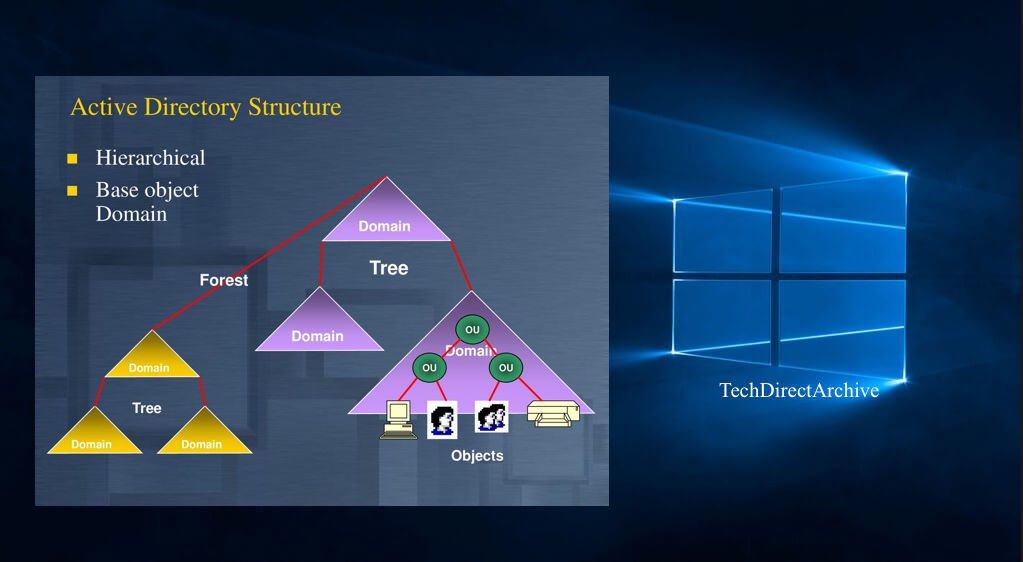
In this article, we will discuss “Active Directory Forest – Trees and Domain and Sites”. Active Directory (AD) is a directory service developed by Microsoft for the Windows domain environment. AD forest is the top container in an Active Directory setup that contains domains, users, computers, and group policies. Please see how to install Veeam…

Read More “Active Directory Forest – Trees and Domain and Sites” »

Windows Server

Active Directory Flexible Single-Master Operations Roles [FSMO]

Posted on 13/02/202023/10/2024 Christian By Christian No Comments on Active Directory Flexible Single-Master Operations Roles [FSMO]
Active Directory Flexible Single-Master Operations Roles [FSMO]

The five operations master roles are also referred to as FSMO roles. When installed on a single machine, this ensures all changes occur in a single location. This in turns makes the Active Directory database consistent. In this article, we shall discuss “Active Directory Flexible Single-Master Operations Roles [FSMO]”. Please see Pleasant User Group Permission…

Read More “Active Directory Flexible Single-Master Operations Roles [FSMO]” »

Windows Server

The following error occurred attempting to rename the computer Account already exists

Posted on 24/01/202025/06/2025 Christian By Christian No Comments on The following error occurred attempting to rename the computer Account already exists
The following error occurred attempting to rename the computer Account already exists

In this guide, I will be showing you how to fix “the following error occurred attempting to rename the computer Account already exists”. An Active Directory (AD) domain is basically the same as an Internet domain. It “defines a realm of administrative autonomy, authority, and control” for a group of computers. Please how to fix “The logon attempt failed for the…

Read More “The following error occurred attempting to rename the computer Account already exists” »

Windows Server

How to add a second Domain Controller

Posted on 08/01/202015/10/2024 Christian By Christian No Comments on How to add a second Domain Controller
How to add a second Domain Controller

A domain controller (DC) is a server computer that responds to authentication requests. It participates in the replication and contains a complete copy of all directory information for their domain. If your environment requires high availability of IT systems when one DC fails, another takes over to ensure successful login, etc. Please see this guide…

Read More “How to add a second Domain Controller” »

Windows Server

Active Directory: How to Setup a Domain Controller

Posted on 08/01/202023/11/2025 Christian By Christian No Comments on Active Directory: How to Setup a Domain Controller
Active Directory: How to Setup a Domain Controller

In this article, we will discuss Active Directory: How to Setup a Domain Controller. A domain controller (DC) is a server computer that responds to authentication requests. It participates in the replication and contains a complete copy of all directory information for its domain. Please see this guide for how to add a second DC…

Read More “Active Directory: How to Setup a Domain Controller” »

Windows Server

Specify user account name when adding a DC to an existing Forest

Posted on 05/01/202009/10/2024 Christian By Christian 1 Comment on Specify user account name when adding a DC to an existing Forest
Specify user account name when adding a DC to an existing Forest

When the following error is prompted “You must specify user account name when adding a DC to an existing Forest”. This is because, when adding a new Domain Controller (DC) to an existing Active Directory (AD) forest. You must provide the credentials of a user account with sufficient privileges. Please see Active Directory: How to…

Read More “Specify user account name when adding a DC to an existing Forest” »

Windows Server

The trust relationship between this workstation and the primary domain failed

Posted on 11/04/201606/04/2023 Christian By Christian No Comments on The trust relationship between this workstation and the primary domain failed
The trust relationship between this workstation and the primary domain failed

Windows domains provide network administrators with ways to administer devices and control them from a central location. Domains are generally made up of computers on the same local network. When a computer is joined to a domain, it doesn’t use its own local user accounts. User accounts and passwords are managed on the domain controller….

Read More “The trust relationship between this workstation and the primary domain failed” »

Windows Server

Posts pagination

Previous 1 2

Microsoft MVP

VEEAMLEGEND

vexpert-badge-stars-5

Virtual Background

GoogleNews

Categories

veeaam100

sysadmin top30a

  • HyperV and vSwitch creation
    Install HyperV and Configure vSwitch on Windows Server with PowerShell Virtualization
  • banner2
    A Review of MiniTool Partition Wizard – Disk Utility Tool Reviews
  • backupvssnapshot
    Virtual Machine Snapshot vs Backup Version Control System
  • 1 kajkbmlyehn0inifwrh 8w
    How to install Kerberos packages with Cygwin on Windows Windows Server
  • Featured image GPU Temp
    How to check graphics card temperature on Windows 11 Network | Monitoring
  • powerpoint 1280x720 1
    How to change the speller and proofing language in PowerPoint Microsoft Exchange/Office/365
  • feature linux boot process
    Linux Boot Process Explained Step by Step for Beginners Linux
  • schedulepythontasksinWindows
    Task Scheduler shows task still running despite successful Windows

Subscribe to Blog via Email

Enter your email address to subscribe to this blog and receive notifications of new posts by email.

Join 1,841 other subscribers
  • RSS - Posts
  • RSS - Comments
  • About
  • Authors
  • Write for us
  • Advertise with us
  • General Terms and Conditions
  • Privacy policy
  • Feedly
  • Telegram
  • Youtube
  • Facebook
  • Instagram
  • LinkedIn
  • Tumblr
  • Pinterest
  • Twitter
  • mastodon

Tags

AWS Azure Bitlocker Microsoft Windows PowerShell WDS Windows 10 Windows 11 Windows Deployment Services Windows Server 2016

Copyright © 2025 TechDirectArchive