Skip to content

TechDirectArchive

Hands-on IT, Cloud, Security & DevOps Insights

  • Home
  • About
  • Advertise With US
  • Reviews
  • Contact
  • Toggle search form
  • PowerShell Exec
    Determine the execution policy configured on Windows PC Windows
  • Featured image 9
    Create and Delete Registry Keys via PowerShell in Windows Scripts
  • settings app not working featured 800x400 1
    Disable or Remove Kiosk Mode Via the Local Settings Windows
  • Install RSAT on Windows 11 today
    Install Remote Server Administration Tools on Windows 11 Windows
  • images 4 1
    How to export passwords from KeePass Database to Pleasant Password Server Password Manager
  • maxresdefault
    How to remove a Printer from Windows 10 via PowerShell, Windows registry and Print Management Windows
  • FoneTool
    FoneTool is the best iPhone backup software Backup
  • system
    How to fix the system cannot find the file specified when adding LP, LIP, and FoD packages to Windows Images Windows Server

Tag: Windows Registry

How to Disable and Enable Registry Access on Windows 11

Posted on 30/06/202301/07/2023 Matthew By Matthew No Comments on How to Disable and Enable Registry Access on Windows 11
How to Disable and Enable Registry Access on Windows 11

The Windows Registry is a critical database that stores configuration settings for the operating system, hardware, and installed applications. Making incorrect changes to the Registry can have severe consequences, leading to irreversible damage to your system. Therefore, it’s essential to exercise caution when accessing and modifying the Registry. In this guide, we will explore two…

Read More “How to Disable and Enable Registry Access on Windows 11” »
Windows

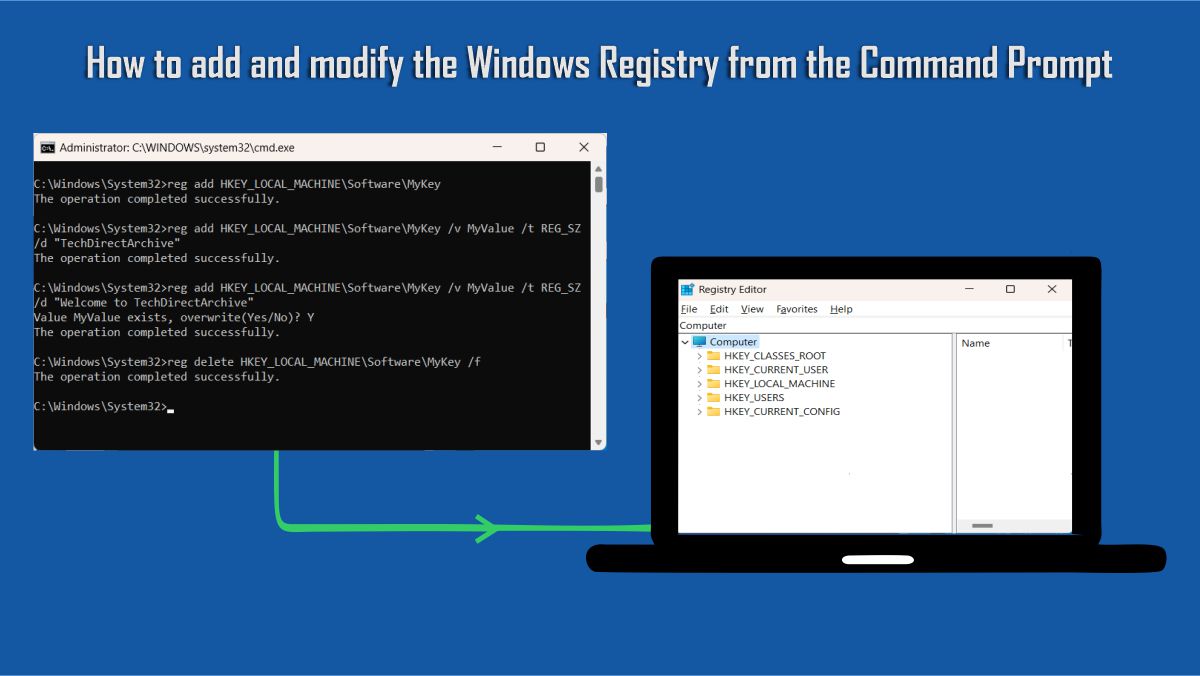
How to add and modify the Windows Registry from the Command Prompt

Posted on 01/04/202304/06/2023 Matthew By Matthew No Comments on How to add and modify the Windows Registry from the Command Prompt
How to add and modify the Windows Registry from the Command Prompt

The Windows Registry is a critical component of the Windows operating system that contains several configuration settings. It’s a tree-structured database that stores all the configuration data for your system, including hardware specs, software versions, user preferences, and more. Both the Windows Registry Editor and the Command Prompt can be used to access and edit…

Read More “How to add and modify the Windows Registry from the Command Prompt” »

Windows

Disable Developer Tools in Microsoft Edge using Registry or Group Policy in Windows

Posted on 29/01/202318/09/2024 Temitope Odemo By Temitope Odemo No Comments on Disable Developer Tools in Microsoft Edge using Registry or Group Policy in Windows
Disable Developer Tools in Microsoft Edge using Registry or Group Policy in Windows

Developer tools are a feature on every browser for performing tasks like viewing HTML tags, Javascript, and CSS and you can instantly make some changes and see the effect on the front-end. In this article, I will be showing you how to disable the developer tools in Microsoft Edge if you decide to do that….

Read More “Disable Developer Tools in Microsoft Edge using Registry or Group Policy in Windows” »

Windows

Create and Delete Registry Keys via PowerShell in Windows

Posted on 27/07/202201/10/2024 Matthew By Matthew No Comments on Create and Delete Registry Keys via PowerShell in Windows
Create and Delete Registry Keys via PowerShell in Windows

The Registry Editor (regedit.exe) and the reg.exe command-line utility aren’t the only tools in Windows for accessing and managing the registry. PowerShell offers a lot of tools for administrators to interact with the registry. In this article, you will learn “Get and Edit Registry Keys: How to Create and Delete Registry Keys via PowerShell in…

Read More “Create and Delete Registry Keys via PowerShell in Windows” »

Scripts, Windows

Add Registry Keys via DISM in Windows

Posted on 10/06/202231/07/2024 Matthew By Matthew No Comments on Add Registry Keys via DISM in Windows
Add Registry Keys via DISM in Windows

Adding Registry Keys via DISM in Windows involves modifying the default Windows install image, the install.wim file, which includes servicing an offline image, mounting an image, and committing changes made to the image. The offline image is serviced using DISM (Deployment Image Servicing and Management), a native Windows program. DISM is a command-line program for…

Read More “Add Registry Keys via DISM in Windows” »

Windows

Disable Bing Search in Windows: Quick Guide for Windows

Posted on 08/05/202224/01/2024 Matthew By Matthew No Comments on Disable Bing Search in Windows: Quick Guide for Windows
Disable Bing Search in Windows: Quick Guide for Windows

In this guide, we will look at using the Windows Registry and Group Policy editor to disable Bing search, so if the Registry method does not work, you can fall back on the Group Policy Editor method. Microsoft opted to combine Bing Search with the File Explorer search bar in Windows 10, which resulted in…

Read More “Disable Bing Search in Windows: Quick Guide for Windows” »

Windows

Prevent Windows Users from Changing the Screen Saver via the Registry Settings

Posted on 13/04/202223/11/2025 Temitope Odemo By Temitope Odemo No Comments on Prevent Windows Users from Changing the Screen Saver via the Registry Settings
Prevent Windows Users from Changing the Screen Saver via the Registry Settings

A Screensaver is a computer software program that blanks the screen with moving images or patterns when the computer is not in use. In this article, we will learn how to Prevent Windows Users from changing the Screen Saver via the Registry Settings. The original purpose of screensavers was to prevent phosphor burn-in on CRT. Though…

Read More “Prevent Windows Users from Changing the Screen Saver via the Registry Settings” »

Windows

Unable to import Windows Reg File: The specified file is not a registry script

Posted on 10/08/202124/08/2023 Christian By Christian No Comments on Unable to import Windows Reg File: The specified file is not a registry script
Unable to import Windows Reg File: The specified file is not a registry script

The Registry Editor is an advanced tool for viewing and modifying settings in the registry. This information contains information about how your computer runs etc. Windows stores its configuration information in a database called the registry in a tree format. In this article, you will learn how to fix the Unable to import Windows Reg…

Read More “Unable to import Windows Reg File: The specified file is not a registry script” »

Scripts

Unable to install Azure AD Connect, TLS 1.2 is required: How to enable or disable TLS 1.2 on a Windows Server via the Registry and PowerShell

Posted on 09/08/202108/09/2023 Christian By Christian No Comments on Unable to install Azure AD Connect, TLS 1.2 is required: How to enable or disable TLS 1.2 on a Windows Server via the Registry and PowerShell
Unable to install Azure AD Connect, TLS 1.2 is required: How to enable or disable TLS 1.2 on a Windows Server via the Registry and PowerShell

Transport Layer Security (TLS) is a protocol that provides communications over a computer network, typically between a website and a browser. for your information. The primary goal of TLS is to provide a secure channel between two communicating peers and the only requirement from the underlying transport is a reliable, in-order data stream. Specifically, the…

Read More “Unable to install Azure AD Connect, TLS 1.2 is required: How to enable or disable TLS 1.2 on a Windows Server via the Registry and PowerShell” »

AWS/Azure/OpenShift

Workaround for “SeriousSAM or HiveNightmare” registry vulnerability for Windows 10 and 11

Posted on 22/07/202110/04/2023 Christian By Christian 2 Comments on Workaround for “SeriousSAM or HiveNightmare” registry vulnerability for Windows 10 and 11
Workaround for “SeriousSAM or HiveNightmare” registry vulnerability for Windows 10 and 11

An elevation of privilege vulnerability exists because of overly permissive Access Control Lists (ACLs) on multiple system files. Including the Security Accounts Manager (SAM) database. An attacker who successfully exploited this vulnerability could run arbitrary code with SYSTEM privileges. An attacker could then install programs; view, change, or delete data. Or create new accounts with…

Read More “Workaround for “SeriousSAM or HiveNightmare” registry vulnerability for Windows 10 and 11” »

Security | Vulnerability Scans and Assessment

Windows Profile: How to determine your windows username

Posted on 09/10/202030/08/2023 Christian By Christian No Comments on Windows Profile: How to determine your windows username
Windows Profile: How to determine your windows username

Windows profile is a set of files that contains all settings and user configuration files, folders (Desktop, your Documents) pertaining to you only, and registry settings. In an Active Directory or NT4 domain. Your user profile folder is located in the Users folder on your Windows system drive, which on most computers is C Dirve (C:)….

Read More “Windows Profile: How to determine your windows username” »

Windows

NTuser.dat file: How to correctly load Windows Registry Hive

Posted on 21/09/202010/10/2024 Christian By Christian No Comments on NTuser.dat file: How to correctly load Windows Registry Hive
NTuser.dat file: How to correctly load Windows Registry Hive

The Registry Editor is an advanced tool for viewing and modifying settings in the registry. This information contains information about how your computer runs etc. See the following hyperlinks for some Windows Registry contents I have written. What is Registry Editor and how to access the registry hives, how to Implement Split-Brain DNS Policies in…

Read More “NTuser.dat file: How to correctly load Windows Registry Hive” »

Windows

How to disable Taskbar Web Search in Windows 10 via GPO and Windows Registry

Posted on 13/08/202030/08/2023 Christian By Christian 2 Comments on How to disable Taskbar Web Search in Windows 10 via GPO and Windows Registry
How to disable Taskbar Web Search in Windows 10  via GPO and Windows Registry

The Registry Editor is an advanced tool for viewing and modifying settings in the registry. This information contains information about how your computer runs etc. Windows stores its configuration information in a database called the registry and this is organized in a tree format. Although Registry Editor enables you to inspect and modify the registry,…

Read More “How to disable Taskbar Web Search in Windows 10 via GPO and Windows Registry” »

Windows

Posts pagination

1 2 Next

Microsoft MVP

VEEAMLEGEND

vexpert-badge-stars-5

Virtual Background

GoogleNews

Categories

veeaam100

sysadmin top30a

  • PowerShell Exec
    Determine the execution policy configured on Windows PC Windows
  • Featured image 9
    Create and Delete Registry Keys via PowerShell in Windows Scripts
  • settings app not working featured 800x400 1
    Disable or Remove Kiosk Mode Via the Local Settings Windows
  • Install RSAT on Windows 11 today
    Install Remote Server Administration Tools on Windows 11 Windows
  • images 4 1
    How to export passwords from KeePass Database to Pleasant Password Server Password Manager
  • maxresdefault
    How to remove a Printer from Windows 10 via PowerShell, Windows registry and Print Management Windows
  • FoneTool
    FoneTool is the best iPhone backup software Backup
  • system
    How to fix the system cannot find the file specified when adding LP, LIP, and FoD packages to Windows Images Windows Server

Subscribe to Blog via Email

Enter your email address to subscribe to this blog and receive notifications of new posts by email.

Join 1,836 other subscribers
  • RSS - Posts
  • RSS - Comments
  • About
  • Authors
  • Write for us
  • Advertise with us
  • General Terms and Conditions
  • Privacy policy
  • Feedly
  • Telegram
  • Youtube
  • Facebook
  • Instagram
  • LinkedIn
  • Tumblr
  • Pinterest
  • Twitter
  • mastodon

Tags

Active Directory AWS Azure Bitlocker Microsoft Windows PowerShell WDS Windows 10 Windows 11 Windows Server 2016

Copyright © 2025 TechDirectArchive