Skip to content

TechDirectArchive

Hands-on IT, Cloud, Security & DevOps Insights

  • Home
  • About
  • Advertise With US
  • Contact
  • Reviews
  • Toggle search form
Home » Windows Server » SimpleSAMLphp Setup on Windows Server [Part 1]

SimpleSAMLphp Setup on Windows Server [Part 1]

Posted on 18/05/201806/12/2023 Christian By Christian No Comments on SimpleSAMLphp Setup on Windows Server [Part 1]
Authentication

SimpleSAMLphp Setup on Windows is an award-winning application written in native PHP that deals with authentication. UNINETT leads the project and has a large user base, a helpful user community, and many external contributors. The main focus of SimpleSAMLphp Setup on Windows is providing support for SAML 2.0 as a Service Provider (SP). Kindly take a look at pSimpleSAMLphp[part 2] of this guide. However, SAML SSO works by transferring the user’s identity from one place (the identity provider) to another (the service provider). This is done through an exchange of digitally signed XML documents.

Steps followed to implement this:
 1. This environment was installed on AWS (Please see previous article on how to provision an instance on AWS, assign security group(s) and EIP) to successfully connect to the instance (server).

However, Install PHP on your server: For simplicity’s sake, I will split this article into three sections.

  • Install PHP
  • Install SimpleSAMLPHP
  • Configure SimpleSAMLPHP IDP, Connect to AD etc.

Install PHP on Windows Server 2012 on AWS

In this article, I will be installing PHP on Windows Server 2012 on AWS
PHP, a widely-used open-source web scripting language, powers dynamic web page construction.

Note: Moreover, You can install PHP by visiting the PHP site or by installing Apache/WAMP etc.

  • Use the Web Platform Installer to automate the installation and configuration of PHP on your server.  Manually doing this can be highly challenging at times.
    You will find the installer.
  • Download and launch the installer Web Platform Installer
Windows Server

Nonetheless, Now search for Web Platform Installer and Launch it

Single sign-on

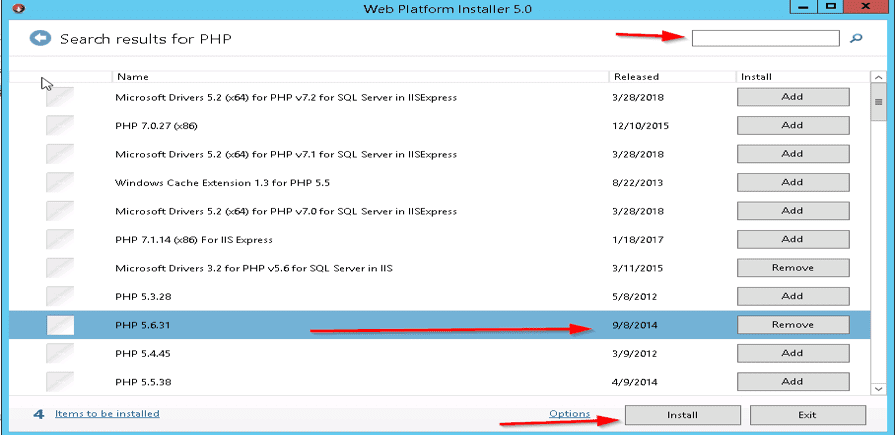
Now search for PHP, as shown below I selected PHP 5.6.31  and clicked on “Add”
Single sign-on

The PHP installation will list missing dependent components for inclusion, connecting them with transitional clarity. However, Go ahead and click the “I Accept” button

Identity provider

Installation progress

Authentication

Moreover, Once the installation finishes, the system will display a summary page detailing the installed components.  Click on Finish.

Note: Therefore, If you are unlucky 😉 an error will be prompted that PHP Manager for IIS could not be installed. I was successfully able to install some PHP and its components but was unable to install PHP Manager for IIS.

Note: However, I had both ( .NET Framework 3.5 (includes 2.0 & 3.0) installed) etc. And none of the registry key modifications I found online helped.

Solution: Here is the installer for PHP manager. Now launch Windows IIS and Set recommendations for adding index.php to default file and automatically reset php when config.php is updated.

Click on the “View recommendations.” link.

I hope you found this blog post helpful. If you have any questions, please let me know in the comment session.

Rate this post

Thank you for reading this post. Kindly share it with others.

  • Share on X (Opens in new window) X
  • Share on Reddit (Opens in new window) Reddit
  • Share on LinkedIn (Opens in new window) LinkedIn
  • Share on Facebook (Opens in new window) Facebook
  • Share on Pinterest (Opens in new window) Pinterest
  • Share on Tumblr (Opens in new window) Tumblr
  • Share on Telegram (Opens in new window) Telegram
  • Share on WhatsApp (Opens in new window) WhatsApp
  • Share on Mastodon (Opens in new window) Mastodon
  • Share on Bluesky (Opens in new window) Bluesky
  • Share on Threads (Opens in new window) Threads
  • Share on Nextdoor (Opens in new window) Nextdoor
Windows Server

Post navigation

Previous Post: How to apply Windows Updates from WSUS to AWS Instances
Next Post: Installing and configuring SimpleSAMLphp [Part 2]

Related Posts

  • certificate import and export on windows
    Export and Convert Private Keys to .PEM Format in Windows Windows
  • screenshot 2020 04 27 at 13.30.17
    What are the differences between a Role and a Feature Windows Server
  • fress install windows server 2025   downgrade of Windows Server datacenter to standard edition
    Convert Windows Server Datacenter to Standard: Install Windows Server via iDRAC Virtual Media Windows Server
  • email
    How to monitor Windows Server backup via PowerShell Windows Server
  • Screenshot 2021 10 07 at 00.00.32
    How to fix this computer is a domain controller: The snap-in cannot be used on a domain controller Windows Server
  • VMware workstation networking issues
    Network cable Unplugged: Fix VMware “Warning – Multiple default gateways are intended to provide redundancy to a single network Virtualization

More Related Articles

certificate import and export on windows Export and Convert Private Keys to .PEM Format in Windows Windows
screenshot 2020 04 27 at 13.30.17 What are the differences between a Role and a Feature Windows Server
fress install windows server 2025   downgrade of Windows Server datacenter to standard edition Convert Windows Server Datacenter to Standard: Install Windows Server via iDRAC Virtual Media Windows Server
email How to monitor Windows Server backup via PowerShell Windows Server
Screenshot 2021 10 07 at 00.00.32 How to fix this computer is a domain controller: The snap-in cannot be used on a domain controller Windows Server
VMware workstation networking issues Network cable Unplugged: Fix VMware “Warning – Multiple default gateways are intended to provide redundancy to a single network Virtualization

Leave a Reply Cancel reply

You must be logged in to post a comment.

Microsoft MVP

VEEAMLEGEND

vexpert-badge-stars-5

Virtual Background

GoogleNews

Categories

veeaam100

Veeam Vanguard

  • VMware
    How to install Windows Server 2022 on VMware Workstation Virtualization
  • oracle q4 earnings are in e28094 but what does it really mean 700x425 1
    How to uninstall Oracle Database 11G or 12c Oracle/MSSQL/MySQL
  • windows powershell thumbnail
    Unable to uninstall AppX? How to uninstall builtin programs using PowerShell in Windows 10 Scripts
  • Slide1 1
    Enable or disable Secure Boot in Windows via UEFI Firmware Settings Windows
  • Test your webcam and microphone before meeting
    How to Test Your Webcam And Microphone Before Meeting Windows
  • How to determine Active Directory Site Name
    How to determine Active Directory Site Name Network | Monitoring
  • Banner
    How to Stop OneDrive from Starting Up Automatically on Windows 11 Windows
  • image 28
    How to monitor your website uptime and status using Uptime Configuration Management Tool

Subscribe to Blog via Email

Enter your email address to subscribe to this blog and receive notifications of new posts by email.

Join 1,817 other subscribers
  • RSS - Posts
  • RSS - Comments
  • About
  • Authors
  • Write for us
  • Advertise with us
  • General Terms and Conditions
  • Privacy policy
  • Feedly
  • Telegram
  • Youtube
  • Facebook
  • Instagram
  • LinkedIn
  • Tumblr
  • Pinterest
  • Twitter
  • mastodon

Tags

Active Directory Azure Bitlocker Microsoft Windows PowerShell WDS Windows 10 Windows 11 Windows Deployment Services Windows Server 2016

Copyright © 2025 TechDirectArchive


Loading Comments...
 

You must be logged in to post a comment.