Skip to content

TechDirectArchive

Hands-on IT, Cloud, Security & DevOps Insights

  • Home
  • About
  • Advertise With US
  • Reviews
  • Contact
  • Toggle search form
Home » Windows Server » Concept of Active Directory Computer Account
  • Dockerize NodeJS Application
    Dockerizing a NodeJs Express Application Automation
  • microsoft ntlm2
    NT LAN Manager: How to prevent NTLM credentials from being sent to remote servers Security | Vulnerability Scans and Assessment
  • dd featured 1
    How to delete obsolete drivers from the Driver Store in Windows Windows
  • How to Migrate Windows Servers from Hyper V to Proxmox Correctly
    Migrate Windows Servers from Hyper V to Proxmox Correctly Backup
  • remove Windows PC from you iCloud Account completely
    How to remove Windows PC from your iCloud Account completely Mac
  • maxresdefault 2
    How to uninstall Applications with PowerShell Script Scripts
  • Enable or Disable Mac asking for Password
    Enable or Disable Mac asking for Password after Sleep or Screen Saver Mac
  • edge7
    How to enable Adblocker on Microsoft Edge Windows

Concept of Active Directory Computer Account

Posted on 09/04/202001/10/2024 Christian By Christian No Comments on Concept of Active Directory Computer Account
Active Directory

In this article, we will discuss the “Concept of Active Directory Computer Account”. Please visit the following article to learn more about the various methods available for integrating Azure Active Directory with on-Premise Active Directory, how to install Windows Server 2019 and Windows Server 2016, or on a Hyper-V Server. See the following link for the post-installation of Windows Server 2019. Did you know that all domain computers have a computer account and a password like a regular user account password?

This password is randomly generated and used to create a secure connection. This password is changed every 30 days.

Please see the following guide Azure Active Directory integration with on-Premise AD using PTA for more information and also this guide for reasons to deploy AAD.

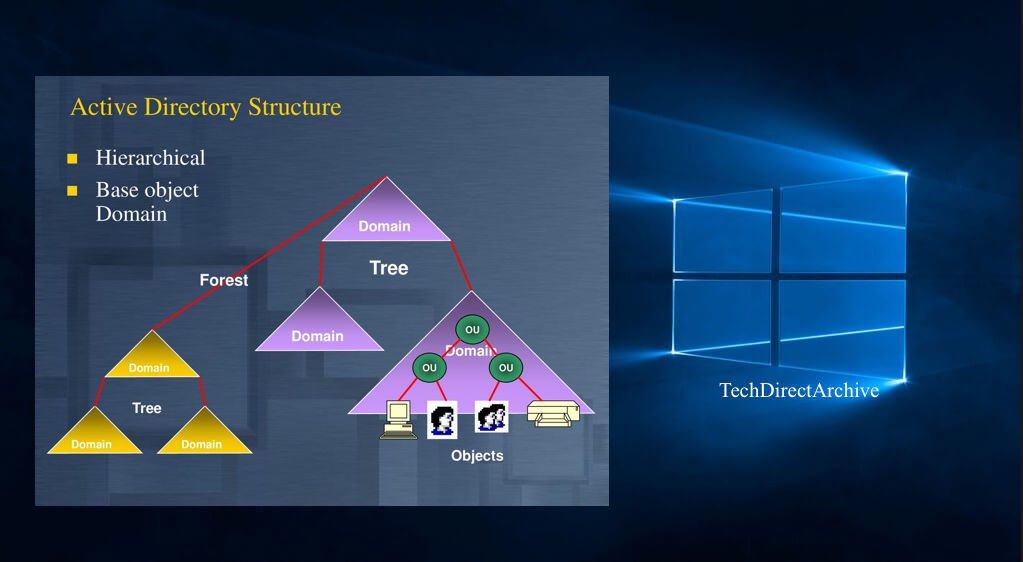
AD Account Concept

When Computer Accounts are automatically joined the domain. But this has a drawback as the device might be placed in a different OU not desired. This brings us to the point of Pre-staging.

Prestaging: Prestaging is a process of creating a computer account in Active Directory prior to joining the computer to Active directory. 

Note: This allows a PC to be placed in the right OUT and this allows GPO to be applied correctly. When using windows deployment services (WDS), this can be achieved as well.

I hope you found this blog post on the “Concept of Active Directory Computer Account” helpful. If you have any questions, please let me know in the comment session.

5/5 - (1 vote)

Thank you for reading this post. Kindly share it with others.

  • Click to share on X (Opens in new window) X
  • Click to share on Reddit (Opens in new window) Reddit
  • Click to share on LinkedIn (Opens in new window) LinkedIn
  • Click to share on Facebook (Opens in new window) Facebook
  • Click to share on Pinterest (Opens in new window) Pinterest
  • Click to share on Tumblr (Opens in new window) Tumblr
  • Click to share on Telegram (Opens in new window) Telegram
  • Click to share on WhatsApp (Opens in new window) WhatsApp
  • Click to share on Pocket (Opens in new window) Pocket
  • Click to share on Mastodon (Opens in new window) Mastodon
  • Click to share on Bluesky (Opens in new window) Bluesky
  • Click to share on Threads (Opens in new window) Threads
  • Click to share on Nextdoor (Opens in new window) Nextdoor
Windows Server Tags:Active Directory, Active Directory Domain Services, Azure AD, Network Security

Post navigation

Previous Post: Active Directory Contact and a User Account Object Differences
Next Post: Request a certificate signing request in Windows using Microsoft Management Console

Related Posts

  • remote desktop connection tabs   rdp tabs
    Guide to Remote Desktop Connection Properties for Secure Access Windows
  • images 3 4
    Fix an appropriate resource file could not be found for the file for BitLocker Management Windows Server
  • images 3 4
    What are the differences between an ADM and ADMX file Windows Server
  • xxxxxx 1
    Active Directory Administrative Tools shortcut Windows Server
  • nonexistent AD
    Fix Active Directory Domain Controller (AD DS) for this domain could not be contacted Windows Server
  • SSL for Localhost on WAMP
    How to configure SSL for WAMP server Windows Server

More Related Articles

remote desktop connection tabs   rdp tabs Guide to Remote Desktop Connection Properties for Secure Access Windows
images 3 4 Fix an appropriate resource file could not be found for the file for BitLocker Management Windows Server
images 3 4 What are the differences between an ADM and ADMX file Windows Server
xxxxxx 1 Active Directory Administrative Tools shortcut Windows Server
nonexistent AD Fix Active Directory Domain Controller (AD DS) for this domain could not be contacted Windows Server
SSL for Localhost on WAMP How to configure SSL for WAMP server Windows Server

Leave a Reply Cancel reply

You must be logged in to post a comment.

Microsoft MVP

VEEAMLEGEND

vexpert-badge-stars-5

Virtual Background

GoogleNews

Categories

veeaam100

sysadmin top30a

  • Dockerize NodeJS Application
    Dockerizing a NodeJs Express Application Automation
  • microsoft ntlm2
    NT LAN Manager: How to prevent NTLM credentials from being sent to remote servers Security | Vulnerability Scans and Assessment
  • dd featured 1
    How to delete obsolete drivers from the Driver Store in Windows Windows
  • How to Migrate Windows Servers from Hyper V to Proxmox Correctly
    Migrate Windows Servers from Hyper V to Proxmox Correctly Backup
  • remove Windows PC from you iCloud Account completely
    How to remove Windows PC from your iCloud Account completely Mac
  • maxresdefault 2
    How to uninstall Applications with PowerShell Script Scripts
  • Enable or Disable Mac asking for Password
    Enable or Disable Mac asking for Password after Sleep or Screen Saver Mac
  • edge7
    How to enable Adblocker on Microsoft Edge Windows

Subscribe to Blog via Email

Enter your email address to subscribe to this blog and receive notifications of new posts by email.

Join 1,839 other subscribers
  • RSS - Posts
  • RSS - Comments
  • About
  • Authors
  • Write for us
  • Advertise with us
  • General Terms and Conditions
  • Privacy policy
  • Feedly
  • Telegram
  • Youtube
  • Facebook
  • Instagram
  • LinkedIn
  • Tumblr
  • Pinterest
  • Twitter
  • mastodon

Tags

AWS Azure Bitlocker Microsoft Windows PowerShell WDS Windows 10 Windows 11 Windows Deployment Services Windows Server 2016

Copyright © 2025 TechDirectArchive


Loading Comments...
 

You must be logged in to post a comment.