Skip to content

TechDirectArchive

Hands-on IT, Cloud, Security & DevOps Insights

  • Home
  • About
  • Advertise With US
  • Reviews
  • Contact
  • Toggle search form
Home » Virtualization » Fix Hyper-V VM Stuck in Stopping State
  • Synology 1
    Synology NAS brute-force attack: Employ Synology Best Practice to remediate StealthWorker Botnet attack Security | Vulnerability Scans and Assessment
  • Manually resize your partition
    KB5034439 Windows Update Error: Resize WinRE Partition Windows Server
  • Deploy static website to azure blog storage
    Deploy a Static Website to Azure Storage from VSCode AWS/Azure/OpenShift
  • Could not load file or assembly
    Unable to edit MDT XML unattended file: Could not load file Windows Server
  • Configure Synology DS923+ NAS for File Sharing
    How to Configure Synology DS923+ NAS for File Sharing [Part 2] Reviews
  • Screenshot 2020 06 23 at 10.52.52
    How to uninstall Microsoft SQL Server on Windows Oracle/MSSQL/MySQL
  • How to pause updates and why
    How to Pause Windows Update via Windows Settings Windows
  • screenshot 2020 05 11 at 20.25.01
    How to remove (uninstall) a printer on a macOS Mac

Fix Hyper-V VM Stuck in Stopping State

Posted on 27/08/202217/11/2023 Temitope Odemo By Temitope Odemo No Comments on Fix Hyper-V VM Stuck in Stopping State
stuck

An article on Hyper-V on techdirectarchive.com defines Hyper-V as Microsoft’s hardware virtualization product. It lets you create and run a software version of a computer, called a virtual machine. In this guide, you will learn how to fix Hyper-V VM Stuck in Stopping State. Please refer to these related articles: MDT deployment failed and Stuck at Command Prompt: Windows installation does not proceed, How to Fix “Getting Windows Ready” don’t turn off your PC off, and Enable HyperV on Windows: How to install Windows 11 on HyperV.

Each virtual machine acts like a complete computer, running an operating system and programs. Hyper-V in Windows and Windows Server replaces older hardware virtualization products, such as Microsoft Virtual PC, Microsoft Virtual Server, and Windows Virtual PC.

Below is a YouTube video of how to fix HyperV VM(s) stuck in a stopping state. 

Hyper-V offers networking, performance, storage, and security features not available in these older products. Just like any other software, Hyper-V has its own specific and general issues. One of the issues that plague users is when the virtual machine suddenly gets stuck in the stopping state.

Resolve Hyper-V Virtual Machine Stuck in the Stopping State

image-30
Hyper-V Manager

Here are some exciting articles: Hyper-V Server Core Mode: How to install free Hyper-V Server on a VMware Workstation, vSwitches: How to delete Virtual Switches from Hyper-V, How to install and Configure Hyper-V on Windows Server on Windows Server 2019, and 2022 via the Server Manager, PowerShell or DISM.

Follow the below steps to fix this issue:

1: If multiple VMs are ON and you need to stop one of them but is stuck just open the Powershell as an administrator to find out the GUID of the virtual machine that is having the issue. Once the Powershell is opened then type this command

Get-VM "VMname" | fl *

The VMname is the name of the Virtual machine with the problem. Please note the VMId as this is the id you will need when looking for the right process to end.

image-31
Windows PowerShell

2. Now open the Task Manager and click the Details tab. You now need to locate vmwp.exe process. Please note that you are definitely going to see more than one of such processes if you have more than one VM running.

That is why you need to know the VMId of the VM. After locating this VMId click on the End task button then the VM that is stuck will be instantly killed.
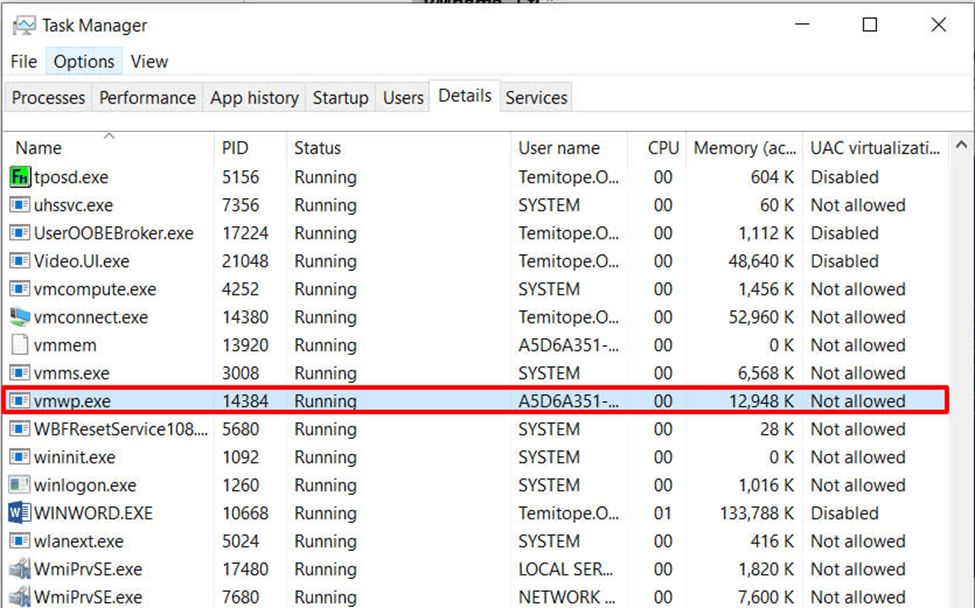
image-32
vmwp.exe process

Please refer to these related articles: How to perform Windows Server backup with Nakivo or Windows Server backup utility, how to enable Secure boot and TPM on HyperV: How to fix “This PC Can’t Run Windows 11” on Hyper V, and An error occurred while attempting to connect to the server: Check if the VM service is running.

I hope you found this blog post on how to Fix Hyper-V VM Stuck in Stopping State Interesting and helpful. In case you have any questions do not hesitate to ask in the comment section.

Rate this post

Thank you for reading this post. Kindly share it with others.

  • Click to share on X (Opens in new window) X
  • Click to share on Reddit (Opens in new window) Reddit
  • Click to share on LinkedIn (Opens in new window) LinkedIn
  • Click to share on Facebook (Opens in new window) Facebook
  • Click to share on Pinterest (Opens in new window) Pinterest
  • Click to share on Tumblr (Opens in new window) Tumblr
  • Click to share on Telegram (Opens in new window) Telegram
  • Click to share on WhatsApp (Opens in new window) WhatsApp
  • Click to share on Pocket (Opens in new window) Pocket
  • Click to share on Mastodon (Opens in new window) Mastodon
  • Click to share on Bluesky (Opens in new window) Bluesky
  • Click to share on Threads (Opens in new window) Threads
  • Click to share on Nextdoor (Opens in new window) Nextdoor
Virtualization Tags:Hyper-V, hyperV, Hypervisor, Virtual Host, Virtual Machine, virtualization, Windows Server 2016

Post navigation

Previous Post: How to demote and remove a Domain Controller on Windows Servers
Next Post: How to create Desktop Stickers in Windows 11

Related Posts

  • oracle virtualbox
    Fix VirtualBox Virtual Machine Encountered a Non-Fatal problem Virtualization
  • VMware Type 1 Hypervisor installation
    How to install ESXi on a Beelink EQ12 Mini PC Virtualization
  • Reduce VMDK dile defragment and compact
    Analyse Disks with Treesize: Defragment and Shrink VMware Workstation VM Disks Virtualization
  • Veeam Plugin update for Proxmox
    Update Veeam Backup for Proxmox Plugin to support PVE 9.0 Backup
  • Clone a Virtual Machine via Export and Import
    Clone a Virtual Machine via Export and Import: How to copy Virtual Hard Disk on Hyper-V Virtualization
  • ESNAS Virtualization 01
    How to remove Recent vSphere Client Connections Virtualization

More Related Articles

oracle virtualbox Fix VirtualBox Virtual Machine Encountered a Non-Fatal problem Virtualization
VMware Type 1 Hypervisor installation How to install ESXi on a Beelink EQ12 Mini PC Virtualization
Reduce VMDK dile defragment and compact Analyse Disks with Treesize: Defragment and Shrink VMware Workstation VM Disks Virtualization
Veeam Plugin update for Proxmox Update Veeam Backup for Proxmox Plugin to support PVE 9.0 Backup
Clone a Virtual Machine via Export and Import Clone a Virtual Machine via Export and Import: How to copy Virtual Hard Disk on Hyper-V Virtualization
ESNAS Virtualization 01 How to remove Recent vSphere Client Connections Virtualization

Leave a Reply Cancel reply

You must be logged in to post a comment.

Microsoft MVP

VEEAMLEGEND

vexpert-badge-stars-5

Virtual Background

GoogleNews

Categories

veeaam100

sysadmin top30a
 
  • Synology 1
    Synology NAS brute-force attack: Employ Synology Best Practice to remediate StealthWorker Botnet attack Security | Vulnerability Scans and Assessment
  • Manually resize your partition
    KB5034439 Windows Update Error: Resize WinRE Partition Windows Server
  • Deploy static website to azure blog storage
    Deploy a Static Website to Azure Storage from VSCode AWS/Azure/OpenShift
  • Could not load file or assembly
    Unable to edit MDT XML unattended file: Could not load file Windows Server
  • Configure Synology DS923+ NAS for File Sharing
    How to Configure Synology DS923+ NAS for File Sharing [Part 2] Reviews
  • Screenshot 2020 06 23 at 10.52.52
    How to uninstall Microsoft SQL Server on Windows Oracle/MSSQL/MySQL
  • How to pause updates and why
    How to Pause Windows Update via Windows Settings Windows
  • screenshot 2020 05 11 at 20.25.01
    How to remove (uninstall) a printer on a macOS Mac

Subscribe to Blog via Email

Enter your email address to subscribe to this blog and receive notifications of new posts by email.

Join 1,840 other subscribers
  • RSS - Posts
  • RSS - Comments
  • About
  • Authors
  • Write for us
  • Advertise with us
  • General Terms and Conditions
  • Privacy policy
  • Feedly
  • Telegram
  • Youtube
  • Facebook
  • Instagram
  • LinkedIn
  • Tumblr
  • Pinterest
  • Twitter
  • mastodon

Tags

AWS Azure Bitlocker Microsoft Windows PowerShell WDS Windows 10 Windows 11 Windows Deployment Services Windows Server 2016

Copyright © 2025 TechDirectArchive


Loading Comments...
 

You must be logged in to post a comment.