Resolve Invalid Key ID when requesting BitLocker Recovery Key


In this guide, I will show you how to Regain Access to a PC via the Self-Service Portal: Resolve Invalid Key ID when requesting BitLocker Recovery Key. MBAM is an administrator interface used to manage BitLocker drive encryption. It allows you to configure your enterprise with the correct BitLocker encryption policy options. As well as monitor compliance with these policies. Please see how to backup existing and new BitLocker recovery keys to Active Directory, and BitLocker Drive Encryption architecture and implementation types on Windows.
Kindly refer to the following similar guides on BitLocker. how to fix missing BitLocker Recovery Tab in Active Directory Users and Computers, how to enable or disable BitLocker Drive Encryption on Windows 10 and Virtual Machines, how to view BitLocker disk encryption status in Windows,
Why Would the BitLocker Recovery Key Window be prompted?
There are multiple reasons for this. You will have to troubleshoot specifically to pinpoint what could have happened in your case. We have outlined them in this guide “Reasons for BitLocker Recovery Mode Prompt“.
BitLocker Recovery Key restores access to a BitLocker-protected device when locked. Since I administer BitLocker via MBAM, I can save the recovery keys to the MBAM Database and Active Directory.
Note: You will only be able to perform the self-service recovery or recovery via the MBAM helpdesk. If the keys have been successfully escrowed in the MBAM database.
If this does not happen, and you do not have the recovery keys saved to Active Directory. In this case, you have to re-install your device.
Why was this “error “Invalid Key ID, Unable to get BitLocker Recovery Key” Prompted?
If you are experiencing errors due to invalid key ID, please take a look at the FAQs section for other possible reasons.
The Invalid Key ID was prompted because the user requesting the key isn’t an end-user on the device! Below are the prerequisites for recovery BitLocker Recovery Key via the SelfService Portal.
- You must be the end user of the system to recover the key through the Self-Service Portal*
- You must use your usual login credentials for that PC when logging into the Self-Service Portal. Else you will not be able to perform the recovery.
Note: If the device is also non-complaint in MBAM, the user will not be able to perform self-service recovery.

Note: If the IT administrator configured an IIS Session State time-out. A message is displayed in the Self-Service Portal 5 Minutes prior to the time-out etc.
Resolve Invalid Key ID by Requesting BitLocker Recovery Key in AD
Lastly, if you have BitLocker Recovery Keys saved to Active Directory. You can log in Active Directory and get the recovery key.
You may need to fix the missing BitLocker Recovery Tab in Active Directory Users and Computers before being able to view the recovery key in AD. Here is how Backup existing and new BitLocker recovery keys to Windows Active Directory if you are not using GPO.
I really do not recommend AD, if you are using MBAM. As there will not be any form of auditing in place when keys are accessed by the Active Directory.

See Enterprise Compliance, Computer Compliance, and Recovery Audit Report: Understanding the Microsoft BitLocker Administration and Monitoring (MBAM) reports fields, and how to query MBAM to display the BitLocker Recovery report.
Resolve Invalid Key ID when requesting BitLocker Recovery Key
This section covers how to unlock your PC that is encrypted using the MBAM (Microsoft BitLocker Administration and Monitoring) client. It is assumed that the MBAM client is installed on your device.
And that the drive has already been encrypted by the MBAM client. Else, you should look at this guide how and where to find your BitLocker recovery key in Windows
Important An end user must have physically logged on to the computer (not remotely) at least one time successfully to be able to recover their key using the Self-Service Portal. Otherwise, they must use the Helpdesk Portal for key recovery.Regain Access to a PC via the Self-Service Portal
The Self-Service Portal is a website that IT administrators configure as part of Microsoft BitLocker Administration and Monitoring (MBAM) deployment.
The portal allows end users to individually regain access to their PCs without bothering the helpdesk or System (AD) Administrators if they get locked out of Windows. Learn about how to deploy MBAM for Bitlocker Administration.
To use the Self-Service Portal to regain access to a computer, kindly access the Self Srvice Portal URL of your Company.

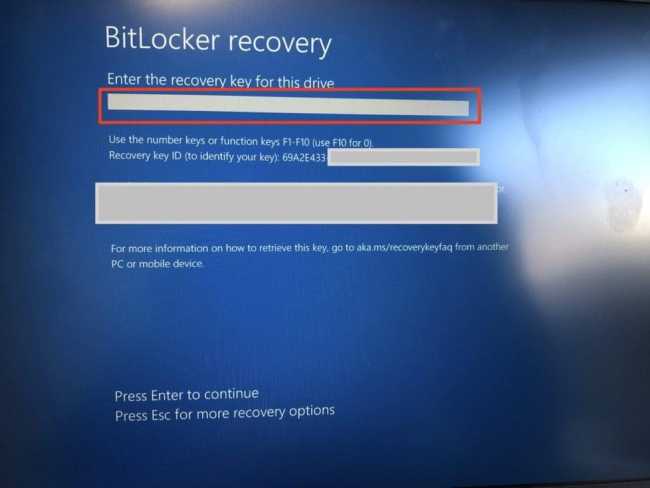
Enter the Recovery Key ID as displayed on your PC and select a reason.

In the Recovery KeyId field, enter a minimum of eight of the 32-digit BitLocker Key ID that is displayed on the BitLocker recovery screen of your computer.
If the first eight digits match multiple keys, a message displays that requires you to enter all 32 digits of the recovery key ID.
In the Reason field, select a reason for your request for the recovery key. Next, click on Get Key. Your BitLocker recovery key is displayed in the Your BitLocker Recovery Key field.
Enter the 48-digit code into the BitLocker recovery screen on your computer to regain access to the computerRegain Access via the Help Desk Portal
Since the “HelpDesk” Portal does not have this explicit requirements as discussed above. We could contact the Helpdesk office to help retrieve theBitLocker Recovery Key.
What could cause Invalid Key ID when requesting BitLocker Recovery Key?
One of the reasons could be that the User profile has been deleted from the device and you are trying to use this user to perform BitLocker self-service recovery.
Another reason could be due to last contact date my the device. You can take a look on the Computer or Enterprise Reporting services for more information about the device.

To fix this issue and ensure the agent is able to communicate with the database correctly, I will run the command “gpupdate /force” in order to have the policies reapplied. With this, the device will be recognized with the Recovery key ID and was you should be able to perform the self-service recovery. As you can see below, recovery via self-service is now possible.

FAQs
What happens if the computer is turned off during encryption or decryption?
If the computer is turned off or goes into hibernation, the BitLocker encryption and decryption process will resume where it stopped the next time Windows starts. Resuming encryption or decryption is true even if the power is suddenly unavailable.
Does BitLocker encrypt and decrypt the entire drive all at once when reading and writing data?
No, BitLocker doesn’t encrypt and decrypt the entire drive when reading and writing data. The encrypted sectors in the BitLocker-protected drive are decrypted only as they’re requested from system read operations. Blocks that are written to the drive are encrypted before the system writes them to the physical disk. No unencrypted data is ever stored on a BitLocker-protected drive.
I hope you found this blog post helpful on how to Regain Access to a PC via the Self-Service Portal: Resolve Invalid Key ID when requesting BitLocker Recovery Key. If you have any questions, please let me know in the comment session.


