Skip to content

TechDirectArchive

Hands-on IT, Cloud, Security & DevOps Insights

  • Home
  • About
  • Advertise With US
  • Contact
  • Reviews
  • Toggle search form
Home » Windows Server » How does Key Rotation work in MBAM?

How does Key Rotation work in MBAM?

Posted on 09/11/202309/11/2023 Christian By Christian No Comments on How does Key Rotation work in MBAM?
How does key rotation work in MBAM

Key Rotation in Microsoft BitLocker Administration and Monitoring (MBAM) refers to the process of rotating the encryption keys used to protect BitLocker-encrypted drives. This is a security best practice to minimize the risk associated with long-term exposure to a single encryption key. In this article, we shall discuss How does Key Rotation work in MBAM. Please see how to Fix WDAC vulnerabilities by updating PowerShell, and How to deploy MBAM for Bitlocker Administration.

Key rotation helps enhance the overall security posture of the BitLocker deployment. It does this by limiting the time window during which an attacker could potentially exploit a compromised key. See how to Backup existing and new BitLocker Recovery Keys to Active Directory.

How exactly does the recovery work?

When the recovery is performed via the MBAM Helpdesk portal. The MBAM agent on the client’s computer will force it to rotate (meaning, the keys are rotated). That is, the Recovery Key and Recovery Key ID will be rotated.

Helpdesk BitLocker drive recovery

Note: Disclosing the Recovery Key using self-service does not cause the key to rotate.

But when it is pulled from Active Directory. MBAM does not know about this request and the rotation will also not happen. For accountability (audit), BitLocker recovery should not be done over Active Directory. Want to learn how to Disable BitLocker on Windows 10

You will be able to verify this change very quickly by using the following command below. These new values are escrowed to the MBAM database based on the configured policy or to the ConfigMgr (SCCM) database in SQL.

manage-bde -protectors -get C:
manage bde getprotectors BitLocker

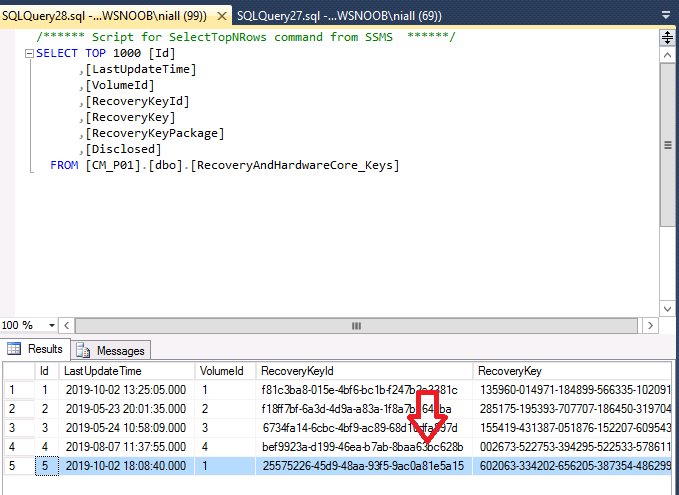
Once the key has been disclosed in MBAM DB, it changes from “0” to “1”. Then the MBAM agent on the client’s computer will force it to rotate. You can see the new recovery ID and recovery password on the host below.

RecoveryAndHardwareCore_Keys-from-MBAM-DB-and-Event-Viewer-

Note: I recommend implementing a backup of BitLocker recovery keys to Active Directory. In this way, you will avoid a single point of failure.

Regular audits and monitoring of key recovery activities in MBAM contribute to maintaining a robust and secure BitLocker deployment.

You may be interested in these: How to check if Microsoft BitLocker Administration and Monitoring is installed on Windows, how to Use Logrotate For Managing Log Files In Ubuntu Linux, and MBAM Frequent Report Errors: Understanding Microsoft BitLocker Administration and Monitoring compliance state and error status.

FAQs on Microsoft BitLocker Administration and Monitoring

Why is Key Rotation Important?

Key Rotation is crucial for maintaining the security of BitLocker-encrypted devices over time. It helps mitigate the impact of potential key compromise scenarios, such as insider threats or exposure to unauthorized access. By changing keys at regular intervals, organizations can reduce the risk associated with static encryption keys and enhance the overall resilience of their data protection strategy.

How Does Key Rotation Work in MBAM?

Key Rotation involves generating a new set of cryptographic keys for each BitLocker-protected drive and updating the corresponding recovery information stored in the MBAM database. MBAM provides an automated process for key rotation. Ensuring that the encryption keys are rotated when retrieved by the helpdesk without requiring manual intervention. The rotation process includes the generation of new BitLocker recovery keys and the storage of these keys in the MBAM Database for future retrieval.

You may want to see how MBAM Key Rotation works in MBAM integrated with SCCM, and What happens when WDS and DNS are installed on the same Windows Server? DNS issues with WDS.

I hope you found this article on how Key Rotation works in MBAM useful. Please let me know in the comment section if you have any questions.

Rate this post

Thank you for reading this post. Kindly share it with others.

  • Share on X (Opens in new window) X
  • Share on Reddit (Opens in new window) Reddit
  • Share on LinkedIn (Opens in new window) LinkedIn
  • Share on Facebook (Opens in new window) Facebook
  • Share on Pinterest (Opens in new window) Pinterest
  • Share on Tumblr (Opens in new window) Tumblr
  • Share on Telegram (Opens in new window) Telegram
  • Share on WhatsApp (Opens in new window) WhatsApp
  • Share on Mastodon (Opens in new window) Mastodon
  • Share on Bluesky (Opens in new window) Bluesky
  • Share on Threads (Opens in new window) Threads
  • Share on Nextdoor (Opens in new window) Nextdoor
Oracle/MSSQL/MySQL, Windows Server Tags:Bitlocker, MBAM, Microsoft BitLocker Administration and Monitoring, Microsoft BitLocker Administration and Monitoring (MBAM), Microsoft Windows, Windows 10, Windows 11, Windows Server 2016

Post navigation

Previous Post: Register Devices to Intune and EntraID Using Company Portal
Next Post: How to Create Hyper-V Virtual Switch

Related Posts

  • Enable or disable SA acocunt
    How to enable an SA account that has been disabled Oracle/MSSQL/MySQL
  • sandbox
    How to Configure Windows Sandbox Virtualization
  • Implementing DHCP Server
    Comprehensive Guide to Install DHCP Server on Windows Server Windows Server
  • Windows Logo
    Restrict IP Address Range on Windows PC Windows
  • How to use DBeaver on MacOS
    Install DBeaver on macOS: Connect to PostgreSQL Database Oracle/MSSQL/MySQL
  • HybridCloudTrust
    WHFB Hybrid Cloud Kerberos Trust Model is now available AWS/Azure/OpenShift

More Related Articles

Enable or disable SA acocunt How to enable an SA account that has been disabled Oracle/MSSQL/MySQL
sandbox How to Configure Windows Sandbox Virtualization
Implementing DHCP Server Comprehensive Guide to Install DHCP Server on Windows Server Windows Server
Windows Logo Restrict IP Address Range on Windows PC Windows
How to use DBeaver on MacOS Install DBeaver on macOS: Connect to PostgreSQL Database Oracle/MSSQL/MySQL
HybridCloudTrust WHFB Hybrid Cloud Kerberos Trust Model is now available AWS/Azure/OpenShift

Leave a Reply Cancel reply

You must be logged in to post a comment.

Microsoft MVP

VEEAMLEGEND

vexpert-badge-stars-5

Virtual Background

GoogleNews

Categories

veeaam100

Veeam Vanguard

  • How to upgrade Trellix ePolicy Orchestrator
    How to upgrade Trellix ePolicy Orchestrator Security | Vulnerability Scans and Assessment
  • screenshot 2020 03 07 at 22.25.21
    How to configure the FrontFace Lockdown Tool Windows
  • image 129
    Using Awx to deploy, schedule and run playbooks Linux
  • Secure Web Server
    How to secure a Web Server on a Windows VM in Azure using TLS/SSL Certificates Saved in Azure Key Vault AWS/Azure/OpenShift
  • 1 WeXxkEX0JG3oB781HD8Hrg 1
    How to convert a GPT disk into an MBR disk error: Windows cannot be installed on drive 0 Partition 1 Windows
  • centos feature
    How to change the system time zone under RedHat and CentOS Linux
  • Reduce VMDK dile defragment and compact
    Analyse Disks with Treesize: Defragment and Shrink VMware Workstation VM Disks Virtualization
  • linux w640 h400
    How to install and configure Ubuntu Linux on VirtualBox Linux

Subscribe to Blog via Email

Enter your email address to subscribe to this blog and receive notifications of new posts by email.

Join 1,819 other subscribers
  • RSS - Posts
  • RSS - Comments
  • About
  • Authors
  • Write for us
  • Advertise with us
  • General Terms and Conditions
  • Privacy policy
  • Feedly
  • Telegram
  • Youtube
  • Facebook
  • Instagram
  • LinkedIn
  • Tumblr
  • Pinterest
  • Twitter
  • mastodon

Tags

Active Directory Azure Bitlocker Microsoft Windows PowerShell WDS Windows 10 Windows 11 Windows Deployment Services Windows Server 2016

Copyright © 2025 TechDirectArchive


Loading Comments...
 

You must be logged in to post a comment.