Skip to content

TechDirectArchive

Hands-on IT, Cloud, Security & DevOps Insights

  • Home
  • About
  • Advertise With US
  • Contact
  • Reviews
  • Toggle search form
Home » Windows » Failure 5456: Unable to determine destination disk, partition, and/or drive, see BDD Log
  • images 8
    Microsoft Direct Access: Now Always On VPN Windows Server
  • sshkey
    How to perform SSH key-based authentication in Linux Linux
  • winSEARCH
    Hide or Remove Search Button from Windows 10 Taskbar Windows
  • cisco ASA
    Basic Cisco ASA troubleshooting Commands Guide Network | Monitoring
  • banner2
    How to Integrate Postman With GitHub Automation
  • rdp4
    How to change the default RDP port in Windows Network | Monitoring
  • MECM Deployment copy
    How to install Endpoint Configuration Manager on HyperV VM Windows Server
  • Microsoft Office 365 Family
    Download Microsoft Office 365 Family Invoice for tax reasons Microsoft Exchange/Office/365

Failure 5456: Unable to determine destination disk, partition, and/or drive, see BDD Log

Posted on 09/03/202121/09/2023 Christian By Christian No Comments on Failure 5456: Unable to determine destination disk, partition, and/or drive, see BDD Log
destination disk

The BDD.log is an aggregated MDT log file that is copied to a network location at the end of the deployment if you specify the SLShare property in the Customsettings.ini file. Deployment Toolkit (MDT) provides information on current known issues, possible workarounds for those issues, and troubleshooting guidance. The MDT log file format is designed to be read by CMTrace. Use this tool whenever possible to read the log files, because it makes finding errors much easier.

Kindly refer to the following guides for more information on WDS and MDT. How to setup and install WDS role, how to configure DHCP Server option 60, 66, and 67 for WDS, how to remove Windows Deployment Services role via the GUI and PowerShell, how to add boot and install images to WDS and configure Multicast transmission via the GUI and WDSUTIL, and how to deploy images to computers or virtual machines using WDS.

Lite Touch Installation (LTI): LTI is a high-volume deployment strategy for small to midsized organisations that combine the use of MDT with WDS which allows Administrators to deploy devices via network-based installation. 

Destination Disk Determination Failure

Furthermore, The following error below will be prompted when MDT is unable to install the Windows operating system (OS) on your device due to not being able to format the drive.

Failure 5456: Unable to determine destination disk, partition, and/or drive. See BDD.LOG. LiteTouch deployment failed, return code = -2147467259 0x80004005. Failed to run the action: inject drivers

Solution: However, This actually depends on your environment setup. If you have a disk partitioning tool (script) integrated into your wimpe in the path below, you do not have to perform the steps below as the installation will run smoothly. In this approach, you must mount the wimpe file and then unmount afterward. I will be discussing these steps in the future.

C:\Program Files (x86)\Windows Kits\10\Assessment and Deployment Kit\Windows Preinstallation Environment\amd64\en-us

For those that do not have a disk partitioning tool (script) capable of formatting the drive for Windows installation, kindly follow the steps below.
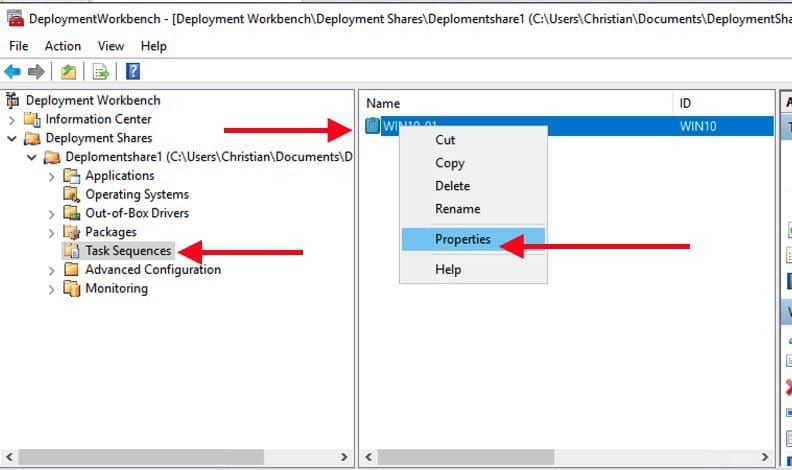
– Launch Deployment Workbench, and expand the deployment share
– Navigate to the Task Sequence and right-click on the properties window to open it as shown below.
partition

Uncheck the “Disable this step” as shown below: This will activate the Formate and disk Partition (UEFI) as shown below.
– Click on Apply and OK.

Task-seq-1

Henceforth, you should be able to configure and complete your deployment without further issues. If you wish to proceed from here, kindly refer to this guide “how to deploy Windows using ADK, MDT, and WDS“.

For some related articles, please see the following guides: No bootable media found system halted: Unable to PXE boot WDS to Virtualbox, how to configure DHCP Server option 60, 66 and 67 for Windows Deployment Services, how to remove Windows Deployment Services role via the GUI and PowerShell.

I hope you found this blog post helpful. If you have any questions, please let me know in the comment session.

Rate this post

Thank you for reading this post. Kindly share it with others.

  • Click to share on X (Opens in new window) X
  • Click to share on Reddit (Opens in new window) Reddit
  • Click to share on LinkedIn (Opens in new window) LinkedIn
  • Click to share on Facebook (Opens in new window) Facebook
  • Click to share on Pinterest (Opens in new window) Pinterest
  • Click to share on Tumblr (Opens in new window) Tumblr
  • Click to share on Telegram (Opens in new window) Telegram
  • Click to share on WhatsApp (Opens in new window) WhatsApp
  • Click to share on Pocket (Opens in new window) Pocket
  • Click to share on Mastodon (Opens in new window) Mastodon
  • Click to share on Bluesky (Opens in new window) Bluesky
  • Click to share on Threads (Opens in new window) Threads
  • Click to share on Nextdoor (Opens in new window) Nextdoor
Windows Tags:Microsoft Deployment Tool kit, Microsoft Deployment Toolkit (MDT), WDS, Windows 10, Windows Deployment Services

Post navigation

Previous Post: Add and remove IIS Web Server on Windows Server 2019 via the Server Manager and PowerShell
Next Post: Create and access a hidden share folder on Windows

Related Posts

  • screenshot 2020 04 22 at 23.28.23
    Remove saved RDP connections in Windows Windows
  • How to Disable device encryption
    How to Disable device encryption on Windows Windows
  • Uninstall MicrosoftDefenderUpdate
    What you need to know about Microsoft Defender Antivirus Security | Vulnerability Scans and Assessment
  • Featured image Teams Whiteboard
    How to use Whiteboard in Microsoft Teams meetings Windows
  • Windows Logo
    Restrict IP Address Range on Windows PC Windows
  • WCD
    Join Bulk Devices using a Provisioning Package to Azure AWS/Azure/OpenShift

More Related Articles

screenshot 2020 04 22 at 23.28.23 Remove saved RDP connections in Windows Windows
How to Disable device encryption How to Disable device encryption on Windows Windows
Uninstall MicrosoftDefenderUpdate What you need to know about Microsoft Defender Antivirus Security | Vulnerability Scans and Assessment
Featured image Teams Whiteboard How to use Whiteboard in Microsoft Teams meetings Windows
Windows Logo Restrict IP Address Range on Windows PC Windows
WCD Join Bulk Devices using a Provisioning Package to Azure AWS/Azure/OpenShift

Leave a Reply Cancel reply

You must be logged in to post a comment.

Microsoft MVP

VEEAMLEGEND

vexpert-badge-stars-5

Virtual Background

GoogleNews

Categories

veeaam100

sysadmin top30a

  • images 8
    Microsoft Direct Access: Now Always On VPN Windows Server
  • sshkey
    How to perform SSH key-based authentication in Linux Linux
  • winSEARCH
    Hide or Remove Search Button from Windows 10 Taskbar Windows
  • cisco ASA
    Basic Cisco ASA troubleshooting Commands Guide Network | Monitoring
  • banner2
    How to Integrate Postman With GitHub Automation
  • rdp4
    How to change the default RDP port in Windows Network | Monitoring
  • MECM Deployment copy
    How to install Endpoint Configuration Manager on HyperV VM Windows Server
  • Microsoft Office 365 Family
    Download Microsoft Office 365 Family Invoice for tax reasons Microsoft Exchange/Office/365

Subscribe to Blog via Email

Enter your email address to subscribe to this blog and receive notifications of new posts by email.

Join 1,836 other subscribers
  • RSS - Posts
  • RSS - Comments
  • About
  • Authors
  • Write for us
  • Advertise with us
  • General Terms and Conditions
  • Privacy policy
  • Feedly
  • Telegram
  • Youtube
  • Facebook
  • Instagram
  • LinkedIn
  • Tumblr
  • Pinterest
  • Twitter
  • mastodon

Tags

Active Directory AWS Azure Bitlocker Microsoft Windows PowerShell WDS Windows 10 Windows 11 Windows Server 2016

Copyright © 2025 TechDirectArchive


Loading Comments...
 

You must be logged in to post a comment.