Docker image OS “windows” cannot be used on this platform: No matching manifest for linux/amd64 in the manifest list entries from Microsoft Docker Registry


In this article, we shall discuss how to resolve “Docker image OS “windows” cannot be used on this platform: No matching manifest for linux/amd64 in the manifest list entries from Microsoft Docker Registry”. Kindly refer to these related guides: How to create and deploy a local Registry Server with Docker Image, how to Pull your first Nginx Container Image from Docker Hub and deploy it to your local machine, and Azure DevOps and GitHub integration for Docker and Kubernetes deployment.
Docker is an open-source containerization platform that enables developers to package apps into containers and standardized executable components combining application source code with the operating system (OS) libraries and dependencies required to run that code in any environment.
The Docker Engine and client aren’t included with Windows and need to be installed and configured individually.
You need Docker in order to work with Windows Containers. Docker consists of the Docker Engine (dockerd.exe), and the Docker client (docker.exe).
The below error occurs when you are trying to pull Microsoft Container images from Microsoft Container Registry (MCR). The error is usually due to a lot of reasons and there are many solutions to it. I will be discussing the fix that worked for me in this troubleshooting guide.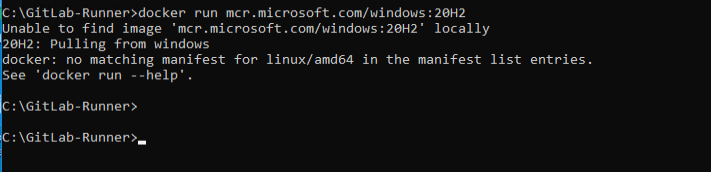
You may also get the following error. Do not freight, all you need do is to switch to a Windows container as discussed below.
C:\GitLab-Runner>docker run mcr.microsoft.com/windows/servercore:20H2-amd64
Unable to find image 'mcr.microsoft.com/windows/servercore:20H2-amd64' locally
20H2-amd64: Pulling from windows/servercore
18ae6bebe21d: Pulling fs layer
df018de09299: Pulling fs layer
docker: image operating system "windows" cannot be used on this platform.
See 'docker run --help'.
Also, see how to create a static pod in Kubernetes. And how to install, register and start GitLab Runner on Windows.
Solution: Switch to Windows Container to resolve Docker image OS “Windows” cannot be used on this platform
To address the Docker Image Compatibility Issue with OS ‘Windows’, consider transitioning from Linux containers. Moreover, For Windows containers, as illustrated in the accompanying screenshot.-
Click on the Show hidden icons and right-click on the Docker icon as shown below. Click on Switch to Windows Container.

Alternatively, you may have to SwitchDaemon the configuration via Command Prompt or PowerShell, as shown below.

You can use the following command on PowerShell as shown below.
PS C:\Program Files\Docker\Docker> ./DockerCli.exe -SwitchDaemonFurthermore, Once you address the Docker Image Compatibility Issue with OS ‘Windows’, running Docker again will yield successful results.

I hope you found this article useful on “Docker image OS “windows” cannot be used on this platform: No matching manifest for linux/amd64 in the manifest list entries from Microsoft Docker Registry’. Please feel free to leave a comment below.


this will not work in windows home edition.
This was tested on Windows 10 Professional and Enterprise Edition