Skip to content

TechDirectArchive

Hands-on IT, Cloud, Security & DevOps Insights

  • Home
  • About
  • Advertise With US
  • Reviews
  • Contact
  • Toggle search form
Home » Windows » How to Check if MBAM Agent is installed on Windows PC
  • Screenshot 2022 04 02 at 23.05.24
    How to apply Windows Updates with PowerShell Windows
  • fix windows activation 0x87E10BC6 error
    Fix Error 0x87E10BC6 on a PC running Windows non-core Edition Windows
  • tpmbiosactivation
    Enable TPM: Determine if TPM is present Windows
  • asdfgh
    Install RSAT on Windows via Windows features Windows
  • whois4578uh
    How to get Domain information using WHOIS Command in Linux Linux
  • WAMPServer Virtual Host
    How to create Virtual Hosts in a WAMPserver Web Server
  • Set a Resource Delete Lock
    How to Add a Delete Lock on Azure Resources AWS/Azure/OpenShift
  • Git not Recognized Image banner
    Fix Git is not recognised as an internal or external command Version Control System

How to Check if MBAM Agent is installed on Windows PC

Posted on 01/11/202111/12/2024 Christian By Christian No Comments on How to Check if MBAM Agent is installed on Windows PC
MBAM-Client

In this article, we shall discuss how to Check if MBAM Agent is installed on Windows PC. The Microsoft BitLocker Administration and Monitoring (MBAM) Client software enables administrators to enforce and monitor BitLocker Drive Encryption on computers in the enterprise. See the following guide on how to enable FileVault disk encryption on a Mac device and BitLocker Drive Encryption architecture and implementation scenarios.  Here is a guide onSSD TRIM: Delete files permanently without using the Recycle Bin.

The BitLocker client can be integrated into an organization by deploying the client through an electronic software distribution system, such as Active Directory Domain Services, or by directly encrypting the client computers as part of the initial imaging process.

There are various ways to check if Microsoft BitLocker Administration and Monitoring is installed on your device. I will be working you through the following steps as shown below.

You may be interested in some of the articles I have written regarding “Insight on Full Disk Encryption with PBA / without PBA, UEFI, Secure Boot, BIOS, File and Directory Encryption, and Container Encryption“. Also How to activate DriveLock License on Windows Server. Since I have tested an FDE solution with PBA, kindly take a look at how to download and install DriveLock. 

Check if MABM Agent exists via Programs / Feature

You can quickly determine this via the Control Panel / Windows Settings. Click on Programs to view the installed programs. If MBAM is installed, you should be able to see this from the list of installed programs as shown below.

mb1-Capture

Check MBAM Agent Via the BitLocker Management Client Service

Determine whether the MBAM agent is installed on the client’s computer. When MBAM is installed, it creates a service that is named BitLocker Management Client Service. This service is configured to start automatically. Determine whether the service is running.

mb2-Capture

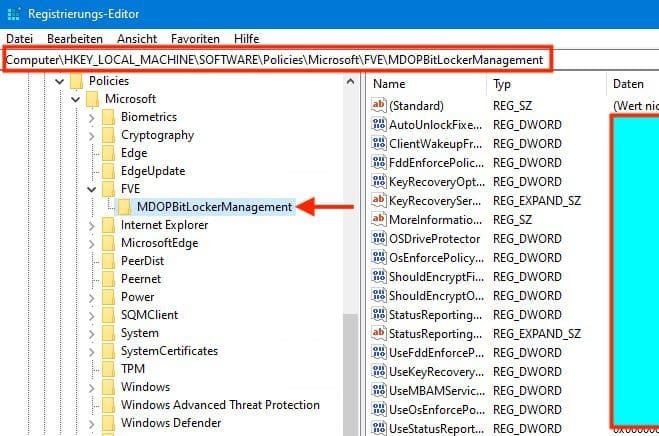
Lastly, make sure that MBAM Group Policy settings are applied on the client’s computer. The following registry subkey is created if the Group Policy settings were applied on the client’s computer.

HKEY_LOCAL_MACHINE\SOFTWARE\Policies\Microsoft\FVE\MDOPBitLockerManagement
mb3-Capture

Note: Depending on when you deploy the Microsoft BitLocker Administration and Monitoring Client software. You can enable BitLocker Drive Encryption on a computer in your organization either before the end-user receives the computer or afterward by configuring Group Policy and deploying the MBAM Client software by using an enterprise software deployment system.

I hope you found this blog post on how to check if MBAM Agent is installed on Windows PC helpful. Please let me know in the comment session if you have any questions.

5/5 - (1 vote)

Thank you for reading this post. Kindly share it with others.

  • Click to share on X (Opens in new window) X
  • Click to share on Reddit (Opens in new window) Reddit
  • Click to share on LinkedIn (Opens in new window) LinkedIn
  • Click to share on Facebook (Opens in new window) Facebook
  • Click to share on Pinterest (Opens in new window) Pinterest
  • Click to share on Tumblr (Opens in new window) Tumblr
  • Click to share on Telegram (Opens in new window) Telegram
  • Click to share on WhatsApp (Opens in new window) WhatsApp
  • Click to share on Pocket (Opens in new window) Pocket
  • Click to share on Mastodon (Opens in new window) Mastodon
  • Click to share on Bluesky (Opens in new window) Bluesky
  • Click to share on Threads (Opens in new window) Threads
  • Click to share on Nextdoor (Opens in new window) Nextdoor
Windows Tags:Bitlocker, MBAM, Microsoft BitLocker Administration and Monitoring, Microsoft Windows, Windows 10, Windows Server 2016

Post navigation

Previous Post: Read-only Files: Saving Files in VIM Editor on Linux/Unix-like OS
Next Post: How to Install and Upgrade Docker Engine From Binaries

Related Posts

  • Windows Container
    How to Install a Windows Server Container Host Containers
  • how to bypass windows admin log in password 2
    How to disable Lock Screen on Windows 10 via Registry Editor Windows
  • Turn On Or Off Auto Unlock For BitLocker Drive
    How To Turn On Or Off Auto-Unlock For BitLocker Drive In Windows 10/11 Security | Vulnerability Scans and Assessment
  • Norton RDP
    Can’t connect via RDP upon installing Norton 360 Anti-Virus Solution
  • Featured image MsTeams.
    How to share an app window on Microsoft Teams Windows
  • Groovy
    How to install Groovy on Linux and Windows Configuration Management Tool

More Related Articles

Windows Container How to Install a Windows Server Container Host Containers
how to bypass windows admin log in password 2 How to disable Lock Screen on Windows 10 via Registry Editor Windows
Turn On Or Off Auto Unlock For BitLocker Drive How To Turn On Or Off Auto-Unlock For BitLocker Drive In Windows 10/11 Security | Vulnerability Scans and Assessment
Norton RDP Can’t connect via RDP upon installing Norton 360 Anti-Virus Solution
Featured image MsTeams. How to share an app window on Microsoft Teams Windows
Groovy How to install Groovy on Linux and Windows Configuration Management Tool

Leave a Reply Cancel reply

You must be logged in to post a comment.

Microsoft MVP

VEEAMLEGEND

vexpert-badge-stars-5

Virtual Background

GoogleNews

Categories

veeaam100

sysadmin top30a

  • Screenshot 2022 04 02 at 23.05.24
    How to apply Windows Updates with PowerShell Windows
  • fix windows activation 0x87E10BC6 error
    Fix Error 0x87E10BC6 on a PC running Windows non-core Edition Windows
  • tpmbiosactivation
    Enable TPM: Determine if TPM is present Windows
  • asdfgh
    Install RSAT on Windows via Windows features Windows
  • whois4578uh
    How to get Domain information using WHOIS Command in Linux Linux
  • WAMPServer Virtual Host
    How to create Virtual Hosts in a WAMPserver Web Server
  • Set a Resource Delete Lock
    How to Add a Delete Lock on Azure Resources AWS/Azure/OpenShift
  • Git not Recognized Image banner
    Fix Git is not recognised as an internal or external command Version Control System

Subscribe to Blog via Email

Enter your email address to subscribe to this blog and receive notifications of new posts by email.

Join 1,836 other subscribers
  • RSS - Posts
  • RSS - Comments
  • About
  • Authors
  • Write for us
  • Advertise with us
  • General Terms and Conditions
  • Privacy policy
  • Feedly
  • Telegram
  • Youtube
  • Facebook
  • Instagram
  • LinkedIn
  • Tumblr
  • Pinterest
  • Twitter
  • mastodon

Tags

Active Directory AWS Azure Bitlocker Microsoft Windows PowerShell WDS Windows 10 Windows 11 Windows Server 2016

Copyright © 2025 TechDirectArchive


Loading Comments...
 

You must be logged in to post a comment.