Skip to content

TechDirectArchive

Hands-on IT, Cloud, Security & DevOps Insights

  • Home
  • About
  • Advertise With US
  • Reviews
  • Contact
  • Toggle search form
Home » Linux » What are the differences between dnf and apt package managers?
  • BitLocker beviour when MBAM Agent is removed   No uninstall options in control panel to remove app
    BitLocker behavior when MBAM agent is removed: No Uninstall Option in Control Panel Windows
  • Update proxmox package database
    Resolve the Update Package Database failure on Proxmox VE Virtualization
  • Building VPC
    Build a Scalable VPC for Your AWS Environment [Part 1] AWS/Azure/OpenShift
  • fix windows activation 0x87E10BC6 error
    Fix Error 0x87E10BC6 on a PC running Windows non-core Edition Windows
  • images 1
    WARNING: The provided hosts list is empty only the localhost is available and note that the implicit localhost does not match all Configuration Management Tool
  • adac
    Enable Active Directory Recycle Bin: How to delete and restore objects using Active Directory Administrative Center Windows Server
  • SOBR   implementing 3 2 1 Rule
    Achieve 3-2-1 rule with SOBR on Synology or OOTBI and Wasabi Backup
  • integrate VHR with VBR
    How to deploy and integrate VHR with VBR Backup

What are the differences between dnf and apt package managers?

Posted on 19/11/202120/11/2023 Raphael Gab-Momoh By Raphael Gab-Momoh No Comments on What are the differences between dnf and apt package managers?
Feature-Image-DNF-vs-APT

If you have used Fedora before, I didn’t entirely surprise you, but for Centos or RHEL users, DNF (Dandified Yum) is an updated and better version of yum. DNF is a software package manager for Red Hat Package Management -based Linux distro that installs, updates, and removes packages. In this guide, we shall discuss the differences between dnf and apt package managers. Please see How to deploy Ansible AWX on centos 8, and 5 Steps to Fix Outlook continually prompts for passwords on Windows 10 and 11.

Meanwhile, APT, the acronym for advanced packaging tool, is the primary package manager for Debian-based distributions like Ubuntu. At the end of the day, whether it is APT or DNF you are using, they both help us achieve the same objective, which is to be able to install, update, and remove packages.

Therefore, if everything is new to you and you don’t know what yum stands for, it is the acronym for YellowDog Updater Modified. You can find other guides in the link:

DNF tries to keep Yum's CLI compatibility and specifies a tight API for extensions and plugins. Plugins can change or extend DNF's capabilities, as well as give more CLI commands

My issues with YellowDog Updater Modified

Built with Python and as such has its own performance issues. It is very memory-intensive

Not enough information especially when one runs into issues and decides documentation is the next resort. Dependency-reliant and most often throws its own issues

Why you Should use DNF Package

DNF has more robust features and functionalities than yum. For DNF there are a lot of repositories to get help and support from.

Not as memory intensive as yum. It is compatible with Python 2 & 3. It has all the beautiful behaviors that you know with RPM

Can be located in  /etc/dnf/dnf.conf, and it is faster than yum

Also, see Creating an offline local repository in Linux, How to solve Errno 256, and how to fix “The package python-virtualenv has no installation candidate error“.

Installation of DNF Package

To install DNF on RHEL/CentOS 7 systems, you need to set up and enable Epel YUM REPO before installing DNF.

1.# yum install epel-release
2.#yum install DNF

Some useful information about the Apt command

On Ubuntu Debian and associated Linux distributions, apt is a command-line tool for installing, updating, removing, and managing deb packages. It combines the most common commands from the apt-get and apt-cache tools, as well as alternative default values for the several choices.

Apt works for user interactivity. In your shell scripts, users can still use apt-get and apt-cache although apt alone will still get the job done because they are backward compatible

Some examples of dnf vs apt use case

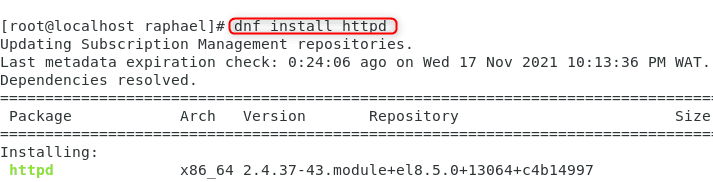
#dnf install <package name>

e.g dnf install httpd

dnf-install-httpd-1

So as you can see you all you need do is just type dnf in place of where you used to type yum

#apt install <package name>

e.g apt install nmap

apt-install-nmap
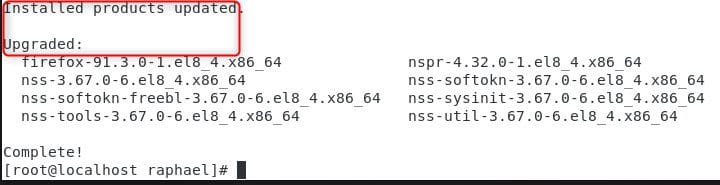
#dnf upradge <package name >

For example, dnf upgrade nmap

updated
#apt upgrade <package name >

e.g apt upgrade nmap

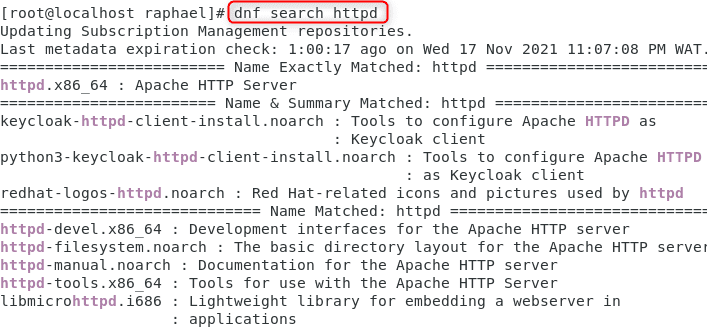
dnf search httpd
dnf-search

Interesting differences between DNF & APT

DNF APT
Dandified YumAdvanced Package Tool
works with .rpm package formatworks with .deb package format
dnf is the front-end of RPM apt is the front end of DPKG
dnf updates the repo lists automaticallyapt update gets all information from configured source
dnf is used in RHEL, Fedora, CentOS, and other derivatives pf RHELapt is used in Debian and all its derivatives like Ubuntu, Knoppix, etc.
can download and install from URLs directlycannot download and install from URLs directly, it needs .deb packages
doesn’t support one-click installssupports one-click install
dnf remove <software name>apt remove <software name>
dnf upgradeapt upgrade
dnf was first introduced in Fedora in the year 2013first stable version of apt was released in the year 2014
dnf vs apt table

Summary

In conclusion, Dnf and apt are package managers as they help with the update, installation, and removal of packages. These two package managers, being the most popular, basically mimic eachother’ss most essential syntactical elements, allowing transitioning between them a breeze.

Rate this post

Thank you for reading this post. Kindly share it with others.

  • Click to share on X (Opens in new window) X
  • Click to share on Reddit (Opens in new window) Reddit
  • Click to share on LinkedIn (Opens in new window) LinkedIn
  • Click to share on Facebook (Opens in new window) Facebook
  • Click to share on Pinterest (Opens in new window) Pinterest
  • Click to share on Tumblr (Opens in new window) Tumblr
  • Click to share on Telegram (Opens in new window) Telegram
  • Click to share on WhatsApp (Opens in new window) WhatsApp
  • Click to share on Pocket (Opens in new window) Pocket
  • Click to share on Mastodon (Opens in new window) Mastodon
  • Click to share on Bluesky (Opens in new window) Bluesky
  • Click to share on Threads (Opens in new window) Threads
  • Click to share on Nextdoor (Opens in new window) Nextdoor
Linux Tags:Package Management, Ubuntu

Post navigation

Previous Post: How to use the DigiCert certificate utility for Windows to create a CSR
Next Post: How to import SSL Certificate to Windows Server using DigiCert Utility

Related Posts

  • etcconf
    How to configure user resource limits and restrictions in Linux Linux
  • teams feature
    How to install and configure Microsoft Teams on Ubuntu Linux
  • Screenshot 2022 04 13 at 21.38.35
    Check Weather Conditions via Command Line on Windows, macOS, Linux and Web Linux
  • feature linux boot process
    Linux Boot Process Explained Step by Step for Beginners Linux
  • runlevels
    How to check your current Runlevel in Linux Linux
  • 517443 637286201540125528 16x9 1
    User account and process management in Linux Linux

More Related Articles

etcconf How to configure user resource limits and restrictions in Linux Linux
teams feature How to install and configure Microsoft Teams on Ubuntu Linux
Screenshot 2022 04 13 at 21.38.35 Check Weather Conditions via Command Line on Windows, macOS, Linux and Web Linux
feature linux boot process Linux Boot Process Explained Step by Step for Beginners Linux
runlevels How to check your current Runlevel in Linux Linux
517443 637286201540125528 16x9 1 User account and process management in Linux Linux

Leave a Reply Cancel reply

You must be logged in to post a comment.

Microsoft MVP

VEEAMLEGEND

vexpert-badge-stars-5

Virtual Background

GoogleNews

Categories

veeaam100

sysadmin top30a

  • BitLocker beviour when MBAM Agent is removed   No uninstall options in control panel to remove app
    BitLocker behavior when MBAM agent is removed: No Uninstall Option in Control Panel Windows
  • Update proxmox package database
    Resolve the Update Package Database failure on Proxmox VE Virtualization
  • Building VPC
    Build a Scalable VPC for Your AWS Environment [Part 1] AWS/Azure/OpenShift
  • fix windows activation 0x87E10BC6 error
    Fix Error 0x87E10BC6 on a PC running Windows non-core Edition Windows
  • images 1
    WARNING: The provided hosts list is empty only the localhost is available and note that the implicit localhost does not match all Configuration Management Tool
  • adac
    Enable Active Directory Recycle Bin: How to delete and restore objects using Active Directory Administrative Center Windows Server
  • SOBR   implementing 3 2 1 Rule
    Achieve 3-2-1 rule with SOBR on Synology or OOTBI and Wasabi Backup
  • integrate VHR with VBR
    How to deploy and integrate VHR with VBR Backup

Subscribe to Blog via Email

Enter your email address to subscribe to this blog and receive notifications of new posts by email.

Join 1,839 other subscribers
  • RSS - Posts
  • RSS - Comments
  • About
  • Authors
  • Write for us
  • Advertise with us
  • General Terms and Conditions
  • Privacy policy
  • Feedly
  • Telegram
  • Youtube
  • Facebook
  • Instagram
  • LinkedIn
  • Tumblr
  • Pinterest
  • Twitter
  • mastodon

Tags

AWS Azure Bitlocker Microsoft Windows PowerShell WDS Windows 10 Windows 11 Windows Deployment Services Windows Server 2016

Copyright © 2025 TechDirectArchive


Loading Comments...
 

You must be logged in to post a comment.