Windows Defender Antivirus Management with Intune


Microsoft included Windows Defender Antivirus by default in Windows 10/11 and Windows Server. In this article, we shall discuss Windows Defender Antivirus Management with Intune. This security component can be managed by Group Policies, PowerShell, or the Settings app. Defender for Endpoint, which requires a monthly subscription, is the only option for reporting and monitoring functions. As an alternative, you can accomplish this using Intune. Please see how to update Microsoft Defender Antivirus into the install image of Windows (install.wim) and Install.wim: How to view Microsoft Defender Antivirus update details on Windows 10 image
“Use Windows Defender Antivirus alone or with Microsoft Defender for Endpoint for better security.” (20 words) Microsoft Defender Antivirus serves as the enterprise endpoint security component of this umbrella solution.
Manage Windows antivirus in Intune for centralized administration and MDfE capabilities. This is especially true for remotely monitoring and activating Defender functions.
To learn more about Windows Defender Antivirus, please review the following related guides: How to manage Microsoft Defender Antivirus with Group Policy and Microsoft Malware Protection from the Command Line, How to restore quarantined files in Microsoft Defender Antivirus,
Tracking and reporting for Windows Defender Antivirus using PowerShell
Secure endpoints need reliable Microsoft Defender Antivirus monitoring. The Get-MpComputerStatus cmdlet in PowerShell can be used to run simple status checks.
Cmdlet provides engine, product versions, service status, antispyware status, full scan age, and behavior monitor state details.

Get-MpComputerStatus CmdletPowerShell checks Defender status, but it’s limited for enterprise use with off-network endpoints.
Utilizing Windows Defender Antivirus Endpoint Manager for Monitoring
Complete monitoring and reporting for Microsoft Defender Antivirus through Endpoint Manager with Intune. You are also alerted about critical failures, inactive agents, and status unknowns.
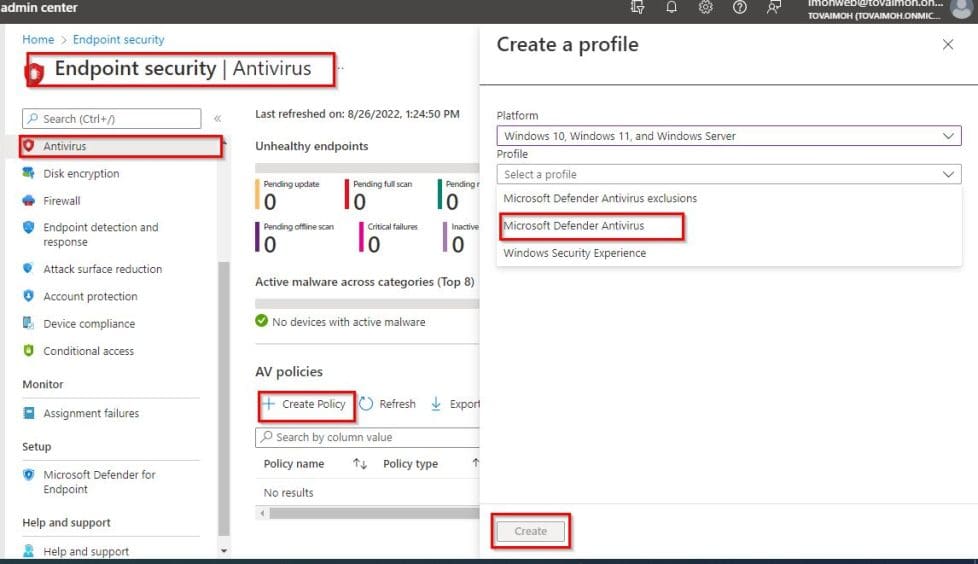
To access the Endpoint Manager, visit the Admin center and login with your details. In Admin center, find Endpoint Security, click Antivirus for reporting dashboard.

Dashboards show shabby endpoints, Active malware, and overall status for swift identification of security flaws.The ability to customize and create settings to cover the overall setup of Windows Defender Antivirus, exclusions, etc., is also provided by the ability to develop robust Antivirus policies.
To create a policy, simply click on "Create Profile". Select Windows 10, Windows 11 and Windows Server in the platform and Microsoft Defender Antivirus in the Profile column, and click on Create as shown in the screenshot below.
When the next page displays, type the profile name, description (optional) and click next

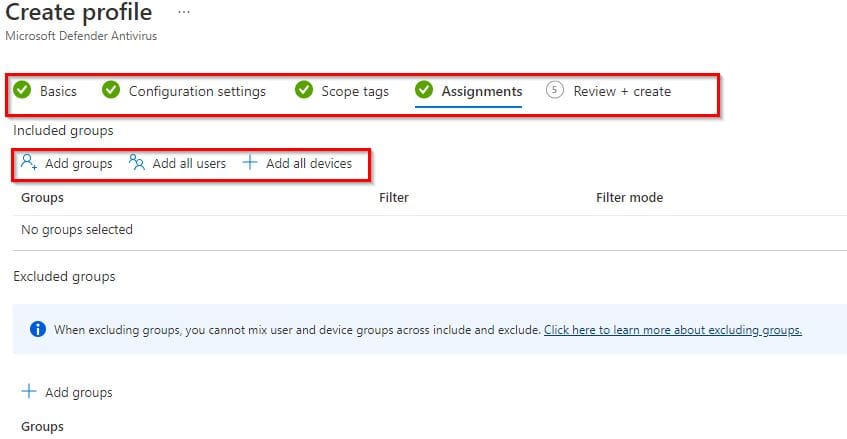
Go ahead and configure all the tabs to suite your needs including the assignment options which gives the opportunity to include or exclude users, groups or devices.
Please see Register Devices to Intune and EntraID Using Company Portal. How to Configure Windows LAPS Management with Microsoft Intune, and Windows 11 Taskbar: Modifying via Intune and GPO.
Intune reporting
Additionally, Intune offers reporting tools that make it easier to create and deliver reports for compliance, SecOps, and other needs Windows Defender Antivirus.
You may find the Summary tab presenting data similar to that of the Endpoint Security -> Antivirus dashboard above by going to Microsoft Endpoint Manager admin center -> Reports->Microsoft Defender Antivirus.

The Windows Defender Antivirus agent status report and the Detected Malware report are both accessible by clicking the Reports tab.
The status of your devices including which ones offer real-time or network protection is displayed in the antivirus agent status. While the detected malware displays the state of devices, identifies any that have malware, and also provides additional information about it.

If you click on the Antivirus Agent Status, you will see the status as similar to the screenshot below:

You can also access the Detected malware report, which lists any malware found as well as specifics about the harmful program Windows Defender Antivirus.

Both reports give IT administrators insight into the health of endpoint security as well as any malware that has been found in the environment. Allowing the security team to monitor and manage Microsoft Defender within the company.
In conclusion, modern versions of Windows come with a Windows Defender Antivirus as a built-in security solution. It is a different product than Microsoft Defender for Endpoint, as this cloud-based solution includes Defender Antivirus as the endpoint security component.
Microsoft Defender Antivirus is more powerful when used in conjunction with Endpoint Manager’s monitoring, reporting, and configuration tools even though it may run in a standalone setup.
I hope you found this guide on Windows Defender Antivirus Management with Intune useful. Please feel free to leave a comment below.


