Workaround for a zero-day vulnerability on Microsoft Exchange Server


Some security researchers have reported that attackers are currently exploiting two zero-day vulnerabilities in Microsoft Exchange Server. Microsoft has acknowledged and is currently investigating two reported zero-day vulnerabilities affecting Microsoft Exchange Server 2013, 2016, and 2019. The first to be reported is CVE-2022-41040 which is a Server-Side Request Forgery (SSRF) vulnerability, and the other one is CVE-2022-41082, which allows Remote Code Execution (RCE) when PowerShell is accessible to the attacker. In this article, you will learn how to apply the workaround for a zero-day vulnerability on Microsoft Exchange Server.
What is Micrsoft Exchange?
Microsoft Exchange Server is a mail server and calendaring server developed by Microsoft and runs on Windows Server operating systems. It is worth noting that Exchange Server has integrated intelligent storage and search functionalities. Basically, Microsoft designed Exchange Server to give users access to the messaging platform from mobile devices, desktops, and web-based systems. With the integrated telephone functions, Exchange Server also supports voice messages.
CVE-2022-41040 and CVE-2022-41082
Note: It has been reported by Microsoft that CVE-2022-41040 can enable an authenticated attacker to remotely trigger CVE-2022-41082. But authenticated access to the vulnerable Exchange Server is necessary to successfully exploit either vulnerability.
You can use the following PowerShell command to check whether servers are already compromised, GTSC released this guideline as a tool to scan IIS log files (stored by default in the %SystemDrive%\inetpub\logs\LogFiles folder).
Get-ChildItem -Recurse -Path <Path_IIS_Logs> -Filter "*.log" | Select-String -Pattern 'powershell.*autodiscover\.json.*\@.*200'Alternatively, based on the exploit signature, GTSC built a tool to search with a much shorter time needed than using Powershell. Here is the download link.
Workaround to contain CVE-2022-41040 and CVE-2022-41082
GTSC’s direct incident response process recorded more than 1 organization being the victim of an attack campaign exploiting this 0-day vulnerability. In addition, we are also concerned that there may be many other organizations that have been exploited but have not been discovered. While waiting for the official patch from the company, GTSC provides a temporary remedy to reduce the vulnerability of attacks by adding a rule to block requests with indicators of attack through the URL Rewrite Rule module on the IIS server.
Microsoft Exchange Online is not affected. It has detections and mitigations to protect customers. As always, Microsoft is monitoring these detections for malicious activity and responds to protect customers.
Also on the Microsoft website, the same Microsoft Exchange Server mitigation steps were mentioned as shown below but with three different approaches. They advised customers to review and apply only one of the recommended mitigation steps.
Add a blocking rule in “IIS Manager -> Default Web Site -> URL Rewrite -> Actions” to block the known attack patterns. Option 1
For customers who have the Exchange Server Emergency Mitigation Service (EMS) enabled, Microsoft released the URL Rewrite mitigation for Exchange Server 2016 and Exchange Server 2019. The mitigation will be enabled automatically. Please see this blog post for more information on this service and how to check active mitigations.
Option 2
Microsoft created the following script for the URL Rewrite mitigation steps: https://aka.ms/EOMTv2. You can download the script from this link. Kindly run the script after downloading with the following command.
.\EOMTv2.ps1What does the EOM Mitigation Tool v2 script do?
The Exchange On-premises Mitigation Tool v2 script (EOMTv2.ps1) can be used to mitigate CVE-2022-41040. This script does the following:
- Check for the latest version of EOMTv2.ps1 and download it.
- Mitigate against current known attacks using CVE-2022-41040 via a URL Rewrite configuration
The default recommended way of using EOMTv2.ps1. This will apply the URL rewrite mitigation. If the IIS URL rewrite module is not installed, this will also download and install the module.
To roll back EOMTv2 mitigations run the following command below.
.\EOMTv2.ps1 -RollbackmitigationCustomers are also advised to follow the below instructions and they have been proven to be successful in breaking current attack chains. Please refer to these related articles: URL Rewrite: How to perform redirection from HTTP to HTTPS, how to enable Exploit Protection on Windows using Windows Security App, Microsoft Endpoint Configuration Manager, and Group Policy Editor. How to disable Password Change for all Users Exchange server, how to block the Change Password Feature for All Users, and how to mitigate Yet another Windows print spooler zero-day Vulnerability: Mitigate Windows Print SpoilerZero day Vulnerability.
Option 3
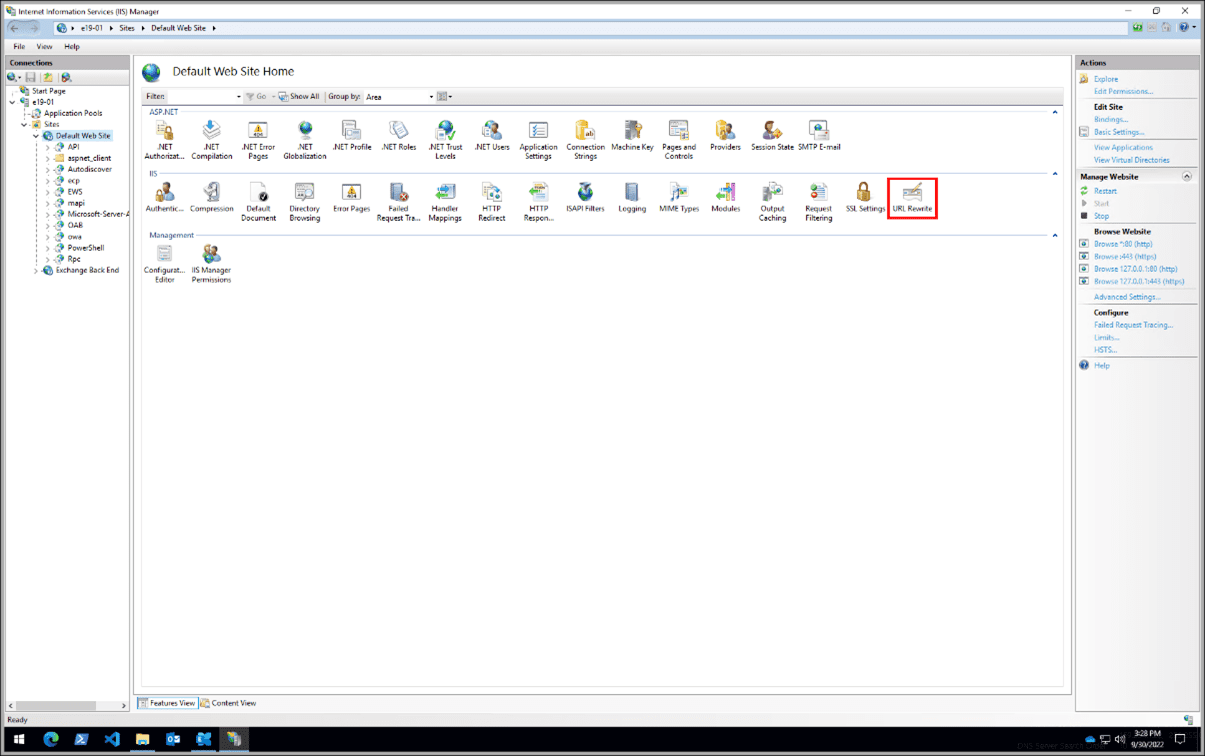
Launch the IIS Manager, and select Default Web Site. In the Feature View, click URL Rewrite as shown below.
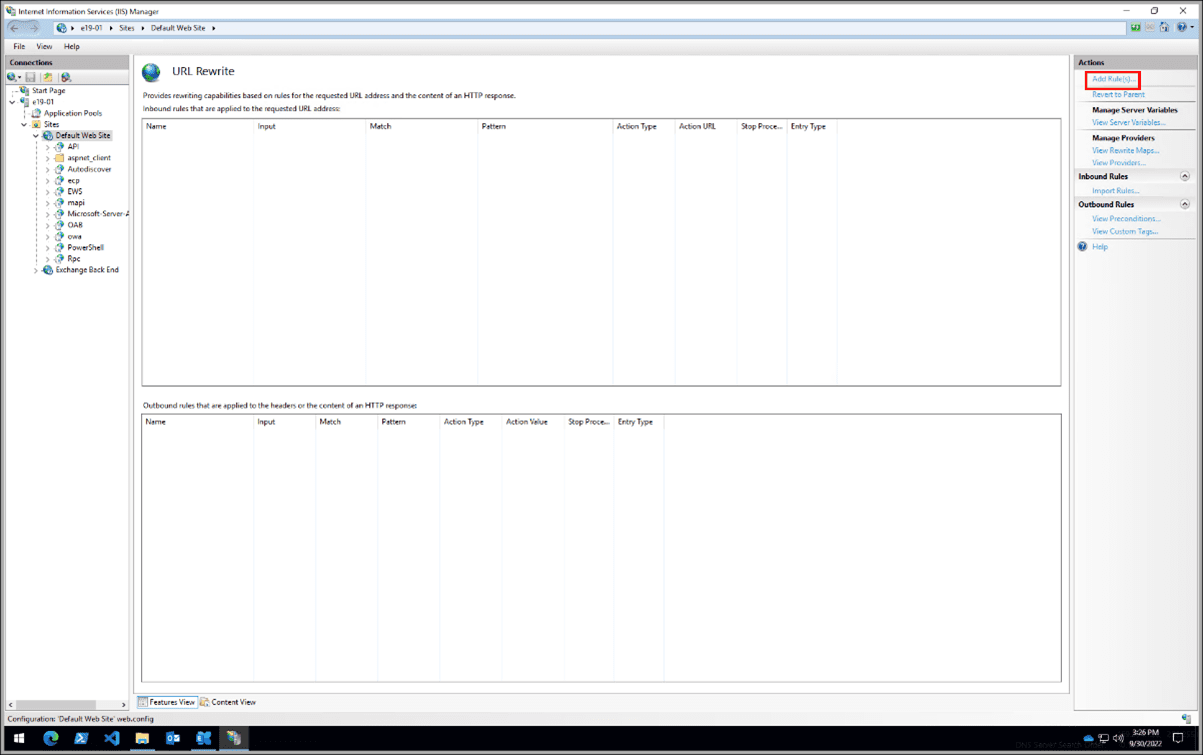
In the Actions pane on the right-hand side, click Add Rule(s)
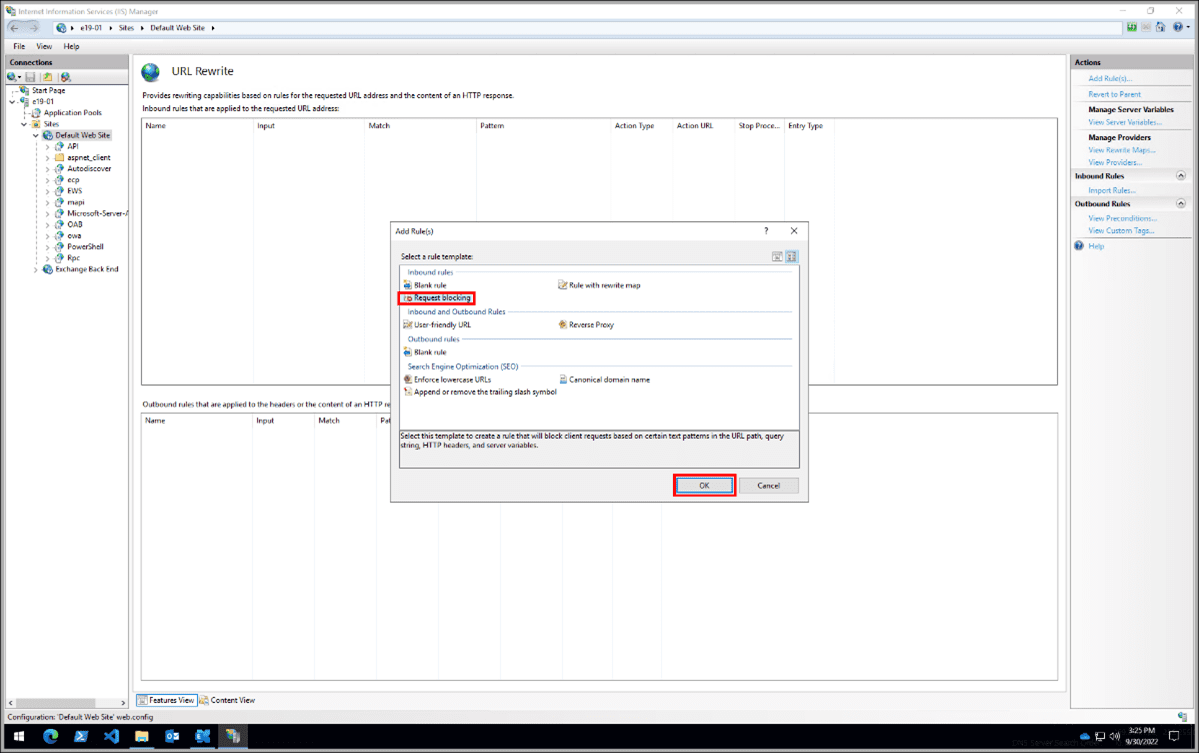
Select Request Blocking and click OK.
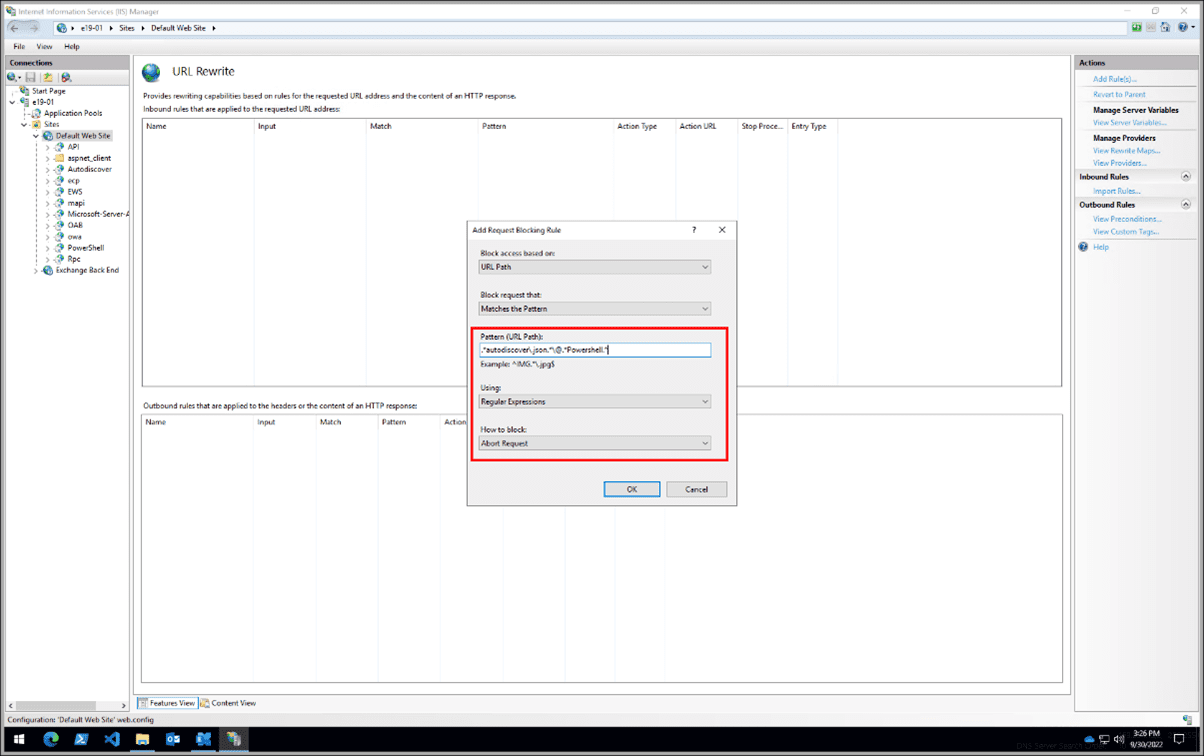
Add the string “.*autodiscover\.json.*\@.*Powershell.*” (excluding quotes).
– Then select Regular Expression under Using.
– Select Abort Request under How to block and then click OK.
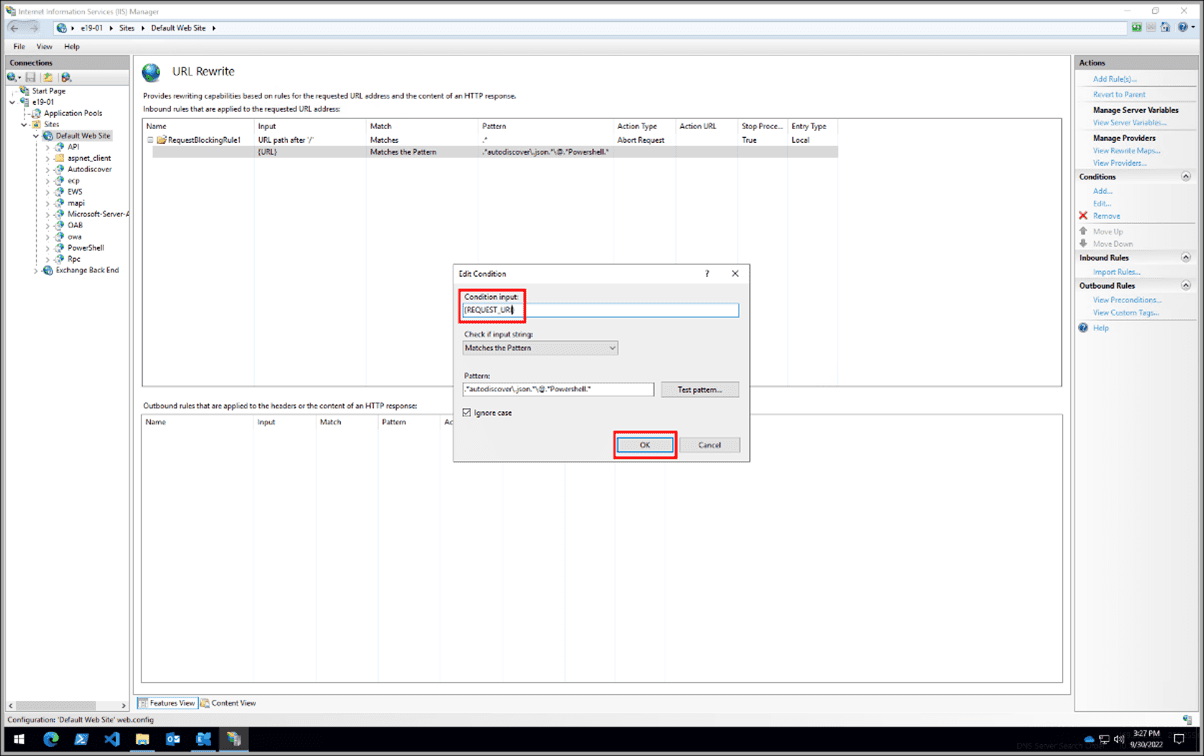
Expand the rule and select the rule with the pattern .*autodiscover\.json.*\@.*Powershell.* and click Edit under Conditions.

Change the Condition input from {URL} to {REQUEST_URI}
Note: If you MUST change any rule that you have created, it is best to delete and recreate it.
I hope you found this blog post helpful on how to apply the workaround for a zero-day vulnerability on Microsoft Exchange Server. If you have any questions, please let me know in the comment session.