Skip to content

TechDirectArchive

Hands-on IT, Cloud, Security & DevOps Insights

  • Home
  • About
  • Advertise With US
  • Reviews
  • Contact
  • Toggle search form
Home » Windows Server » MBAM Policy was detected: Verify the OU used for pre-deployment does not apply MBAM policy
  • Featured image IE mode.
    How to Enable Internet Explorer Mode in Edge in Windows 11 Windows
  • azure just in time
    How to secure access to your Virtual Machine with Just-in-Time (JIT) VM Access AWS/Azure/OpenShift
  • Trellix MVISOSN
    How to install Trellix MVISON Endpoint Security | Vulnerability Scans and Assessment
  • Different Class IP Address
    Classes of IP Address: Understanding IP Address Classification Network | Monitoring
  • Ubuntu on Windows
    Install Ubuntu 20.04 LTS on Windows via WSL Linux
  • how to bypass windows admin log in password 2
    How to disable Lock Screen on Windows 10 via Registry Editor Windows
  • commit trong git 640
    How to uninstall Git from MacOS Mac
  • microsoft edge
    How to forcefully remove Microsoft Edge Browser the hard way from your Windows device Windows

MBAM Policy was detected: Verify the OU used for pre-deployment does not apply MBAM policy

Posted on 03/02/202321/12/2023 Christian By Christian No Comments on MBAM Policy was detected: Verify the OU used for pre-deployment does not apply MBAM policy
Resolvederror-MBAM

The Microsoft BitLocker Administration and Monitoring (MBAM) client enables administrators to enforce and monitor BitLocker drive encryption on computers in the enterprise. In this guide, you will learn how to fix the following error “MBAM Policy was detected: Verify the OU used for pre-deployment does not apply MBAM policy”. Please see the effects of renaming an MBAM or BitLocker-protected Computer. Also, see how to deploy Microsoft BitLocker Administration and Monitoring Tool.

The BitLocker client can also be distributed through an electronic software distribution system. Such as Active Directory Domain Services or Microsoft System Center Configuration Manager or as part of the imaging process for a new deployment.

Here are some interesting guides: BitLocker Recovery Mode prompted? Unable to find my BitLocker Recovery Key. Please see how to fix the MBAM Client Deployment is only supported on MBAM 2.5 SP1.

By the way, what is an OU?

Organizational units (OUs) in an Active Directory Domain Services (AD DS) managed domain enables you to logically group objects such as user accounts, service accounts, computer accounts etc. It enables you to apply group policy to enforce targeted configuration settings. Here is a comprehensive guide on how to deploy an MBAM Client as part of a Windows Deployment.

Reason for the error

It is a very straightforward error. As we can see from the deployment summary below.

An OU linking this device had BitLocker/MBAM policies applied and when the device was joined to the AD and the policies were applied. This policy was detected during the installation of MBAM.
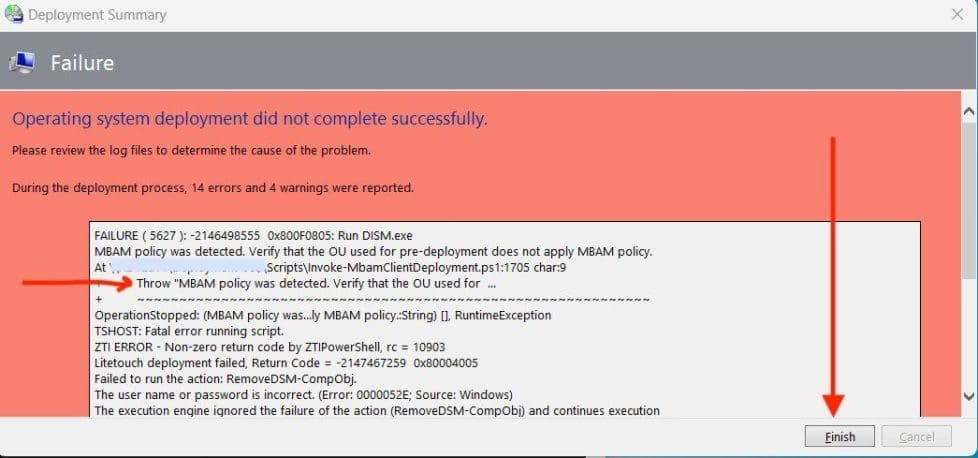
MBAMClientDeploymentError

Resolution to MBAM Policy was detected

To resolve this issue, you will need to move the device out of this OU having BitLocker and MBAM policies linked to it. Move it to an OU that does not have this policy linked.

When this is done, start the deployment process again and it should succeed witouth errors as shown below.

Note: As you can see from the image below, the encryption is in progress wbven when the deployment has completed (succeeded).
desiredbehaviour

As you can see the Computer Compliance Report below shows the encryption status for this device.

compliant

When the encryption is complete, you can now move the device to the right OU.

Note: I would recommend actually having the automatic MBAM client deployment managed by a software deployment system when the device is connected to the domain. 

I hope you found this blog post on “MBAM Policy was detected: Verify the OU used for pre-deployment does not apply MBAM policy” helpful. Please let me know in the comment session if you have any questions.

Rate this post

Thank you for reading this post. Kindly share it with others.

  • Click to share on X (Opens in new window) X
  • Click to share on Reddit (Opens in new window) Reddit
  • Click to share on LinkedIn (Opens in new window) LinkedIn
  • Click to share on Facebook (Opens in new window) Facebook
  • Click to share on Pinterest (Opens in new window) Pinterest
  • Click to share on Tumblr (Opens in new window) Tumblr
  • Click to share on Telegram (Opens in new window) Telegram
  • Click to share on WhatsApp (Opens in new window) WhatsApp
  • Click to share on Pocket (Opens in new window) Pocket
  • Click to share on Mastodon (Opens in new window) Mastodon
  • Click to share on Bluesky (Opens in new window) Bluesky
  • Click to share on Threads (Opens in new window) Threads
  • Click to share on Nextdoor (Opens in new window) Nextdoor
Windows Server Tags:Bitlocker, BitLocker Recovery Keys, BitLocker Status, deployment, MBAM, MBAM Reports, Microsoft Deployment Tool kit, Microsoft Windows, WDS Deployment, Windows 10, Windows 11, Windows Deployment Services

Post navigation

Previous Post: How to uninstall, reinstall, and update Zoom on Mac
Next Post: WinRM cannot complete the operation, verify that the specified computer name is valid

Related Posts

  • WinRM set up for specific IP
    Configure WinRM to accept connection from a specific IP Address Windows
  • windows pe screenshot1 rcm1200x0
    Workaround and Permanent fix for this snap-in performed a non-valid operation and has been unloaded: To continue using this snap-in restart MMC or try loading the snap-in again Windows Server
  • Modernstanby
    Modern Standby: PC is automatically encrypted Windows
  • microsoft confirms some pcs freeze after windows 10 2
    Information on BOOTP Vendor Extensions and DHCP Options Windows Server
  • https   specials images.forbesimg.com imageserve 4c098735a05b4251a85e8505c91f1837 0x0
    Fix insufficient access rights to perform this operation when trying to enable Active Directory Recycle Bin Windows Server
  • BitLocker
    BitLocker Drive Encryption architecture and implementation types on Windows Windows Server

More Related Articles

WinRM set up for specific IP Configure WinRM to accept connection from a specific IP Address Windows
windows pe screenshot1 rcm1200x0 Workaround and Permanent fix for this snap-in performed a non-valid operation and has been unloaded: To continue using this snap-in restart MMC or try loading the snap-in again Windows Server
Modernstanby Modern Standby: PC is automatically encrypted Windows
microsoft confirms some pcs freeze after windows 10 2 Information on BOOTP Vendor Extensions and DHCP Options Windows Server
https   specials images.forbesimg.com imageserve 4c098735a05b4251a85e8505c91f1837 0x0 Fix insufficient access rights to perform this operation when trying to enable Active Directory Recycle Bin Windows Server
BitLocker BitLocker Drive Encryption architecture and implementation types on Windows Windows Server

Leave a Reply Cancel reply

You must be logged in to post a comment.

Microsoft MVP

VEEAMLEGEND

vexpert-badge-stars-5

Virtual Background

GoogleNews

Categories

veeaam100

sysadmin top30a

  • Featured image IE mode.
    How to Enable Internet Explorer Mode in Edge in Windows 11 Windows
  • azure just in time
    How to secure access to your Virtual Machine with Just-in-Time (JIT) VM Access AWS/Azure/OpenShift
  • Trellix MVISOSN
    How to install Trellix MVISON Endpoint Security | Vulnerability Scans and Assessment
  • Different Class IP Address
    Classes of IP Address: Understanding IP Address Classification Network | Monitoring
  • Ubuntu on Windows
    Install Ubuntu 20.04 LTS on Windows via WSL Linux
  • how to bypass windows admin log in password 2
    How to disable Lock Screen on Windows 10 via Registry Editor Windows
  • commit trong git 640
    How to uninstall Git from MacOS Mac
  • microsoft edge
    How to forcefully remove Microsoft Edge Browser the hard way from your Windows device Windows

Subscribe to Blog via Email

Enter your email address to subscribe to this blog and receive notifications of new posts by email.

Join 1,839 other subscribers
  • RSS - Posts
  • RSS - Comments
  • About
  • Authors
  • Write for us
  • Advertise with us
  • General Terms and Conditions
  • Privacy policy
  • Feedly
  • Telegram
  • Youtube
  • Facebook
  • Instagram
  • LinkedIn
  • Tumblr
  • Pinterest
  • Twitter
  • mastodon

Tags

AWS Azure Bitlocker Microsoft Windows PowerShell WDS Windows 10 Windows 11 Windows Deployment Services Windows Server 2016

Copyright © 2025 TechDirectArchive


Loading Comments...
 

You must be logged in to post a comment.