Skip to content

TechDirectArchive

Hands-on IT, Cloud, Security, Veeam & DevOps

  • Home
  • About
  • Advertise With US
  • Reviews
  • Contact
  • Toggle search form

Fix SMB Freezes That Break Backups on Critical Linux Servers

Posted on 01/09/202525/01/2026 matheusgiovanini By matheusgiovanini No Comments on Fix SMB Freezes That Break Backups on Critical Linux Servers
  1. Home
  2. Network | Monitoring
  3. Fix SMB Freezes That Break Backups on Critical Linux Servers
Screenshot 1

Recently I had to configure a backup on a physical Linux server that stores over half a petabyte of traffic fine images collected from speed cameras on federal highways in Brazil. Therefore, in this guide, I will show you how to Fix SMB Freezes That Break Backups on Critical Linux Servers. Please, see how to Setup iSCSI Target and Storage LUN on Synology DS923+ for VBR, and how to fix Outlook Not Responding and Outlook Crashing or freezing.

The catch: this server runs critical client applications, and any migration to another server is extremely sensitive and requires careful planning before taking action. At the moment, a full migration wasn’t feasible.
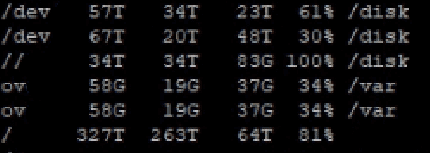
server disks

Due to the urgency of the demand, it was necessary to implement a backup solution immediately. But the server cannot go down for even one minute. Any downtime would mean fines not being recorded, resulting in immediate financial loss.

envio_imagens

Please, see Backup and Restore Proxmox VE virtual machines with Veeam, how to Protect your Windows Devices with MFA with SystoLOCK, and how to Set up Microsoft PKI (ADCS) for SystoLOCK via PowerShell.

The Challenge of Backing Up a Mission-Critical Environment

The client required backup implementation for compliance reasons. My choice was to use Veeam Agent for Linux, configuring the backup job at the volume level. To avoid impacting main traffic, I limited the throughput to 50 Mbps using Veeam’s throttling feature.

Everything seemed well planned, until I ran the first backup job.

network traffic rules
network day rule
network night rule

Please, see How to disable Ads in Windows 11, how to Import a user profile in Windows to another PC, and how to Set up Veeam Backup for Microsoft Azure.

The Problem: Snapshot Freezing and SMB Lockups

During execution, I noticed that the image transfers stopped every time Veeam tried to create a snapshot. Data would pile up in the queue, and the whole process took much longer than expected.

After monitoring the server for hours, I discovered the culprit: the SMB service froze exactly at the moment the snapshot was initiated. Without SMB, images couldn’t be transmitted, and Veeam couldn’t move forward either.

Please, see “Veeam Agent Vulnerability: Fix Veeam Agent vulnerability for Microsoft Windows“, and “Error 1385: The user has not been granted the requested logon type at this time“.

The Investigation and Key Discovery

To test my hypothesis, I forced a systemctl stop smb. As soon as the service stopped, Veeam completed the snapshot with no issues. I restarted SMB right afterward, and image transfers resumed normally.

In other words: snapshots and SMB simply couldn’t coexist smoothly in this environment.

Please, see How to Fix Windows 11 File Explorer Lags and Freezes Issue, and how to fix critical Veeam Backup and Replication 9.5, 10, and 11 vulnerabilities.

The Workaround to fixing SMB Freezes that break Backups

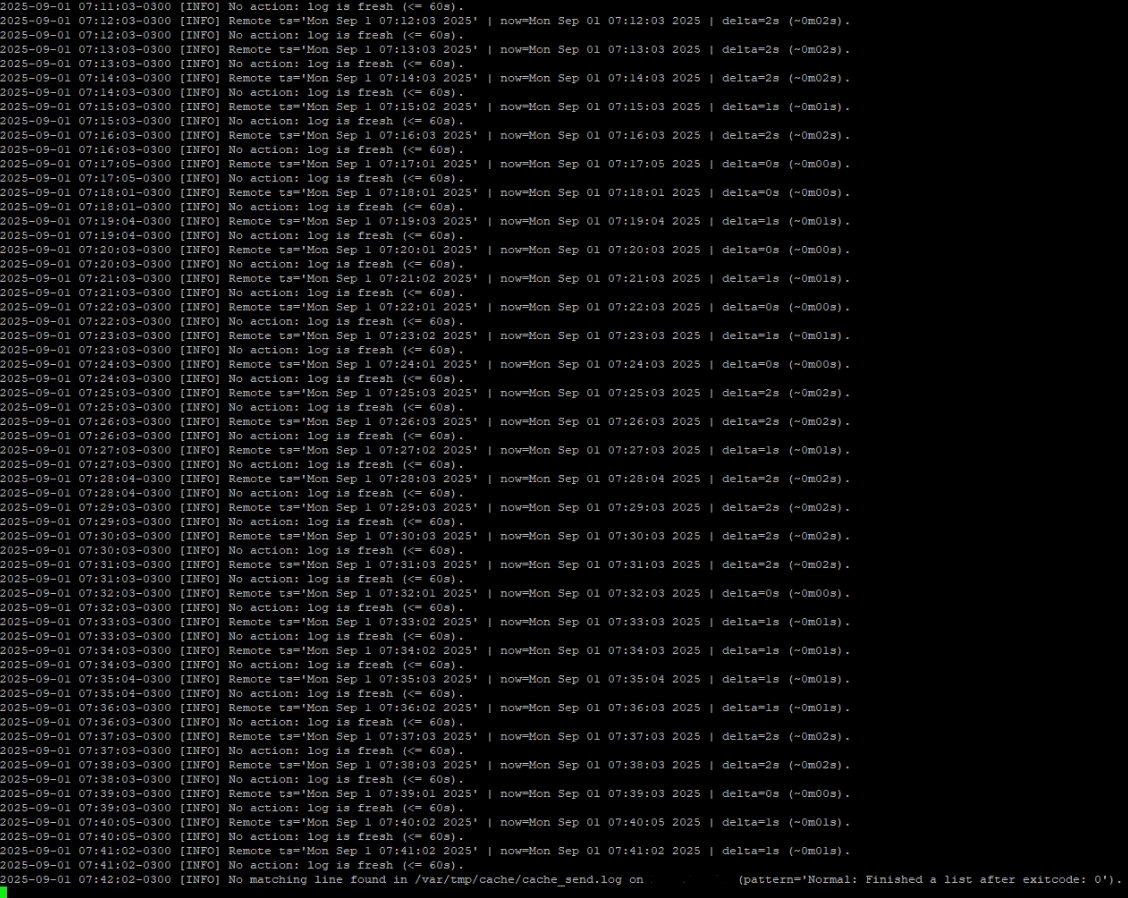
Since this server has no maintenance window and absolutely cannot go offline, fixing the root cause (like patching the system or deep reconfiguration) wasn’t an option at the moment. The workaround I implemented was to create an automated monitoring script:

  • The image processing system generates continuous logs.
  • I set up a script that runs every minute and checks if there’s a delay greater than one minute in transfers.
  • If a delay is detected, the script automatically restarts the SMB service.

With this, Veeam Agent for Linux can successfully complete the snapshot, and image transfers continue with minimal impact (just a few seconds).

Bonus Tip: Want to integrate an IBM Tape Library with Veeam for even stronger backup strategies? Read my full guide: Using IBM Library with Veeam, and Veeam Backup and Replication Disk I/O with diskspd.

veeam job tasks running successfully
image

Please, see Fixing AIX Veeam agent job startup delay issue, how to backup Azure VM with VM Settings, and how to Backup Mac with Veeam Agent for Mac to Synology DS923+ NAS.

Final Thoughts

Of course, this isn’t the perfect solution. The ideal scenario would be to fix the root cause or even redesign the server architecture. But in critical environments, we often need to choose what’s possible right now rather than what would be theoretically ideal.

And you? Have you ever faced a similar situation where you had to improvise a solution to keep the environment running?

How would you back up a critical Linux server without downtime, even with sensitive services like SMB running?

I hope you found this guide on how to Fix SMB Freezes That Break Backups on Critical Linux Servers very useful. Please, feel free to leave a comment below.

5/5 - (2 votes)

Thank you for reading this post. Kindly share it with others.

  • Share on X (Opens in new window) X
  • Share on Reddit (Opens in new window) Reddit
  • Share on LinkedIn (Opens in new window) LinkedIn
  • Share on Facebook (Opens in new window) Facebook
  • Share on Pinterest (Opens in new window) Pinterest
  • Share on Tumblr (Opens in new window) Tumblr
  • Share on Telegram (Opens in new window) Telegram
  • Share on WhatsApp (Opens in new window) WhatsApp
  • Share on Mastodon (Opens in new window) Mastodon
  • Share on Bluesky (Opens in new window) Bluesky
  • Share on Threads (Opens in new window) Threads
  • Share on Nextdoor (Opens in new window) Nextdoor
Network | Monitoring Tags:Linux, Redhat, SMB error, Veeam, Veeam Agent, veeam agent error, veeam agent for linux, Veeam Backup, Veeam Backup & Replication, Veeam software

Post navigation

Previous Post: Veeam Backup Console must be updated to the latest version
Next Post: What to know about “Failed to perform Veeam Worker Upgrade”

Related Posts

  • GNS3
    How to Connect GNS3 to the internet on Windows Network | Monitoring
  • Reverse Image Search
    How to Perform a Reverse Image Search on Your Browsers Network | Monitoring
  • images 1
    How to Monitor Windows Hosts via Nagios Network | Monitoring
  • Hub Transport 1
    Hub Transport Server: Resolving ‘Failed to Reach Running Status’ Network | Monitoring
  • Cannot save to the location Windows
    How to Fix Cannot Save to Windows System32 Default.rdp Error Network | Monitoring
  • nm
    How to add or remove email addresses from a mailbox Network | Monitoring

More Related Articles

GNS3 How to Connect GNS3 to the internet on Windows Network | Monitoring
Reverse Image Search How to Perform a Reverse Image Search on Your Browsers Network | Monitoring
images 1 How to Monitor Windows Hosts via Nagios Network | Monitoring
Hub Transport 1 Hub Transport Server: Resolving ‘Failed to Reach Running Status’ Network | Monitoring
Cannot save to the location Windows How to Fix Cannot Save to Windows System32 Default.rdp Error Network | Monitoring
nm How to add or remove email addresses from a mailbox Network | Monitoring

Leave a Reply Cancel reply

You must be logged in to post a comment.

Microsoft MVP

VEEAMLEGEND

vexpert-badge-stars-5

Virtual Background

GoogleNews

Categories

veeaam100

Veeam Vanguard

  • Missing ADML File
    Fix an appropriate resource file could not be found for LAPS Windows
  • create a two way Active Directory Trust
    How to create a two-way Active Directory Trust Windows Server
  • VMware workstation networking issues
    Network cable Unplugged: Fix VMware “Warning – Multiple default gateways are intended to provide redundancy to a single network Virtualization
  • Featured image Microsoft diagnostic feedback disabled
    Prevent your PC from sending Diagnostics Feedback off via Windows Settings and Group Policy Windows
  • azure resource groups 1
    Setup Public Load Balancer in Azure AWS/Azure/OpenShift
  • Migrate from SQL Database
    Migrate Veeam One Database from SQL Server 2017 to 2025 Backup
  • Run Linux on Windows Server
    How to install Windows Subsystem for Linux on Windows Server Linux
  • ddf 2
    Add boot and install images to WDS and configure Multicast transmission via the GUI and WDSUTIL Windows Server

Subscribe to Blog via Email

Enter your email address to subscribe to this blog and receive notifications of new posts by email.

Join 1,801 other subscribers
  • RSS - Posts
  • RSS - Comments
  • About
  • Authors
  • Write for us
  • Advertise with us
  • General Terms and Conditions
  • Privacy policy
  • Feedly
  • Telegram
  • Youtube
  • Facebook
  • Instagram
  • LinkedIn
  • Tumblr
  • Pinterest
  • Twitter
  • mastodon

Tags

Active Directory Azure Bitlocker Microsoft Windows PowerShell WDS Windows 10 Windows 11 Windows Deployment Services Windows Server 2016

Copyright © 2025 TechDirectArchive

Loading Comments...

You must be logged in to post a comment.