Skip to content

TechDirectArchive

Hands-on IT, Cloud, Security & DevOps Insights

  • Home
  • About
  • Advertise With US
  • Reviews
  • Contact
  • Toggle search form
  • Disable Hardware Acceleration in Browsers and Windows
    How to Disable Hardware Acceleration in Browsers and Windows Windows
  • maxresdefault 2 4
    Setup RAID 5 and 10 with MegaRAID Storage Manager on RX300 S5 Network | Monitoring
  • Screenshot 2020 05 13 at 19.23.25
    AWS Command-Line Interface: How to configure AWS CLI [Part 1] AWS/Azure/OpenShift
  • screenshot 2020 02 08 at 15.53.31
    Enable Automatic Logon via Windows Registry Windows
  • Prevent OS Reinstallation When Switching from Legacy BIOS to UEFI
    Prevent OS Reinstallation: Change from legacy BIOS to UEFI Windows
  • AzureAD
    Azure Active Directory integration with on-premise AD using PTA AWS/Azure/OpenShift
  • Disable Lock Screen on Windows
    How to disable Lock Screen on Windows 10 Windows
  • How to configure Azure container register with secured connection with container apps
    Configure Azure Container Registry for a secure connection with Azure Container Apps AWS/Azure/OpenShift

Tag: Active Directory Domain Services

Harden Active Directory Using CIS Benchmark and MSCT 1.0

Posted on 27/12/202527/12/2025 Link State By Link State No Comments on Harden Active Directory Using CIS Benchmark and MSCT 1.0
Harden Active Directory Using CIS Benchmark and MSCT 1.0

In this guide, I will discuss how to Harden Active Directory Using CIS Benchmark and MSCT 1.0. IT infrastructure security has become an essential priority for any organization. In this context, the Active Directory (AD) domain represents the core of identity management, permissions, and network resources. Please, see “An account with the same name exists…

Read More “Harden Active Directory Using CIS Benchmark and MSCT 1.0” »

Windows Server

Create New Users and Join Synology NAS to Active Directory

Posted on 14/05/202417/10/2024 Christian By Christian No Comments on Create New Users and Join Synology NAS to Active Directory
Create New Users and Join Synology NAS to Active Directory

Microsoft Active Directory Domain Services (AD DS) are a directory service that help organize network resources within Active Directory environment. It supports user/group management, group policies, multiple directory servers (i.e., domain controllers), Kerberos authentication, etc. In this article, we shall learn how to Create New Users and Join Synology NAS to Active Directory. Please see…

Read More “Create New Users and Join Synology NAS to Active Directory” »

Reviews, Storage

Change Active Directory Domain name from dot local to dot com

Posted on 08/04/202416/09/2025 Christian By Christian No Comments on Change Active Directory Domain name from dot local to dot com
Change Active Directory Domain name from dot local to dot com

In this article, we will learn how to change Active Directory Domain name from dot local to dot com (.local to .com.). Since global DNS does not recognise .local domains, and they lack global uniqueness. Also, they are not suitable for services that require access beyond the local network. While this is generally not problematic…

Read More “Change Active Directory Domain name from dot local to dot com” »

Windows Server

Delete or Rename and Create a Protected Organisation Unit in AD

Posted on 01/05/202322/08/2024 Christian By Christian No Comments on Delete or Rename and Create a Protected Organisation Unit in AD
Delete or Rename and Create a Protected Organisation Unit in AD

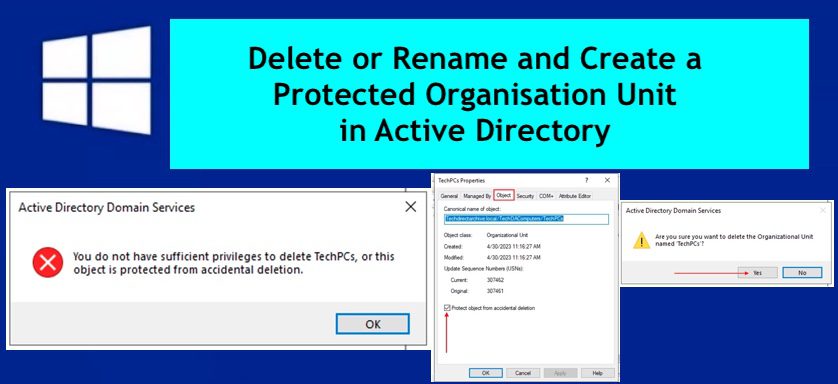
Organizational units (OUs) in an Active Directory Domain Services (AD DS) managed domain to let you logically group objects such as user accounts, service accounts, or computer accounts. In this article, I will show you how to Delete or Rename and Create a Protected Organisation Unit in AD. Please see these related guides: How to add…

Read More “Delete or Rename and Create a Protected Organisation Unit in AD” »

Windows Server

An account with the same name exists in Active Directory: Re-using the account was blocked by a security policy

Posted on 23/11/202229/08/2025 Christian By Christian 10 Comments on An account with the same name exists in Active Directory: Re-using the account was blocked by a security policy
An account with the same name exists in Active Directory: Re-using the account was blocked by a security policy

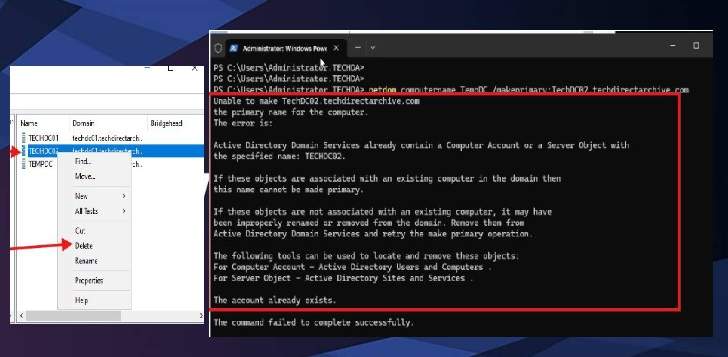
In this article, you learn how to add an account with the same name exists in Active Directory: Re-using the account was blocked by a security policy. When attempting to add a pre-created PC to a domain or reuse an existing computer account. Please see Active Directory Ports: Service and network port requirements for Windows,…

Read More “An account with the same name exists in Active Directory: Re-using the account was blocked by a security policy” »

Security | Vulnerability Scans and Assessment, Windows, Windows Server

WHFB Hybrid Cloud Kerberos Trust Model is now available

Posted on 17/10/202222/11/2023 Christian By Christian No Comments on WHFB Hybrid Cloud Kerberos Trust Model is now available
WHFB Hybrid Cloud Kerberos Trust Model is now available

Windows Hello for Business (WHFB) is a modern two-factor authentication that replaces password authentication on devices. It uses key-based or certificate-based authentication and at least two unique factors “something the user knows (PIN) or something the user is (biometrics), combined with something they have (physical access to their device)”. WHFB offers secure, convenient single sign-on…

Read More “WHFB Hybrid Cloud Kerberos Trust Model is now available” »

AWS/Azure/OpenShift, Windows Server

Configure logon hours for users in Active Directory

Posted on 30/05/202228/08/2024 Temitope Odemo By Temitope Odemo No Comments on Configure logon hours for users in Active Directory
Configure logon hours for users in Active Directory

In this article, I will show you how to Perform the Time of day restriction: How to Configure logon hours for users in Active Directory. Please see how to Resolve Account restrictions are preventing this user from signing in: User Account Password has expired. There are times you may want to restrict users’ access to…

Read More “Configure logon hours for users in Active Directory” »

Windows Server

How to set an account expiration date in Active Directory

Posted on 22/05/202228/08/2023 Temitope Odemo By Temitope Odemo No Comments on How to set an account expiration date in Active Directory
How to set an account expiration date in Active Directory

The account expiration date is used for access control purposes. Let us assume an organization temporarily create an AD account for someone that needed access to one of your servers or a workstation, there is every possibility that you can forget to disable the account when the person completes his task. This can open the way…

Read More “How to set an account expiration date in Active Directory” »

Windows Server

Install and configure Active Directory Domain Services on Windows Server

Posted on 30/11/202120/08/2025 Imoh Etuk By Imoh Etuk No Comments on Install and configure Active Directory Domain Services on Windows Server
Install and configure Active Directory Domain Services on Windows Server

In this write-up, I will take you through the step-by-step guide on how to install and configure Active Directory Domain Services on Windows Server 2022. Before we delve into the hands-on session of this write-up, let’s take a look at some of the amazing new features that Windows Server 2022 brings. A quick peep into…

Read More “Install and configure Active Directory Domain Services on Windows Server” »

Windows, Windows Server

Service Principal Name: How to add or reset and delete SPNs

Posted on 02/09/202109/07/2025 Christian By Christian 2 Comments on Service Principal Name: How to add or reset and delete SPNs
Service Principal Name: How to add or reset and delete SPNs

In this article, we shall discuss the steps resolving “Service Principal Name: How to add or reset and delete SPNs”. A service principal name (SPN) is a unique identifier of a service instance. SPNs are used by Kerberos authentication to associate a service instance with a service logon account. For example, to enable the MBAM server to…

Read More “Service Principal Name: How to add or reset and delete SPNs” »

Windows

Service and Network Port requirements for Active Directory

Posted on 04/06/202115/03/2024 Christian By Christian 1 Comment on Service and Network Port requirements for Active Directory
Service and Network Port requirements for Active Directory

Active Directory communication involves the following ports and as a system administrator, you must be familiar with some of the following ports already. In this article, we will discuss the Service and Network Port requirements for Active Directory. You may want to see the following related guides: Pass-Through Authentication with on-Premise AD, reasons to deploy AAD, Microsoft Azure Active…

Read More “Service and Network Port requirements for Active Directory” »

Windows

Fix an appropriate resource file could not be found for the file for BitLocker Management

Posted on 23/03/202131/10/2025 Christian By Christian No Comments on Fix an appropriate resource file could not be found for the file for BitLocker Management
Fix an appropriate resource file could not be found for the file for BitLocker Management

In this article, I will walk you through how to “Fix an appropriate resource file could not be found for the file for BitLocker Management: The system can not find the file specified”. The Central Store is a file location that the Group Policy tools check. It consists of a folder structure created in the…

Read More “Fix an appropriate resource file could not be found for the file for BitLocker Management” »

Windows Server

How to configure a service account for Kerberos delegation

Posted on 17/03/202106/09/2023 Christian By Christian 1 Comment on How to configure a service account for Kerberos delegation
How to configure a service account for Kerberos delegation

Kerberos is a network authentication protocol. It is designed to provide strong authentication for client/server applications by using secret-key cryptography. Kerberos delegation is to enable an application to access resources hosted on a different server t. For some related content on Active Directory, see the following guides. The sign-in method you are trying to use is not…

Read More “How to configure a service account for Kerberos delegation” »

Windows Server

Posts pagination

1 2 Next

Microsoft MVP

VEEAMLEGEND

vexpert-badge-stars-5

Virtual Background

GoogleNews

Categories

veeaam100

sysadmin top30a
 
  • Disable Hardware Acceleration in Browsers and Windows
    How to Disable Hardware Acceleration in Browsers and Windows Windows
  • maxresdefault 2 4
    Setup RAID 5 and 10 with MegaRAID Storage Manager on RX300 S5 Network | Monitoring
  • Screenshot 2020 05 13 at 19.23.25
    AWS Command-Line Interface: How to configure AWS CLI [Part 1] AWS/Azure/OpenShift
  • screenshot 2020 02 08 at 15.53.31
    Enable Automatic Logon via Windows Registry Windows
  • Prevent OS Reinstallation When Switching from Legacy BIOS to UEFI
    Prevent OS Reinstallation: Change from legacy BIOS to UEFI Windows
  • AzureAD
    Azure Active Directory integration with on-premise AD using PTA AWS/Azure/OpenShift
  • Disable Lock Screen on Windows
    How to disable Lock Screen on Windows 10 Windows
  • How to configure Azure container register with secured connection with container apps
    Configure Azure Container Registry for a secure connection with Azure Container Apps AWS/Azure/OpenShift

Subscribe to Blog via Email

Enter your email address to subscribe to this blog and receive notifications of new posts by email.

Join 1,841 other subscribers
  • RSS - Posts
  • RSS - Comments
  • About
  • Authors
  • Write for us
  • Advertise with us
  • General Terms and Conditions
  • Privacy policy
  • Feedly
  • Telegram
  • Youtube
  • Facebook
  • Instagram
  • LinkedIn
  • Tumblr
  • Pinterest
  • Twitter
  • mastodon

Tags

AWS Azure Bitlocker Microsoft Windows PowerShell WDS Windows 10 Windows 11 Windows Deployment Services Windows Server 2016

Copyright © 2025 TechDirectArchive