Skip to content

TechDirectArchive

Hands-on IT, Cloud, Security, Veeam & DevOps

  • Home
  • About
  • Advertise With US
  • Reviews
  • Contact
  • Toggle search form

Tag: Verify the SVN is correctly applied

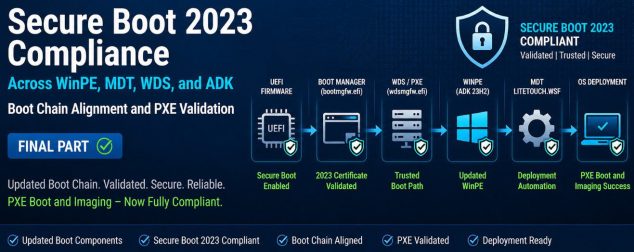
Secure Boot 2023 Compliance Across WinPE, MDT, WDS, and ADK: Boot Chain Alignment and PXE Validation [Final Part]

Posted on 13/06/202623/06/2026 Christian By Christian No Comments on Secure Boot 2023 Compliance Across WinPE, MDT, WDS, and ADK: Boot Chain Alignment and PXE Validation [Final Part]
Secure Boot 2023 Compliance Across WinPE, MDT, WDS, and ADK: Boot Chain Alignment and PXE Validation [Final Part]

Since my devices had secure boot update applied (SafeOS), the firmware and Secure Boot policy enforced stricter validation from the PC. While the deployment environment still served older ( mismatched boot files). This mismatch led to PXE failures, as the firmware refuses to execute the boot loaders that did not meet the minimum required version…

Read More “Secure Boot 2023 Compliance Across WinPE, MDT, WDS, and ADK: Boot Chain Alignment and PXE Validation [Final Part]” »

Windows, Windows Server

Microsoft MVP

vexpert-badge-stars-5

Virtual Background

VEEAMLEGEND

Categories

Top 30 Sysadmin blog

veeaam100

Veeam Vanguard

  • Screenshot 2020 07 25 at 13.09.08
    Fix the following error occurred when DNS was queried for the service location Windows Server
  • chocolatey
    Windows Package Manager: How to install, upgrade or uninstall Chocolatey Windows
  • Windows 11 default Icons
    Windows Desktop Icon: How to Make Default System Icons Visible Windows
  • How to integrate your phone and other devices with Microsoft Edge
    Integrate your phone and other devices with Microsoft Edge Windows
  • Install Veeam Backup and Replication with the default PostgreSQL
    Install Veeam Backup and Replication with the default PostgreSQL Backup
  • Perform Site Maintenance or reset this site greyed out
    Fix “Perform Site Maintenance or reset this site” greyed out Windows Server
  • shortcut
    How to make a desktop shortcut available for all users in Windows 7 and 10 Windows
  • Locate Find and Grep Required 1
    A Brief Introduction to Linux and How to Create Disk Partition in Ubuntu Linux Linux

Subscribe to Blog via Email

Enter your email address to subscribe to this blog and receive notifications of new posts by email.

Join 1,746 other subscribers
  • RSS - Posts
  • RSS - Comments
  • About
  • Authors
  • Write for us
  • Contact
  • Advertise with us
  • General Terms and Conditions
  • Privacy policy
  • Feedly
  • Telegram
  • Youtube
  • Facebook
  • Instagram
  • LinkedIn
  • Tumblr
  • Pinterest
  • Twitter
  • mastodon
  • Bsky

Tags

Active Directory Azure Bitlocker Microsoft Windows PowerShell WDS Windows 10 Windows 11 Windows Deployment Services Windows Server 2016

Copyright © 2026 TechDirectArchive