Skip to content

TechDirectArchive

Hands-on IT, Cloud, Security & DevOps Insights

  • Home
  • About
  • Advertise With US
  • Reviews
  • Contact
  • Toggle search form

Tag: Windows Server 2016

Configure Active Directory-Based Activation (ADBA) for Windows

Posted on 09/10/202507/04/2026 Christian By Christian No Comments on Configure Active Directory-Based Activation (ADBA) for Windows
Configure Active Directory-Based Activation (ADBA) for Windows

Active Directory-Based Activation (ADBA) is a Microsoft Volume Licensing method that automatically activates Windows that are joined to an Active Directory (AD) domain. Here is how to set up and configure the Key Management System (KMS) if you have non-domain joined devices. Therefore, in this guide, we shall discuss how to configure Active Directory-Based Activation…

Read More “Configure Active Directory-Based Activation (ADBA) for Windows” »

Windows Server

Logon Failure: User has not been granted the requested logon type

Posted on 08/09/202507/04/2026 Christian By Christian No Comments on Logon Failure: User has not been granted the requested logon type
Logon Failure: User has not been granted the requested logon type

In this article, we shall discuss how to fix “Logon Failure: the user has not been granted the requested logon type at this computer”. Here is a similar article on this topic “Error 1385: The user has not been granted the requested logon type at this time“. I ran into this error during the cause…

Read More “Logon Failure: User has not been granted the requested logon type” »

Windows, Windows Server

Server Certificate could not be updated: Private key does not match

Posted on 08/09/202507/04/2026 Christian By Christian No Comments on Server Certificate could not be updated: Private key does not match
Server Certificate could not be updated: Private key does not match

In this article, we will discuss how to troubleshoot “Server Certificate could not be updated: Private key does not match”, and and determine the root case of this issue. This concern arose during the process of uploading a new SSL/TLS certificate to Trellix ePolicy Orchestrator (ePO) for securing web-based access to the console over the…

Read More “Server Certificate could not be updated: Private key does not match” »

Windows Server

Fix Error 0x87E10BC6 on a PC running Windows non-core Edition

Posted on 03/09/202507/04/2026 Christian By Christian No Comments on Fix Error 0x87E10BC6 on a PC running Windows non-core Edition
Fix Error 0x87E10BC6 on a PC running Windows non-core Edition

In this article, we shall discuss how to Fix Error 0x87E10BC6 on a PC running Windows non-core Edition. The error code 0x87e10bc6 occurs when there is an issue with activating Windows as we will see very shortly. This can be due to various reasons such as server issues, firewall interference, or incorrect product key. Please,…

Read More “Fix Error 0x87E10BC6 on a PC running Windows non-core Edition” »

Windows, Windows Server

Protect your Windows Devices with MFA with SystoLOCK

Posted on 21/08/202521/08/2025 Christian By Christian No Comments on Protect your Windows Devices with MFA with SystoLOCK
Protect your Windows Devices with MFA with SystoLOCK

SystoLOCK is a passwordless Multi Factor Authentication (MFA) platform developed by Systola GmbH here in Deutschland (Germany). Therefore, in this article, we shall discuss how to protect your Windows Devices with MFA with SystoLOCK. Please, see Creating IAM Users, Adding MFA and Policies on AWS, “MFA on Root Account: Create a User on AWS and…

Read More “Protect your Windows Devices with MFA with SystoLOCK” »

Security | Vulnerability Scans and Assessment, Windows, Windows Server

Convert Windows Server Datacenter to Standard: Install Windows Server via iDRAC Virtual Media

Posted on 13/08/202505/04/2026 Christian By Christian No Comments on Convert Windows Server Datacenter to Standard: Install Windows Server via iDRAC Virtual Media
Convert Windows Server Datacenter to Standard: Install Windows Server via iDRAC Virtual Media

In this article, I will show you how to Convert Windows Server Datacenter to Standard: Install via iDRAC Virtual Media. Previously, we have discussed how to convert Windows Server Essentials or Evaluation to Retail Edition, and we also discussed the differences between Windows Sever Evaluation, Essential and Retail Edition. Specifically, steps to convert Windows Server…

Read More “Convert Windows Server Datacenter to Standard: Install Windows Server via iDRAC Virtual Media” »

Windows Server

How to install Trellix MVISON Endpoint

Posted on 12/08/202523/09/2025 Christian By Christian No Comments on How to install Trellix MVISON Endpoint
How to install Trellix MVISON Endpoint

The “Trellix MVISION Endpoint” and Trellix Endpoint Security (ENS) are both Trellix Endpoint protection products. They are slightly different and offer different use cases. Trellix offers both to provide flexibility and broader coverage for varying customer needs and environments. In this article, I will show you how to install Trellix MVISON Endpoint. Please, see how…

Read More “How to install Trellix MVISON Endpoint” »

Security | Vulnerability Scans and Assessment

Enable Secure Boot: Fix Secure Boot certificates expiration [Part 1]

Posted on 10/07/202523/04/2026 Christian By Christian No Comments on Enable Secure Boot: Fix Secure Boot certificates expiration [Part 1]
Enable Secure Boot: Fix Secure Boot certificates expiration [Part 1]

In this article, we shall discuss how to “Enable Secure Boot: Fix Secure Boot certificates expiration [Part 1] in June 2026”. That is, after 15 years, the Secure Boot certificates that are part of Windows systems will start expiring. Windows devices will need new certificates to maintain continuity and protection. These certificates are the basics…

Read More “Enable Secure Boot: Fix Secure Boot certificates expiration [Part 1]” »

Windows, Windows Server

Fix Windows defender blocked incoming connection on Windows

Posted on 03/07/202503/07/2025 Dickson Victor By Dickson Victor No Comments on Fix Windows defender blocked incoming connection on Windows
Fix Windows defender blocked incoming connection on Windows

Microsoft Defender Antivirus is a next-generation protection solution that comes pre-installed with Windows 11. It provides always on real-time antivirus protection. In this guide, we shall discuss the fix Windows defender blocked incoming connection on Windows. Please, see What you need to know about Microsoft Defender Antivirus, how to enable FIPS mode on Windows Server,…

Read More “Fix Windows defender blocked incoming connection on Windows” »

Network | Monitoring, Windows, Windows Server

BitLocker behavior when MBAM agent is removed: No Uninstall Option in Control Panel

Posted on 02/07/202505/04/2026 Christian By Christian No Comments on BitLocker behavior when MBAM agent is removed: No Uninstall Option in Control Panel
BitLocker behavior when MBAM agent is removed: No Uninstall Option in Control Panel

MBAM (Microsoft BitLocker Administration and Monitoring) is a tool that enables you (organizations) to centrally manage and monitor BitLocker Drive Encryption across Windows devices. In this article, we shall discuss “BitLocker behavior when MBAM agent is removed: Remove MBAM Agent When Uninstall Option is missing”. Please, see Get a list of installed programs locally or…

Read More “BitLocker behavior when MBAM agent is removed: No Uninstall Option in Control Panel” »

Windows

Fix MSIEXEC returned 1602: Trellix Setup cannot use this account

Posted on 01/07/202505/04/2026 Christian By Christian No Comments on Fix MSIEXEC returned 1602: Trellix Setup cannot use this account
Fix MSIEXEC returned 1602: Trellix Setup cannot use this account

In this article, we will discuss “(installation cancelled) – Fix MSIEXEC returned 1602: Trellix Setup cannot use this account”. Due to the multiple errors encountered during the re-installation of Trellix ePolicy Orchestrator (ePO) in my Lab. I have therefore decided to show all relevant errors in this blogpost. Also, these are fixes to common Trellix…

Read More “Fix MSIEXEC returned 1602: Trellix Setup cannot use this account” »

Windows Server

How to enable FIPS mode on Windows Server

Posted on 01/07/202505/04/2026 Christian By Christian No Comments on How to enable FIPS mode on Windows Server
How to enable FIPS mode on Windows Server

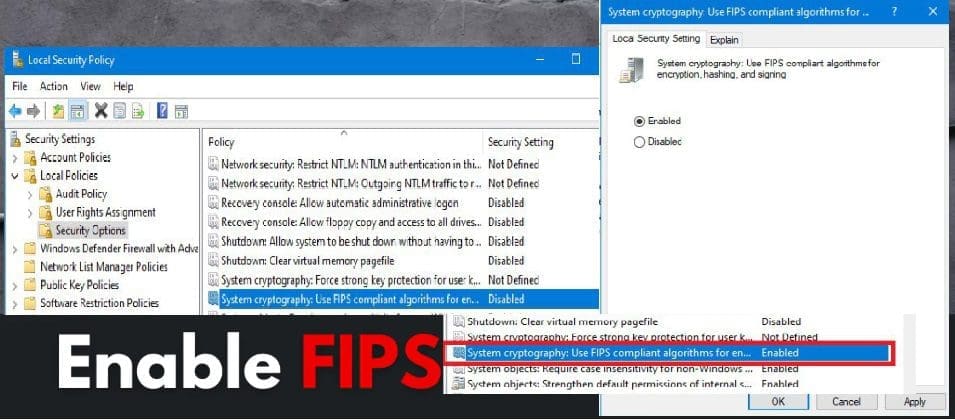
In this article, I will show you how to enable FIPS mode on Windows Server when required. For example, here is a KB2733626 showing instructions for using SQL Server 2012 in the FIPS 140-2-compliant mode. Federal Information Processing Standard (FIPS) is a standard developed by the “The National Institute of Standards and Technology (NIST) in…

Read More “How to enable FIPS mode on Windows Server” »

Oracle/MSSQL/MySQL, Windows Server

How to shrink and create new partition on Windows Server

Posted on 20/06/202505/04/2026 Christian By Christian No Comments on How to shrink and create new partition on Windows Server
How to shrink and create new partition on Windows Server

In this guide, you will learn how to shrink and create new partition on Windows Server. On Windows, you can decrease the space used by primary partitions and logical drives by shrinking them into adjacent, contiguous space on the same disk. Please, see how to Enable and use Sudo in Windows 11, how to Add…

Read More “How to shrink and create new partition on Windows Server” »

Windows Server

Posts pagination

Previous 1 2 3 … 53 Next

Microsoft MVP

VEEAMLEGEND

vexpert-badge-stars-5

Virtual Background

GoogleNews

Categories

veeaam100

Veeam Vanguard

  • MDt
    Failure 5456: Unable to determine destination disk, partition, and/or drive, see BDD Log Windows
  • oauth2final
    How to implement Interactive Authentication using MSAL dotNET AWS/Azure/OpenShift
  • Case Of Internal Sabotage And Recovery
    A real case of Internal Sabotage and Recovery Network | Monitoring
  • picture1 100
    Fix Application blocked unable to run and apply settings Anti-Virus Solution
  • Implement Azure Bicep
    How to Deploy Azure Resources Using Azure Bicep Automation
  • Screenshot
    How to change the Windows Pagefile Size Windows Server
  • banner
    How to Edit Windows Hosts File via PowerToy Editor Utility Web Server
  • How to fix BitLocker always prompting for Recovery Key
    How to fix BitLocker always prompting for Recovery Key Windows

Subscribe to Blog via Email

Enter your email address to subscribe to this blog and receive notifications of new posts by email.

Join 1,808 other subscribers
  • RSS - Posts
  • RSS - Comments
  • About
  • Authors
  • Write for us
  • Advertise with us
  • General Terms and Conditions
  • Privacy policy
  • Feedly
  • Telegram
  • Youtube
  • Facebook
  • Instagram
  • LinkedIn
  • Tumblr
  • Pinterest
  • Twitter
  • mastodon

Tags

AWS Azure Bitlocker Microsoft Windows PowerShell WDS Windows 10 Windows 11 Windows Deployment Services Windows Server 2016

Copyright © 2025 TechDirectArchive