Skip to content

TechDirectArchive

Hands-on IT, Cloud, Security & DevOps Insights

  • Home
  • About
  • Advertise With US
  • Reviews
  • Contact
  • Toggle search form
Home » Windows Server » What are the differences between an ADM and ADMX file
  • Angular Azure
    How to deploy your Angular App to Azure from Visual Studio Code AWS/Azure/OpenShift
  • WinReg
    Unable to import Windows Reg File: The specified file is not a registry script Scripts
  • MBAM
    The web application “Administration Portal” cannot be enabled because one or more software dependencies are not met Windows
  • Proxmox Installation
    Install Proxmox VE on a Beelink EQ12 Mini PC Virtualization
  • ePO installation on Windows Server
    Trellix ePolicy Orchestrator Installation on Windows Server Security | Vulnerability Scans and Assessment
  • article 1280x720.192a2586 1 1
    No valid offer received: WDS PXE-E16 error when booting clients Windows Server
  • windows 1
    How to query, stop and delete a service in Windows Windows
  • Keb
    How to configure a service account for Kerberos delegation Windows Server

What are the differences between an ADM and ADMX file

Posted on 08/03/202025/09/2024 Christian By Christian 1 Comment on What are the differences between an ADM and ADMX file
ADM file

Here is a brief description of ADM and ADMX. First, let’s describe what an ADM and ADMX file is. An “ADM file” was used with Group Policy before Windows Server 2008 was released. The ADM file stores all the settings found under Administrative Templates. Whenever you create a new Group Policy, it saves the settings for that policy in the SysVol share. Please see how to “Install Group Policy Templates for Microsoft Edge and Google Chrome browsers on Windows“.

The ADM file is also stored with the Group Policy setting. This means that Group Policy using the ADM does not scale well as it makes the SysVol share very large. Also once a Group Policy is created it is linked to the one ADM file.

The ADM file only supports one language. So if multiple administrators were working on the same Group Policy, one language would need to be agreed upon between all administrators.

See some GPO-related articles. How to Update central store for Group Policy Administrative Templates, and for a more advanced tool to manage Group Policy, see the following article on Microsoft Desktop Optimisation Pack (MDOP),

ADMX File: The ADMX file replaces the old ADM file. It was first introduced in Windows Server 2008. However, if you download the latest Group Policy Management software, you will also be able to use the ADMX files in early Windows Servers. ADMX is an XML based format making it easy to edit. ADM is an in-house format so it is not as easy to work with as XML files are. The format is made up of two parts. 

Differences between an ADM and ADMX file

The ADMX file defines the Group Policy settings, while the ADML file contains the corresponding language. This setup allows you to use the ADMX file with any language, as long as an ADML file for that language exists.

Both ADM and ADMX output the same files so regardless of which format is used, they will be compatible with old and new clients.

For more information about creating the central store for Group Policy Administrative Templates, see the guide “how to update central store for Group Policy Administrative template“.

ADM vs ADMX

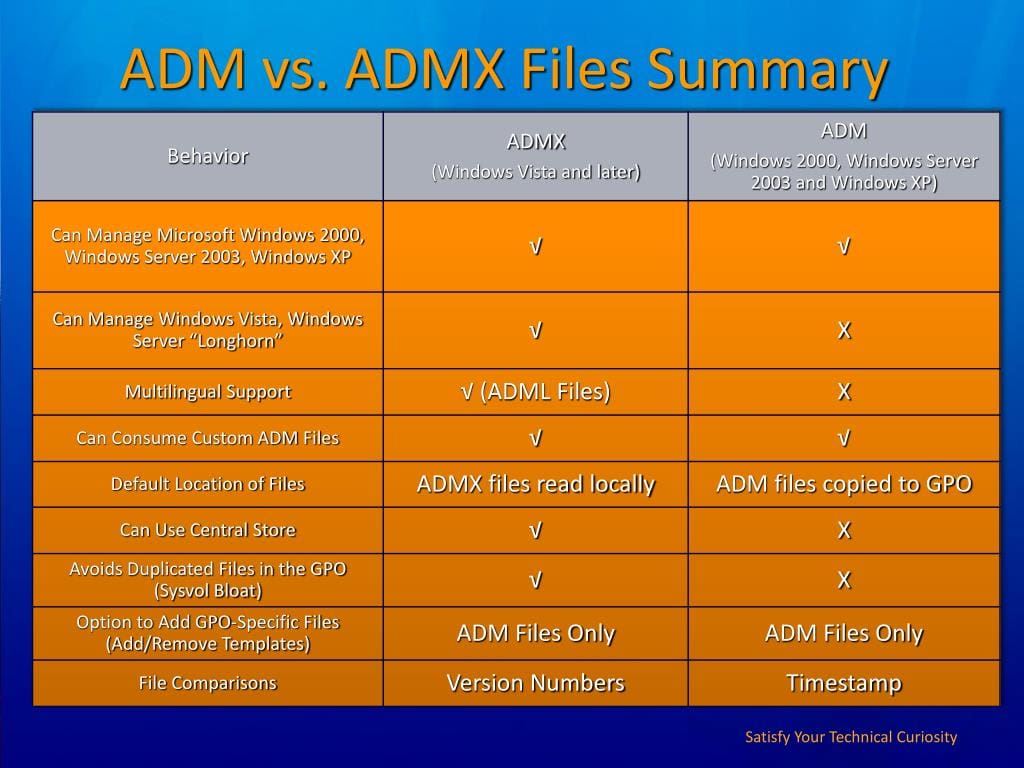
Here is a brief comparison between an ADM and ADMX file and how an ADM file can be migrated. For more information about creating the central store for Group Policy Administrative Templates.
ADMX file

ADMX files use less space in the SysVol. You can choose to store the ADMX and ADML files in the SysVol.

The difference between ADM and ADMX files is that when you store the files in SysVol, you only need to store each ADMX file once, whereas you must store ADM files for every Group Policy you create.

  • ADM are text-based documents and can be created or modified via a text editor.
  • ADMX are XML based document. With an XML document, this can be viewed.

Does your system still use ADM? certainly not sure, but take a look at how to have them converted. Note: ADM cannot be used in some Server Editions but can be converted to ADMX using ADMX migrator.

What is ADMX Migrator

ADMX Migrator is a snap-in for the Microsoft Management Console (MMC) that simplifies the process of converting your existing Group Policy ADM Templates to the new ADMX format and provides a graphical user interface for creating and editing Administrative templates.

ADMX Migrator, which is created and supported by FullArmor, enables you to convert ADM files to the ADMX format and take advantage of the additional capabilities that it provides.

The new XML-based format includes multilanguage support, an optional centralized datastore, and version control capabilities.

I hope you found this blog post helpful. If you have any questions, please let me know in the comment session.

5/5 - (1 vote)

Thank you for reading this post. Kindly share it with others.

  • Click to share on X (Opens in new window) X
  • Click to share on Reddit (Opens in new window) Reddit
  • Click to share on LinkedIn (Opens in new window) LinkedIn
  • Click to share on Facebook (Opens in new window) Facebook
  • Click to share on Pinterest (Opens in new window) Pinterest
  • Click to share on Tumblr (Opens in new window) Tumblr
  • Click to share on Telegram (Opens in new window) Telegram
  • Click to share on WhatsApp (Opens in new window) WhatsApp
  • Click to share on Pocket (Opens in new window) Pocket
  • Click to share on Mastodon (Opens in new window) Mastodon
  • Click to share on Bluesky (Opens in new window) Bluesky
  • Click to share on Threads (Opens in new window) Threads
  • Click to share on Nextdoor (Opens in new window) Nextdoor
Windows Server Tags:GPO, Group Policy Management Console, Group Policy Objects, Grouppolicy, Windows Server 2016

Post navigation

Previous Post: Edge GPO settings: All Group Policies available to configure Microsoft Edge Settings
Next Post: How to create a Desktop shortcut in Windows

Related Posts

  • diagnose
    How to Diagnose a Windows Hardware Issue Windows
  • Update Wampserver
    How to update WampServer to Latest Version Web Server
  • WinServer
    Log Off: How to sign out of Windows Server 2012 Windows Server
  • ddwwdw
    How to query a list of installed programs in Windows Windows Server
  • Perform Site Maintenance or reset this site greyed out
    Fix “Perform Site Maintenance or reset this site” greyed out Windows Server
  • wacxx
    How to set up System Insights on Windows Admin Center Windows Server

More Related Articles

diagnose How to Diagnose a Windows Hardware Issue Windows
Update Wampserver How to update WampServer to Latest Version Web Server
WinServer Log Off: How to sign out of Windows Server 2012 Windows Server
ddwwdw How to query a list of installed programs in Windows Windows Server
Perform Site Maintenance or reset this site greyed out Fix “Perform Site Maintenance or reset this site” greyed out Windows Server
wacxx How to set up System Insights on Windows Admin Center Windows Server

Comment (1) on “What are the differences between an ADM and ADMX file”

  1. Avatar photo Jorge Robas says:
    10/09/2021 at 4:33 PM

    Christian! Thank you very much for so detailed explanation. It was very usefull for me.

    Log in to Reply

Leave a Reply Cancel reply

You must be logged in to post a comment.

Microsoft MVP

VEEAMLEGEND

vexpert-badge-stars-5

Virtual Background

GoogleNews

Categories

veeaam100

sysadmin top30a

  • Angular Azure
    How to deploy your Angular App to Azure from Visual Studio Code AWS/Azure/OpenShift
  • WinReg
    Unable to import Windows Reg File: The specified file is not a registry script Scripts
  • MBAM
    The web application “Administration Portal” cannot be enabled because one or more software dependencies are not met Windows
  • Proxmox Installation
    Install Proxmox VE on a Beelink EQ12 Mini PC Virtualization
  • ePO installation on Windows Server
    Trellix ePolicy Orchestrator Installation on Windows Server Security | Vulnerability Scans and Assessment
  • article 1280x720.192a2586 1 1
    No valid offer received: WDS PXE-E16 error when booting clients Windows Server
  • windows 1
    How to query, stop and delete a service in Windows Windows
  • Keb
    How to configure a service account for Kerberos delegation Windows Server

Subscribe to Blog via Email

Enter your email address to subscribe to this blog and receive notifications of new posts by email.

Join 1,839 other subscribers
  • RSS - Posts
  • RSS - Comments
  • About
  • Authors
  • Write for us
  • Advertise with us
  • General Terms and Conditions
  • Privacy policy
  • Feedly
  • Telegram
  • Youtube
  • Facebook
  • Instagram
  • LinkedIn
  • Tumblr
  • Pinterest
  • Twitter
  • mastodon

Tags

AWS Azure Bitlocker Microsoft Windows PowerShell WDS Windows 10 Windows 11 Windows Deployment Services Windows Server 2016

Copyright © 2025 TechDirectArchive


Loading Comments...
 

You must be logged in to post a comment.