Skip to content

TechDirectArchive

Hands-on IT, Cloud, Security & DevOps Insights

  • Home
  • About
  • Advertise With US
  • Reviews
  • Contact
  • Toggle search form
Home » Windows Server » What are the differences between an ADM and ADMX file

What are the differences between an ADM and ADMX file

Posted on 08/03/202025/09/2024 Christian By Christian 1 Comment on What are the differences between an ADM and ADMX file
ADM file

Here is a brief description of ADM and ADMX. First, let’s describe what an ADM and ADMX file is. An “ADM file” was used with Group Policy before Windows Server 2008 was released. The ADM file stores all the settings found under Administrative Templates. Whenever you create a new Group Policy, it saves the settings for that policy in the SysVol share. Please see how to “Install Group Policy Templates for Microsoft Edge and Google Chrome browsers on Windows“.

The ADM file is also stored with the Group Policy setting. This means that Group Policy using the ADM does not scale well as it makes the SysVol share very large. Also once a Group Policy is created it is linked to the one ADM file.

The ADM file only supports one language. So if multiple administrators were working on the same Group Policy, one language would need to be agreed upon between all administrators.

See some GPO-related articles. How to Update central store for Group Policy Administrative Templates, and for a more advanced tool to manage Group Policy, see the following article on Microsoft Desktop Optimisation Pack (MDOP),

ADMX File: The ADMX file replaces the old ADM file. It was first introduced in Windows Server 2008. However, if you download the latest Group Policy Management software, you will also be able to use the ADMX files in early Windows Servers. ADMX is an XML based format making it easy to edit. ADM is an in-house format so it is not as easy to work with as XML files are. The format is made up of two parts. 

Differences between an ADM and ADMX file

The ADMX file defines the Group Policy settings, while the ADML file contains the corresponding language. This setup allows you to use the ADMX file with any language, as long as an ADML file for that language exists.

Both ADM and ADMX output the same files so regardless of which format is used, they will be compatible with old and new clients.

For more information about creating the central store for Group Policy Administrative Templates, see the guide “how to update central store for Group Policy Administrative template“.

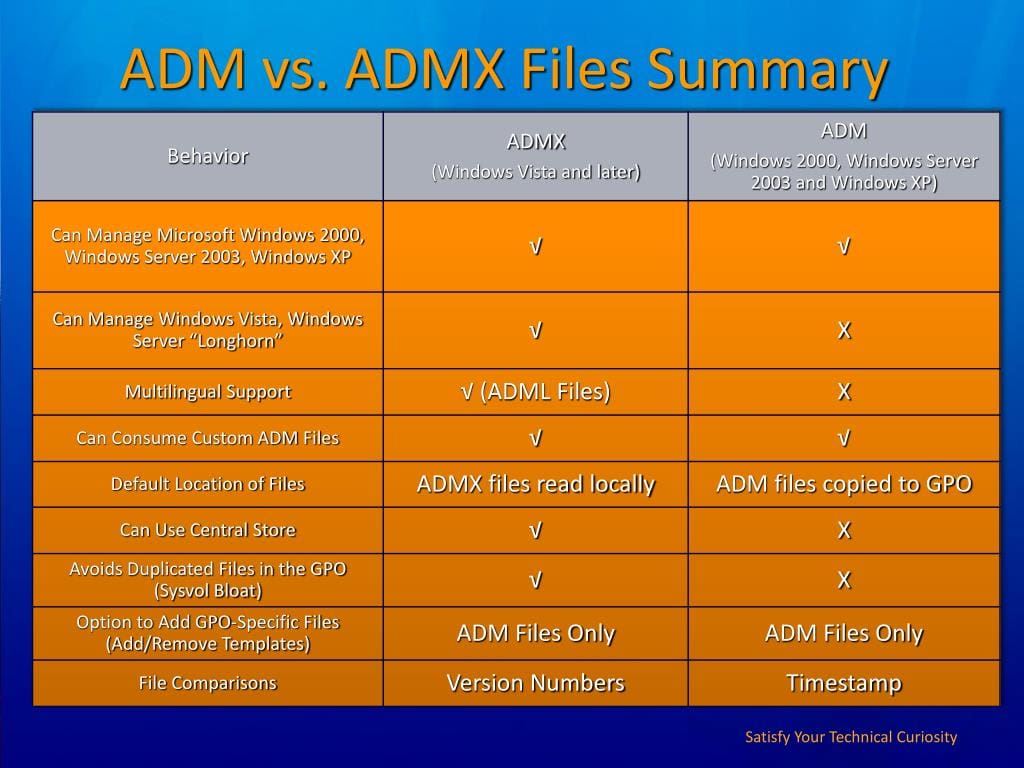
ADM vs ADMX

Here is a brief comparison between an ADM and ADMX file and how an ADM file can be migrated. For more information about creating the central store for Group Policy Administrative Templates.
ADMX file

ADMX files use less space in the SysVol. You can choose to store the ADMX and ADML files in the SysVol.

The difference between ADM and ADMX files is that when you store the files in SysVol, you only need to store each ADMX file once, whereas you must store ADM files for every Group Policy you create.

  • ADM are text-based documents and can be created or modified via a text editor.
  • ADMX are XML based document. With an XML document, this can be viewed.

Does your system still use ADM? certainly not sure, but take a look at how to have them converted. Note: ADM cannot be used in some Server Editions but can be converted to ADMX using ADMX migrator.

What is ADMX Migrator

ADMX Migrator is a snap-in for the Microsoft Management Console (MMC) that simplifies the process of converting your existing Group Policy ADM Templates to the new ADMX format and provides a graphical user interface for creating and editing Administrative templates.

ADMX Migrator, which is created and supported by FullArmor, enables you to convert ADM files to the ADMX format and take advantage of the additional capabilities that it provides.

The new XML-based format includes multilanguage support, an optional centralized datastore, and version control capabilities.

I hope you found this blog post helpful. If you have any questions, please let me know in the comment session.

5/5 - (1 vote)

Thank you for reading this post. Kindly share it with others.

  • Share on X (Opens in new window) X
  • Share on Reddit (Opens in new window) Reddit
  • Share on LinkedIn (Opens in new window) LinkedIn
  • Share on Facebook (Opens in new window) Facebook
  • Share on Pinterest (Opens in new window) Pinterest
  • Share on Tumblr (Opens in new window) Tumblr
  • Share on Telegram (Opens in new window) Telegram
  • Share on WhatsApp (Opens in new window) WhatsApp
  • Share on Mastodon (Opens in new window) Mastodon
  • Share on Bluesky (Opens in new window) Bluesky
  • Share on Threads (Opens in new window) Threads
  • Share on Nextdoor (Opens in new window) Nextdoor
Windows Server Tags:GPO, Group Policy Management Console, Group Policy Objects, Grouppolicy, Windows Server 2016

Post navigation

Previous Post: Edge GPO settings: All Group Policies available to configure Microsoft Edge Settings
Next Post: How to create a Desktop shortcut in Windows

Related Posts

  • WAMPServer Virtual Host
    How to create Virtual Hosts in a WAMPserver Web Server
  • images 8
    Microsoft Direct Access: Now Always On VPN Windows Server
  • ssl 600x315 1 1
    Components needed to create a certificate signing request Windows Server
  • schedulepythontasksinWindows
    Run Python Script via Windows Task Scheduler Windows
  • sdgfdhx
    MDT Warning: Unable to set working directory, the application returned an unexpected code 2 Windows Server
  • File Share in Windows
    Create Folders and Enable File sharing on Windows Windows Server

More Related Articles

WAMPServer Virtual Host How to create Virtual Hosts in a WAMPserver Web Server
images 8 Microsoft Direct Access: Now Always On VPN Windows Server
ssl 600x315 1 1 Components needed to create a certificate signing request Windows Server
schedulepythontasksinWindows Run Python Script via Windows Task Scheduler Windows
sdgfdhx MDT Warning: Unable to set working directory, the application returned an unexpected code 2 Windows Server
File Share in Windows Create Folders and Enable File sharing on Windows Windows Server

Comment (1) on “What are the differences between an ADM and ADMX file”

  1. Avatar photo Jorge Robas says:
    10/09/2021 at 4:33 PM

    Christian! Thank you very much for so detailed explanation. It was very usefull for me.

    Log in to Reply

Leave a Reply Cancel reply

You must be logged in to post a comment.

Microsoft MVP

VEEAMLEGEND

vexpert-badge-stars-5

Virtual Background

GoogleNews

Categories

veeaam100

Veeam Vanguard

  • Webp.net resizeimage 7
    Create a new Azure Disk: How to create and attach an extra Disk to Azure Virtual Machine AWS/Azure/OpenShift
  • How to upgrade Trellix ePolicy Orchestrator
    How to upgrade Trellix ePolicy Orchestrator Security | Vulnerability Scans and Assessment
  • ansiblebanner
    Install and configure Ansible on Azure Virtual Machine Configuration Management Tool
  • feature image sublime text 4
    How to install Sublime Text 4 on Ubuntu Linux
  • Screenshot 2020 05 14 at 17.46.59
    Linux System Update: Upgrade vs. Dist-upgrade Differences Linux
  • Task Scheduler Error 0x2 1
    How to fix Windows Task Scheduler 0x2 Error Windows
  • Extend C drive with additional Software
    Fix unable to Extend Volume on Windows protected by BitLocker Windows
  • Synergy software kvm
    Why Software KVMs such as Synergy is replacing Hardware KVMs Linux

Subscribe to Blog via Email

Enter your email address to subscribe to this blog and receive notifications of new posts by email.

Join 1,808 other subscribers
  • RSS - Posts
  • RSS - Comments
  • About
  • Authors
  • Write for us
  • Advertise with us
  • General Terms and Conditions
  • Privacy policy
  • Feedly
  • Telegram
  • Youtube
  • Facebook
  • Instagram
  • LinkedIn
  • Tumblr
  • Pinterest
  • Twitter
  • mastodon

Tags

AWS Azure Bitlocker Microsoft Windows PowerShell WDS Windows 10 Windows 11 Windows Deployment Services Windows Server 2016

Copyright © 2025 TechDirectArchive


Loading Comments...
 

You must be logged in to post a comment.