Skip to content

TechDirectArchive

Hands-on IT, Cloud, Security & DevOps Insights

  • Home
  • About
  • Advertise With US
  • Contact
  • Reviews
  • Toggle search form
Home » Network | Monitoring » Docker image OS “windows” cannot be used on this platform: No matching manifest for linux/amd64 in the manifest list entries from Microsoft Docker Registry

Docker image OS “windows” cannot be used on this platform: No matching manifest for linux/amd64 in the manifest list entries from Microsoft Docker Registry

Posted on 16/10/202121/12/2023 Christian By Christian 2 Comments on Docker image OS “windows” cannot be used on this platform: No matching manifest for linux/amd64 in the manifest list entries from Microsoft Docker Registry
Docker images

In this article, we shall discuss how to resolve “Docker image OS “windows” cannot be used on this platform: No matching manifest for linux/amd64 in the manifest list entries from Microsoft Docker Registry”. Kindly refer to these related guides: How to create and deploy a local Registry Server with Docker Image, how to Pull your first Nginx Container Image from Docker Hub and deploy it to your local machine, and Azure DevOps and GitHub integration for Docker and Kubernetes deployment.

Docker is an open-source containerization platform that enables developers to package apps into containers and standardized executable components combining application source code with the operating system (OS) libraries and dependencies required to run that code in any environment.

The Docker Engine and client aren’t included with Windows and need to be installed and configured individually.

You need Docker in order to work with Windows Containers. Docker consists of the Docker Engine (dockerd.exe), and the Docker client (docker.exe). 

The below error occurs when you are trying to pull Microsoft Container images from Microsoft Container Registry (MCR). The error is usually due to a lot of reasons and there are many solutions to it. I will be discussing the fix that worked for me in this troubleshooting guide.
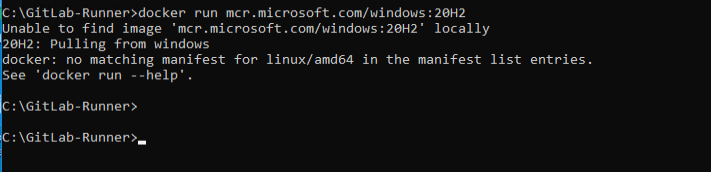
Windows platform

You may also get the following error. Do not freight, all you need do is to switch to a Windows container as discussed below.

C:\GitLab-Runner>docker run mcr.microsoft.com/windows/servercore:20H2-amd64
Unable to find image 'mcr.microsoft.com/windows/servercore:20H2-amd64' locally
20H2-amd64: Pulling from windows/servercore
18ae6bebe21d: Pulling fs layer
df018de09299: Pulling fs layer
docker: image operating system "windows" cannot be used on this platform.
See 'docker run --help'.

Also, see how to create a static pod in Kubernetes. And how to install, register and start GitLab Runner on Windows.

Solution: Switch to Windows Container to resolve Docker image OS “Windows” cannot be used on this platform

To address the Docker Image Compatibility Issue with OS ‘Windows’, consider transitioning from Linux containers. Moreover, For Windows containers, as illustrated in the accompanying screenshot.-

Click on the Show hidden icons and right-click on the Docker icon as shown below. Click on Switch to Windows Container.

Linux

Alternatively, you may have to SwitchDaemon the configuration via Command Prompt or PowerShell, as shown below.

Screenshot-2021-10-16-at-22.56.57

You can use the following command on PowerShell as shown below.

PS C:\Program Files\Docker\Docker> ./DockerCli.exe -SwitchDaemon

Furthermore, Once you address the Docker Image Compatibility Issue with OS ‘Windows’, running Docker again will yield successful results.

Captur3e

I hope you found this article useful on “Docker image OS “windows” cannot be used on this platform: No matching manifest for linux/amd64 in the manifest list entries from Microsoft Docker Registry’. Please feel free to leave a comment below.

Rate this post

Thank you for reading this post. Kindly share it with others.

  • Share on X (Opens in new window) X
  • Share on Reddit (Opens in new window) Reddit
  • Share on LinkedIn (Opens in new window) LinkedIn
  • Share on Facebook (Opens in new window) Facebook
  • Share on Pinterest (Opens in new window) Pinterest
  • Share on Tumblr (Opens in new window) Tumblr
  • Share on Telegram (Opens in new window) Telegram
  • Share on WhatsApp (Opens in new window) WhatsApp
  • Share on Mastodon (Opens in new window) Mastodon
  • Share on Bluesky (Opens in new window) Bluesky
  • Share on Threads (Opens in new window) Threads
  • Share on Nextdoor (Opens in new window) Nextdoor
Network | Monitoring Tags:docker, docker cli, Windows 10

Post navigation

Previous Post: How to uninstall GitLab Runner from your Windows device
Next Post: The executor requires OSType=windows, but Docker Engine supports only OSType=linux

Related Posts

  • How to configure Cisco switches A step by step guide
    How to configure a console port password on Cisco Router Network | Monitoring
  • doc register profile 1
    How to Remove a profile on outlook Network | Monitoring
  • Screenshot 1
    Fix SMB Freezes That Break Backups on Critical Linux Servers Network | Monitoring
  • Case Of Internal Sabotage And Recovery
    A real case of Internal Sabotage and Recovery Network | Monitoring
  • Database Connection Stuck on Working on it
    How to fix TeamPass stuck on working on it Network | Monitoring
  • screenshot 2020 03 19 at 19.17.42
    SG300 Firmware Upgrade Copy: Illegal software format Network | Monitoring

More Related Articles

How to configure Cisco switches A step by step guide How to configure a console port password on Cisco Router Network | Monitoring
doc register profile 1 How to Remove a profile on outlook Network | Monitoring
Screenshot 1 Fix SMB Freezes That Break Backups on Critical Linux Servers Network | Monitoring
Case Of Internal Sabotage And Recovery A real case of Internal Sabotage and Recovery Network | Monitoring
Database Connection Stuck on Working on it How to fix TeamPass stuck on working on it Network | Monitoring
screenshot 2020 03 19 at 19.17.42 SG300 Firmware Upgrade Copy: Illegal software format Network | Monitoring

Comments (2) on “Docker image OS “windows” cannot be used on this platform: No matching manifest for linux/amd64 in the manifest list entries from Microsoft Docker Registry”

  1. Avatar photo Juan Vilar says:
    20/04/2022 at 10:03 AM

    this will not work in windows home edition.

    Log in to Reply
    1. chris Christian says:
      20/04/2022 at 10:43 AM

      This was tested on Windows 10 Professional and Enterprise Edition

      Log in to Reply

Leave a Reply Cancel reply

You must be logged in to post a comment.

Microsoft MVP

VEEAMLEGEND

vexpert-badge-stars-5

Virtual Background

GoogleNews

Categories

veeaam100

Veeam Vanguard

  • How To Upgrade Domain Controllers
    Build a New DC vs Swing Migration: Upgrade Server OS Correctly Windows Server
  • Encryption
    How to encrypt Microsoft SQL Server Traffic Oracle/MSSQL/MySQL
  • vmca course
    Veeam Certified Architect: VMCA Training & Certification Review Backup
  • image 1
    How to Enable the End Task Option on Windows 11 Taskbar Windows
  • How to Check what files are taking up space
    WinDirStat: Check what files are taking up space on Windows Windows
  • Defender Antivirus
    Windows Defender Antivirus Management with Intune Anti-Virus Solution
  • original
    Error 0x800710E0: Operator or Administrator has refused request Windows Server
  • how to bypass windows admin log in password 2
    Disable or Enable Auto log on in Windows Windows

Subscribe to Blog via Email

Enter your email address to subscribe to this blog and receive notifications of new posts by email.

Join 1,814 other subscribers
  • RSS - Posts
  • RSS - Comments
  • About
  • Authors
  • Write for us
  • Advertise with us
  • General Terms and Conditions
  • Privacy policy
  • Feedly
  • Telegram
  • Youtube
  • Facebook
  • Instagram
  • LinkedIn
  • Tumblr
  • Pinterest
  • Twitter
  • mastodon

Tags

Active Directory Azure Bitlocker Microsoft Windows PowerShell WDS Windows 10 Windows 11 Windows Deployment Services Windows Server 2016

Copyright © 2025 TechDirectArchive


Loading Comments...
 

You must be logged in to post a comment.