Skip to content

TechDirectArchive

Hands-on IT, Cloud, Security & DevOps Insights

  • Home
  • About
  • Advertise With US
  • Reviews
  • Contact
  • Toggle search form
Home » Windows » Windows 10 and Windows 11 updates will now expire for better performance
  • fdsdsd
    Configuring DHCP Scope: Post-deployment of Dynamic Host Configuration Protocol Windows Server
  • GNS 3
    Graphical Network Simulator: How to uninstall GNS3 in Windows Windows
  • adfs training
    Post-Deployment of Active Directory Federation Service (ADFS) Windows Server
  • Capture 2
    MDT Invalid credentials: The network was not found Windows
  • fast user switching in windows 10 2
    To enable or disable fast User Switching in Windows 10 Windows
  • article 1280x720.aa742702
    How to create a custom view in Windows Event Viewer Windows Server
  • AzureMonitor
    Configure Azure Monitor for VMs on Azure Stack Hub AWS/Azure/OpenShift
  • featuredimage
    Create App Service Resource with Azure CLI AWS/Azure/OpenShift

Windows 10 and Windows 11 updates will now expire for better performance

Posted on 20/10/202123/03/2024 Christian By Christian No Comments on Windows 10 and Windows 11 updates will now expire for better performance
update-set-expire

As part of the servicing model known as Windows as a Service (feature and Quality Updates), Windows 10 and 11 versions receive monthly updates with security and general fixes. Microsoft produces two to three updates per supported Windows platform monthly. This results in a backlog of updates and potentially increases the size of update packages. In this article, we shall discuss “Windows 10 and Windows 11 updates will now expire for better performance”. Please see RDP Users are unable to change Passwords, and How to set an account expiration date in Active Directory.

Many of these updates, however, are cumulative and include all earlier updates that have been published for that platform. That means, when older packages expire, you still receive the updates contained in those packages by installing the cumulative update.

An expired package will not appear in Windows Update scan results and it can also reduce internet data usage, which is particularly important when you have a limited internet connection. This policy only applies to Windows updates. Updates for other Microsoft software or firmware may have different policies and should be considered separately.

Enhance performance by removing older packages. Enjoy faster scans, user experience, and reduced risk of outdated updates. Here are answers to common questions we receive about our Windows update expiration policy.

Kindly refer to these related guides: How to Start, Stop and Restart Windows Server Update Services (WSUS) via PowerShell and CMD, Windows Server Update Services: Windows 2016 Servers does not show up on WSUS console, and how to apply Windows Updates from WSUS to the server using AWS RunCommand.

How often are update packages expired?

Our published packages are evaluated for expiration on a regular basis. Once a large enough quantity has been found, an expiration will take place.

Please see how to resolve Account restrictions are preventing this user from signing in: User Account Password has expired

Why aren’t older updates expired?

Some older packages may not yet have been evaluated or may not have met the criteria for expiration. It is also possible that they have not yet expired because of existing dependencies on that specific update.

Are there any packages that cannot be expired? 

Security-only update packages for Windows 8.1, Windows Server 2012 SP2, Windows Server 2012, Windows 7 SP1, Windows Server 2008 R2, and Windows Server 2008 SP2 do not expire as they are not cumulative and hold only one month worth of fixes.

Additionally, if a more recent update package has a dependency on an older package, the older package will not expire until it has been superseded by a newer package.

How can find out if my update has expired?

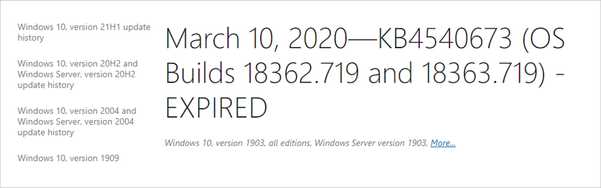
When an update expires, “EXPIRED” is added to the title of the associated release note article on support.microsoft.com.
undefined

There will also be an expiration notice at the top of the article.

Windows Expiration notice

While using Windows Server Update Services (WSUS), an expired update triggers a banner atop the details pane. Source: Microsoft Techcommunity.

Update Stack Packages for Windows 11

Microsoft is also testing a feature called “Update Stack Packages” which is being touted as a new way to deliver improvements before a big patch is deployed.

With the new “Update Stack Package”, Microsoft can help improve some areas of the OS before shipping monthly or feature updates.

The first Update Stack Package was released alongside Build 22478 for Windows Insiders and it is currently available for a limited number of users with no noticeable changes.

As such, the Update Stack Package enhances successful update installation on your PC, offering a smoother and less disruptive experience.

I hope you found this blog post on Windows 10 and Windows 11 updates will now expire for better performance helpful. If you have any questions, please let me know in the comment session.

Rate this post

Thank you for reading this post. Kindly share it with others.

  • Click to share on X (Opens in new window) X
  • Click to share on Reddit (Opens in new window) Reddit
  • Click to share on LinkedIn (Opens in new window) LinkedIn
  • Click to share on Facebook (Opens in new window) Facebook
  • Click to share on Pinterest (Opens in new window) Pinterest
  • Click to share on Tumblr (Opens in new window) Tumblr
  • Click to share on Telegram (Opens in new window) Telegram
  • Click to share on WhatsApp (Opens in new window) WhatsApp
  • Click to share on Pocket (Opens in new window) Pocket
  • Click to share on Mastodon (Opens in new window) Mastodon
  • Click to share on Bluesky (Opens in new window) Bluesky
  • Click to share on Threads (Opens in new window) Threads
  • Click to share on Nextdoor (Opens in new window) Nextdoor
Windows Tags:updates, Windows 10, Windows 11, Windows Updates

Post navigation

Previous Post: Disable BitLocker: How to correctly disable MBAM-encrypted devices
Next Post: Create a Service Fabric Cluster using the Azure Stack Hub portal and the CLI

Related Posts

  • windows hello la gi
    All you need to know before deploying Windows Hello for Business Key and Certificate Trust Windows
  • View installed Updates on Windows
    Get lists of installed Microsoft Windows Updates Windows
  • How To Fix “Startup Repair Couldn’t Repair Your PC
    How To Fix “Startup Repair Couldn’t Repair Your PC Windows
  • hh
    Graphical Network Simulator: How to install GNS3 on a Windows device Windows
  • Windows10 as a Service Waas
    Windows 10 Feature and Quality Updates Windows
  • Permission1
    How to create a Shortcut That enables Standard Users to run Applications as Administrator Windows

More Related Articles

windows hello la gi All you need to know before deploying Windows Hello for Business Key and Certificate Trust Windows
View installed Updates on Windows Get lists of installed Microsoft Windows Updates Windows
How To Fix “Startup Repair Couldn’t Repair Your PC How To Fix “Startup Repair Couldn’t Repair Your PC Windows
hh Graphical Network Simulator: How to install GNS3 on a Windows device Windows
Windows10 as a Service Waas Windows 10 Feature and Quality Updates Windows
Permission1 How to create a Shortcut That enables Standard Users to run Applications as Administrator Windows

Leave a Reply Cancel reply

You must be logged in to post a comment.

Microsoft MVP

VEEAMLEGEND

vexpert-badge-stars-5

Virtual Background

GoogleNews

Categories

veeaam100

sysadmin top30a

  • fdsdsd
    Configuring DHCP Scope: Post-deployment of Dynamic Host Configuration Protocol Windows Server
  • GNS 3
    Graphical Network Simulator: How to uninstall GNS3 in Windows Windows
  • adfs training
    Post-Deployment of Active Directory Federation Service (ADFS) Windows Server
  • Capture 2
    MDT Invalid credentials: The network was not found Windows
  • fast user switching in windows 10 2
    To enable or disable fast User Switching in Windows 10 Windows
  • article 1280x720.aa742702
    How to create a custom view in Windows Event Viewer Windows Server
  • AzureMonitor
    Configure Azure Monitor for VMs on Azure Stack Hub AWS/Azure/OpenShift
  • featuredimage
    Create App Service Resource with Azure CLI AWS/Azure/OpenShift

Subscribe to Blog via Email

Enter your email address to subscribe to this blog and receive notifications of new posts by email.

Join 1,836 other subscribers
  • RSS - Posts
  • RSS - Comments
  • About
  • Authors
  • Write for us
  • Advertise with us
  • General Terms and Conditions
  • Privacy policy
  • Feedly
  • Telegram
  • Youtube
  • Facebook
  • Instagram
  • LinkedIn
  • Tumblr
  • Pinterest
  • Twitter
  • mastodon

Tags

Active Directory AWS Azure Bitlocker Microsoft Windows PowerShell WDS Windows 10 Windows 11 Windows Server 2016

Copyright © 2025 TechDirectArchive


Loading Comments...
 

You must be logged in to post a comment.