Email notifications for MBAM Enterprise and Compliance and Recovery Audit reports


In this guide, you will learn how to set up Email notifications for MBAM Enterprise and Compliance and Recovery Audit reports. Here is a guide on how to query MBAM to display the report for BitLocker Recovery for a specified period of time. Here is how to fix you are not allowed to view this folder on SSRS: MBAM reports cannot be accessed because it could not load folder contents. SQL Server Reporting Services (SSRS) provides a set of on-premises tools and services that create, deploy, and manage mobile and paginated reports (Automatic E-mail notification).
That is, SSRS is a reporting software that allows you to produce formatted reports with tables in the form of data, graphs, images, and charts. The SSRS solution flexibly delivers the right information to the right users.
Users can consume the reports via a web browser, on their mobile device, or via email. These reports are hosted on a server that can be executed at any time using parameters defined by the users.
Microsoft BitLocker Administration and Monitoring Reporting Services
A Reporting Services subscription is a configuration that delivers a report at a specific time or in response to an event, and in a file format that you specify.
You can use either SQL Server Management Studio or the web portal to manage Reporting Services reports. Before proceeding to discuss ways to automate reports via email. I will like to discuss a little MBAM architecture as shown in the image below.
Here are some guides on how to fix the missing BitLocker Recovery Tab in Active Directory Users and Computers. How to enable or disable BitLocker Drive Encryption on Windows 10 and Virtual Machines.
Components of the MBAM Reporting Services
Before configuring the E-mail notification, it is very vital to describe the components and at least discuss what they do.
Here are the MBAM components: Recovery Database (stores recovery keys), Compliance and Audit Database (stores compliance data mostly used by reporting), Reporting (based on SQL Server Reporting Services), Administration and Monitoring Portal (Help Desk portal), Self-Service Portal (end-user portal), MBAM Client, and MBAM GPO.
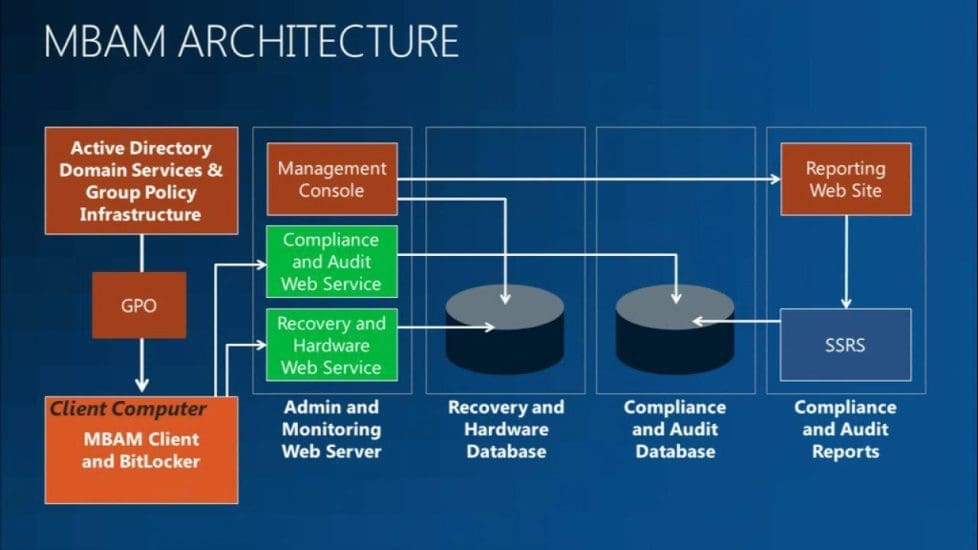
Kindly refer to the following similar guides on BitLocker. How to view BitLocker disk encryption status in Windows, and how to backup existing and new BitLocker recovery keys to Active Directory. See BitLocker Drive Encryption architecture and implementation types on Windows.
Components required to deploy MBAM
The procedures in this topic describe how to install Microsoft BitLocker Administration and Monitoring (MBAM) in the Stand-alone topology on a single server. You may also want to see the following guide: MBAM components: How to deploy Microsoft BitLocker Administration and Monitoring Tool.
- Compliance and Audit Database: This stores the compliance data, which is used primarily for reports that SQL Server Reporting Services hosts.
- Recovery Database: This stores recovery data that is collected from MBAM client computers.
- Reports: This provide recovery audit and compliance status data about the client computers in your enterprise. You can access the reports from the Administration and Monitoring Website or directly from SQL Server Reporting Services.
- Administration and Monitoring Website: This enables us to view the reports that show compliance status and recovery activity for client computers.
- Help Desk: This is used to help end users regain access to their computers when they are locked out.
- Self-Service Portal is a website that enables end users on client computers to independently log on to a website to get a recovery key if they lose or forget their BitLocker password.
- MBAM Group Policy Templates: These Group Policy settings define the implementation settings for MBAM, which enable you to manage BitLocker Drive Encryption.
- MBAM Client: Uses Group Policy Objects to enforce BitLocker Drive Encryption on client computers in the enterprise. The MBAM client also collects the Bitlocker recovery key for three data drive types: operating system drives, fixed data drives, and removable (USB) data drives. It collects recovery information and computer information about the client’s computers
The prerequisite to this task is to ensure you have your reports server set up in the E-Mail Settings in SSRS Native Mode. See these steps on how to install Reporting Services. The BitLocker Enterprise Compliance Dashboard provides the following reports (graphs), which show BitLocker compliance status across the enterprise:

             - Compliance Status Distribution.
             - Non-Compliant Errors Distribution.
             - Compliance Status Distribution by Drive Type.
Part A: Configure Email notifications for Enterprise Compliance Reports
This report shows information about the overall BitLocker compliance across the enterprise for the collection of computers that are targeted for BitLocker use. To confirm the report notifications.
Open a web browser and navigate to SQL Server Reporting Services via URL: https://xxxxxxxxxxxx.com. In the example below, I will be configuring first for the “Enterprise Compliance Report”, therefore, I will be clicking on the three horizontal dots (...)/ellipsis.
This will open the Enterprise Compliance Report window. Click on Manage.
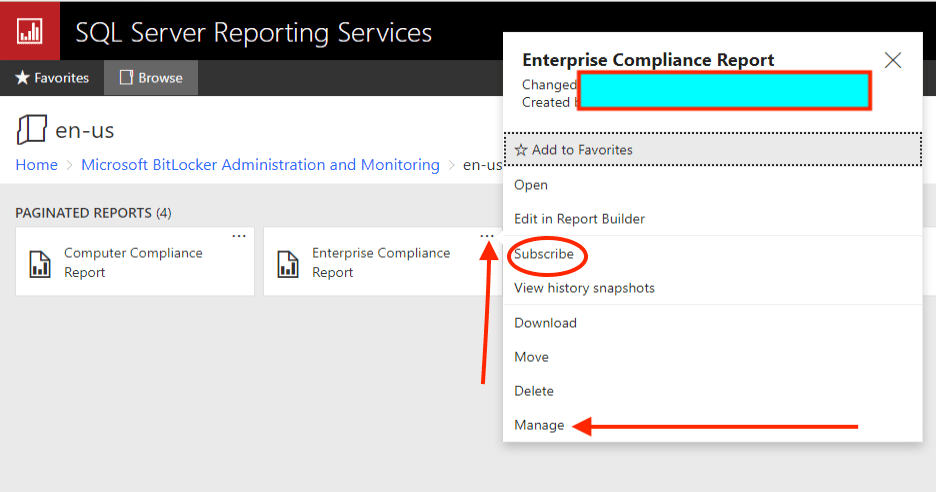
Create Subscription
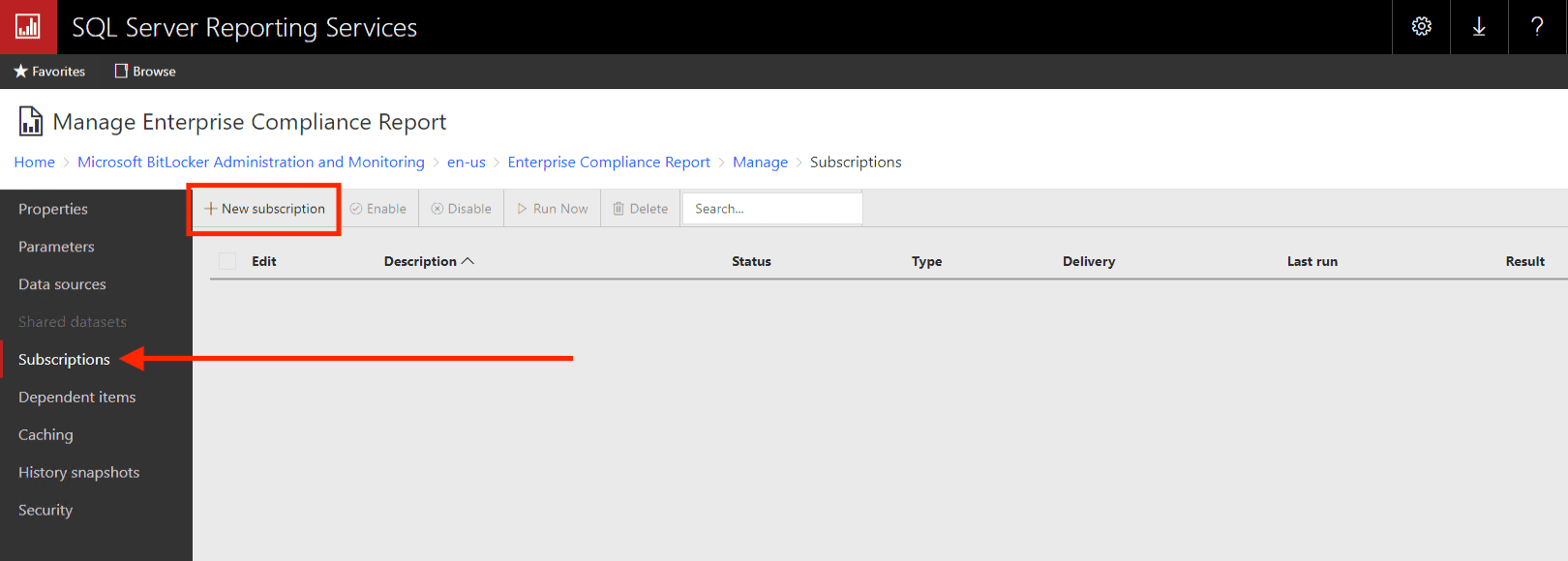
This will open the subscription window. Click on Subscriptions. Next, click on new subscriptions
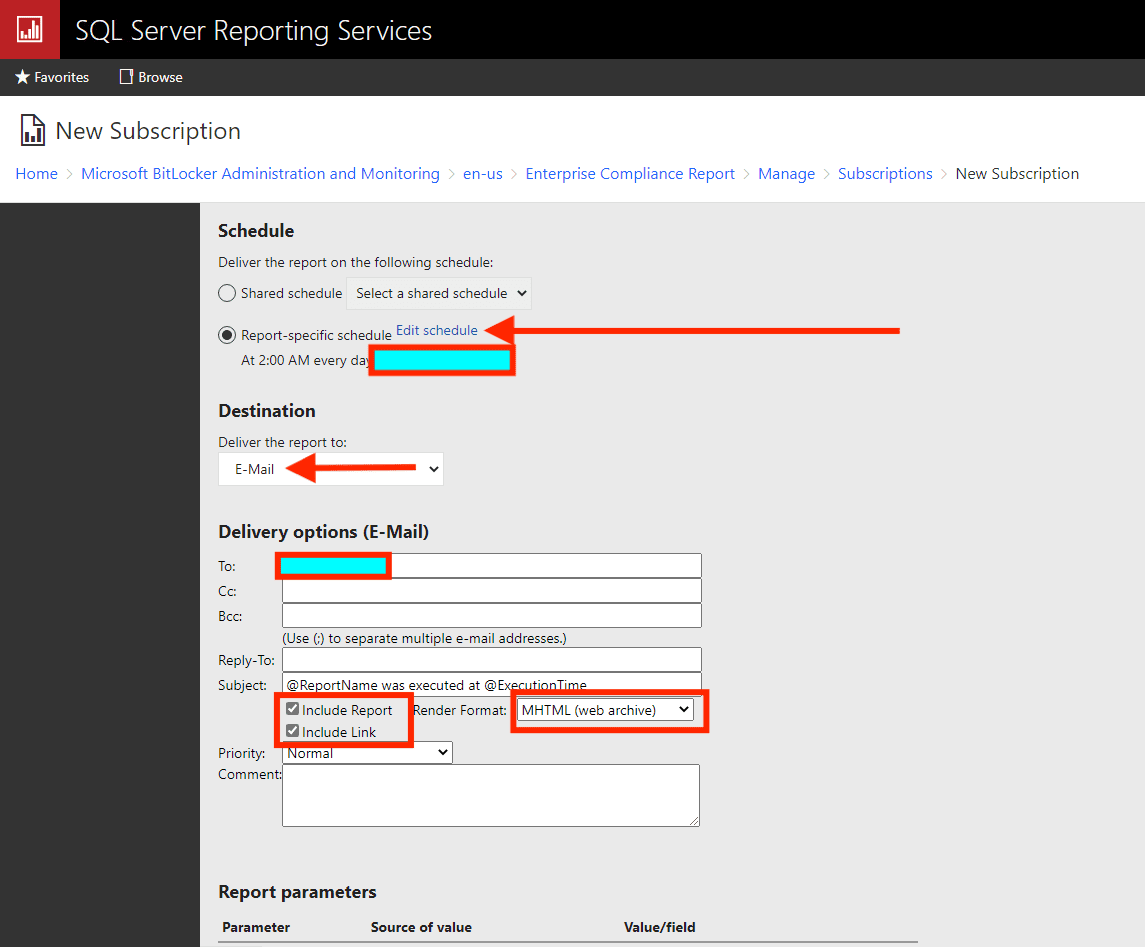
This will open the new subscription window. These fields are so self-explanatory. The following table describes the common Reporting Services subscription scenarios.
Enter the email, you can decide to include or exclude the link in the subject, select the render format, Enter the report schedule, and finally select your desired report parameters. When all these parameters are set, you can then click on “Create Subscription“.
| Scenario | Description |
|---|---|
| E-mail Reports | E-mail reports to individual users and groups. Create a subscription and specify a group alias or e-mail alias to receive a report that you want to distribute. You can have Reporting Services determine the subscription data at run time. |
| View Reports off-line | Users can select one of the following formats for subscription output: – XML file with report data – CSV (comma delimited) – MHTML (web archive) – Microsoft Excel – TIFF file – Microsoft Word Reports that you want to archive can be sent directly to a shared folder that you back up on a nightly schedule. Large reports that take too long to load in a browser can be sent to a shared folder in a format that can be viewed in a desktop application. |
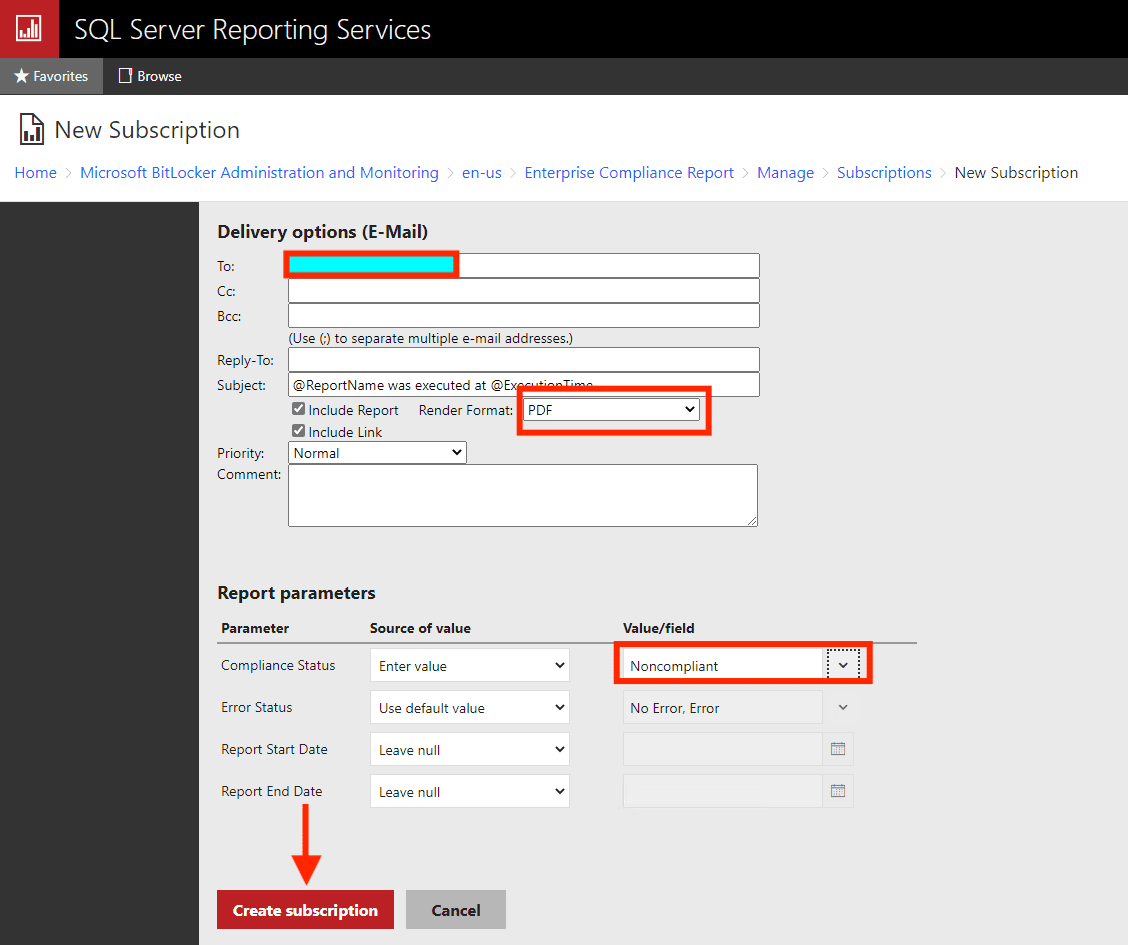
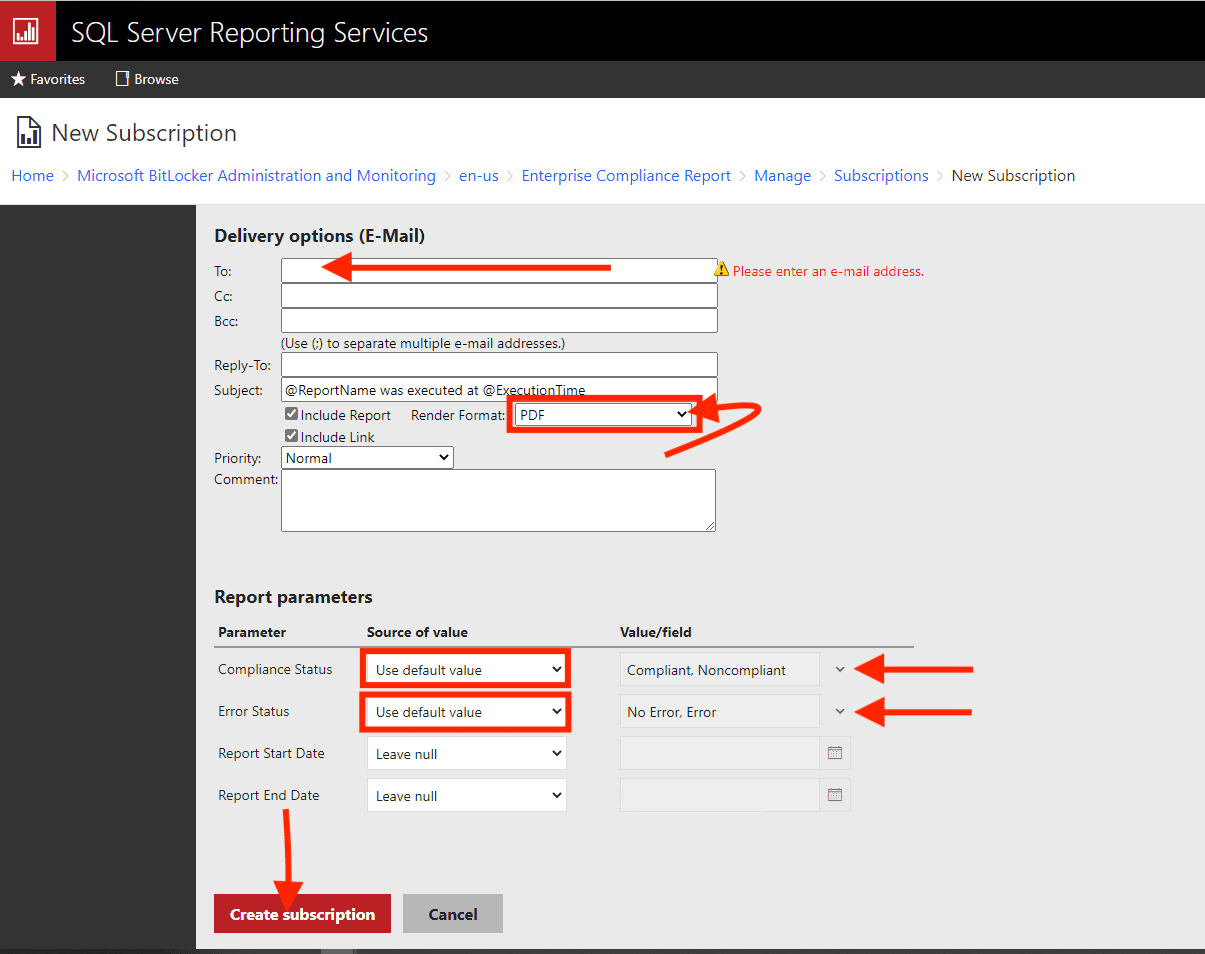
As you can see below, the subscription has been created as shown below. As you can see in the image below, the subscription is enabled and you can run it now.
You can create multiple subscriptions for a single report to vary the subscription options. Subscriptions are not available in every edition of SQL Server.
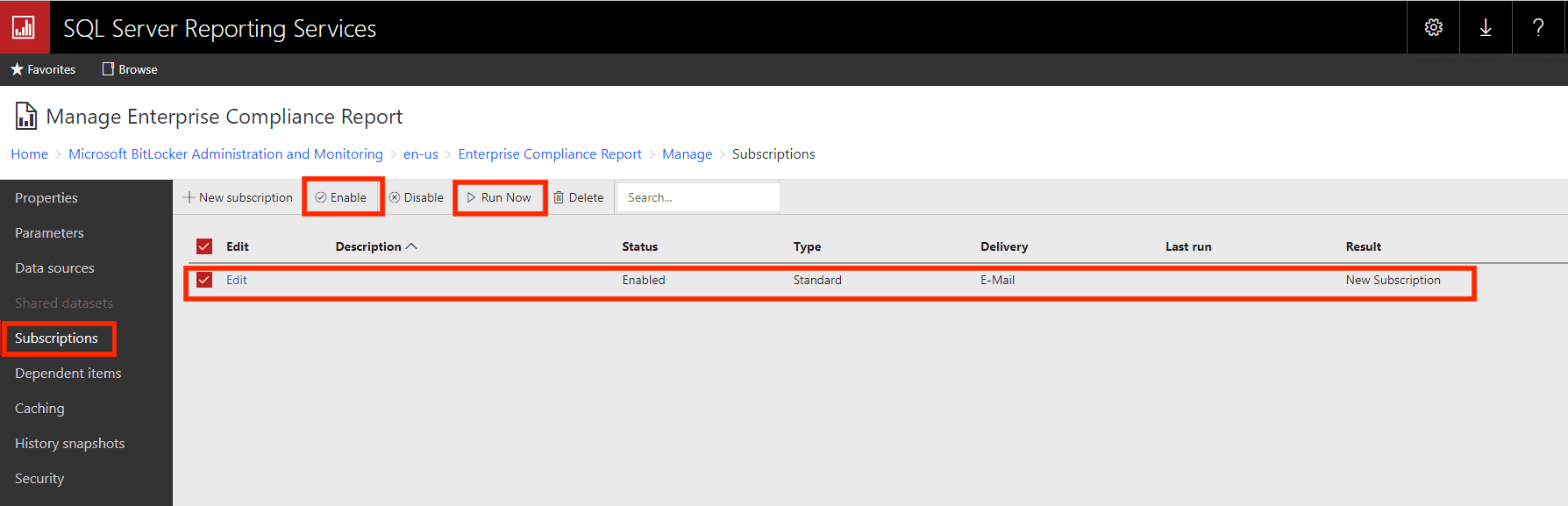
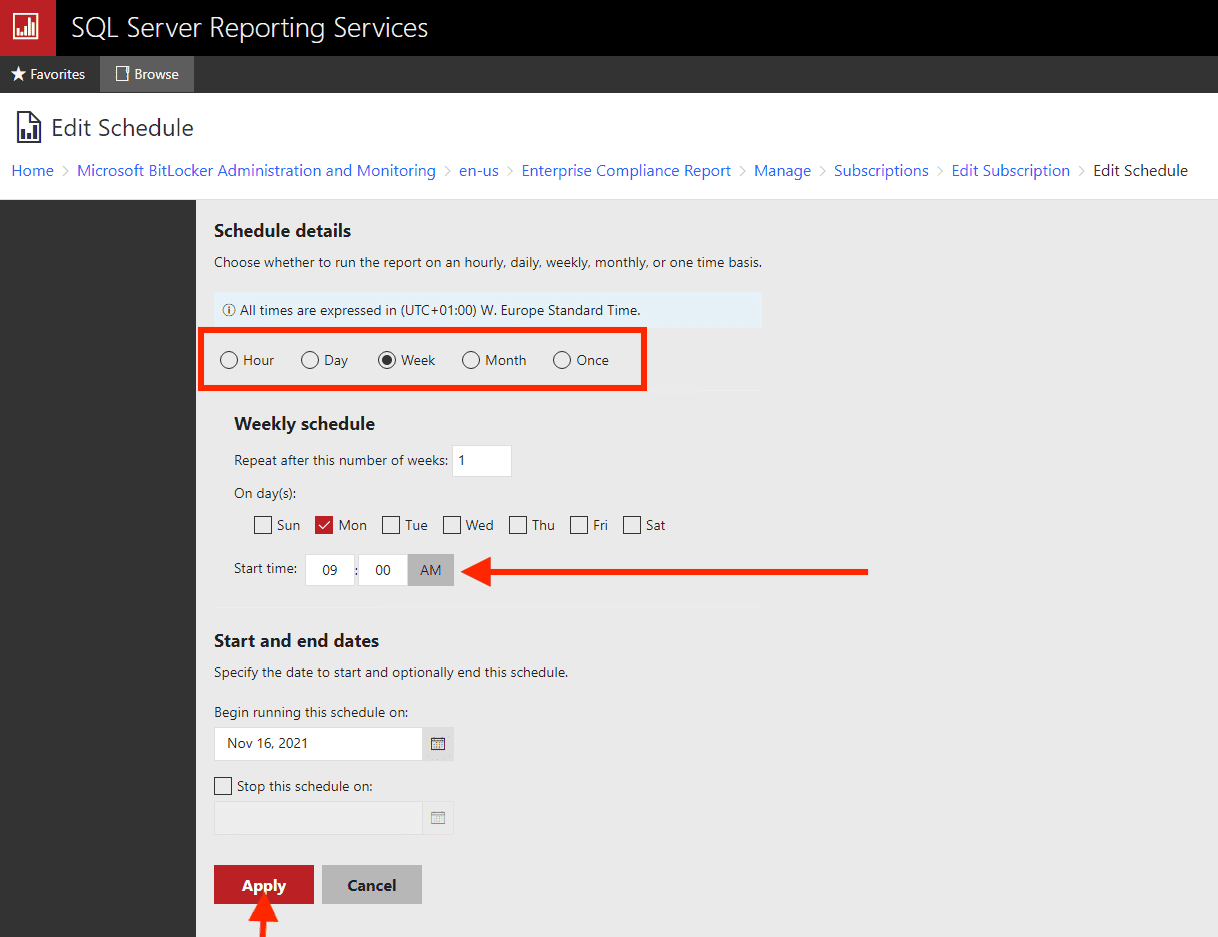
If you feel you have missed something while configuring your reports, you can edit it as shown below. For me, I had to edit the subscription in order to set the scheduled report automatically.
When you are done editing the subscription, click on Apply.
After clicking on "Run Now", you should get an email very shortly. Part B: Configure Email notification for Recovery Audit report
As discussed above, the Recovery Audit Report can help you audit users who have requested access to recovery keys.
The filter criteria for this report include the type of user making the request, type of key requested, time of occurrence, success or failure, time of occurrence, and type of user requesting. This report enables administrators to produce contextual reports based on need.
Follow the same steps described above to configure the Report Audit Report. To do this, click on the three horizontal dots (...)/ellipsis.
This will open the subscription window. Click on Subscriptions. Next, click on new subscriptions
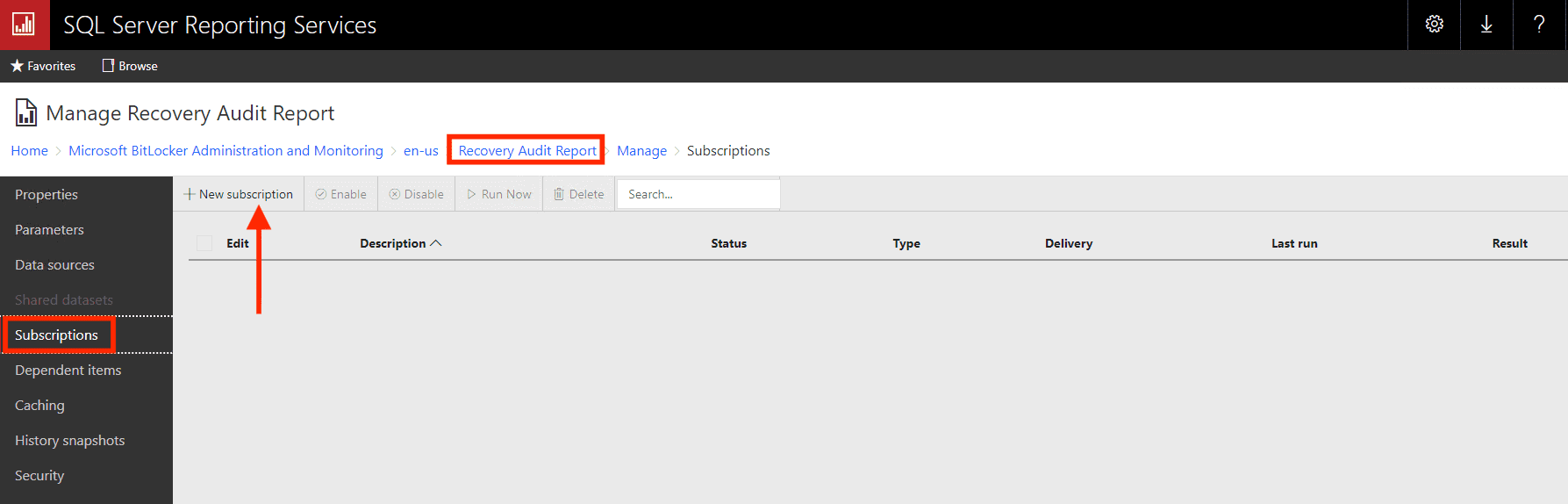
This will open the new subscription window. The following table describes the common Reporting Services subscription scenarios.
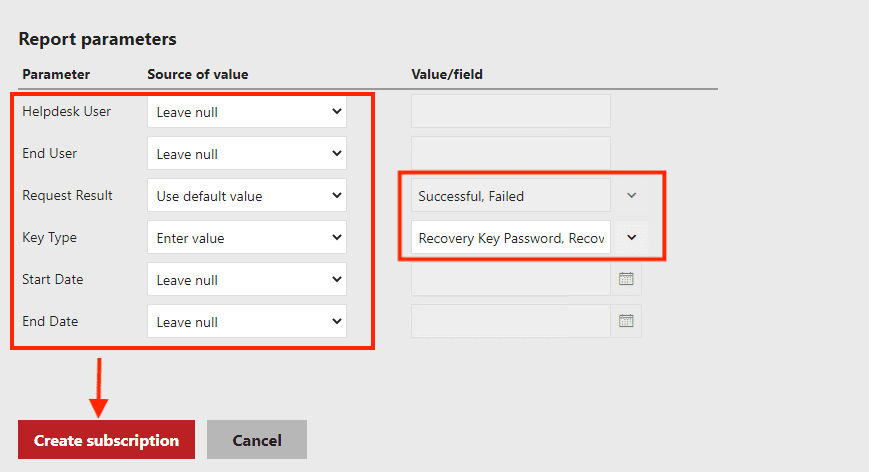
Enter the email, you can decide to include or exclude the link in the subject, select the render format, Enter the report schedule, and finally select your desired report parameters.
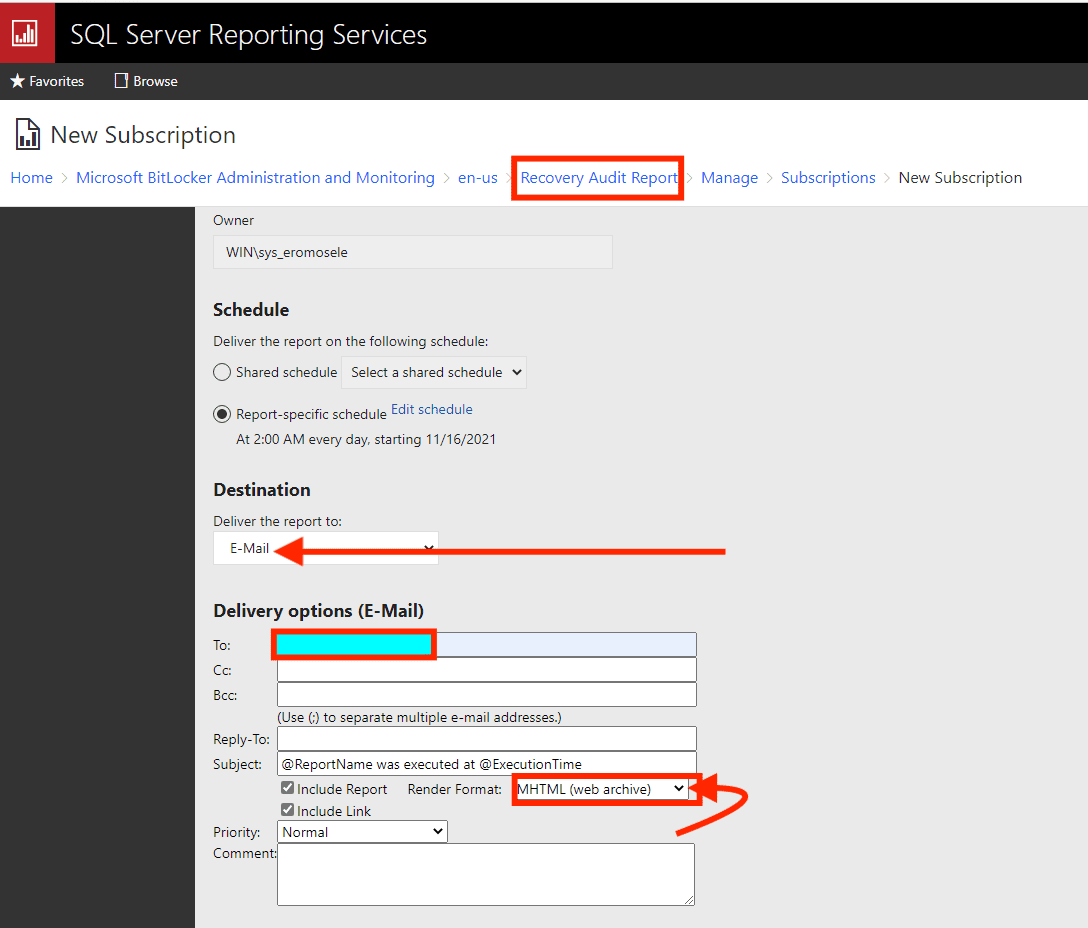
When all these parameters are set, you can then click on “Create Subscription“.
As you can see below, the Report Audit Subscription has been created. After clicking on “Run Now”, you should get an email very shortly.
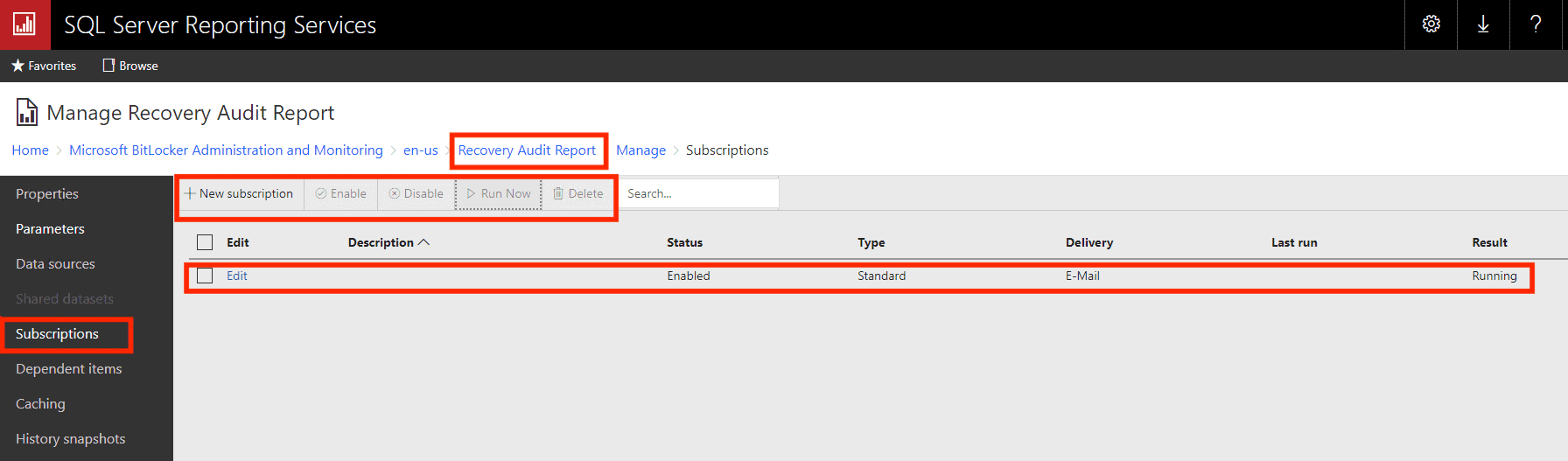
After clicking on “Run Now”, you should get an email very shortly.
Note: The Monitoring Web Service is no longer available in Microsoft BitLocker Administration and Monitoring (MBAM) 2.5 SP1 since the MBAM websites communicate directly with the Recovery Database.FAQs
How can I identify the cause of BitLocker repeatedly asking for a recovery key at boot?
To diagnose the issue, review system event logs for BitLocker-related events. Open the Event Viewer and navigate to “Applications and Services Logs” -> “Microsoft” -> “Windows” -> “BitLocker-API.” Look for events indicating changes to system state or TPM status.
Additionally, check for hardware changes, firmware updates, or recent software installations that might have triggered BitLocker’s recovery key request.
Can a BIOS/UEFI update cause BitLocker to prompt for a recovery key with each boot?
BIOS/UEFI update can impact BitLocker, especially if it involves changes to the system’s boot process or TPM settings. After a firmware update, BitLocker may require the recovery key for validation.
It’s recommended to suspend BitLocker protection before performing firmware updates and then resume protection afterward. Always refer to the device manufacturer’s guidelines for updating firmware while BitLocker is in use. But for Dell devices, when applying a BIOS update via DELL Command Update on Windows 10 or 11, BitLocker will be automatically suspended. After the update is completed, BitLocker will resume automatically.
But when you download the BIOS update manually, then you will have to temporarily suspend BitLocker yourself. BitLocker protection will resume automatically when the computer restarts. If BitLocker is not suspended manually if you apply the BIOS update yourself. The next time you reboot the computer it will not recognize the BitLocker key. 
How can I Force BitLocker recovery?
Launch the Command Prompt or PowerShell window and type the following command <manage-bde -ForceRecovery C:> depending on the drive you wish to initiate the recovery on.
I hope you found this blog post helpful on how to set up Email notifications for MBAM Enterprise and Compliance and Recovery Audit reports. If you have any questions, please let me know in the comment session.


