How To Install Google Cloud SDK on a Linux System


Utilizing a command-line interface, you may create a virtual machine or environment for programming and software testing using the Google Cloud SDK (Software Development Kit), a cloud-based API system. It is Google-built and is housed in Google Cloud Storage. Here’s a guide that shows you how to install Google Cloud SDK on a Linux system. Please see How to create multiple users and set passwords for each user in Linux, and how to install Sysinternals from the Microsoft Store and How to install and configure JIRA on Linux.
For free Google Cloud SDK signups in the past, Google would grant credit. Unfortunately, Google seems to have disabled those free functions. The Google Cloud SDK is an easy-to-use virtual platform for releasing and testing your code if you’re a software developer or tester.
You may install The Google Cloud SDK on your Linux machine to provide a superior CLI-based interface over the cloud software development kit’s web-based counterpart. Are you a Linux user? Do you want to harness the capabilities of Google Cloud SDK?
On the official Linux repository, you may find the Google software development kit. You may install via the script, Snap, or repository methods. In this post, we’ll look at installing and getting started with the Google Cloud SDK on Linux servers running Ubuntu.
Find previous guides here: How to install Golang on a Linux System and how to install and configure JIRA on Linux and how to install Gradle on Ubuntu.
Why Install Google Cloud SDK On Linux
1: It is made up of the command-line utilities gsutil, gcloud, and bq. The Cloud SDK includes an automated download of the gcloudtool.
2: Python 2.7.x is necessary for Google Cloud SDK to operate on the supported operating systems of Windows, Linux, and macOS.
3: Utilizes client libraries for Java, Python, Node.js, Ruby, Go, NET, and PHP to integrate with APIs.
4: Using Google Cloud CLI, you may script or interact with cloud resources at scale.
5: Spanner, Bigtable, Pub/Sub, and Datastore emulation can speed up local development.
Key features of Google Cloud SDK
1: Libraries for popular programming languages’ SDKs: Language-specific Cloud Client Libraries from the Cloud SDK support each language’s built-in standards and styles. You may now communicate with Google Cloud APIs more easily in the language of your choosing.
Additionally, client libraries take care of authentication, minimize the amount of boilerplate code required, and offer auxiliary methods for huge dataset pagination and asynchronous handling of lengthy tasks.
2: Command Line Interface for Google Cloud (gcloud CLI): The gcloud CLI controls interfaces with Google Cloud resources generally as well as authentication, local settings, developer workflow, and so on.
The Google Cloud CLI makes it simple to carry out a variety of basic cloud activities, such as setting up a Compute Engine VM instance, controlling a Google Kubernetes Engine cluster, and deploying an App Engine application, either directly from the command line or through scripts and other automation.
Requirements for Installing Google Cloud SDK on Linux
Ubuntu 20.04 or higher. A Linux system that has root privileges. You can use a number of approaches to accomplish this
Approach 1: Using a repository to install
Step 1: Add Google Cloud Repository on Ubuntu Linux
To start, check that you’ve updated your system repository. To add the CA and GNU Privacy Guard to your machine, use the following command.
sudo apt update
sudo apt install apt-transport-https ca-certificates gnupg
You may now use the curl command shown below to add the GPG key from the system’s Google Cloud repository after installing the CA-certificate to your Ubuntu system.
curl https://packages.cloud.google.com/apt/doc/apt-key.gpg | sudo apt-key add -root@ubuntu:/home/rdgmh# curl https://packages.cloud.google.com/apt/doc/apt-key.gpg | sudo apt-key add -
% Total % Received % Xferd Average Speed Time Time Time Current
Dload Upload Total Spent Left Speed
100 2537 100 2537 0 0 2098 0 0:00:01 0:00:01 --:--:-- 2098
OK
root@ubuntu:/home/rdgmh# We must now include a private package repository within the system. You can add the repository by using the following echo command in your terminal shell.
echo "deb https://packages.cloud.google.com/apt cloud-sdk main" | sudo tee -a /etc/apt/sources.list.d/google-cloud-sdk.listStep 2: Install Google Software Development Kit
The GNU privacy guard and the Google cloud SDK repositories have been added to our Ubuntu system so far. Once updated, load the updated SDK repository files from the system repository.
sudo apt updateTo install the SDK on your Ubuntu Linux machine, perform the following aptitude command, which is provided below. Hence, the command initiates the installation of a few PHP modules, the MySQL library, Java, and Google Cloud SDK files on your drive.
sudo apt install google-cloud-sdk
Method 2: Install GCP SDK with Snap
We may install Google Cloud SDK on our system using the Snap command. Furthermore, it is one of the widely used methods for installing packages on Debian-based systems.
Make sure you install the Snap daemon on your Linux system before executing a Snap command in your terminal shell. Run the following instructions to install it on your machine.
sudo apt update
sudo apt install snapd
You can install the Google Cloud SDK on your Linux machine by running the following Snap command. Thus, check the command below.
The program will access the official Linux repository, get the stable version of SDK, and install it. Following this, you may monitor the SDK’s system-wide installation progress in the terminal window.
sudo snap install google-cloud-sdk --classic

Start using the Google Cloud SDK
You may access your Google cloud SDK account using a web browser if you already have one by logging in with your Gmail account.
Nevertheless, since we are attempting to access the Google Cloud SDK through the CLI, we may launch an SDK login session using the terminal shell by executing the gcloud command.
sudo gcloud initSo, the command mentioned will assess your internet connectivity and start a login session for the SDK account.
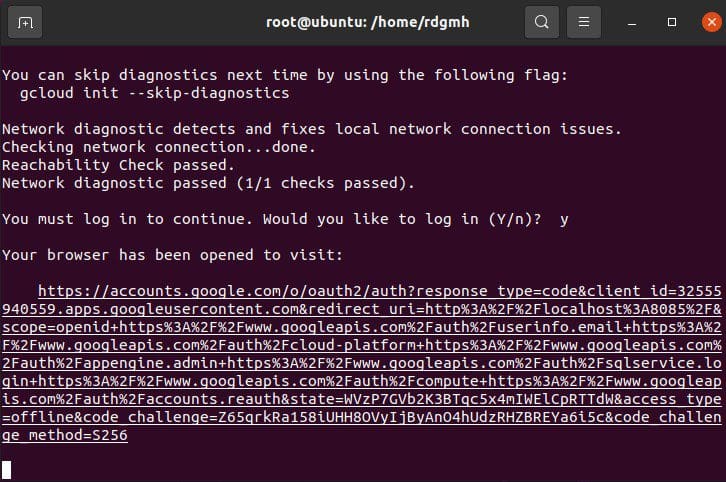
gcloud init --console-onlyThen, run the command above on your Linux system’s terminal shell if you wish to launch the Google Cloud SDK console view. When the network check is complete, a URL will be provided for you to view in a web browser.
Summary
In conclusion, for folks like me, moving PCs is time-consuming and challenging. Google Cloud offers a cloud-based ready-to-go integrated system that can be a convenient answer.
I’ve discussed two alternative ways to show you how install the Google Cloud SDK on a Linux machine and how to use it throughout the whole post.
I hope you found this blog post helpful. If you have any questions, please let me know in the comment session.


