Skip to content

TechDirectArchive

Hands-on IT, Cloud, Security & DevOps Insights

  • Home
  • About
  • Advertise With US
  • Reviews
  • Contact
  • Toggle search form
Home » Windows » DISM “Failed to open image” CWimImageInfo Mount(hr:0x8007000d): Fix Error DISM WIM Provider

DISM “Failed to open image” CWimImageInfo Mount(hr:0x8007000d): Fix Error DISM WIM Provider

Posted on 09/04/202409/04/2024 Christian By Christian No Comments on DISM “Failed to open image” CWimImageInfo Mount(hr:0x8007000d): Fix Error DISM WIM Provider
original 1

The Deployment Image Servicing and Management (DISM) tool is a command-line tool that is used to modify Windows images. In this article, we shall discuss the following error found in the log ‘DISM “Failed to open image” CWimImageInfo Mount(hr:0x8007000d): Fix Error DISM WIM Provider: PID=6928 TID=10308″. Please see how to update Microsoft Defender Antivirus into the install image of Windows (install.wim), and how to “Fix Error 183: The specified image is currently being serviced by another DISM operation“.

You can use DISM’s Features commands to enable or disable Windows features directly from the command prompt. Or by applying an answer file to the image. You can enable or disable Windows features offline on a WIM or VHD file, or online on a running operating system.

Below is the error prompted on the command line when running the DISM tool "The system cannot find the specified path".
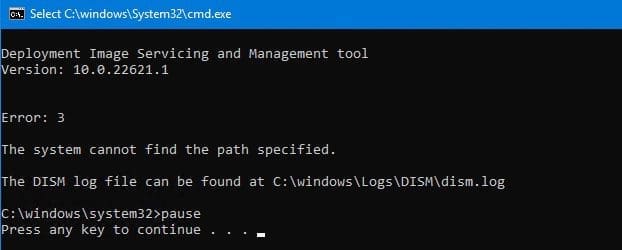
DISM-Error

Here are some possible errors you can encounter while resolving this issue Error 0xc1570103: The license file was not found in the specified path, and how to fix error 0xc1510114: The wim file needs to be remounted. Also, see “Install Wim: How to Add Packages to Windows image the DISM Tool“.

Log Review for DISM Error

As you can see above, the error message is not descriptive enough. Now let’s locate the log file as described in the image above

Dismerrorloglocation

When you open the log as described via CMTrace, the following errors will be displayed
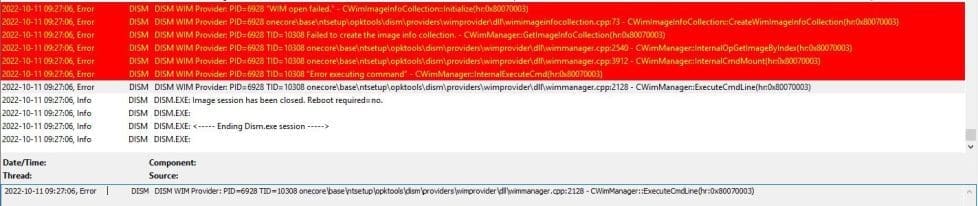
Wimerror

Note: This issue has nothing to do with the install.wim or boot.wim file. Therefore, you do not need to download a new ISO file to have the wim file extracted.

nonewwimfilerequired

Note: This has nothing to do with installing or repairing the Windows ADK. Shortly, I will be discussing the solution to this.

Note: Kindly avoid all manners of suggestions online and please pay attention to the errors prompted to you.

Reason and Solution

This isn’t a DISM or the installation file issue. The path to the Win file is incorrect as well. But the script included some line breaks in between. This may be hard to detect, therefore, I will advise copying it to a different text editor and copying it back to the original local and saving it.

Then run the command again, then it should work for you. If this does not fix your issue, then you must have a different and specific issue.

I urge you to pay more attention to your error than trying out every steps (solutions) on the internet.
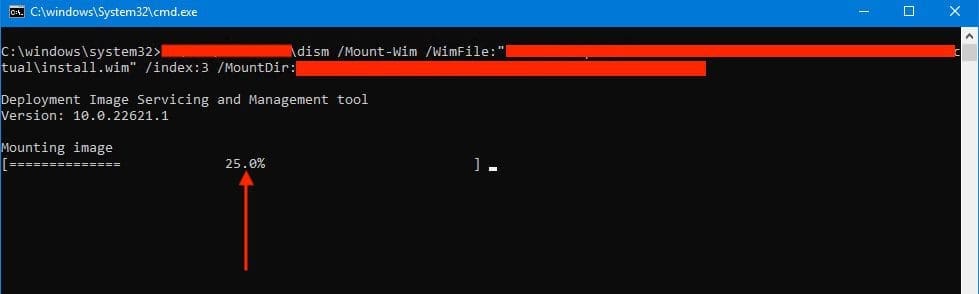
solutioncheckurDISMcommand

I hope you found the steps to fix “DISM “Failed to open image” CWimImageInfo Mount(hr:0x8007000d): Fix Error DISM WIM Provider: PID=6928 TID=10308 onecore\base\ntsetup\opktools\dism\providers\wimprovider\dll\wimmanager (hr:0x80070003)” very useful. Please feel free to leave a comment below.

Rate this post

Thank you for reading this post. Kindly share it with others.

  • Share on X (Opens in new window) X
  • Share on Reddit (Opens in new window) Reddit
  • Share on LinkedIn (Opens in new window) LinkedIn
  • Share on Facebook (Opens in new window) Facebook
  • Share on Pinterest (Opens in new window) Pinterest
  • Share on Tumblr (Opens in new window) Tumblr
  • Share on Telegram (Opens in new window) Telegram
  • Share on WhatsApp (Opens in new window) WhatsApp
  • Share on Mastodon (Opens in new window) Mastodon
  • Share on Bluesky (Opens in new window) Bluesky
  • Share on Threads (Opens in new window) Threads
  • Share on Nextdoor (Opens in new window) Nextdoor
Windows, Windows Server

Post navigation

Previous Post: Change Active Directory Domain name from dot local to dot com
Next Post: How to create a Logic App for monitoring tweets

Related Posts

  • banner
    How to hide Folders and Files from Search Results in Windows Windows
  • automatepythonsinwindows
    Python Automation in Windows with Visual Studio Code Version Control System
  • msinfo32 thumbnail
    How to use MSINFO32 to view System Information Windows
  • How to fix BitLocker always prompting for Recovery Key
    How to fix BitLocker always prompting for Recovery Key Windows
  • wingettool
    Install Applications with Winget CLI on Windows Windows Server
  • HybridCloudTrust
    WHFB Hybrid Cloud Kerberos Trust Model is now available AWS/Azure/OpenShift

More Related Articles

banner How to hide Folders and Files from Search Results in Windows Windows
automatepythonsinwindows Python Automation in Windows with Visual Studio Code Version Control System
msinfo32 thumbnail How to use MSINFO32 to view System Information Windows
How to fix BitLocker always prompting for Recovery Key How to fix BitLocker always prompting for Recovery Key Windows
wingettool Install Applications with Winget CLI on Windows Windows Server
HybridCloudTrust WHFB Hybrid Cloud Kerberos Trust Model is now available AWS/Azure/OpenShift

Leave a Reply Cancel reply

You must be logged in to post a comment.

Microsoft MVP

VEEAMLEGEND

vexpert-badge-stars-5

Virtual Background

GoogleNews

Categories

veeaam100

Veeam Vanguard

  • Screenshot 2022 03 20 at 21.08.50
    How to integrate AWS CodeBuild and AWS CodeCommit to SonarCloud AWS/Azure/OpenShift
  • 05kvj2jzbpj1ugp4etb4gdf 19.fit scale.size 2698x1517 e1690630247655
    Various methods to launch the Event Viewer Windows Server
  • How to Fix Scanning and Repairing Drive on Every Boot
    How to Fix Scanning and Repairing Drive on Every Boot Windows
  • Manage OU
    Delete or Rename and Create a Protected Organisation Unit in AD Windows Server
  • How to Hide or Fix HP Printer Updates Windows Error 0x800f020b
    Hide Windows Updates: How to Hide or Fix HP Printer Windows Updates Error 0x800f020b Windows
  • Slide1
    Fix Failed to open session in VirtualBox to install Windows 11 Image  Windows
  • Lets Encryp
    How to install Let’s Encrypt Certificates with IIS on a Windows Server Windows
  • banner
    How to Create a Child and Tree Domain Windows Server

Subscribe to Blog via Email

Enter your email address to subscribe to this blog and receive notifications of new posts by email.

Join 1,808 other subscribers
  • RSS - Posts
  • RSS - Comments
  • About
  • Authors
  • Write for us
  • Advertise with us
  • General Terms and Conditions
  • Privacy policy
  • Feedly
  • Telegram
  • Youtube
  • Facebook
  • Instagram
  • LinkedIn
  • Tumblr
  • Pinterest
  • Twitter
  • mastodon

Tags

AWS Azure Bitlocker Microsoft Windows PowerShell WDS Windows 10 Windows 11 Windows Deployment Services Windows Server 2016

Copyright © 2025 TechDirectArchive


Loading Comments...
 

You must be logged in to post a comment.