Skip to content

TechDirectArchive

Hands-on IT, Cloud, Security & DevOps Insights

  • Home
  • About
  • Advertise With US
  • Reviews
  • Contact
  • Toggle search form
Home » Oracle/MSSQL/MySQL » How to change the default user password in PostgreSQL

How to change the default user password in PostgreSQL

Posted on 26/05/202513/11/2025 Christian By Christian No Comments on How to change the default user password in PostgreSQL
Change default postgreSQL database password

In this guide, we shall discuss how to change the default user password in PostgreSQL. PostgreSQL is a relational database management system (RDBMS) that provides an open-source solution for storing and managing data. It offers a variety of features for database administration, queries, and security. This blog post was birthed by the following question: “Resetting the Veeam built-in PostgreSQL Database password” in the Veeam Forum. Please, see how to install PostgreSQL on Ubuntu, and how to migrate Veeam Configuration Database to PostgreSQL Server.

PostgreSQL supports complex queries, indexes, and transactions. It also has an active developer community that is constantly bringing new features and improvements. It’s a popular choice for businesses and developers who need a high-performance, reliable, and scalable database.

Note: Unlike some database systems, PostgreSQL does not assign a default password to the database superuser account (postgres) during installation. Instead, it follows a secure approach, requiring the user to create and manage passwords explicitly

Therefore, when the password field is prompted. You can just click on OK to connect to your PostgreSQL server as shown below. Please, see how to upgrade PostgreSQL Engine used by VBR

PostgreSQL default password is null

You can also connect via the Command Line (psql) with the command below.

$ sudo -u postgres psql

Now that you are aware that the default PostgresSQL user neither requires nor uses a password for authentication. Instead, depending how Postgres was originally installed and what version you are using. Please, see how to install PostgreSQL on Windows server as Veeam Database Engine. The default authentication method will either be ident or peer.

  • ident authentication uses the operating system’s identification server running at TCP port 113 to verify the user’s credentials.
  • peer authentication on the other hand. Is used for local connections and verifies that the logged in username of the operating system matches the username for the Postgres database.

Set the Default User Password via Command Line (psql)

Note: Maintaining strong security in PostgreSQL is a critical responsibility for database administrators. One of the first steps is to set a strong, unique password for the default superuser account. By default, PostgreSQL creates a user named postgres, which has full administrative privileges. To enhance security and prevent unauthorized access, log in as the postgres user and assign a secure password to this account.

To changeset the default PostgreSQL user (postgres) password via command line on Windows using psql. Follow the steps below. If yo run into issues “SSPI authentication failed for user” after changing the VBR hostname, you will need to update the pg_ident.conf file with the new hostname for all local user accounts.

Launch SQL Shell

Launch Command Prompt as Administrator, and connect to the PostgreSQL via psql. The psql is available in the system PATH. If not, locate it (usually in C:\Program Files\PostgreSQL\<version>\bin) or run commands from the SQL Shell (psql) as previously suggested.

psql -U postgres -d postgres

Note: You will be prompted to enter the current password for the postgres user. As you already know, I do not have a password. If you have also never set a password and the authentication method is trust, it may let you in without one.

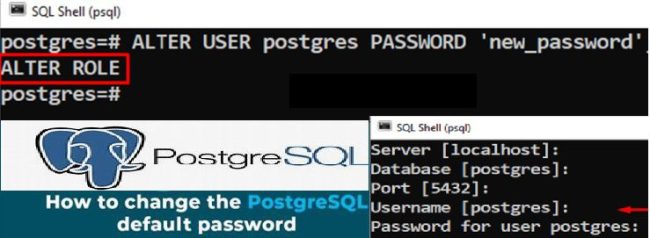
With a connection now established to Postgres at the psql prompt. Issue the ALTER USER command to change the password for the postgres user:

postgres=# ALTER USER postgres PASSWORD 'myPassword';
set postgresql password

Alternatively, you can execute the “ALTER ROLE” statement as shown below.

ALTER ROLE postgres PASSWORD 'my_new_password';
set the default postgresql user password

Please, see “Veeam backup for aws Processing postgres rds failed: No valid combination of the network settings was found for the worker configuration“, and how to upgrade Microsoft SQL Server 2019 to 2022

Exit the psql Shell

If successful, Postgres will output a confirmation of ALTER ROLE. Finally, exit the psql client by using the \q command.

postgres=# \q

The default PostgreSQL user now has a password associated with the account for use in your other applications.

Note: If you run into Trust authentication issues, you may have to modify the Postgres authentication config file (pg_hfa.conf).

I hope you found this article very useful on how to change the default user password in PostgreSQL. Please feel free to leave a comment below.

5/5 - (1 vote)

Thank you for reading this post. Kindly share it with others.

  • Share on X (Opens in new window) X
  • Share on Reddit (Opens in new window) Reddit
  • Share on LinkedIn (Opens in new window) LinkedIn
  • Share on Facebook (Opens in new window) Facebook
  • Share on Pinterest (Opens in new window) Pinterest
  • Share on Tumblr (Opens in new window) Tumblr
  • Share on Telegram (Opens in new window) Telegram
  • Share on WhatsApp (Opens in new window) WhatsApp
  • Share on Mastodon (Opens in new window) Mastodon
  • Share on Bluesky (Opens in new window) Bluesky
  • Share on Threads (Opens in new window) Threads
  • Share on Nextdoor (Opens in new window) Nextdoor
Oracle/MSSQL/MySQL Tags:Microsoft Windows, PostgreSQL, Windows 10, Windows 11, Windows Server 2016, Windows Server 2025

Post navigation

Previous Post: How to upgrade PostgreSQL Engine used by VBR
Next Post: Guide to Remote Desktop Connection Properties for Secure Access

Related Posts

  • check and assign privileges to a MySQL User
    How to check and assign privileges to a MySQL User Oracle/MSSQL/MySQL
  • sql server installation
    Install SQL Server 2022 Express and SQL Server Management Studio Oracle/MSSQL/MySQL
  • images 5 1
    How to access MySQL Server from command Prompt Oracle/MSSQL/MySQL
  • create a new Azure SQL Database
    How to create a new Azure SQL Database [PaaS] AWS/Azure/OpenShift
  • azure sql featured image
    How to delete ADFS Windows Internal Database without access credentials Oracle/MSSQL/MySQL
  • azure app service with office 365 and yammer sharepoint saturday florence 2015 session 8 638
    WordPress site on Azure: How to create a website hosted in Azure Oracle/MSSQL/MySQL

More Related Articles

check and assign privileges to a MySQL User How to check and assign privileges to a MySQL User Oracle/MSSQL/MySQL
sql server installation Install SQL Server 2022 Express and SQL Server Management Studio Oracle/MSSQL/MySQL
images 5 1 How to access MySQL Server from command Prompt Oracle/MSSQL/MySQL
create a new Azure SQL Database How to create a new Azure SQL Database [PaaS] AWS/Azure/OpenShift
azure sql featured image How to delete ADFS Windows Internal Database without access credentials Oracle/MSSQL/MySQL
azure app service with office 365 and yammer sharepoint saturday florence 2015 session 8 638 WordPress site on Azure: How to create a website hosted in Azure Oracle/MSSQL/MySQL

Leave a Reply Cancel reply

You must be logged in to post a comment.

Microsoft MVP

VEEAMLEGEND

vexpert-badge-stars-5

Virtual Background

GoogleNews

Categories

veeaam100

Veeam Vanguard

  • Ping 3
    How to convert images from PNG to JPG on WordPress, Windows, and Mac JIRA|Confluence|Apps
  • Screenshot 2020 09 19 at 02.22.42
    Remove Windows 10 Apps with DISM: How to remove pre-provisioned apps from Windows Image Windows Server
  • azure app service with office 365 and yammer sharepoint saturday florence 2015 session 8 638
    WordPress site on Azure: How to create a website hosted in Azure Oracle/MSSQL/MySQL
  • exchange 2016 1
    Failed Edge Transport: Easy Guide For Removal Network | Monitoring
  • powershell
    How to install the Microsoft PSWindowsUpdate module silently Scripts
  • Ping commands
    Ping from Source IP Address from all environments Mac
  • ArchiveUnarchiveDelete134
    Manage a GitLab Project: How to archive or unarchive and delete GitLab projects Version Control System
  • ads
    How to disable Ads in Windows 11 Windows

Subscribe to Blog via Email

Enter your email address to subscribe to this blog and receive notifications of new posts by email.

Join 1,814 other subscribers
  • RSS - Posts
  • RSS - Comments
  • About
  • Authors
  • Write for us
  • Advertise with us
  • General Terms and Conditions
  • Privacy policy
  • Feedly
  • Telegram
  • Youtube
  • Facebook
  • Instagram
  • LinkedIn
  • Tumblr
  • Pinterest
  • Twitter
  • mastodon

Tags

Active Directory Azure Bitlocker Microsoft Windows PowerShell WDS Windows 10 Windows 11 Windows Deployment Services Windows Server 2016

Copyright © 2025 TechDirectArchive


Loading Comments...
 

You must be logged in to post a comment.