Fix Error 0x87E10BC6 on a PC running Windows non-core Edition


In this article, we shall discuss how to Fix Error 0x87E10BC6 on a PC running Windows non-core Edition. The error code 0x87e10bc6 occurs when there is an issue with activating Windows as we will see very shortly. This can be due to various reasons such as server issues, firewall interference, or incorrect product key. Please, see What to know about “Failed to perform Veeam Worker Upgrade”, and how to Fix SMB Freezes That Break Backups on Critical Linux Servers.
As you would see on the internet or on some AI Assistance (Conversation AI) platforms. You are required to run the Windows Activation Troubleshooter when the SLMGR commands do not work.
Therefore, understanding the server edition such as the “Non-Core”/Semi-Minimal Installation or Server with Desktop Experience (Full) etc” installed and the type of ISO used will be paramount in solving this issue. Non-core is another way of describing “server with Desktop Experience”.
Also, see how to Set up Veeam Backup for Microsoft Azure, how to Check Windows Activation Status and troubleshoot activation errors, and how to Transfer Windows License from one PC to the other on Windows.
Why was the error prompted “Activating Windows ServerStandard Edition (Error 0x87E10BC6)
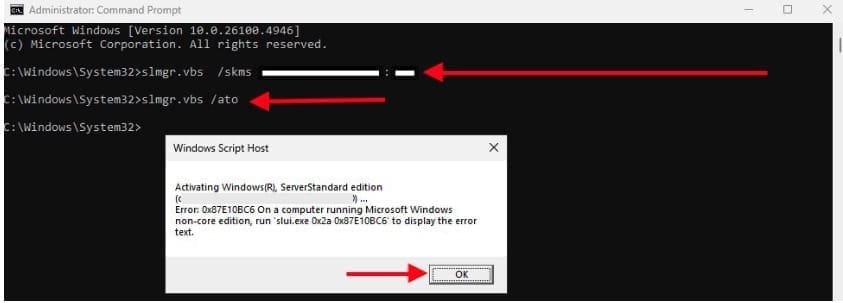
As noted, I attempted to activate this Windows Server using the slmgr command. The error 0x87E10BC6 indicates an activation failure caused by a mismatch between the installed edition’s licensing type and the ISO (minimal edition) used for installation.
Reviewing the KMS logs and understanding the available installation ISOs in your environment will be essential for identifying the correct edition and resolving the activation issue.
The KMS log is where Windows records activation attempts and errors when using a Key Management Service (KMS) for volume activation. On Windows Server (and client editions), it’s essential for diagnosing activation errors like 0x87E10BC6.
Regardless of the Edition you install with this ISO, you will get the below error. To do this, navigate to Settings > System > Activation and click Troubleshoot.

Even when attempting to execute the activation command on a single line. The system returns the following error. This indicates that the activation attempt fails due to a mismatch between the installed edition and the provided activation channel and Port.
slmgr.vbs /ipk <KMS server> /ato
Note: If activation fails, the Windows Activation Troubleshooter can normally be used to resolve common issues. However, as mentioned earlier, in this case the tool will not resolve the problem because the installed edition of Windows Server does not match the licensing type.

Please, see “Editions of MSSQL Server: What are the differences between various Editions of Microsoft SQL Server“. Here is a guide on “Microsoft SQL Evaluation period has expired: How to upgrade SQL Server instance“.
Fix Error 0x87E10BC6 on a PC running Windows non-core Edition
Due to the error message “Error 0x87E10BC6 on a PC running Windows non-core Edition.” It appears that the installed Windows Server, despite being non-core. Some reason for this could be that most Windows Server ISOs are often “Slipstreamed” with the latest cummulative updates. These updates might include changes to the activation or installation process than the older non-updated ISO.
While such editions may appear as “non-core” in logs or setup, they are not a complete Full installation.
Therefore, I will proceed to install the correct “Older ISO” to deploy a Windows Server with Desktop. This ensures proper activation and compatibility.
Please, see How to install Windows Server unto ACEMAGICIAN Mini PC, and how to Install Windows Server 2025 via iDRAC Virtual Media or PXE. Here is how to Convert Windows Server Datacenter to Standard: Install Windows Server via iDRAC Virtual Media.
Upon installing Windows Server 2025 using the an older ISO. I was able to successfully activate the operating system using the slmgr volume licensing commands.
slmgr.vbs /skms <KMS_SERVER_NAME or FQDN:port>
slmgr.vbs /ato
slmgr.vbs /ipk <YOUR-PRODUCT-KEY> /ato
This enforces the thoughts that the older ISO contained a more complete set of features or it was a specific type of installation media that bundled the Full desktop experience.
Also, see how to Configure Windows Server Core using SConfig. Here is how to perform In-place upgrade of Windows Server 2022 to 2025.
As you can see below also. Windows is activated using the organizations activation service.

Tip: Update your KMS Server
Note that in some cases, your KMS server may need the latest Windows Updates to activate newer client versions. If you run into activation errors. Make sure the server has the required updates listed under the Activation Versions section on the official Microsoft Learn site.
Except this is not the case, please follow the steps below. A KMS Server activated with a newer KMS Host Key can activate all previous versions of Windows. But not vice versa. For example, a KMS server activated with a Windows Server 2016 Data center, or Standard Edition KMS key won’t be able to activate Windows 11 or Windows Server 2022/2019 computers etc.
To support modern versions of Windows. You will need to obtain a new CSVLK key and activate it on your KMS server.
I hope you found this article on how to fix Error 0x87E10BC6 on a PC running Windows non-core Edition very useful. Please, feel free to leave a comment below.


