Skip to content

TechDirectArchive

Hands-on IT, Cloud, Security & DevOps Insights

  • Home
  • About
  • Advertise With US
  • Reviews
  • Contact
  • Toggle search form
Home » Backup » Cloud Protection Manager: N2WS Veeam CPM Guide
  • Featured Image
    Restore Point Creation in Windows 10 and Windows 11 Windows
  • image 14
    How to fix Unknown Hard Error on Windows Server and Windows 10 Windows
  • screenshot 2020 03 26 at 22.14.14
    How to create a scheduled task with Windows Admin Center Windows Server
  • BitLocker Recovery Password Rotation in Active Directory
    Perform BitLocker Recovery Password Rotation in Active Directory Windows Server
  • dev
    Disable Developer Tools in Microsoft Edge using Registry or Group Policy in Windows Windows
  • screenshot 2020 03 20 at 16.10.20
    How to install Ansible on Windows with Cygwin Windows Server
  • image 77
    How to use the DigiCert certificate utility for Windows to create a CSR Windows
  • Screenshot 2022 03 15 at 10.05.53
    VMware Workstation states: What are the differences between Suspend, Power Off, and Run in Background Linux

Cloud Protection Manager: N2WS Veeam CPM Guide

Posted on 17/05/201822/03/2024 Christian By Christian No Comments on Cloud Protection Manager: N2WS Veeam CPM Guide
N2WS

Cloud Protection Manager by N2WS stands as a premier solution for enterprise backup, recovery, and disaster recovery needs within the Amazon Web Services (AWS) ecosystem. With a focus on Amazon Elastic Compute Cloud (EC2), Amazon Relational Database Services (RDS), Amazon Redshift, Amazon Elastic File System (EFS), Amazon Simple Storage Service (S3), Amazon Aurora, and Amazon DynamoDB, N2WS offers cutting-edge capabilities to ensure data security and availability.

Kindly refer to these related guides to more on other Veeam products. How to migrate Veeam MsSQL Database to a new MsSQL Server, how to implement N2WS Veeam Cloud Protection Manager (CPM 2.3.0d), and the advantage of using a 3rd party software for Backup (N2WS by Veeam) over AMI.

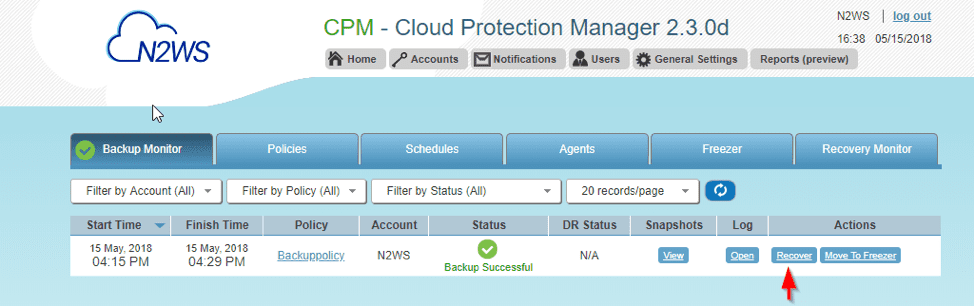
Kindly follow these steps to recover backup via N2WS Veeam  CPM.

Enhanced Recovery Workflow with Cloud Protection Manager

When utilizing Cloud Protection Manager, as depicted in the image below, the recovery of backup instances becomes notably streamlined. Furthermore, this approach surpasses exclusive AMI reliance, assuring instance configuration preservation, except EIP. Attaching an EIP within a VPC while launching a new instance is not feasible.
Veeam

Note: When utilizing Cloud Protection Manager, it’s important to note that due to the incremental nature of the process, the initial backup might typically require more time than subsequent ones.
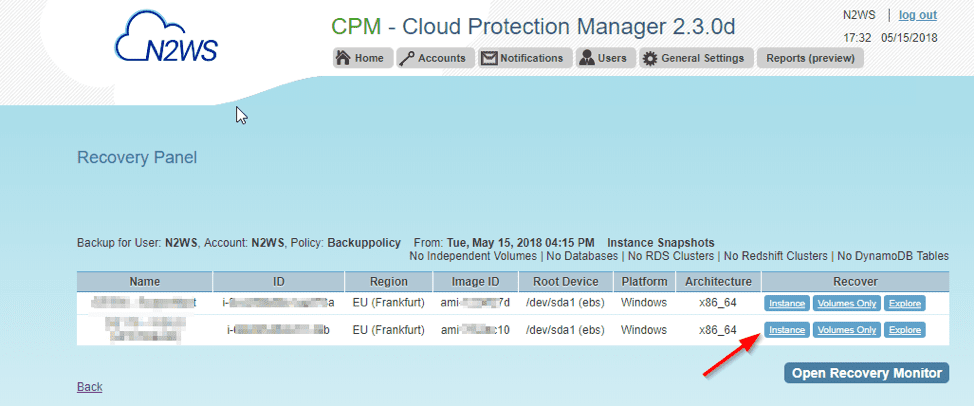
– Next select instance as I wish to recover the whole instance as shown below
Cloud Protection Manager

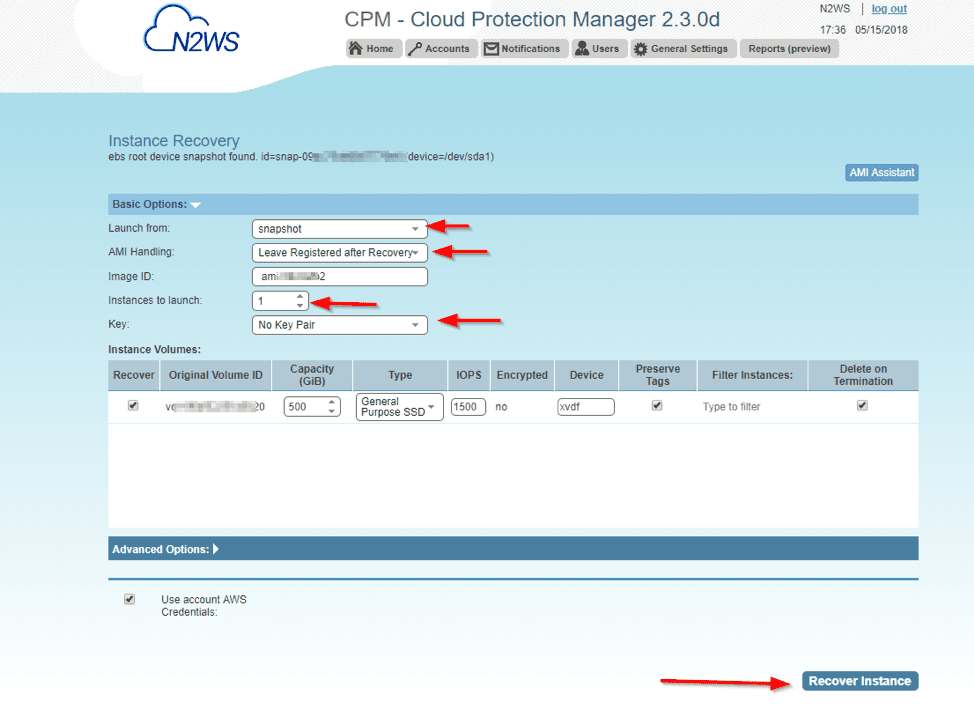
Which will prompt the Instance Recovery Window.

In the realm of safeguarding your cloud infrastructure, Cloud Protection Manager steps to the forefront. Follow the guidelines below to input all essential details, which might vary based on your unique situation.
CPM Guide

And this will prompt you to confirm performing Recovery Operations.

Select Okay.  The green status showing the successful recovery operation launched

Now Open the resource Monitor to view the progress
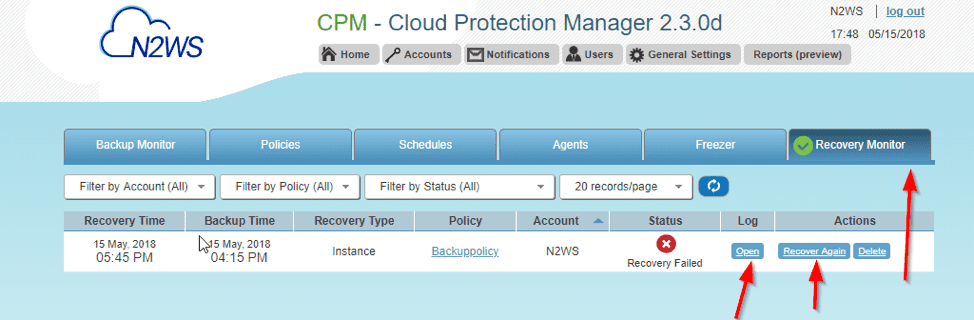
Note: In the context of Cloud Protection Manager, the failure in question stems from the persistence of the identical private IP address on the server that was subjected to backup.

Therefore, this goal is successful. And I performed using a dummy device and it worked.

I hope you found this blog post helpful. If you have any questions, please let me know in the comment session.

Rate this post

Thank you for reading this post. Kindly share it with others.

  • Click to share on X (Opens in new window) X
  • Click to share on Reddit (Opens in new window) Reddit
  • Click to share on LinkedIn (Opens in new window) LinkedIn
  • Click to share on Facebook (Opens in new window) Facebook
  • Click to share on Pinterest (Opens in new window) Pinterest
  • Click to share on Tumblr (Opens in new window) Tumblr
  • Click to share on Telegram (Opens in new window) Telegram
  • Click to share on WhatsApp (Opens in new window) WhatsApp
  • Click to share on Pocket (Opens in new window) Pocket
  • Click to share on Mastodon (Opens in new window) Mastodon
  • Click to share on Bluesky (Opens in new window) Bluesky
  • Click to share on Threads (Opens in new window) Threads
  • Click to share on Nextdoor (Opens in new window) Nextdoor
Backup Tags:Backup Database, Image backup, Veeam

Post navigation

Previous Post: How to implement N2WS Backup & Recovery (CPM)
Next Post: Client Visibility Issues: Fix WSUS Clients appear then disappear in the console

Related Posts

  • Error 1069 Windows could not start
    Fix Error 1069: Windows could not start the Veeam backup service on local computer Backup
  • Steps to upgrade VBR to v12.1
    How to upgrade Veeam Backup and Replication v11 to 12.1 Backup
  • Integrate OOTBI with VBR
    How to integrate ObjectFirst OOTBI Appliance with VBR Backup
  • Upgrade for Veeam ONE
    How to upgrade Veeam ONE to v12.1 Backup
  • banner 1
    How to Export and remove Passwords in Firefox Backup
  • nextcloudfeature 1
    How To Install Nextcloud on a Linux system Backup

More Related Articles

Error 1069 Windows could not start Fix Error 1069: Windows could not start the Veeam backup service on local computer Backup
Steps to upgrade VBR to v12.1 How to upgrade Veeam Backup and Replication v11 to 12.1 Backup
Integrate OOTBI with VBR How to integrate ObjectFirst OOTBI Appliance with VBR Backup
Upgrade for Veeam ONE How to upgrade Veeam ONE to v12.1 Backup
banner 1 How to Export and remove Passwords in Firefox Backup
nextcloudfeature 1 How To Install Nextcloud on a Linux system Backup

Leave a Reply Cancel reply

You must be logged in to post a comment.

Microsoft MVP

VEEAMLEGEND

vexpert-badge-stars-5

Virtual Background

GoogleNews

Categories

veeaam100

sysadmin top30a

  • Featured Image
    Restore Point Creation in Windows 10 and Windows 11 Windows
  • image 14
    How to fix Unknown Hard Error on Windows Server and Windows 10 Windows
  • screenshot 2020 03 26 at 22.14.14
    How to create a scheduled task with Windows Admin Center Windows Server
  • BitLocker Recovery Password Rotation in Active Directory
    Perform BitLocker Recovery Password Rotation in Active Directory Windows Server
  • dev
    Disable Developer Tools in Microsoft Edge using Registry or Group Policy in Windows Windows
  • screenshot 2020 03 20 at 16.10.20
    How to install Ansible on Windows with Cygwin Windows Server
  • image 77
    How to use the DigiCert certificate utility for Windows to create a CSR Windows
  • Screenshot 2022 03 15 at 10.05.53
    VMware Workstation states: What are the differences between Suspend, Power Off, and Run in Background Linux

Subscribe to Blog via Email

Enter your email address to subscribe to this blog and receive notifications of new posts by email.

Join 1,839 other subscribers
  • RSS - Posts
  • RSS - Comments
  • About
  • Authors
  • Write for us
  • Advertise with us
  • General Terms and Conditions
  • Privacy policy
  • Feedly
  • Telegram
  • Youtube
  • Facebook
  • Instagram
  • LinkedIn
  • Tumblr
  • Pinterest
  • Twitter
  • mastodon

Tags

AWS Azure Bitlocker Microsoft Windows PowerShell WDS Windows 10 Windows 11 Windows Deployment Services Windows Server 2016

Copyright © 2025 TechDirectArchive


Loading Comments...
 

You must be logged in to post a comment.