Skip to content

TechDirectArchive

Hands-on IT, Cloud, Security & DevOps Insights

  • Home
  • About
  • Advertise With US
  • Contact
  • Reviews
  • Toggle search form
Home » Windows » Fix Windows cannot check for updates in Windows 8, 7, and 10
  • elasticsearch error feature
    Elasticsearch: How to stop systemd service start operation from timing out Linux
  • updates
    How to stop Windows from applying updates Windows
  • Storage Explorer
    How to Install Azure Storage Explorer on Windows AWS/Azure/OpenShift
  • windows pe screenshot1 rcm1200x0
    Workaround and Permanent fix for this snap-in performed a non-valid operation and has been unloaded: To continue using this snap-in restart MMC or try loading the snap-in again Windows Server
  • Windows server 2025 set up
    Install Windows Server 2025 via iDRAC Virtual Media or PXE Windows Server
  • sdf
    Creating an offline local repository in Linux Linux
  • fix IP addressed blocked Synology
    IP Address blocked on Synology NAS due to forgotten Password Storage
  • Screenshot 2020 11 17 at 12.20.15
    PA Server Monitor Ultra: How to setup PA Server Monitor Reviews

Fix Windows cannot check for updates in Windows 8, 7, and 10

Posted on 13/07/201815/08/2023 Christian By Christian No Comments on Fix Windows cannot check for updates in Windows 8, 7, and 10
Update errors

Dealing with update issues is a common concern for Windows users across various versions, including Windows 8, 7, and 10. If you’re encountering the frustrating problem of not being able to check for updates, you’re not alone. Fortunately, there are effective solutions available to fix Windows cannot check for updates errors and regain control over your system’s updates. Whether you’re facing this issue due to system glitches, network problems, or other underlying causes, understanding the steps to fix Windows cannot check for updates is crucial to ensure your operating system’s security, performance, and functionality remain optimal.

In this comprehensive guide, we’ll delve into troubleshooting methods tailored to Windows 8, 7, and 10, covering a range of potential solutions to this persistent problem. From verifying network connections to exploring system-specific fixes, you’ll find step-by-step instructions to resolve the issue and restore your ability to initiate updates seamlessly. By following these strategies, you can overcome the challenges posed by update errors and enable your Windows system to fix Windows cannot check for updates reliably, keeping your OS up-to-date and running smoothly.

Error - "Windows Update error “Windows update cannot currently check for updates because the service is not running. You may need to restart your computer” probably occurs when Windows temporary update folder (SoftwareDistribution folder) is corrupted"
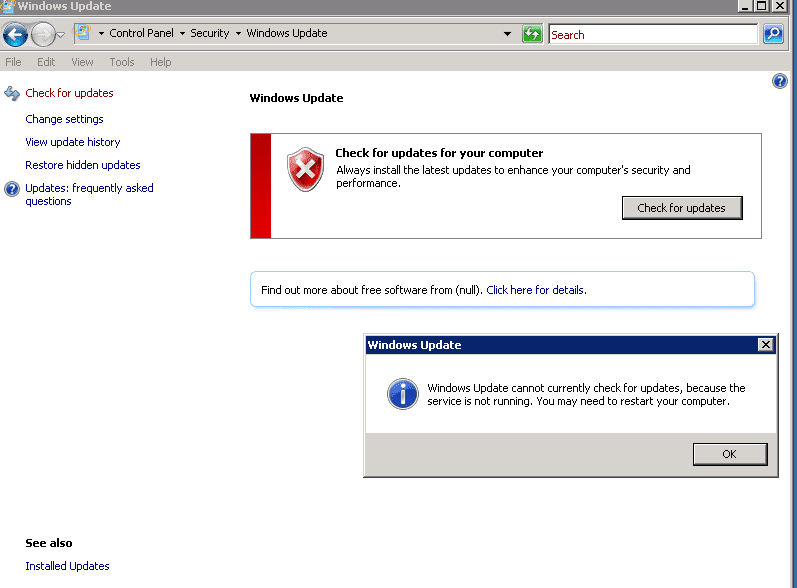
Windows update problem

Solution: To easily fix this error, follow the steps below
1. Stop Windows Update service.
2: Open “My Computer” and navigate to “C:Windows”folder.
– Delete (or Rename e.g. to “SoftwareDistributionOLD”) the “SoftwareDistribution” folder.
– Renamed in my case as “SoftwareDistributionOLD”

Step 3: Start the Windows Update service.
– Go to Windows services and “Start”theWindows Update service.
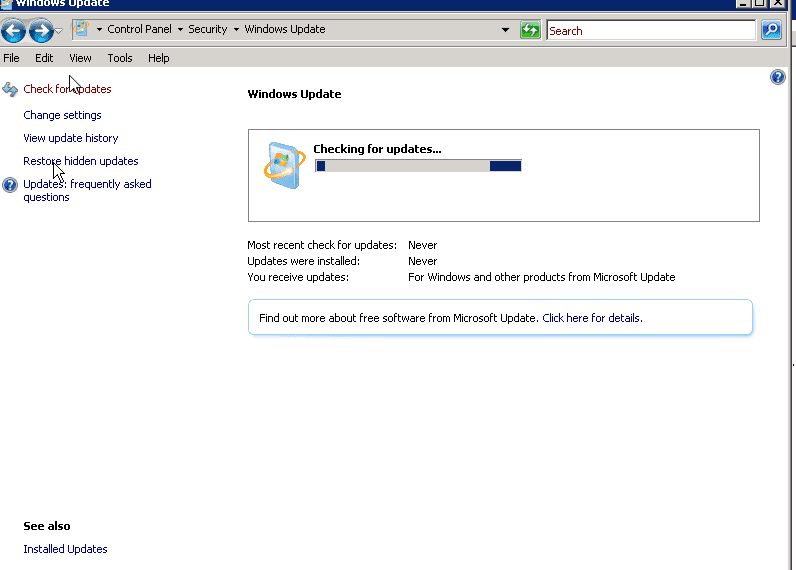
Update troubleshooting

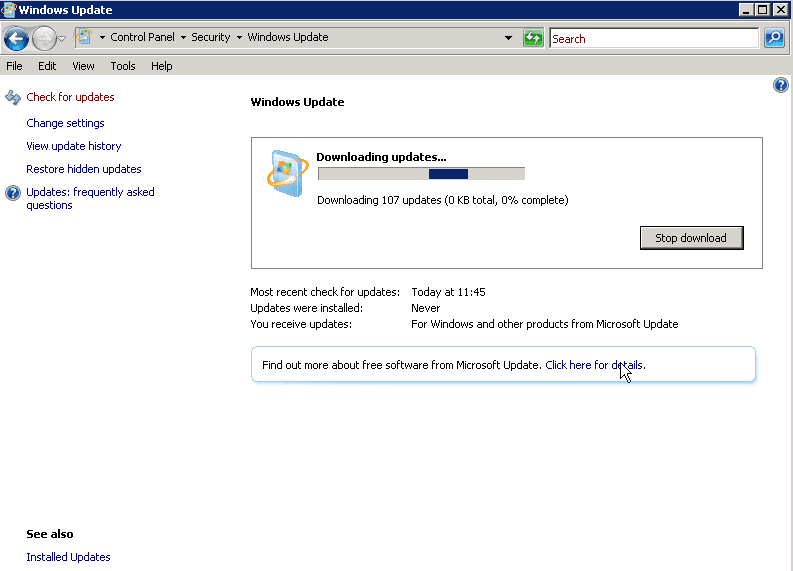
After search was complete, we could find all updates as shown below
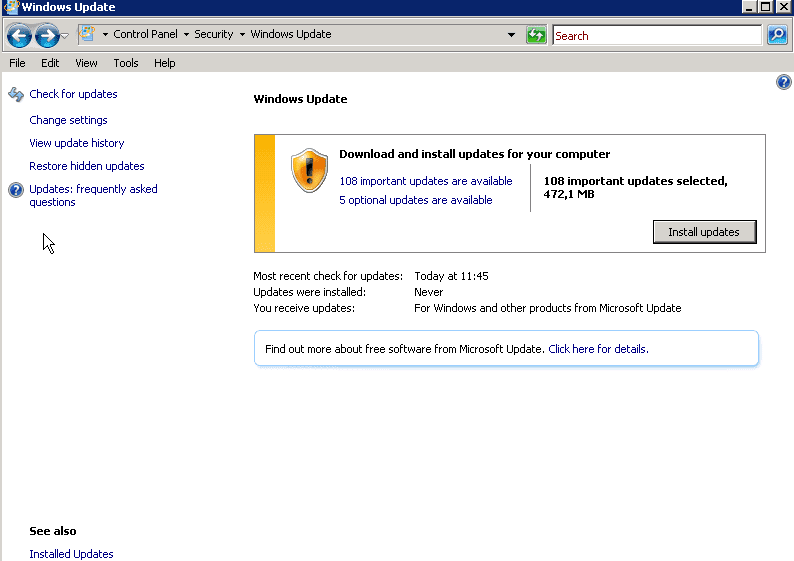
Now you can proceed installing your updates
I hope you found this blog post helpful. If you have any questions, please let me know in the comment session. I welcome you to follow me on Twitter and Facebook.

Rate this post

Thank you for reading this post. Kindly share it with others.

  • Click to share on X (Opens in new window) X
  • Click to share on Reddit (Opens in new window) Reddit
  • Click to share on LinkedIn (Opens in new window) LinkedIn
  • Click to share on Facebook (Opens in new window) Facebook
  • Click to share on Pinterest (Opens in new window) Pinterest
  • Click to share on Tumblr (Opens in new window) Tumblr
  • Click to share on Telegram (Opens in new window) Telegram
  • Click to share on WhatsApp (Opens in new window) WhatsApp
  • Click to share on Pocket (Opens in new window) Pocket
  • Click to share on Mastodon (Opens in new window) Mastodon
  • Click to share on Bluesky (Opens in new window) Bluesky
  • Click to share on Threads (Opens in new window) Threads
  • Click to share on Nextdoor (Opens in new window) Nextdoor
Windows Tags:Windows 10

Post navigation

Previous Post: AWS Network Adapter: Redhat to Citrix PV and AWS PV Driver
Next Post: Fix Windows Can’t find the path: Please check the spelling and try again

Related Posts

  • change keyboard layout windows 10 thumb800
    Prevent on-screen keyboard from starting automatically and from appearing at login Windows
  • Create Windows Defender Firewall Rule
    Fix Windows defender blocked incoming connection on Windows Network | Monitoring
  • Featured image 9
    Create and Delete Registry Keys via PowerShell in Windows Scripts
  • FixThunderboltissue
    Fix the Thunderbolt application is not in use and can be safely uninstalled Windows
  • banner
    How to Fix Python was not found run without arguments to install from the Microsoft Store Windows
  • schedulepythontasksinWindows
    Run Python Script via Windows Task Scheduler Windows

More Related Articles

change keyboard layout windows 10 thumb800 Prevent on-screen keyboard from starting automatically and from appearing at login Windows
Create Windows Defender Firewall Rule Fix Windows defender blocked incoming connection on Windows Network | Monitoring
Featured image 9 Create and Delete Registry Keys via PowerShell in Windows Scripts
FixThunderboltissue Fix the Thunderbolt application is not in use and can be safely uninstalled Windows
banner How to Fix Python was not found run without arguments to install from the Microsoft Store Windows
schedulepythontasksinWindows Run Python Script via Windows Task Scheduler Windows

Leave a Reply Cancel reply

You must be logged in to post a comment.

Microsoft MVP

VEEAMLEGEND

vexpert-badge-stars-5

Virtual Background

GoogleNews

Categories

veeaam100

sysadmin top30a
 
  • elasticsearch error feature
    Elasticsearch: How to stop systemd service start operation from timing out Linux
  • updates
    How to stop Windows from applying updates Windows
  • Storage Explorer
    How to Install Azure Storage Explorer on Windows AWS/Azure/OpenShift
  • windows pe screenshot1 rcm1200x0
    Workaround and Permanent fix for this snap-in performed a non-valid operation and has been unloaded: To continue using this snap-in restart MMC or try loading the snap-in again Windows Server
  • Windows server 2025 set up
    Install Windows Server 2025 via iDRAC Virtual Media or PXE Windows Server
  • sdf
    Creating an offline local repository in Linux Linux
  • fix IP addressed blocked Synology
    IP Address blocked on Synology NAS due to forgotten Password Storage
  • Screenshot 2020 11 17 at 12.20.15
    PA Server Monitor Ultra: How to setup PA Server Monitor Reviews

Subscribe to Blog via Email

Enter your email address to subscribe to this blog and receive notifications of new posts by email.

Join 1,841 other subscribers
  • RSS - Posts
  • RSS - Comments
  • About
  • Authors
  • Write for us
  • Advertise with us
  • General Terms and Conditions
  • Privacy policy
  • Feedly
  • Telegram
  • Youtube
  • Facebook
  • Instagram
  • LinkedIn
  • Tumblr
  • Pinterest
  • Twitter
  • mastodon

Tags

AWS Azure Bitlocker Microsoft Windows PowerShell WDS Windows 10 Windows 11 Windows Deployment Services Windows Server 2016

Copyright © 2025 TechDirectArchive


Loading Comments...
 

You must be logged in to post a comment.