Skip to content

TechDirectArchive

Hands-on IT, Cloud, Security & DevOps Insights

  • Home
  • About
  • Advertise With US
  • Contact
  • Reviews
  • Toggle search form
Home » Linux » Linux Machine: Is it Virtual or a Physical server
  • featureimagepshell 1
    Running PowerShell remotely on Azure VMs AWS/Azure/OpenShift
  • adfs
    Guide on federating ADFS with Azure Active Directory AWS/Azure/OpenShift
  • screenshot 2020 02 08 at 15.53.31
    Enable Automatic Logon on Windows Windows Server
  • How to Make the Taskbar Transparent in Windows 11
    How to Make Your Taskbar Completely Transparent on Windows 11 Windows
  • encrypt your Data with Trellix Data Encryption
    How to encrypt your system with Trellix Data Encryption Security | Vulnerability Scans and Assessment
  • ansible logo600 591x296 1 1
    Ansible error: Server unreachable, ssl: auth method ssl requires a password Configuration Management Tool
  • tmutil localsnapshot
    Fix what is taking up my Mac Storage? Delete Snapshots Network | Monitoring
  • Machine translation software min
    Self-hosted translator: How to install and uninstall SYSTRAN 6 translator on Windows Security | Vulnerability Scans and Assessment

Linux Machine: Is it Virtual or a Physical server

Posted on 11/10/202031/08/2023 Christian By Christian No Comments on Linux Machine: Is it Virtual or a Physical server
Virtualization technology

Sometimes, as a Linux Administrator, you want to know if a server you are working on remotely is a Physical device or a Virtual machine. This tutorial explains some simple command which will help you determine the nature of the machine you are working on.

SAMPLE 1  The dmidecode tool


This is the Desktop Management Interface table decoder and it retrieves comprehensive system information of your systems hardware components and presents it in a readable format.

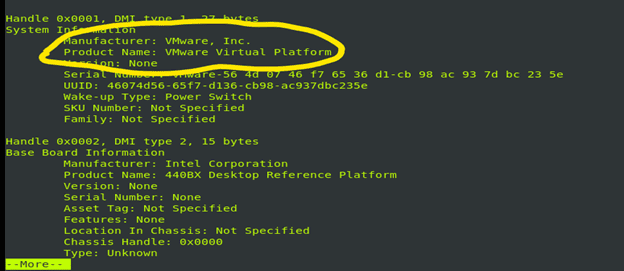
Below are two images from the command: sudo dmidecode | more

Server hardware
Hypervisor

You can download the dmidecode package from: https://centos.pkgs.org/6/centos-x86_64/dmidecode-2.12-7.el6.x86_64.rpm.html
– Other derivatives of the dmidecode command are:

Sudo dmidecode –s system-manufacturer
Cloud computing

My machine is a Virtual Machine. If it were a physical device, the output will be the name of the company that developed the device e.g. Dell Inc, Lenovo, Asus Inc.

Other virtualization tools exist such as innotek , which is German based company that develops Virtualbox.

sudo dmidecode –t system

Virtualization technology
sudo dmidecode | egrep -i 'manufacturer|product'
Hypervisor
sudo dmidecode -s system-product-name
Cloud computing

Their outputs will differ in format but they will tell the Physical or Virtual nature of the Linux machine.

SAMPLE 2 : hostnamectl
If you have system installed, hostnamectl is a very good good command to determine if the machine is physical or virtual.

Hotsnamectl status
Virtualization technology

SAMPLE 3 : Viewing the /sys/class/dmi/id/product_name using the cat command

cat /sys/class/dmi/id/product_name

Server hardware

However, this particular command has a certain peculiarity: a libvirt-kvm-VM will be displayed as Standard PC (i440fx +/PIIX) which is a common fingerprint for QEMU/KVM VITUAL virtual machines.

Another derivative of this command is;

pr –t /sys/class/dmi/id/sys-vendor/sys/class/dmi//id/product_name

Cloud computing

SAMPLE 4: Using the dmesg tool with the following command;

 Sudo dmesg | grep “Hypervisor detected” 

What this dmesg does is to control the kernel buffer. If the machine is virtual, the output will be something like the image below. If it is a physical device, the command will return nothing

SAMPLE 5: virt-what
You will need to install this utility. And the command is just that. If the machine is virtual, the output will look like the image below:

If the machine is physical, it will return nothing or exit the script with code0.

SAMPLE 6: lshw
This utility is included in the epel-release. if you don’t have it already, you need to install it and then install the lshw utility.

If this were a physical device, the output under the product tag will be the model of the device.

SAMPLE 7: systemd-detect-virt
This command is unique in a way in that it can tell the difference in the virtualization tehnology if the system is on a virtual machine

If this were a physical device, the output to the command will be none. However, if it is a virtual machine on VirtualBox, the output will be “Is it Virtual or a Physical server.

Rate this post

Thank you for reading this post. Kindly share it with others.

  • Click to share on X (Opens in new window) X
  • Click to share on Reddit (Opens in new window) Reddit
  • Click to share on LinkedIn (Opens in new window) LinkedIn
  • Click to share on Facebook (Opens in new window) Facebook
  • Click to share on Pinterest (Opens in new window) Pinterest
  • Click to share on Tumblr (Opens in new window) Tumblr
  • Click to share on Telegram (Opens in new window) Telegram
  • Click to share on WhatsApp (Opens in new window) WhatsApp
  • Click to share on Pocket (Opens in new window) Pocket
  • Click to share on Mastodon (Opens in new window) Mastodon
  • Click to share on Bluesky (Opens in new window) Bluesky
  • Click to share on Threads (Opens in new window) Threads
  • Click to share on Nextdoor (Opens in new window) Nextdoor
Linux Tags:Virtual Machine, VirtualBox, virtualization

Post navigation

Previous Post: How to pause a PowerShell script
Next Post: Keepalive Settings: Understanding keepalive configuration

Related Posts

  • S3 Bucket 1
    How to delete AWS S3 Bucket and Objects via  AWS CLI from Linux AWS/Azure/OpenShift
  • FEATURE IMAGE
    SSH into a VM created using Azure CLI or GUI Linux
  • Run Linux on Windows Server
    How to install Windows Subsystem for Linux on Windows Server Linux
  • Webp.net resizeimage 1
    Automate Infrastructure Deployments in the Cloud with Ansible and Azure Pipelines AWS/Azure/OpenShift
  • posfix as an smtp server
    How to Install and Configure Postfix as a Send-Only SMTP Server Linux
  • speedtest
    How to set up a self-hosted speed test server on Ubuntu Linux Linux

More Related Articles

S3 Bucket 1 How to delete AWS S3 Bucket and Objects via  AWS CLI from Linux AWS/Azure/OpenShift
FEATURE IMAGE SSH into a VM created using Azure CLI or GUI Linux
Run Linux on Windows Server How to install Windows Subsystem for Linux on Windows Server Linux
Webp.net resizeimage 1 Automate Infrastructure Deployments in the Cloud with Ansible and Azure Pipelines AWS/Azure/OpenShift
posfix as an smtp server How to Install and Configure Postfix as a Send-Only SMTP Server Linux
speedtest How to set up a self-hosted speed test server on Ubuntu Linux Linux

Leave a Reply Cancel reply

You must be logged in to post a comment.

Microsoft MVP

VEEAMLEGEND

vexpert-badge-stars-5

Virtual Background

GoogleNews

Categories

veeaam100

sysadmin top30a

  • featureimagepshell 1
    Running PowerShell remotely on Azure VMs AWS/Azure/OpenShift
  • adfs
    Guide on federating ADFS with Azure Active Directory AWS/Azure/OpenShift
  • screenshot 2020 02 08 at 15.53.31
    Enable Automatic Logon on Windows Windows Server
  • How to Make the Taskbar Transparent in Windows 11
    How to Make Your Taskbar Completely Transparent on Windows 11 Windows
  • encrypt your Data with Trellix Data Encryption
    How to encrypt your system with Trellix Data Encryption Security | Vulnerability Scans and Assessment
  • ansible logo600 591x296 1 1
    Ansible error: Server unreachable, ssl: auth method ssl requires a password Configuration Management Tool
  • tmutil localsnapshot
    Fix what is taking up my Mac Storage? Delete Snapshots Network | Monitoring
  • Machine translation software min
    Self-hosted translator: How to install and uninstall SYSTRAN 6 translator on Windows Security | Vulnerability Scans and Assessment

Subscribe to Blog via Email

Enter your email address to subscribe to this blog and receive notifications of new posts by email.

Join 1,841 other subscribers
  • RSS - Posts
  • RSS - Comments
  • About
  • Authors
  • Write for us
  • Advertise with us
  • General Terms and Conditions
  • Privacy policy
  • Feedly
  • Telegram
  • Youtube
  • Facebook
  • Instagram
  • LinkedIn
  • Tumblr
  • Pinterest
  • Twitter
  • mastodon

Tags

AWS Azure Bitlocker Microsoft Windows PowerShell WDS Windows 10 Windows 11 Windows Deployment Services Windows Server 2016

Copyright © 2025 TechDirectArchive


Loading Comments...
 

You must be logged in to post a comment.