Skip to content

TechDirectArchive

Hands-on IT, Cloud, Security & DevOps Insights

  • Home
  • About
  • Advertise With US
  • Reviews
  • Contact
  • Toggle search form
Home » Mac » How to stop Zoom App from launching automatically at startup on Mac
  • dns
    How to setup a cache-only DNS server Linux
  • Gfeature
    How to install Googler on a Linux System Linux
  • windows 1 1
    Generation 2 VM: Set up a HyperV VM through PXE boot Virtualization
  • Create Password Policies via GPO
    How to Create a Password Policy with Group Policy Object Windows
  • remove Windows PC from you iCloud Account completely
    How to remove Windows PC from your iCloud Account completely Mac
  • VeeamIgnite2022
    Veeam at Microsoft Ignite 2022 from 12-14 October Backup
  • screenshot 2020 03 14 at 16.23.23
    Change Windows Desktop icon shortcut for fast user switching Windows
  • unnamed
    Remove Xbox from automatic startup: How to enable and disable automatic startup in Windows 11 Windows

How to stop Zoom App from launching automatically at startup on Mac


Posted on 22/02/202129/09/2023 Christian By Christian No Comments on How to stop Zoom App from launching automatically at startup on Mac
zoom-2

Zoom is a video telephony software program developed by Zoom Video Communications. Zoom offers a full-featured basic plan for free video chatting service that allows up to 100 participants concurrently, with a 40-minute time as of today. I know I have written articles around this topic but I wanted to cover this topic in a more precise way for users that are having Zoom startup issues. Learn how to stop Zoom App from launching automatically on MacOS.

See the following guides on how to start an application automatically on macOS, how to stop TeamViewer from starting automatically on Mac, How to stop an application from starting up automatically on macOS, how to stop Cisco Webex Meetings from starting up automatically, how to enable or disable startup programs: How to view or change programs that run on startup, how to enable or disable automatic login on macOS, and how to enable and disable automatic login on Ubuntu Linux via the GUI and CLI.

An APP file is an application bundle that runs under macOS. MacOS is an operating system (OS) developed by Apple and designed to run on Macintosh computers. It stores multiple directories, such as Contents, Resources, and Frameworks, which contain various files that make up the application. APP files are executable files similar to .EXE files in Windows and run when double-clicked.

Steps to Stop Zoom App From Launching on MacOS

Launch the system Preferences and click on Users and Groups as shown below
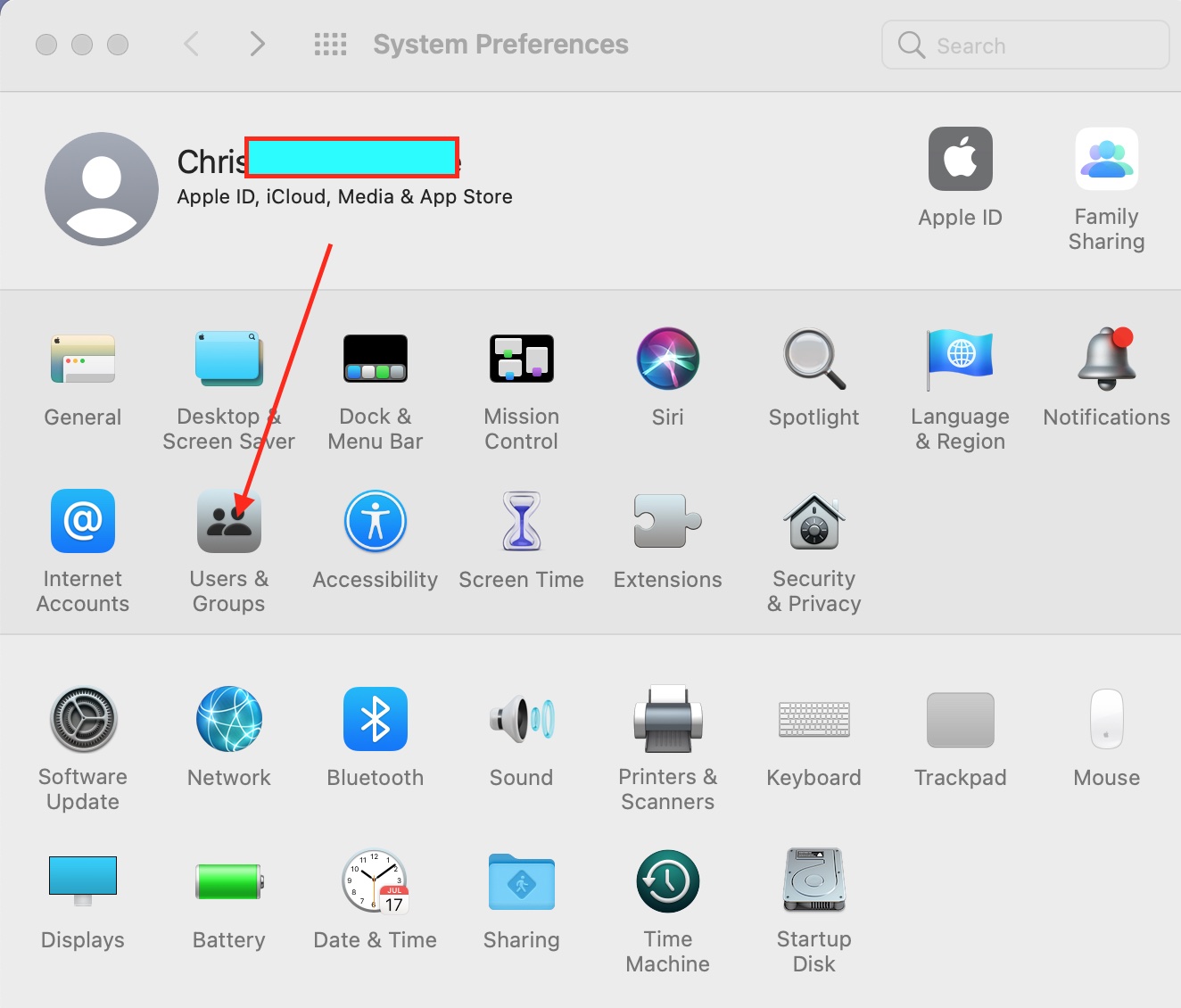
stop Zoom App from launching -system properties

This will open the Users&Groups Window as shown below. Click on the Login Items and select the Zoom application you wish to stop from launching automatically at start up (hide an application when you log in).
– You will have to select Zoom and then
– Click on the “-” as shown below
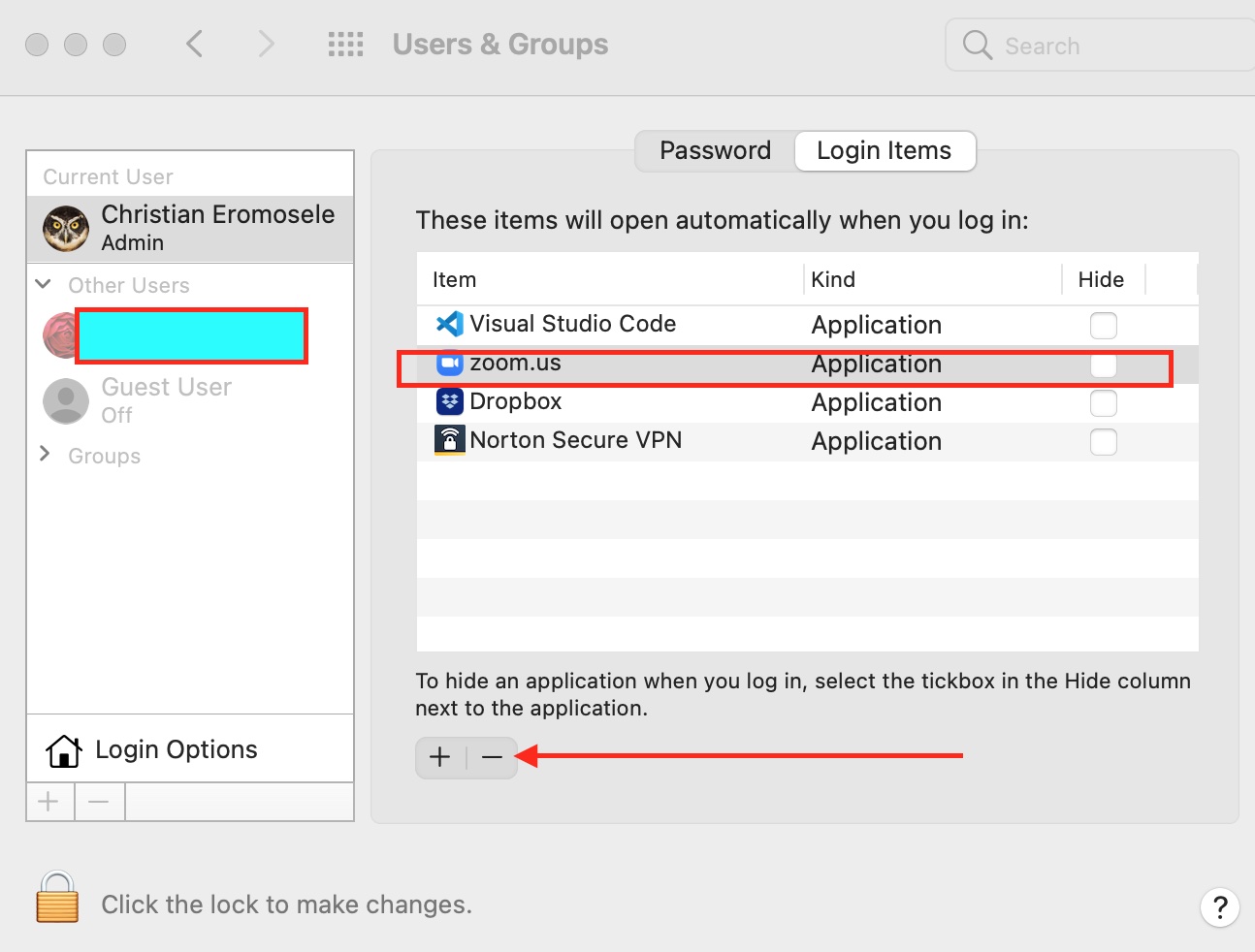
stop Zoom App from launching -remove Zoom from startup

Note: I also want to remove “Norton Secure VPN” as this can be annoying as well. I will follow the same process i used in hide Zoom from startup. As you can see below, I have hidden Zoom and Norton Secure VPn from automatically starting up.
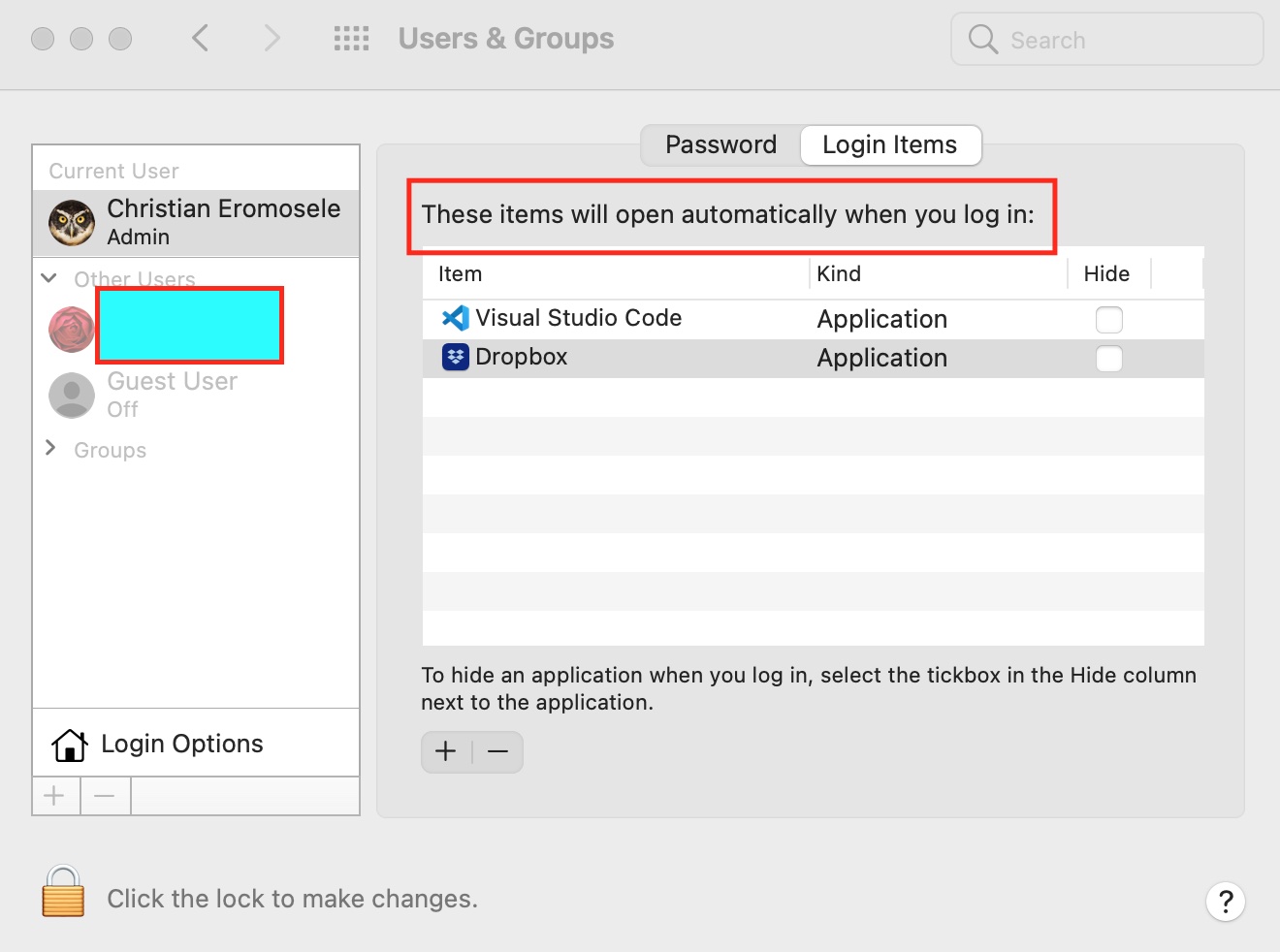
stop Zoom App from launching -Hide Zoom

That is all that is needed to stop Zoom App from launching automatically starting up in Mac upon user login. Here are some related articles: How to configure the FrontFace Lockdown Tool, and how to disable or enable automatic login from the sign-in screen in Windows.

So, that’s how to stop Zoom App from launching automatically on Mac. I hope you found this blog post helpful. If you have any questions, please let me know in the comment session.

Rate this post

Thank you for reading this post. Kindly share it with others.

  • Click to share on X (Opens in new window) X
  • Click to share on Reddit (Opens in new window) Reddit
  • Click to share on LinkedIn (Opens in new window) LinkedIn
  • Click to share on Facebook (Opens in new window) Facebook
  • Click to share on Pinterest (Opens in new window) Pinterest
  • Click to share on Tumblr (Opens in new window) Tumblr
  • Click to share on Telegram (Opens in new window) Telegram
  • Click to share on WhatsApp (Opens in new window) WhatsApp
  • Click to share on Pocket (Opens in new window) Pocket
  • Click to share on Mastodon (Opens in new window) Mastodon
  • Click to share on Bluesky (Opens in new window) Bluesky
  • Click to share on Threads (Opens in new window) Threads
  • Click to share on Nextdoor (Opens in new window) Nextdoor
Mac Tags:Windows 10

Post navigation

Previous Post: How to convert images from PNG to JPG on WordPress, Windows, and Mac
Next Post: How to change the default screen capture format in macOS

Related Posts

  • Password Migration to ICloud Keychain
    How to import your Chrome or Firefox passwords into your iCloud Keychain Mac
  • screenshot 2020 05 11 at 15.03.02
    How to record the screen of macOS Mac
  • plain screenshot 1
    How to make a screenshot on a macOS device Mac
  • annoying startup apps
    Stop an application from starting up automatically on macOS Mac
  • How To Remove Takeprize50.life Redirect From Mac unboxhow
    Remove unwanted site redirects or pop-ups from Google Chrome Mac
  • zoom
    How to install Zoom on macOS Mac

More Related Articles

Password Migration to ICloud Keychain How to import your Chrome or Firefox passwords into your iCloud Keychain Mac
screenshot 2020 05 11 at 15.03.02 How to record the screen of macOS Mac
plain screenshot 1 How to make a screenshot on a macOS device Mac
annoying startup apps Stop an application from starting up automatically on macOS Mac
How To Remove Takeprize50.life Redirect From Mac unboxhow Remove unwanted site redirects or pop-ups from Google Chrome Mac
zoom How to install Zoom on macOS Mac

Leave a Reply Cancel reply

You must be logged in to post a comment.

Microsoft MVP

VEEAMLEGEND

vexpert-badge-stars-5

Virtual Background

GoogleNews

Categories

veeaam100

sysadmin top30a

  • dns
    How to setup a cache-only DNS server Linux
  • Gfeature
    How to install Googler on a Linux System Linux
  • windows 1 1
    Generation 2 VM: Set up a HyperV VM through PXE boot Virtualization
  • Create Password Policies via GPO
    How to Create a Password Policy with Group Policy Object Windows
  • remove Windows PC from you iCloud Account completely
    How to remove Windows PC from your iCloud Account completely Mac
  • VeeamIgnite2022
    Veeam at Microsoft Ignite 2022 from 12-14 October Backup
  • screenshot 2020 03 14 at 16.23.23
    Change Windows Desktop icon shortcut for fast user switching Windows
  • unnamed
    Remove Xbox from automatic startup: How to enable and disable automatic startup in Windows 11 Windows

Subscribe to Blog via Email

Enter your email address to subscribe to this blog and receive notifications of new posts by email.

Join 1,839 other subscribers
  • RSS - Posts
  • RSS - Comments
  • About
  • Authors
  • Write for us
  • Advertise with us
  • General Terms and Conditions
  • Privacy policy
  • Feedly
  • Telegram
  • Youtube
  • Facebook
  • Instagram
  • LinkedIn
  • Tumblr
  • Pinterest
  • Twitter
  • mastodon

Tags

AWS Azure Bitlocker Microsoft Windows PowerShell WDS Windows 10 Windows 11 Windows Deployment Services Windows Server 2016

Copyright © 2025 TechDirectArchive


Loading Comments...
 

You must be logged in to post a comment.