Skip to content

TechDirectArchive

  • Home
  • About
  • Advertise With US
  • Reviews
  • Contact
  • Toggle search form
Home » Windows Server » How to configure a service account for Kerberos delegation
  • VHDX resizing and veeam back
    Hyper V Disk allocation: Why Veeam reports full size after Shrinking Windows Server
  • WindowsCoreSecurity
    How to enable Smart App Control on Windows 11 Security | Vulnerability Scans and Assessment
  • fghj
    MDT deployment failed and Stuck at Command Prompt: Windows installation does not proceed via PXE boot Windows Server
  • UnregisterGitLabRunner
    How to unregister GitLab Runner in Windows Version Control System
  • windows update 03
    Check if Windows Updates were installed Windows
  • Webp.net resizeimage 5
    How to create a Traffic Manager Profile in Azure AWS/Azure/OpenShift
  • screenshot 2020 02 07 at 21.59.33
    Prerequisites for setting up a Single and Multi App Kiosk Windows
  • Fix this file came from another computer and might be blocked error
    File Came From Another Computer And Might be Blocked Error Windows

How to configure a service account for Kerberos delegation

Posted on 17/03/202106/09/2023 Christian By Christian 1 Comment on How to configure a service account for Kerberos delegation
Kerberos authentication

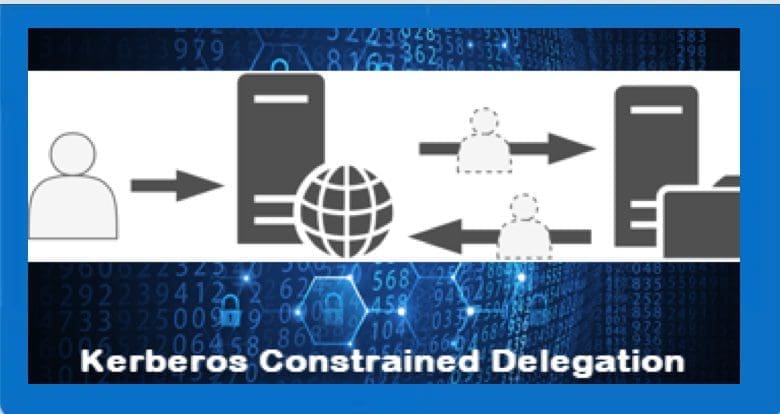
Kerberos is a network authentication protocol. It is designed to provide strong authentication for client/server applications by using secret-key cryptography. Kerberos delegation is to enable an application to access resources hosted on a different server t. For some related content on Active Directory, see the following guides. The sign-in method you are trying to use is not allowed, Active Directory Authentication methods: Kerberos and NTLM, Concept of AD Computer Account, how to create a contact in AD, and for a detailed list of articles on Active Directory, visit the following link, Enable Active Directory Recycle Bin: How to delete and restore objects using Active Directory Administrative Center, How to fix insufficient access right to perform this operation when trying to enable Active Directory Recycle Bin.

You may have so many reasons to configure delegation for Kerberos authentication. For me, I had wanted to test MBAM 2.0 but later decided to install MBAm 2.5 with SP1 and therefore had no need to configure Kerberos delegation. Regardless, I decided to describe the steps here for your need 🙂 The following are the types of delegation. (1) Unconstrained delegation (2) Constrained delegation and (3) RBCD (Resource Based Constrained Delegation. Kindly take a look at this guide “” for more information.

Configure a service account for Kerberos delegation

Furthermore, If you wish to configure constrained delegation when you are using MBAM 2.5 only, please see this link.
– Navigate to Active Directory Users and Computers, click on the right container housing the account (service account), and
– Moreover, Find the app pool credentials (in my case a service account named MBAM-IISAP-SVC),
– Right-click, and go to properties.

Service account setup

– In addition, Click the delegation, and click on the option to trust the user for delegation to any (Kerberos only) and click on OK.
Note: If you do want to trust this user to any services, Please select "Trust this user for delegation to the specified services only" and
- Add the service.

Security permissions for service accounts

That is all that you need to do to configure Kerberos delegation for a user account (service account).You may also want to visit the following interesting articles. What are the merits and demerits of Local System Account and Service Logon Account, how to delete and restore objects using Active Directory Administrative Center, and what are the differences between an Active Directory contact and a user account object?

Alternatively, you could use Active Directory Administrative Center. Here you will have to 
- Launch the Active Directory Administrative Center as shown below
Service account setup

Locate the container (OU) that the service account or user account is located in and right click on the user.
– Alternatively, you could click on Properties to display the user account properties”.

Screenshot-2021-03-17-at-19.32.23

– Click the delegation, and click on the option to trust the user for delegation to any (Kerberos only) and click on OK.
Note: If you do want to trust this user to any services, Please select "Trust this user for delegation to the specified services only" and
- Add the service.

Screenshot-2021-03-17-at-19.47.55

I hope you found this blog post helpful. If you have any questions, please let me know in the comment session.

Rate this post

Thank you for reading this post. Kindly share it with others.

  • Click to share on X (Opens in new window) X
  • Click to share on Reddit (Opens in new window) Reddit
  • Click to share on LinkedIn (Opens in new window) LinkedIn
  • Click to share on Facebook (Opens in new window) Facebook
  • Click to share on Pinterest (Opens in new window) Pinterest
  • Click to share on Tumblr (Opens in new window) Tumblr
  • Click to share on Telegram (Opens in new window) Telegram
  • Click to share on WhatsApp (Opens in new window) WhatsApp
  • Click to share on Pocket (Opens in new window) Pocket
  • Click to share on Mastodon (Opens in new window) Mastodon
  • Click to share on Bluesky (Opens in new window) Bluesky
  • Click to share on Threads (Opens in new window) Threads
  • Click to share on Nextdoor (Opens in new window) Nextdoor
Windows Server Tags:Active Directory, Active Directory Administrative Center, Active Directory Domain Services, Kerberos, Windows 10

Post navigation

Previous Post: Unable to install Microsoft Bitlocker Administration: Uninstall your current version of MBAM and run setup again
Next Post: How to deploy MBAM for BitLocker Administration

Related Posts

  • ssl 600x315 1 1
    Components needed to create a certificate signing request Windows Server
  • image 19
    Download your MySQL database from Azure to a local PC with MySQL Workbench AWS/Azure/OpenShift
  • Configure AD LDAPs
    Generate a self-signed SSL certificate: Enable LDAP over SSL Windows Server
  • windows update 03
    How to target WSUS clients with the registry keys Windows Server
  • Windows Server 2016 1
    All About Windows Server 2016 Windows Server
  • group
    How to update PowerShell and Package Management via Group Policy Object Windows Server

More Related Articles

ssl 600x315 1 1 Components needed to create a certificate signing request Windows Server
image 19 Download your MySQL database from Azure to a local PC with MySQL Workbench AWS/Azure/OpenShift
Configure AD LDAPs Generate a self-signed SSL certificate: Enable LDAP over SSL Windows Server
windows update 03 How to target WSUS clients with the registry keys Windows Server
Windows Server 2016 1 All About Windows Server 2016 Windows Server
group How to update PowerShell and Package Management via Group Policy Object Windows Server

Comment (1) on “How to configure a service account for Kerberos delegation”

  1. Avatar photo Long says:
    21/02/2024 at 11:11 AM

    how to set constrained delegation for MBAM?

    Log in to Reply

Leave a Reply Cancel reply

You must be logged in to post a comment.

VEEAMLEGEND

vexpert-badge-stars-5

Virtual Background

GoogleNews

Categories

veeaam100

Microsoft MVP

  • VHDX resizing and veeam back
    Hyper V Disk allocation: Why Veeam reports full size after Shrinking Windows Server
  • WindowsCoreSecurity
    How to enable Smart App Control on Windows 11 Security | Vulnerability Scans and Assessment
  • fghj
    MDT deployment failed and Stuck at Command Prompt: Windows installation does not proceed via PXE boot Windows Server
  • UnregisterGitLabRunner
    How to unregister GitLab Runner in Windows Version Control System
  • windows update 03
    Check if Windows Updates were installed Windows
  • Webp.net resizeimage 5
    How to create a Traffic Manager Profile in Azure AWS/Azure/OpenShift
  • screenshot 2020 02 07 at 21.59.33
    Prerequisites for setting up a Single and Multi App Kiosk Windows
  • Fix this file came from another computer and might be blocked error
    File Came From Another Computer And Might be Blocked Error Windows

Subscribe to Blog via Email

Enter your email address to subscribe to this blog and receive notifications of new posts by email.

Join 1,843 other subscribers
  • RSS - Posts
  • RSS - Comments
  • About
  • Authors
  • Write for us
  • Advertise with us
  • General Terms and Conditions
  • Privacy policy
  • Feedly
  • Telegram
  • Youtube
  • Facebook
  • Instagram
  • LinkedIn
  • Tumblr
  • Pinterest
  • Twitter
  • mastodon

Tags

AWS Azure Bitlocker Microsoft Windows PowerShell WDS Windows 10 Windows 11 Windows Deployment Services Windows Server 2016

Copyright © 2025 TechDirectArchive


Loading Comments...
 

You must be logged in to post a comment.