Skip to content

TechDirectArchive

Hands-on IT, Cloud, Security & DevOps Insights

  • Home
  • About
  • Advertise With US
  • Reviews
  • Contact
  • Toggle search form
Home » Linux » How to deploy Ansible AWX on centos 8
  • Ping 3
    How to convert images from PNG to JPG on WordPress, Windows, and Mac JIRA|Confluence|Apps
  • ansible 1
    Kinit Error: Fix Malformed representation of principal when parsing name Configuration Management Tool
  • Screenshot 2020 12 30 at 01.03.14
    Device cannot use a Trusted Platform Module: Allow BitLocker without a compatible TPM Windows
  • Failedcluster
    Failover Cluster Manager failed while managing one or more clusters, the error was unable to determine if the computer exists in the domain Virtualization
  • microsoft edge
    All available Policies for the latest version of Microsoft Edge Windows
  • maxresdefault 2 1
    How to disconnect a Remote Desktop User Windows Server
  • powershell
    How to install the Microsoft PSWindowsUpdate module silently Scripts
  • Active Directory Restore issue
    AD Recovery: Fix device ran into an issue with error 0xc00002e2 Windows Server

How to deploy Ansible AWX on centos 8

Posted on 12/10/202126/08/2023 Christian By Christian 2 Comments on How to deploy Ansible AWX on centos 8
Ansible AWX

In Today’s tutorial, we will be installing ansible Awx (Ansible web executable). This is an open-source project that allows you to manage and control your ansible project easily from a web interface with a task engine that is built on ansible. We will be installing AWX on centos 8 servers with 4GB RAM with Epel repository installed. Kindly check out some of my other guides: Openstack Deployment with Devstack, Deploying a load balancer from scratch and adding backend servers, how to monitor services using Zabbix, and how to set-up PowerShell on a Linux server. LET’S GET STARTED.

First let’s Disable SELINUX
/etc/sysconfig/selinux
SELINUX=disabled
Next install the epel repository
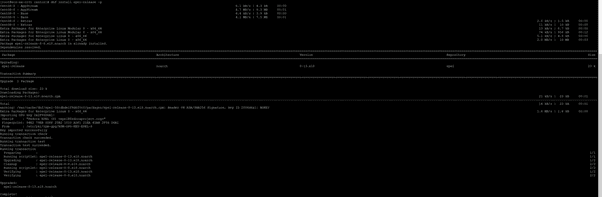
dnf install epel-release -y
deploy

Now we will install some dependent packages

dnf install git gcc gcc-c++ ansible nodejs gettext device-mapper-persistent-data lvm2 bzip2 python3-pip -y

CentOS 8

Next we will install docker, so we can run AWX in a container. We have to add the docker repository to the system using the below command

dnf config-manager --add-repo=https://download.docker.com/linux/centos/docker-ce.repo

installation

Install Docker and verify docker version

dnf install docker-ce -y

automation

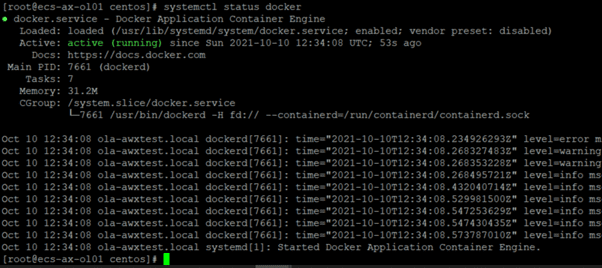
Then start and enable docker to load at start up

systemctl start docker
systemctl enable docker
 

configuration management

Now that we have our docker running, lets install AWX. We have to download the latest version from git hub using the following command below

git clone https://github.com/ansible/awx.git

image-124

The next step is very important as we must follow the instructions on how to deploy Ansible AWX on CentOS 8. Additionally, we need to generate a secret key to encrypt the inventory file using the below command. Save this key, as it will be needed.

cd awx/installer
openssl rand -base64 30
wnwsaB7Z1KbNWTFuedc8LF9+XFpOIHCA38QwqSto
image-125

Next cd into the installer directory, vim and edit the file with the following parameters

[all:vars]
dockerhub_base=ansible
awx_task_hostname=awx
postgres_data_dir="/var/lib/pgdocker"
host_port=80
host_port_ssl=443
docker_compose_dir="~/.awx/awxcompose"
pg_username=awx
pg_password=awxpass
pg_database=awx
pg_port=5432
pg_admin_password=password
rabbitmq_password=awxpass
rabbitmq_erlang_cookie=cookiemonster
admin_user=admin
admin_password=password
create_preload_data=True
secret_key=wnwsaB7Z1KbNWTFuedc8LF9+XFpOIHCA38QwqSto
awx_official=true
awx_alternate_dns_servers="8.8.8.8,8.8.4.4"
project_data_dir=/var/lib/awx/projects

Create the postgres directory

mkdir /var/lib/pgdocker

How to deploy Ansible AWX on centos 8

To begin with, let’s explore how to deploy Ansible AWX on CentOS 8. Once this is done, run the command to install AWX in the installer directory

ansible-playbook -i inventory install.yml
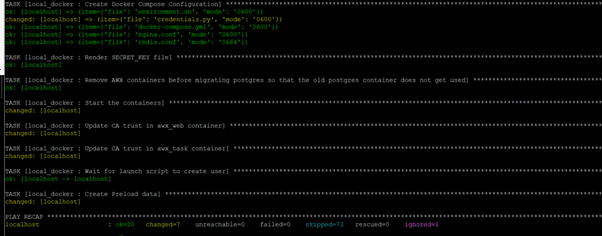
image-126

Once your docker has been installed and all the required dockers started. We have to verify the status using the following command

docker ps

image-127

Now that installation is completed and dockers verified, let’s move on to the next step: How to deploy Ansible AWX on CentOS 8. After that, we can proceed to add the HTTPS service to the firewall.

firewall-cmd --zone=public --add-masquerade --permanent
firewall-cmd --permanent --add-service=http
firewall-cmd --permanent --add-service=https
firewall-cmd –reload

 

image-128

Now try to access the dashboard using your server IP.

image-129

Now, we have successfully followed the steps on how to deploy Ansible AWX on CentOS 8, and we have deployed an Ansible tower instance. We can now use this instance to effectively manage and schedule jobs on our remote nodes using SSH credentials or SSH keys.

Rate this post

Thank you for reading this post. Kindly share it with others.

  • Click to share on X (Opens in new window) X
  • Click to share on Reddit (Opens in new window) Reddit
  • Click to share on LinkedIn (Opens in new window) LinkedIn
  • Click to share on Facebook (Opens in new window) Facebook
  • Click to share on Pinterest (Opens in new window) Pinterest
  • Click to share on Tumblr (Opens in new window) Tumblr
  • Click to share on Telegram (Opens in new window) Telegram
  • Click to share on WhatsApp (Opens in new window) WhatsApp
  • Click to share on Pocket (Opens in new window) Pocket
  • Click to share on Mastodon (Opens in new window) Mastodon
  • Click to share on Bluesky (Opens in new window) Bluesky
  • Click to share on Threads (Opens in new window) Threads
  • Click to share on Nextdoor (Opens in new window) Nextdoor
Linux

Post navigation

Previous Post: How to create a load balancer for Azure Stack Hub
Next Post: How to solve cannot find a valid base URL for repo: base/7/x86_64

Related Posts

  • Synergy software kvm
    Why Software KVMs such as Synergy is replacing Hardware KVMs Linux
  • google sdk feature
    How To Install Google Cloud SDK on a Linux System Linux
  • feature linux boot process
    Linux Boot Process Explained Step by Step for Beginners Linux
  • linuxnethero
    Adding a subnetwork interface to an existing network interface Linux
  • Generate SSH Keys
    Associate SSH Public key with Azure Linux VM AWS/Azure/OpenShift
  • speedtest
    How to set up a self-hosted speed test server on Ubuntu Linux Linux

More Related Articles

Synergy software kvm Why Software KVMs such as Synergy is replacing Hardware KVMs Linux
google sdk feature How To Install Google Cloud SDK on a Linux System Linux
feature linux boot process Linux Boot Process Explained Step by Step for Beginners Linux
linuxnethero Adding a subnetwork interface to an existing network interface Linux
Generate SSH Keys Associate SSH Public key with Azure Linux VM AWS/Azure/OpenShift
speedtest How to set up a self-hosted speed test server on Ubuntu Linux Linux

Comments (2) on “How to deploy Ansible AWX on centos 8”

  1. Avatar photo Pedro says:
    28/10/2021 at 2:31 PM

    fyi, preferred way is to install it on k8s nowadays.

    Log in to Reply
  2. Avatar photo Oren says:
    21/05/2022 at 11:24 AM
    cd awx/installer
    

    couldnt find such directory

    Log in to Reply

Leave a Reply Cancel reply

You must be logged in to post a comment.

Microsoft MVP

VEEAMLEGEND

vexpert-badge-stars-5

Virtual Background

GoogleNews

Categories

veeaam100

sysadmin top30a

  • Ping 3
    How to convert images from PNG to JPG on WordPress, Windows, and Mac JIRA|Confluence|Apps
  • ansible 1
    Kinit Error: Fix Malformed representation of principal when parsing name Configuration Management Tool
  • Screenshot 2020 12 30 at 01.03.14
    Device cannot use a Trusted Platform Module: Allow BitLocker without a compatible TPM Windows
  • Failedcluster
    Failover Cluster Manager failed while managing one or more clusters, the error was unable to determine if the computer exists in the domain Virtualization
  • microsoft edge
    All available Policies for the latest version of Microsoft Edge Windows
  • maxresdefault 2 1
    How to disconnect a Remote Desktop User Windows Server
  • powershell
    How to install the Microsoft PSWindowsUpdate module silently Scripts
  • Active Directory Restore issue
    AD Recovery: Fix device ran into an issue with error 0xc00002e2 Windows Server

Subscribe to Blog via Email

Enter your email address to subscribe to this blog and receive notifications of new posts by email.

Join 1,841 other subscribers
  • RSS - Posts
  • RSS - Comments
  • About
  • Authors
  • Write for us
  • Advertise with us
  • General Terms and Conditions
  • Privacy policy
  • Feedly
  • Telegram
  • Youtube
  • Facebook
  • Instagram
  • LinkedIn
  • Tumblr
  • Pinterest
  • Twitter
  • mastodon

Tags

AWS Azure Bitlocker Microsoft Windows PowerShell WDS Windows 10 Windows 11 Windows Deployment Services Windows Server 2016

Copyright © 2025 TechDirectArchive


Loading Comments...
 

You must be logged in to post a comment.