Skip to content

TechDirectArchive

Hands-on IT, Cloud, Security & DevOps Insights

  • Home
  • About
  • Advertise With US
  • Reviews
  • Contact
  • Toggle search form
Home » JIRA|Confluence|Apps » How to change or cancel your Trello plan
  • S3 Bucket
    Access AWS Management Console and Create Resources with AWS CLI on Windows AWS/Azure/OpenShift
  • homebrew social card
    Package Manager for macOS: How to install Homebrew on macOS Mac
  • zoom
    How to install Zoom on macOS Mac
  • Hyper V Virtual Switch Copy
    How to Create VDI Collections on Windows Server 2022 Network | Monitoring
  • git default branch min
    Git config –global init.defaultBranch: Error cannot lock ref ‘refs/remotes/origin/windows’, not a directory Version Control System
  • windows1019h2
    Synchronize your Domain Controller with an external time source Windows Server
  • User profile in Windows
    How to delete User Profile in Windows Windows
  • How to Disable Automatic Opening of Previous files in Notepad on Windows 11
    How to Disable Automatic Opening of Previous Files in Notepad on Windows 11 Windows

How to change or cancel your Trello plan

Posted on 21/05/202228/08/2023 Christian By Christian No Comments on How to change or cancel your Trello plan
Trello subscription modification

Trello is a simple, yet powerful tool, very easy to use, and flexible, so you can create anything you want. If you ever need to start, cancel or change your subscription, you can only do this on the web version of Trello. The desktop and mobile apps at the time of writing this piece do not currently support subscription management. Note: only Workspace admins can manage subscriptions on their Workspace. Kindly refer to these related guides: How to convert images from PNG to JPG on WordPress, Windows, and Mac, How to remove a member from Trello Workspace, how to add or remove a Board Guest to a Trello Board, How to remove a member from Trello Board, how to fix sound not working on Google Chrome, and how to deactivate a Slack workspace.

As you can see, I am currently on the Premium Free trial. I have been using the free Trail for over a long period of time. Most of that features are free and available to absolutely everybody, and you can do a lot with the free version of Trello.

Kindly take a look at one of the images below for the various features Trello has to offer.

Adjusting Trello membership

Exploring Plan Options: Compare Before Making Changes

Before we proceed with changing the plan, you may want to compare and see what each plan has to offer. Here click on this link for more information.

Note: Trello currently does not offer a free trial for a Standard account, but you can Premium trial for a period of14 days. Furthermore, The premium features have all of the features in Standard and more. To activate the premium, you do not need to enter any credit card information. However, Kindly let us access the Billing dashboard. To do this, click on Settings as shown below.

Screenshot-2022-05-21-at-16.06.28

If you start a Premium trial on a Free Workspace, your subscription will be canceled at the end of the trial period if you don’t add a credit card. If you add a credit card to your subscription, your subscription will auto-renew at the end of the trial period.

Move between Standard or Premium Subscriptions

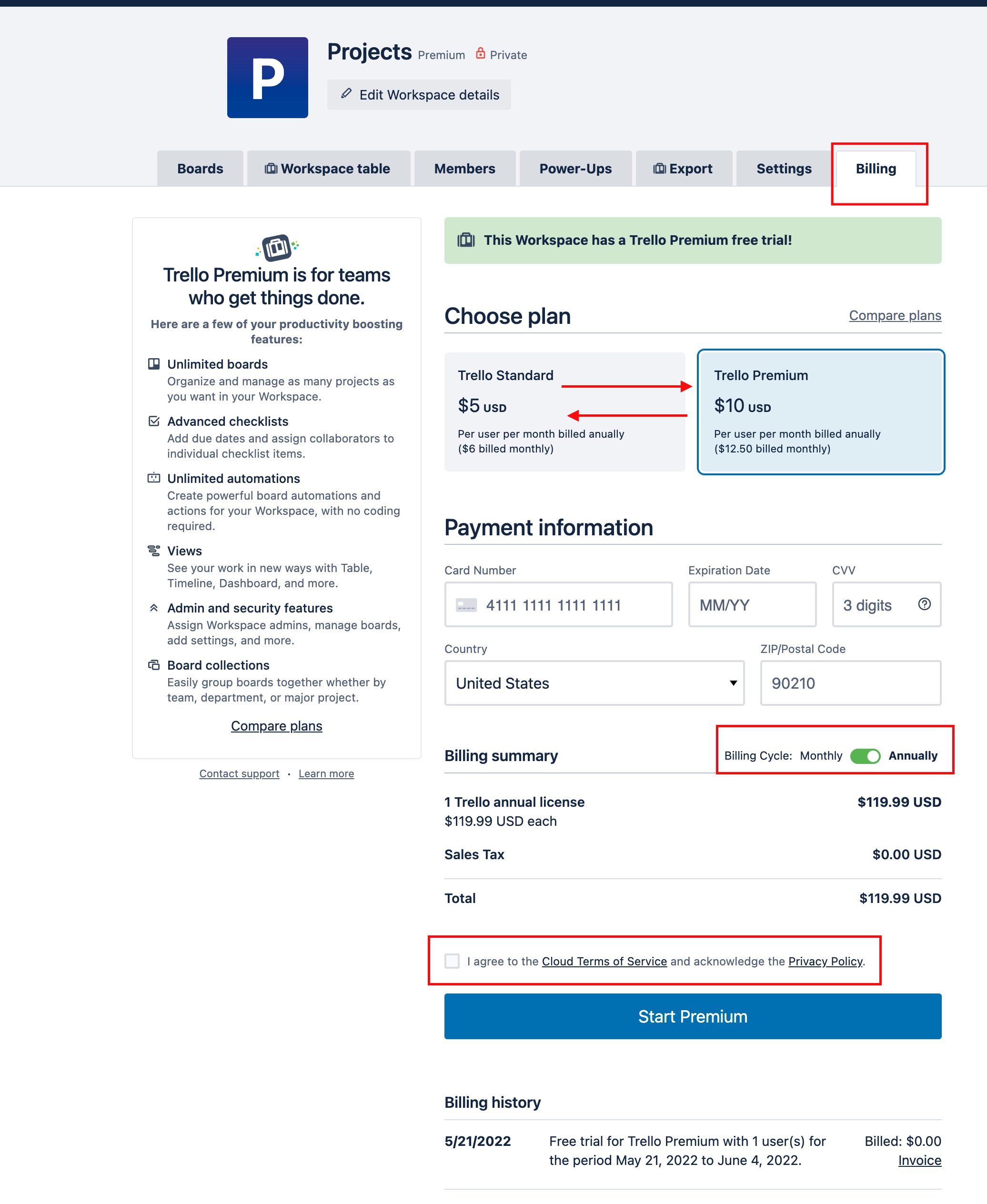
As you can see, upon clicking on the Setting and the billing tab, the following Window below will open.

Note: If you are on a paid plan (Standard or Premium), you will need to be a Workspace administrator to change to another plan. 
Screenshot-2022-05-21-at-16.21.22

To cancel your Trello Premium or Standard plan, you will need to be a Workspace administrator. Either navigate to your Workspace’s billing page (https://trello.com/your-Workspace-shortname/billing) directly or navigate to your account’s activity tab and click on your Workspace’s name and then the Billing tab.

On the Billing tab, scroll to the bottom of the page. Click the “Cancel” link and it will show you which features will be removed once the plan ends, confirming the cancellation will prevent your card from being billed in the future. Your plan will be canceled at the end of its prepaid service period.

Note the following points below:
- If you cancel your Standard subscription while in a Premium free trial, you’ll continue to have access to Premium features until the trial ends, but your subscription will not renew after the trial ends. 
- If you start a Premium trial on your Standard Workspace but don’t want to move to the Premium subscription at the end of the trial, you can opt out.

What happens to our Workspace after we downgrade?

When a Workspace downgrades from Premium or Standard, it retains its Premium or Standard features and unlimited boards until the end of its prepaid service period. At the end of its prepaid service period, depending on which plan you’ve selected it’ll become a Standard or free Trello Workspace. For this test as you can see below, my access to my Trello free is back!

Trellodowngrade

If you decided to downgrade to the free plan, you’ll see a list of the 10 most active Workspace boards that will remain open, and any other boards will be closed but not deleted. Extra boards can be closed prior to downgrading or moved to a different Workspace.

I hope you found this blog post helpful. If you have any questions, please let me know in the comment session.

Rate this post

Thank you for reading this post. Kindly share it with others.

  • Click to share on X (Opens in new window) X
  • Click to share on Reddit (Opens in new window) Reddit
  • Click to share on LinkedIn (Opens in new window) LinkedIn
  • Click to share on Facebook (Opens in new window) Facebook
  • Click to share on Pinterest (Opens in new window) Pinterest
  • Click to share on Tumblr (Opens in new window) Tumblr
  • Click to share on Telegram (Opens in new window) Telegram
  • Click to share on WhatsApp (Opens in new window) WhatsApp
  • Click to share on Pocket (Opens in new window) Pocket
  • Click to share on Mastodon (Opens in new window) Mastodon
  • Click to share on Bluesky (Opens in new window) Bluesky
  • Click to share on Threads (Opens in new window) Threads
  • Click to share on Nextdoor (Opens in new window) Nextdoor
JIRA|Confluence|Apps Tags:Windows 10, Windows 11

Post navigation

Previous Post: Remote WMI Connection: How to enable or disable WMI Traffic Using Firewall UI
Next Post: How to deactivate and reactivate a Slack user

Related Posts

  • Nextcloud installation on macOS
    How to install Nextcloud on Mac JIRA|Confluence|Apps
  • jooblejobs
    Find your dream job with Jooble JIRA|Confluence|Apps
  • Nosound chrome
    How to fix No sound on Google Chrome JIRA|Confluence|Apps
  • Schedule and join Teams Meeting
    How to schedule and join meetings with Microsoft Teams JIRA|Confluence|Apps
  • Screenshot 2022 05 21 at 11.42.39
    How to remove a member from Trello Board JIRA|Confluence|Apps
  • GoogleAppleCalendarSync
    Sync Google Calendar events to Apple Calendar JIRA|Confluence|Apps

More Related Articles

Nextcloud installation on macOS How to install Nextcloud on Mac JIRA|Confluence|Apps
jooblejobs Find your dream job with Jooble JIRA|Confluence|Apps
Nosound chrome How to fix No sound on Google Chrome JIRA|Confluence|Apps
Schedule and join Teams Meeting How to schedule and join meetings with Microsoft Teams JIRA|Confluence|Apps
Screenshot 2022 05 21 at 11.42.39 How to remove a member from Trello Board JIRA|Confluence|Apps
GoogleAppleCalendarSync Sync Google Calendar events to Apple Calendar JIRA|Confluence|Apps

Leave a Reply Cancel reply

You must be logged in to post a comment.

Microsoft MVP

VEEAMLEGEND

vexpert-badge-stars-5

Virtual Background

GoogleNews

Categories

veeaam100

sysadmin top30a

  • S3 Bucket
    Access AWS Management Console and Create Resources with AWS CLI on Windows AWS/Azure/OpenShift
  • homebrew social card
    Package Manager for macOS: How to install Homebrew on macOS Mac
  • zoom
    How to install Zoom on macOS Mac
  • Hyper V Virtual Switch Copy
    How to Create VDI Collections on Windows Server 2022 Network | Monitoring
  • git default branch min
    Git config –global init.defaultBranch: Error cannot lock ref ‘refs/remotes/origin/windows’, not a directory Version Control System
  • windows1019h2
    Synchronize your Domain Controller with an external time source Windows Server
  • User profile in Windows
    How to delete User Profile in Windows Windows
  • How to Disable Automatic Opening of Previous files in Notepad on Windows 11
    How to Disable Automatic Opening of Previous Files in Notepad on Windows 11 Windows

Subscribe to Blog via Email

Enter your email address to subscribe to this blog and receive notifications of new posts by email.

Join 1,836 other subscribers
  • RSS - Posts
  • RSS - Comments
  • About
  • Authors
  • Write for us
  • Advertise with us
  • General Terms and Conditions
  • Privacy policy
  • Feedly
  • Telegram
  • Youtube
  • Facebook
  • Instagram
  • LinkedIn
  • Tumblr
  • Pinterest
  • Twitter
  • mastodon

Tags

Active Directory AWS Azure Bitlocker Microsoft Windows PowerShell WDS Windows 10 Windows 11 Windows Server 2016

Copyright © 2025 TechDirectArchive


Loading Comments...
 

You must be logged in to post a comment.