Skip to content

TechDirectArchive

Hands-on IT, Cloud, Security, Veeam & DevOps

  • Home
  • About
  • Advertise With US
  • Reviews
  • Tech News
  • Contact
  • Toggle search form

How to enable or disable a Remote WMI Connection in Windows

Posted on 21/05/202202/07/2025 Matthew By Matthew No Comments on How to enable or disable a Remote WMI Connection in Windows
  1. Home
  2. Windows
  3. How to enable or disable a Remote WMI Connection in Windows
Featured-Image_1

To enable or disable a Remote WMI Connection in Windows, employ Command Prompt. Manage multiple WMI rules swiftly, enhancing system control. Enabling these rules allows WMI to accept remote connections and asynchronous callbacks from Unsecapp.exe. This comprehensive guide outlines the process for managing WMI traffic directly from the command prompt, providing valuable insights into controlling remote access and thereby optimizing system management. Please see this detailed guide on: Windows Management Instrumentation: WMI Commands.

See How to Enable and Disable WMI Traffic through Windows CMD, and Remote WMI Connection: How to enable or disable WMI Traffic Using Firewall UI.

Configuring Network Access via Command Prompt Rule Group

Please see this detailed guide on Windows Management Instrumentation: WMI Commands.

Remote WMI Access

Enable WMI traffic through the firewall:

netsh advfirewall firewall set rule group="windows management instrumentation (wmi)" new enable=yes
WMI Connectivity

The “Remote WMI Connection” command activates 8 vital WMI rules, enhancing remote system management. This results in seamless control and comprehensive monitoring.

The Remote WMI Connection significantly empowers control by streamlining system management by integrating 8 essential Windows Management Instrumentation (WMI) rules.

These rules are essential, providing data collection, remote management, and performance monitoring, thus bolstering system security and stability.

Such automation significantly saves time and ensures the consistent application of essential settings, consequently contributing to a more robust and dependable IT infrastructure.

Here is Windows Management Instrumentation Commands, how to Get a list of installed programs locally or remotely in Windows, and “How to delete an Instance (AssignedAccess) when applied via MDM WMI bridge Provider“.

Steps to Turn Off

First, run the command prompt as administrator.

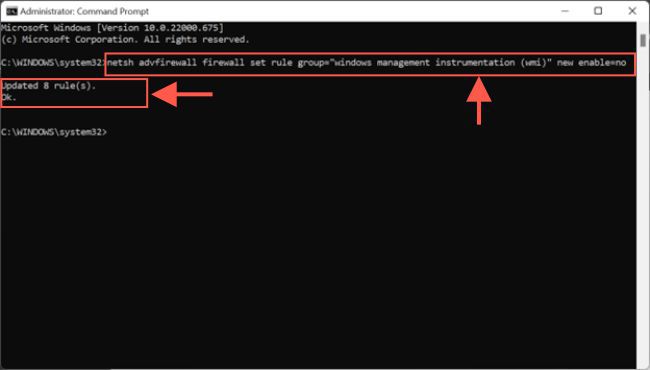
netsh advfirewall firewall set rule group="windows management instrumentation (wmi)" new enable=no
Remote System Management

The command removes 8 rules added to the WMI, streamlining the configuration and improving system management.

Please see see how to query a list of installed programs in Windows via Windows Settings, Control Panel, WMIC, PowerShell and Windows Registry, and How to setup and configure Remote Desktop Services via Standard Deployment on Windows Server.

If you’ve found this blog post on how to enable or disable a Remote WMI Connection in Windows helpful, please share your thoughts or questions in the comment section. Additionally, your feedback is greatly appreciated, and I’m here to assist with any inquiries.

5/5 - (1 vote)

Thank you for reading this post. Kindly share it with others.

  • Share on X (Opens in new window) X
  • Share on Reddit (Opens in new window) Reddit
  • Share on LinkedIn (Opens in new window) LinkedIn
  • Share on Facebook (Opens in new window) Facebook
  • Share on Pinterest (Opens in new window) Pinterest
  • Share on Tumblr (Opens in new window) Tumblr
  • Share on Telegram (Opens in new window) Telegram
  • Share on WhatsApp (Opens in new window) WhatsApp
  • Share on Mastodon (Opens in new window) Mastodon
  • Share on Bluesky (Opens in new window) Bluesky
  • Share on Threads (Opens in new window) Threads
  • Share on Nextdoor (Opens in new window) Nextdoor
Windows Tags:MDM Bridge WMI Provide, Remote Access, Remote Desktop, Remote Desktop Services, Remote Server Administration Tools, RemoteConnection

Post navigation

Previous Post: How to deactivate and reactivate a Slack user
Next Post: How to remove a user from a Slack Channel

Related Posts

  • iso10
    Mount an ISO image in Windows 10 and 11 Windows
  • MBRGPT
    Run MBR and GPT conversion with the best GPT converter Windows
  • fddd
    How to check the version of Windows ADK Windows
  • media8
    How to create a Windows 11 Bootable USB drive Windows
  • image 23
    Copy Deployment Share between Servers without using linked Deployment Shares Windows
  • Convert PEM to PPK 1
    Convert a PEM Key to a PPK Key on a Linux and Windows AWS/Azure/OpenShift

More Related Articles

iso10 Mount an ISO image in Windows 10 and 11 Windows
MBRGPT Run MBR and GPT conversion with the best GPT converter Windows
fddd How to check the version of Windows ADK Windows
media8 How to create a Windows 11 Bootable USB drive Windows
image 23 Copy Deployment Share between Servers without using linked Deployment Shares Windows
Convert PEM to PPK 1 Convert a PEM Key to a PPK Key on a Linux and Windows AWS/Azure/OpenShift

Leave a Reply Cancel reply

You must be logged in to post a comment.

Microsoft MVP

VEEAMLEGEND

vexpert-badge-stars-5

Virtual Background

GoogleNews

Categories

veeaam100

Veeam Vanguard

  • images
    Fix the Synchronization service scheduler is suspended AWS/Azure/OpenShift
  • Banner App GW 1
    Azure Application Gateway: Practical Configuration Guide AWS/Azure/OpenShift
  • Disable automatic updates
    Turn off Automatic Updates in Windows via Windows Registry and Group Policy Windows
  • 2026 04 16 16 08 12 Downloads File Explorer
    Active Directory Vulnerability Assessment with Purple Knight: Domain Controller Owner Is Not an Administrator Windows Server
  • screenshot 2020 05 05 at 10.26.12
    How to enable or disable User Account Control Windows
  • ad
    Service and Network Port requirements for Active Directory Windows
  • PSD1 Azure 2
    How to install PSD Hydration Kit for remote bare-metal deployment or via PXE boot Windows Server
  • image 28
    How to monitor your website uptime and status using Uptime Configuration Management Tool

Subscribe to Blog via Email

Enter your email address to subscribe to this blog and receive notifications of new posts by email.

Join 1,779 other subscribers
  • RSS - Posts
  • RSS - Comments
  • About
  • Authors
  • Write for us
  • Advertise with us
  • General Terms and Conditions
  • Privacy policy
  • Feedly
  • Telegram
  • Youtube
  • Facebook
  • Instagram
  • LinkedIn
  • Tumblr
  • Pinterest
  • Twitter
  • mastodon

Tags

Active Directory Azure Bitlocker Microsoft Windows PowerShell WDS Windows 10 Windows 11 Windows Deployment Services Windows Server 2016

Copyright © 2026 TechDirectArchive

Loading Comments...

You must be logged in to post a comment.