How to encrypt your system with Trellix Data Encryption


Trellix Data Encryption offers a full range of products to safeguard data and devices from unauthorized access. In this article, we will discuss how to encrypt your system with Trellix Data Encryption. Trelix also makes it possible to protect corporate-owned devices and shared servers with comprehensive encryption and integrated centralized management. Please see How to upgrade Trellix ePolicy Orchestrator, What are the Differences between UEFI and BIOS, and Trellix ePO AD integration and ENS Agents Installation.
Data encryption is an effective key management, rendering data unreadable to anyone without the correct decryption key or password. Thus protecting sensitive data from unauthorized access, modification, disclosure, or theft. Encryption can be employed both for data at rest and for data in motion.
Note: Trellix Data Encryption products work hand-in-hand with Trellix DLP to provide full-disk encryption and device control as part of an enterprise-wide DLP solution.
This solution is exciting as it monitors and protects sensitive data and prevents unauthorized external devices from joining the network etc. See the image below for more information.

Please see Selfservice Recovery: Trellix BitLocker and fileVault Recovery, and how to Test Web Applications Using Scandium, how to Install and Set Lively Wallpaper on Windows 11, and how to Perform a Reverse Image Search on Your Browsers.
Differences between Trellix MNE and Drive Encryption
Trellix Drive Encryption offers feature-rich, highly compliant protection with multi-user authentication options. This solution requires an agent in addition to Trellix ENS agent to be installed on your device. While Trellix Native Drive Encryption provides a simplified, central management of Microsoft BitLocker and Apple FileVault.
Note: MNE is designed to provide a simple and easier-to-manage encryption solution that manages the built-in operating system encryption of Apple OS X and Microsoft Windows.
Below, we will provide the definition and some description of these tools offered by Trellix for data protection. For Trellix these are the two options for data protection on end-devices.
Management of Native Encryption
Trellix Management of Native Encryption (MNE) includes Bitlocker Encryption for Windows and Drive Encryption GO/FileVault for MacOS. With Trellix ePolicy Orchestrator, administrators can manage Apple FileVault and Microsoft BitLocker.
Trellix Management of Native Encryption provides an easy-to-use administrative interface to manage, report and recover the respective native encryption systems.
Here is how to perform “Trellix ePolicy Orchestrator Installation on Windows Server, how to Sync Data in Cloud Drives to Synology NAS, and steps to integrate Trellix ePO with AD and ENS Agents Installation.
2. Trellix Data Encryption (Trellix DE)
Trellix DE is full disk encryption software that helps protect data on Microsoft Windows tablets, laptops, and desktop PCs. It helps prevent the loss of sensitive data, especially from lost or stolen equipment.
It is designed to make all data on a system drive unintelligible to unauthorized persons, which in turn helps meet compliance requirements.
Trellix Data Encryption is compatible with traditional hard drives (spinning media AKA HDD), solid-state drives (SSD), and self-encrypting drives (SED and OPAL). DE will continue to be developed as t offers customer-oriented features than Microsoft BitLocker as shown below:
- User-based reboot
- Smart card and biometric authentication
- Self-recovery
- Complex user-based policies
- Endpoint Assistant, and
- Support for Intel AMT and ePO Deep Command.
Check Trellix Data Encryption Extensions and Packages
I will be checking in extensions while the Software catalog. But if you have downloaded this, you can check them in via extensions
Method 1: Trellix extensions
This step involves downloading the software extensions and product packages to the Trellix ePO On-prem server from the Trellix downloads site or Trellix Product download. After you have downloaded the packages, click on Trellix Menu and then extensions.

On the Extensions window, click on “Install Extensions”.

Select the files (packages you have downloaded) and click Ok.

Note: As a best practice, Trellix recommend you to install the deployment packages into Main Repository. You also have to ensure that the extension version is always greater than or equal to the deployment package. Also, if the packages are not downloaded correctly via the Software catalog, you might have to rebuild your ePO server.
To check-in packages via the Main Repository, select Menu and then under Software, select Main Repository. Click “Check In Package” as shown below.

Now, select the packages you have downloaded and upload them.

Method 2: Software Catalog
There are numerous ways to load Trellix Agents unto ePO. You could check them in using the extension or the repository. But, I have decided to use the Software Catalog.
Note: The Trellix Software Catalog removes the need to access the Trellix Product Download website to retrieve new Trellix software and software updates.
To do this, click on the Trellix menu and under software. Select Software Catalog.

This will launch the Software catalog. Let’s check in (load) some management extensions first.
Note: Some of these files cannot be checked in, you will have to manually download them as shown below.
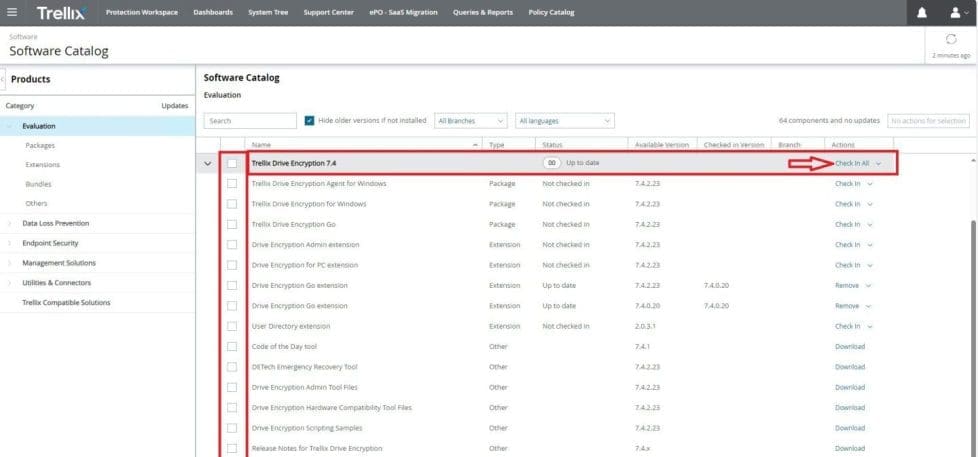
Check-in the packages as well.

Deploy Trellix Encryption to End Devices
In this section, we shall be discussing the next steps. The image below shows the required steps involved in deploying Trellix DE to end devices.
We have fulfilled steps 1-4 as depicted in the image below. 
Please see these guides for further information. “Prerequisite checklist for installing Drive Encryption, and how to install or upgrade to Drive Encryption 7.x from the command line“. Finially, you will find the installation guide very useful.
Deploy Trellix Data Encryption to the end device
Note: To use Trellix DE, you must disable BitLocker on all Endpoints before rolling Trellix Drive Encryption to all clients and the Trellix license model is per node.
As I need a solution to manage previously encrypted lab clients automatically, this is not a solution for me. If you are using MBAM to manage your clients, MBAM must be uninstalled before the deployment of Trellix Drive Encryption and disabling BitLocker.
I am not interested in this technology and as such, I will not be showing the steps to deploy the egnets to clients and configure the necessary policies. These steps are similar to the steps discussed here “Manage BitLocker and FileVault with Trellix Native Encryption”
FAQs
Why add management of Windows BitLocker with MNE when we already have Drive Encryption (DE) or Endpoint Protection for PC (EEPC)?
MNE for BitLocker is a secondary option for our existing DE customers and provides customers with an option if they want only basic encryption. This goal is especially for customers who are already using BitLocker on all or a group of endpoints.
Can I simply move from Microsoft BitLocker Administration and Monitoring (MBAM) client to MNE?
Yes, but need to push the MNE client software to the endpoints and enable the MNE reporting policy in the first instance. After you see your systems reporting BitLocker status.
Then you can then start removing MBAM from the endpoint and enabling the MNE management policy. If you fail to remove MBAM from the endpoint, it results in conflict between the two management solutions as they compete to manage BitLocker.
How does MNE handle BitLocker recovery keys stored in AD; is it done automatically?
When MNE is first installed on a system where BitLocker is already running, MNE takes a backup of the recovery keys that exist on the computer to ePO. It does so by simply pulling them from the client using the BitLocker API (no round trip needed to AD). MNE also adds our own recovery key as well. So, a system where MNE is taking over BitLocker will have multiple recovery keys and all are safely stored in ePO.
I hope you found this article on how to encrypt your system with Trellix Data Encryption useful. Please feel free to leave a comment below.