Skip to content

TechDirectArchive

  • Home
  • About
  • Advertise With US
  • Reviews
  • Contact
  • Toggle search form
Home » Windows Server » Fix Error 0x87E10BC6 on a PC running Windows non-core Edition
  • fix this PC cannot run on Windows
    How to Fix “This PC Can’t Run Windows 11” on Hyper Windows
  • Print Spooler
    Mitigate Windows Print Spooler Remote Code Execution Vulnerability Security | Vulnerability Scans and Assessment
  • fgh
    Configure log on as a batch job permissions on any server Windows Server
  • banner
    How to Fix Python was not found run without arguments to install from the Microsoft Store Windows
  • Windows 11 default Icons
    Windows Desktop Icon: How to Make Default System Icons Visible Windows
  • TeamPass Password manager
    Install and configure TeamPass Password Manager Password Manager
  • system
    How to fix the system cannot find the file specified when adding LP, LIP, and FoD packages to Windows Images Windows Server
  • HAProxy
    Deploying a load balancer from scratch and adding backend servers Linux

Fix Error 0x87E10BC6 on a PC running Windows non-core Edition

Posted on 03/09/202516/09/2025 Christian By Christian No Comments on Fix Error 0x87E10BC6 on a PC running Windows non-core Edition
fix windows activation 0x87E10BC6 error

In this article, we shall discuss how to Fix Error 0x87E10BC6 on a PC running Windows non-core Edition. The error code 0x87e10bc6 occurs when there is an issue with activating Windows as we will see very shortly. This can be due to various reasons such as server issues, firewall interference, or incorrect product key. Please, see What to know about “Failed to perform Veeam Worker Upgrade”, and how to Fix SMB Freezes That Break Backups on Critical Linux Servers.

As you would see on the internet or on some AI Assistance (Conversation AI) platforms. You are required to run the Windows Activation Troubleshooter when the SLMGR commands do not work.

Therefore, understanding the server edition such as the “Non-Core”/Semi-Minimal Installation or Server with Desktop Experience (Full) etc” installed and the type of ISO used will be paramount in solving this issue. Non-core is another way of describing “server with Desktop Experience”.

Also, see how to Set up Veeam Backup for Microsoft Azure, how to Check Windows Activation Status and troubleshoot activation errors, and how to Transfer Windows License from one PC to the other on Windows.

Why was the error prompted “Activating Windows ServerStandard Edition (Error 0x87E10BC6)

As noted, I attempted to activate this Windows Server using the slmgr command. The error 0x87E10BC6 indicates an activation failure caused by a mismatch between the installed edition’s licensing type and the ISO (minimal edition) used for installation.

Reviewing the KMS logs and understanding the available installation ISOs in your environment will be essential for identifying the correct edition and resolving the activation issue.
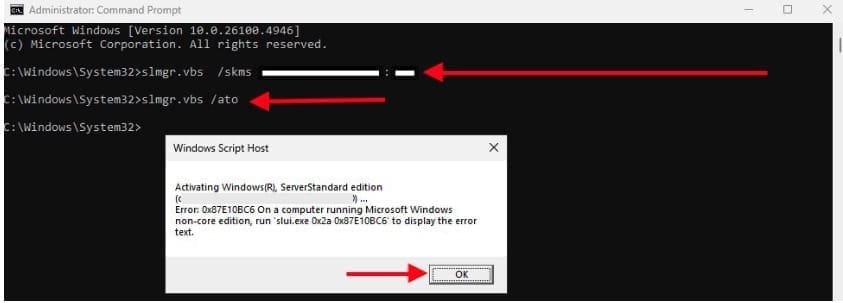
activate windows error

The KMS log is where Windows records activation attempts and errors when using a Key Management Service (KMS) for volume activation. On Windows Server (and client editions), it’s essential for diagnosing activation errors like 0x87E10BC6.

Regardless of the Edition you install with this ISO, you will get the below error. To do this,  navigate to Settings > System > Activation and click Troubleshoot.

Activation error

Even when attempting to execute the activation command on a single line. The system returns the following error. This indicates that the activation attempt fails due to a mismatch between the installed edition and the provided activation channel and Port.

slmgr.vbs /ipk <KMS server> /ato
Activation_Error

Note: If activation fails, the Windows Activation Troubleshooter can normally be used to resolve common issues. However, as mentioned earlier, in this case the tool will not resolve the problem because the installed edition of Windows Server does not match the licensing type.

cannot connect to your organisation

Please, see “Editions of MSSQL Server: What are the differences between various Editions of Microsoft SQL Server“. Here is a guide on “Microsoft SQL Evaluation period has expired: How to upgrade SQL Server instance“.

Fix Error 0x87E10BC6 on a PC running Windows non-core Edition

Due to the error message “Error 0x87E10BC6 on a PC running Windows non-core Edition.” It appears that the installed Windows Server, despite being non-core. Some reason for this could be that most Windows Server ISOs are often “Slipstreamed” with the latest cummulative updates. These updates might include changes to the activation or installation process than the older non-updated ISO.

While such editions may appear as “non-core” in logs or setup, they are not a complete Full installation.

Therefore, I will proceed to install the correct “Older ISO” to deploy a Windows Server with Desktop. This ensures proper activation and compatibility.

Please, see How to install Windows Server unto ACEMAGICIAN Mini PC, and how to Install Windows Server 2025 via iDRAC Virtual Media or PXE. Here is how to Convert Windows Server Datacenter to Standard: Install Windows Server via iDRAC Virtual Media.

Upon installing Windows Server 2025 using the an older ISO. I was able to successfully activate the operating system using the slmgr volume licensing commands.

slmgr.vbs /skms <KMS_SERVER_NAME or FQDN:port>
slmgr.vbs /ato
slmgr.vbs /ipk <YOUR-PRODUCT-KEY> /ato
kms activation

This enforces the thoughts that the older ISO contained a more complete set of features or it was a specific type of installation media that bundled the Full desktop experience.

Also, see how to Configure Windows Server Core using SConfig. Here is how to perform In-place upgrade of Windows Server 2022 to 2025.

As you can see below also. Windows is activated using the organizations activation service.

activated

Tip: Update your KMS Server

Note that in some cases, your KMS server may need the latest Windows Updates to activate newer client versions. If you run into activation errors. Make sure the server has the required updates listed under the Activation Versions section on the official Microsoft Learn site.

Except this is not the case, please follow the steps below. A KMS Server activated with a newer KMS Host Key can activate all previous versions of Windows. But not vice versa. For example, a KMS server activated with a Windows Server 2016 Data center, or Standard Edition KMS key won’t be able to activate Windows 11 or Windows Server 2022/2019 computers etc.

To support modern versions of Windows. You will need to obtain a new CSVLK key and activate it on your KMS server.

I hope you found this article on how to fix Error 0x87E10BC6 on a PC running Windows non-core Edition very useful. Please, feel free to leave a comment below.


5/5 - (1 vote)

Thank you for reading this post. Kindly share it with others.

  • Click to share on X (Opens in new window) X
  • Click to share on Reddit (Opens in new window) Reddit
  • Click to share on LinkedIn (Opens in new window) LinkedIn
  • Click to share on Facebook (Opens in new window) Facebook
  • Click to share on Pinterest (Opens in new window) Pinterest
  • Click to share on Tumblr (Opens in new window) Tumblr
  • Click to share on Telegram (Opens in new window) Telegram
  • Click to share on WhatsApp (Opens in new window) WhatsApp
  • Click to share on Pocket (Opens in new window) Pocket
  • Click to share on Mastodon (Opens in new window) Mastodon
  • Click to share on Bluesky (Opens in new window) Bluesky
  • Click to share on Threads (Opens in new window) Threads
  • Click to share on Nextdoor (Opens in new window) Nextdoor
Windows, Windows Server Tags:Error 0x87E10BC6, Microsoft Windows, Windows 10, Windows 11, Windows Activation, Windows Key Activation, Windows Server 2016, Windows Server 2019, Windows Server 2022, Windows Server 2025, Windows server Activation

Post navigation

Previous Post: What to know about “Failed to perform Veeam Worker Upgrade”
Next Post: Server Certificate could not be updated: Private key does not match

Related Posts

  • Trellix Invalid credential
    Fix unable to login to Trellix ePO with Windows authentication Windows Server
  • Prevent Windows from Saving RDP Connection
    Prevent Windows from Saving RDP Connection History Windows
  • How to Install Winget on Windows Server
    How to Install Winget on Windows Server Windows Server
  • Grant Non Domain Admin Privileges to Manage Workstation
    Grant Non-Domain Admin Privileges to Manage Workstation Windows
  • windows sysinternals
    Sysmon from SysInternal: What is System Monitor and how to install and use it Windows Server
  • the Execute permission was denied
    Fix An error has occurred during report processing (rsProcessingAborted) Oracle/MSSQL/MySQL

More Related Articles

Trellix Invalid credential Fix unable to login to Trellix ePO with Windows authentication Windows Server
Prevent Windows from Saving RDP Connection Prevent Windows from Saving RDP Connection History Windows
How to Install Winget on Windows Server How to Install Winget on Windows Server Windows Server
Grant Non Domain Admin Privileges to Manage Workstation Grant Non-Domain Admin Privileges to Manage Workstation Windows
windows sysinternals Sysmon from SysInternal: What is System Monitor and how to install and use it Windows Server
the Execute permission was denied Fix An error has occurred during report processing (rsProcessingAborted) Oracle/MSSQL/MySQL

Leave a Reply Cancel reply

You must be logged in to post a comment.

VEEAMLEGEND

vexpert-badge-stars-5

Virtual Background

GoogleNews

Categories

veeaam100

Microsoft MVP

  • fix this PC cannot run on Windows
    How to Fix “This PC Can’t Run Windows 11” on Hyper Windows
  • Print Spooler
    Mitigate Windows Print Spooler Remote Code Execution Vulnerability Security | Vulnerability Scans and Assessment
  • fgh
    Configure log on as a batch job permissions on any server Windows Server
  • banner
    How to Fix Python was not found run without arguments to install from the Microsoft Store Windows
  • Windows 11 default Icons
    Windows Desktop Icon: How to Make Default System Icons Visible Windows
  • TeamPass Password manager
    Install and configure TeamPass Password Manager Password Manager
  • system
    How to fix the system cannot find the file specified when adding LP, LIP, and FoD packages to Windows Images Windows Server
  • HAProxy
    Deploying a load balancer from scratch and adding backend servers Linux

Subscribe to Blog via Email

Enter your email address to subscribe to this blog and receive notifications of new posts by email.

Join 1,843 other subscribers
  • RSS - Posts
  • RSS - Comments
  • About
  • Authors
  • Write for us
  • Advertise with us
  • General Terms and Conditions
  • Privacy policy
  • Feedly
  • Telegram
  • Youtube
  • Facebook
  • Instagram
  • LinkedIn
  • Tumblr
  • Pinterest
  • Twitter
  • mastodon

Tags

AWS Azure Bitlocker Microsoft Windows PowerShell WDS Windows 10 Windows 11 Windows Deployment Services Windows Server 2016

Copyright © 2025 TechDirectArchive


Loading Comments...
 

You must be logged in to post a comment.