Skip to content

TechDirectArchive

Hands-on IT, Cloud, Security & DevOps Insights

  • Home
  • About
  • Advertise With US
  • Reviews
  • Contact
  • Toggle search form
  • Featured image 10
    Add a Printer Using an IP Address in Windows 11 Network | Monitoring
  • 1 kajkbmlyehn0inifwrh 8w 1
    What to note when settings up Ansible to work with Kerberos Configuration Management Tool
  • how to fix the sorry this file type is not permitted for security reasons error in wordpress 5e4a5632967c7
    Error 1707: Network address invalid when trying to connect remotely Windows
  • maxresdefault 2 6
    How to create an AMI from the Command line AWS/Azure/OpenShift
  • gitlab56789iuj
    Error unregistering Runner from GitLab: Forbidden with Docker Executor Network | Monitoring
  • Windows 10 1024x683 1
    ADK|WinPE|MDT: Deploy Windows with WDS Windows Server
  • hero activedirectory
    The following error occurred attempting to rename the computer Account already exists Windows Server
  • BitLocker unlock
    How to unlock a fixed drive protected by BitLocker Windows

Tag: HTTPS

Setup VirtualHost with SSL on WAMP Server

Posted on 09/05/202327/11/2024 Christian By Christian 2 Comments on Setup VirtualHost with SSL on WAMP Server
Setup VirtualHost with SSL on WAMP Server

In this article, you will learn how to setup VirtualHost with SSL on WAMP Server for your application. Secure Sockets Layer (SSL) is a security protocol that creates an encrypted link between a web server and a web browser. Literally speaking, an SSL Certificate is an X.509 certificate. The X.509 is the standard that defines…

Read More “Setup VirtualHost with SSL on WAMP Server” »

Linux, Security | Vulnerability Scans and Assessment, Windows

Domain Naming System: Enabling DNS over TLS in Windows 11

Posted on 16/10/202206/03/2024 Matthew By Matthew No Comments on Domain Naming System: Enabling DNS over TLS in Windows 11
Domain Naming System: Enabling DNS over TLS in Windows 11

Domain Naming System over TLS, or DoT, is an encrypted DNS protocol. It is seen as a viable alternative to DNS over HTTPS. In this article, we shall discuss “Domain Naming System: Enabling DNS over TLS in Windows 11”. DNS traffic in DoH is simply another HTTPS data stream over port 443. On the other…

Read More “Domain Naming System: Enabling DNS over TLS in Windows 11” »

Network | Monitoring, Windows

How to install Let’s Encrypt on Apache Web Server

Posted on 21/03/202205/07/2024 Imoh Etuk By Imoh Etuk No Comments on How to install Let’s Encrypt on Apache Web Server
How to install Let’s Encrypt on Apache Web Server

This article provides a comprehensive guide on how to install Let’s Encrypt on Apache HTTP Web Server on Ubuntu 20.04 LTS. The process involves using Certbot to acquire a free SSL certificate specifically for Apache on Ubuntu 20.04 LTS, ensuring seamless automatic renewal. Please see How to integrate ObjectFirst OOTBI Appliance with VBR, and how…

Read More “How to install Let’s Encrypt on Apache Web Server” »

Linux, Web Server

Setup HTTPS users using Git credentials and Pushing Code to AWS CodeCommit

Posted on 19/03/202204/09/2023 Temitope Odemo By Temitope Odemo 2 Comments on Setup HTTPS users using Git credentials and Pushing Code to AWS CodeCommit
Setup HTTPS users using Git credentials and Pushing Code to AWS CodeCommit

If you want to create a connection to AWS CodeCommit repositories is by configuring Git credentials for CodeCommit in the IAM console. In this article, you shall learn how to setup HTTPS users using Git credentials and Pushing Code to AWS CodeCommit. Kindly check these pages to read more on AWS: How to Deploy Dynamic…

Read More “Setup HTTPS users using Git credentials and Pushing Code to AWS CodeCommit” »

AWS/Azure/OpenShift, Version Control System

How to force your website to redirect from HTTP to HTTPS using a web.config file

Posted on 15/01/202220/03/2024 Temitope Odemo By Temitope Odemo No Comments on How to force your website to redirect from HTTP to HTTPS using a web.config file
How to force your website to redirect from HTTP to HTTPS using a web.config file

In this guide I will be showing you what you can do if you don’t want your website to route to HTTP rather you want it to redirect from HTTP to HTTPS, put simply I will show yo how to force redirect your website visitor from HTTP to HTTPS. HTTP stand for Hypertext Transfer Protocol….

Read More “How to force your website to redirect from HTTP to HTTPS using a web.config file” »

Network | Monitoring

Add and remove IIS Web Server on Windows Server 2019 via the Server Manager and PowerShell

Posted on 03/03/202125/03/2024 Christian By Christian No Comments on Add and remove IIS Web Server on Windows Server 2019 via the Server Manager and PowerShell
Add and remove IIS Web Server on Windows Server 2019 via the Server Manager and PowerShell

This article explore how to add and remove IIS web server. Kindly refer to the following related contents: Event ID 5059: Application pool has been disabled or Changing identity user for IIS Application Pooland how to setup and configure Windows server update services (WSUS). The Web Server (IIS) role in Windows Server 2019 provides a…

Read More “Add and remove IIS Web Server on Windows Server 2019 via the Server Manager and PowerShell” »

Web Server

Configure SSL connection for WSUS Upstream and Downstream Servers

Posted on 10/03/201816/03/2024 Christian By Christian No Comments on Configure SSL connection for WSUS Upstream and Downstream Servers
Configure SSL connection for WSUS Upstream and Downstream Servers

In this article, we will learn how to Configure SSL connection for WSUS Upstream and Downstream Servers. SSL stands for Secure Sockets Layer, a vital security technology. See the following guides for some related articles I have written. Configuring WSUS Email Notification to Work With Office365, How to setup and configure Windows server update services…

Read More “Configure SSL connection for WSUS Upstream and Downstream Servers” »

Windows Server

How to run the Cisco ASDM launcher

Posted on 11/04/201606/12/2023 Christian By Christian No Comments on How to run the Cisco ASDM launcher
How to run the Cisco ASDM launcher

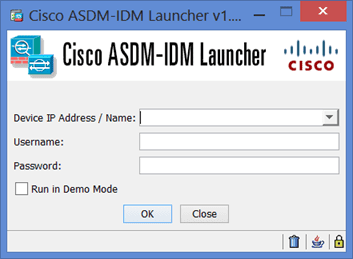
Welcome to the comprehensive guide on how to run the Cisco ASDM launcher. The Cisco Adaptive Security Device Manager (ASDM) is vital for effectively managing Cisco network devices. Whether you’re a networking professional or an enthusiast, understanding how to run the Cisco ASDM launcher is essential for streamlined network administration. Please see How to enable…

Read More “How to run the Cisco ASDM launcher” »

Network | Monitoring

Microsoft MVP

VEEAMLEGEND

vexpert-badge-stars-5

Virtual Background

GoogleNews

Categories

veeaam100

sysadmin top30a

  • Featured image 10
    Add a Printer Using an IP Address in Windows 11 Network | Monitoring
  • 1 kajkbmlyehn0inifwrh 8w 1
    What to note when settings up Ansible to work with Kerberos Configuration Management Tool
  • how to fix the sorry this file type is not permitted for security reasons error in wordpress 5e4a5632967c7
    Error 1707: Network address invalid when trying to connect remotely Windows
  • maxresdefault 2 6
    How to create an AMI from the Command line AWS/Azure/OpenShift
  • gitlab56789iuj
    Error unregistering Runner from GitLab: Forbidden with Docker Executor Network | Monitoring
  • Windows 10 1024x683 1
    ADK|WinPE|MDT: Deploy Windows with WDS Windows Server
  • hero activedirectory
    The following error occurred attempting to rename the computer Account already exists Windows Server
  • BitLocker unlock
    How to unlock a fixed drive protected by BitLocker Windows

Subscribe to Blog via Email

Enter your email address to subscribe to this blog and receive notifications of new posts by email.

Join 1,839 other subscribers
  • RSS - Posts
  • RSS - Comments
  • About
  • Authors
  • Write for us
  • Advertise with us
  • General Terms and Conditions
  • Privacy policy
  • Feedly
  • Telegram
  • Youtube
  • Facebook
  • Instagram
  • LinkedIn
  • Tumblr
  • Pinterest
  • Twitter
  • mastodon

Tags

AWS Azure Bitlocker Microsoft Windows PowerShell WDS Windows 10 Windows 11 Windows Deployment Services Windows Server 2016

Copyright © 2025 TechDirectArchive


Loading Comments...
 

You must be logged in to post a comment.