Skip to content

TechDirectArchive

Hands-on IT, Cloud, Security, Veeam & DevOps

  • Home
  • About
  • Advertise With US
  • Reviews
  • Contact
  • Toggle search form

Category: Windows

Step-by-step guides and tips for Windows setup, installation, customization, and troubleshooting to optimize your PC performance and user experience

How to forcefully remove Microsoft Edge Browser the hard way from your Windows device

Posted on 13/08/202003/09/2026 Christian By Christian No Comments on How to forcefully remove Microsoft Edge Browser the hard way from your Windows device
How to forcefully remove  Microsoft Edge Browser the hard way from your Windows device

Microsoft Edge is a new web browser developed by Microsoft and it replaces Internet Explorer in Windows 10. Edge is also included in Windows 10 and is the default web browser. In this article, we shall discuss How to forcefully remove Microsoft Edge Browser the hard way from your Windows device. Please see Task Kill vs…

Read More “How to forcefully remove Microsoft Edge Browser the hard way from your Windows device” »

Windows

Make Cortana search with a different web browser instead of Edge

Posted on 12/08/202003/09/2026 Christian By Christian No Comments on Make Cortana search with a different web browser instead of Edge
Make Cortana search with a different web browser instead of Edge

Cortana allows you to search for items in Windows 10 such as settings, files, and apps on your PC and it uses the default Bing search engine. In this article, we will discuss how to Make Cortana search with a different web browser instead of Edge. Please visit this article on how to disable Cortona…

Read More “Make Cortana search with a different web browser instead of Edge” »

Windows

What is Cortona: How to disable Cortana via the registry or GPO

Posted on 09/08/202003/09/2026 Christian By Christian No Comments on What is Cortona: How to disable Cortana via the registry or GPO
What is Cortona: How to disable Cortana via the registry or GPO

Cortana is a virtual assistant developed by Microsoft, which uses the Bing search engine to perform tasks such as setting reminders and answering questions for the user. Therefore, Cortana helps you save time and focus attention on what matters most in the following ways below. How to make Cortana use to your default web browser…

Read More “What is Cortona: How to disable Cortana via the registry or GPO” »

Windows

Fix Error code 0x4 Session disconnected: Your session ended because of an error, if this keeps happening, contact your system administrator

Posted on 07/08/202003/09/2026 Christian By Christian 4 Comments on Fix Error code 0x4 Session disconnected: Your session ended because of an error, if this keeps happening, contact your system administrator
Fix Error code 0x4 Session disconnected: Your session ended because of an error, if this keeps happening, contact your system administrator

Remote Desktop Protocol (RDP) is a proprietary protocol developed by Microsoft. It provides a user with a graphical interface to connect to another computer over a network connection. In this article, we will discuss how to “Fix Error code 0x4 Session disconnected: Your session ended because of an error, if this keeps happening, contact your system administrator’. You will receive the…

Read More “Fix Error code 0x4 Session disconnected: Your session ended because of an error, if this keeps happening, contact your system administrator” »

Windows

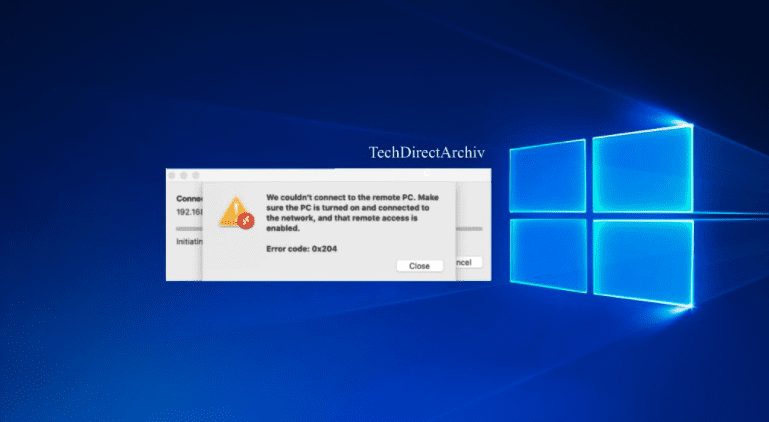
Error 0x204: Unable to Connect to Remote PC [Part 2]

Posted on 07/08/202003/09/2026 Christian By Christian No Comments on Error 0x204: Unable to Connect to Remote PC [Part 2]
Error 0x204: Unable to Connect to Remote PC [Part 2]

The Windows Remote Desktop Connection tool gives users the ability to connect to a remote Windows PC or server. In this article, we shall discuss how to fix “We could not connect to the remote PC with error code 0x204 and make sure the PC is turned on and connected to the network [Part 2]”….

Read More “Error 0x204: Unable to Connect to Remote PC [Part 2]” »

Windows

How to track your device performance and health via Windows Security in Windows 10

Posted on 06/07/202005/09/2026 Christian By Christian No Comments on How to track your device performance and health via Windows Security in Windows 10
How to track your device performance and health via Windows Security in Windows 10

Windows Security previously known as Windows Defender Security Center is a great start to see that your Windows 10 device is running smoothly. This helps to keep your device secure, Windows Security monitors your device for security issues and provides a health report. This appears on the Device Performance & health page. Please see How to use…

Read More “How to track your device performance and health via Windows Security in Windows 10” »

Windows

Clean Install and PC Reset: How to perform a Fresh Start installation of Windows 10

Posted on 06/07/202005/09/2026 Christian By Christian No Comments on Clean Install and PC Reset: How to perform a Fresh Start installation of Windows 10
Clean Install and PC Reset: How to perform a Fresh Start installation of Windows 10

For Windows 10 PC users, there are times you may encounter issues caused by system file corruption, system settings changes, third-party software, malware, etc. In order to fix your device and to make it work as it uses to, you may need to reinstall the operating system. Microsoft offers you four options to reinstall Windows…

Read More “Clean Install and PC Reset: How to perform a Fresh Start installation of Windows 10” »

Windows

Reset and reinstall Windows from the cloud : Recover Windows when you cannot boot

Posted on 16/06/202005/09/2026 Christian By Christian No Comments on Reset and reinstall Windows from the cloud : Recover Windows when you cannot boot
Reset and reinstall Windows from the cloud : Recover Windows when you cannot boot

Windows 10 20H1 introduced a new feature called Windows 10 Cloud Reset. This new cloud recovery feature enables administrators (users) to reset their devices from the cloud (Microsoft’s servers). Previously, Windows when Administrators or users initiate the device reset, Windows 10 will reinstall Windows using files available on the device. On how to reset Windows…

Read More “Reset and reinstall Windows from the cloud : Recover Windows when you cannot boot” »

Windows

Request timed out and Destination Host Unreachable, Transit Failed, General Failure

Posted on 16/06/202005/09/2026 Christian By Christian No Comments on Request timed out and Destination Host Unreachable, Transit Failed, General Failure
Request timed out and Destination Host Unreachable, Transit Failed, General Failure

In this article, we shall discuss “Request timed out and Destination Host Unreachable “Transit Failed, General Failure, Request timed out and Destination Host unreachable””. The ping command is a very common method for troubleshooting the accessibility of devices between two endpoints. Please see “KDC reply did not match expectations while getting initial credential“, and how…

Read More “Request timed out and Destination Host Unreachable, Transit Failed, General Failure” »

Windows

How to perform sysprep in Windows

Posted on 06/06/202005/09/2026 Christian By Christian No Comments on How to perform sysprep in Windows
How to perform sysprep in Windows

Sysprep is the Microsoft system preparation tool used by system administrators. It is often used during the automated deployment of Windows Server-based operating systems. In this article, we shall discuss How to perform sysprep in Windows. Cloning a Windows Server or Windows 10 without first running Sysprep would be problematic because Windows 10 and Windows Server include security identifiers…

Read More “How to perform sysprep in Windows” »

Windows

How to deploy images to computers using PXE Boot

Posted on 27/05/202005/09/2026 Christian By Christian No Comments on How to deploy images to computers using PXE Boot
How to deploy images to computers using PXE Boot

Windows Deployment Services (WDS) is a really interesting tool from Microsoft. In this article, we shall discuss “How to deploy images to computers using PXE Boot”. WDS allows an administrator to remotely deploy Windows operating systems to machines booting from a network adapter. Please see how to Add boot and install images to WDS and…

Read More “How to deploy images to computers using PXE Boot” »

Windows

Windows Package Manager: How to install applications using Chocolatey?

Posted on 25/05/202005/09/2026 Christian By Christian No Comments on Windows Package Manager: How to install applications using Chocolatey?
Windows Package Manager: How to install applications using Chocolatey?

Chocolatey is software management automation and works with over 20+ installer technologies for Windows. It can also manage things you would normally xcopy deploy (like runtime binaries and zip files). Kindly refer to the following Windows Package Manager: How to install, upgrade and uninstall software with Chocolatey, and Windows Package Manager: How to install applications with Winget…

Read More “Windows Package Manager: How to install applications using Chocolatey?” »

Windows

Windows Package Manager: How to install, upgrade or uninstall Chocolatey

Posted on 25/05/202005/09/2026 Christian By Christian No Comments on Windows Package Manager: How to install, upgrade or uninstall Chocolatey
Windows Package Manager: How to install, upgrade or uninstall Chocolatey

Chocolatey is a secure and simple Windows package manager. Windows package managers are a collection of tools that enable users to automate the installation, configuration, and updating of apps and programs. It is free and open-source for personal and business use. Please see Strategic breakdown and step by step guide to upgrading to VBR 13.1, and Veeam…

Read More “Windows Package Manager: How to install, upgrade or uninstall Chocolatey” »

Windows

Posts pagination

Previous 1 … 49 50 51 … 60 Next

Microsoft MVP

vexpert-badge-stars-5

Virtual Background

VEEAMLEGEND

Categories

Top 30 Sysadmin blog

veeaam100

Veeam Vanguard

  • Featured image 5
    How to uninstall and prevent the installation of Microsoft Teams on Windows Windows
  • featured image
    How to Add or Remove Sites from Favorites list in Microsoft Edge Windows
  • queryremoteinstalledapps
    Get a list of installed programs locally or remotely in Windows Windows
  • image 54
    How to enable Amazon S3 default bucket encryption using S3 Console AWS/Azure/OpenShift
  • template 1
    Install Group Policy Templates for Microsoft Edge and Google Chrome browsers on Windows Windows
  • Screenshot 2020 11 17 at 02.06.58
    The PA Server Monitor review and product details Reviews
  • Restrict Access to USB Drives
    Deny Execute Access: Restrict Access to USB Drives on Windows [Part 1] Windows
  • How to Find Out Which Users Are Logged on Windows Server
    How to Find Out Which Users Are Logged on Windows Server Windows

Subscribe to Blog via Email

Enter your email address to subscribe to this blog and receive notifications of new posts by email.

Join 1,746 other subscribers
  • RSS - Posts
  • RSS - Comments
  • About
  • Authors
  • Write for us
  • Contact
  • Advertise with us
  • General Terms and Conditions
  • Privacy policy
  • Feedly
  • Telegram
  • Youtube
  • Facebook
  • Instagram
  • LinkedIn
  • Tumblr
  • Pinterest
  • Twitter
  • mastodon
  • Bsky

Tags

Active Directory Azure Bitlocker Microsoft Windows PowerShell WDS Windows 10 Windows 11 Windows Deployment Services Windows Server 2016

Copyright © 2026 TechDirectArchive