Skip to content

TechDirectArchive

Hands-on IT, Cloud, Security, Veeam & DevOps

  • Home
  • About
  • Advertise With US
  • Reviews
  • Contact
  • Toggle search form

Category: Windows

Step-by-step guides and tips for Windows setup, installation, customization, and troubleshooting to optimize your PC performance and user experience

OOBESETTINGSMULTIPLEPAGE error on Windows 10

Posted on 23/05/202005/09/2026 Christian By Christian No Comments on OOBESETTINGSMULTIPLEPAGE error on Windows 10
OOBESETTINGSMULTIPLEPAGE error on Windows 10

In this article, you will learn about ways to go about “OOBESETTINGSMULTIPLEPAGE error on Windows 10”. When a user starts a new Windows-based computer, or after they install a new Windows operating system, the Out-Of-Box Experience (OOBE) guides the user through various setup operations. Please see DISM Error 87: The package is unknown, and how…

Read More “OOBESETTINGSMULTIPLEPAGE error on Windows 10” »

Windows

How to reset your lost or forgotten Windows 10 Password

Posted on 05/05/202006/09/2026 Christian By Christian No Comments on How to reset your lost or forgotten Windows 10 Password
How to reset your lost or forgotten Windows 10 Password

When your Windows 10 Password is lost or forgotten. It is practically impossible to use the device, neither will you be able to install any application (program) nor Windows Updates, etc. The process of resetting the password is tedious and Microsoft has decided to harden the entire process. In this article, we shall discuss “Sysmon…

Read More “How to reset your lost or forgotten Windows 10 Password” »

Windows

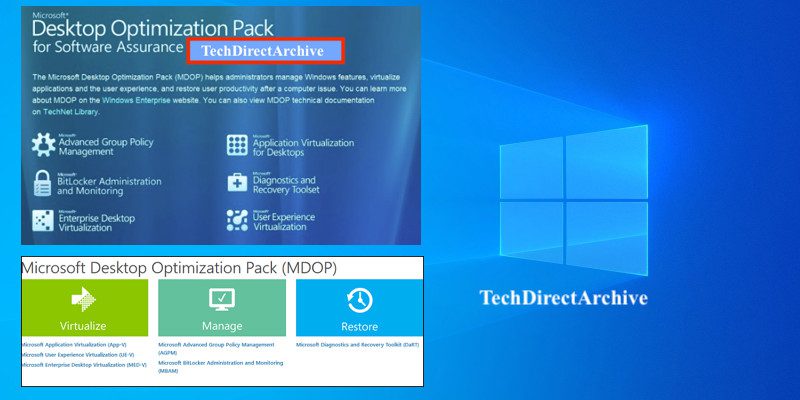
Microsoft Desktop Optimization Pack [MDOP] at a glance

Posted on 27/04/202006/09/2026 Christian By Christian No Comments on Microsoft Desktop Optimization Pack [MDOP] at a glance
Microsoft Desktop Optimization Pack [MDOP] at a glance

Microsoft Desktop Optimization Pack (MDOP) is a suite (portfolio) of technologies available to Software Assurance customers through an additional subscription. The following components are included in the MDOP suite: Microsoft Application Virtualization (App-V), Microsoft User Experience Virtualization (UE-V), Microsoft Advanced Group Policy Management (AGPM), Microsoft Diagnostics & Recovery Toolset (DaRT), and Microsoft BitLocker Administration and…

Read More “Microsoft Desktop Optimization Pack [MDOP] at a glance” »

Windows

WSL Error 0x8007019e: WSL Register Distribution failed with error

Posted on 26/04/202007/09/2026 Christian By Christian No Comments on WSL Error 0x8007019e: WSL Register Distribution failed with error
WSL Error 0x8007019e: WSL Register Distribution failed with error

You may encounter the WSL Register Distribution Failed error due to the disabled subsystem for Linux. This means there is a corrupt installation of the Linux distro application. See the following guide for more information “What is Windows Subsystem for Linux (WSL)“, How to install Windows Subsystem for Linux on Windows 11 via the Command line, and…

Read More “WSL Error 0x8007019e: WSL Register Distribution failed with error” »

Windows

Various methods on how to launch Windows Task Manager

Posted on 24/04/202007/09/2026 Christian By Christian No Comments on Various methods on how to launch Windows Task Manager
Various methods on how to launch Windows Task Manager

Windows Task Manager is a built-in application available on all Windows OS. It provides information about running applications, processes, and services, as well as computer performance, network activity, and memory information. In this article, we shall discuss ‘the Various methods on how to launch Windows Task Manager”. Please see how to Enable the End Task…

Read More “Various methods on how to launch Windows Task Manager” »

Windows

Set Google as default: How to set a browser as default in Windows 10

Posted on 23/04/202007/09/2026 Christian By Christian No Comments on Set Google as default: How to set a browser as default in Windows 10
Set Google as default: How to set a browser as default in Windows 10

Every PC as well as the mobile device has a default web browser. Windows 10 has Microsoft Edge, Apple devices run Safari, etc. For more information on how to create a shortcut, see the following links: Create a desktop shortcut, how to make a shortcut available to all users, and how to create a scheduled task…

Read More “Set Google as default: How to set a browser as default in Windows 10” »

Windows

Ping request could not find the host: Verify if the name is entered correctly

Posted on 05/04/202015/09/2026 Christian By Christian No Comments on Ping request could not find the host: Verify if the name is entered correctly
Ping request could not find the host: Verify if the name is entered correctly

The ping command is a very common method for troubleshooting the accessibility of devices between two endpoints. This utility uses a series of Internet Control Message Protocol (ICMP) echo messages to determine whether a remote host is active or inactive, the round-trip delay in communicating with the host, and packet loss. Please see why can’t I…

Read More “Ping request could not find the host: Verify if the name is entered correctly” »

Windows

Periodic Scanning: How to schedule Windows Defender Antivirus to scan on Windows

Posted on 03/04/202016/09/2026 Christian By Christian No Comments on Periodic Scanning: How to schedule Windows Defender Antivirus to scan on Windows
Periodic Scanning: How to schedule Windows Defender Antivirus to scan on Windows

Microsoft Defender also referred to as Windows Defender before Windows 10 November 2019 Update or Windows Defender Antivirus in Windows 10 Creators Update and later is an anti-malware component of Microsoft Windows. Learn more about Microsoft Defender and Windows 11 encryption features in these related posts how to remove Microsoft Defender update on Windows 10…

Read More “Periodic Scanning: How to schedule Windows Defender Antivirus to scan on Windows” »

Windows

How to use command prompt to shutdown and restart your computer

Posted on 02/04/202016/09/2026 Christian By Christian No Comments on How to use command prompt to shutdown and restart your computer
How to use command prompt to shutdown and restart your computer

There are times you (as a system Administrator) may want to reboot your PC due to undesired behavior on your PC. During and after the installation of new programs (software and hardware), most times, you may need to restart your device. Please see  how to prevent users from shutting down in a Virtual Machine and Handy Command-Prompt…

Read More “How to use command prompt to shutdown and restart your computer” »

Windows

Run or Edit and Delete Tasks via Windows Task Scheduler

Posted on 02/04/202016/09/2026 Christian By Christian No Comments on Run or Edit and Delete Tasks via Windows Task Scheduler
Run or Edit and Delete Tasks via Windows Task Scheduler

Task Scheduler enables you to automatically perform routine tasks on a chosen computer. Task Scheduler does this by monitoring whatever criteria you choose. This is referred to as “triggers” and then executing the tasks when those criteria are met. Please refer to the following exciting guides: Task scheduler errors and success code: What does code…

Read More “Run or Edit and Delete Tasks via Windows Task Scheduler” »

Windows

How to prevent a remote shutdown and restart in Windows

Posted on 02/04/202016/09/2026 Christian By Christian No Comments on How to prevent a remote shutdown and restart in Windows
How to prevent a remote shutdown and restart in Windows

Due to the COVID-19 outbreak, most users remotely connect to their workstations at work in order to perform their duties and they can accidentally shut down or restart their devices. Kindly refer to the following related guides: How to hide or stop Apps such as OneDrive from opening automatically upon login on Macbook Pro, and…

Read More “How to prevent a remote shutdown and restart in Windows” »

Windows

How to disable power plan in Windows via GPO and Windows Settings

Posted on 30/03/202016/09/2026 Christian By Christian 1 Comment on How to disable power plan in Windows via GPO and Windows Settings
How to disable power plan in Windows via GPO and Windows Settings

If you ever find your Windows 10 devices dimming their screen and this act irritates you, I will be describing various ways to prevent Windows from going into standby/sleep after a certain period of inactivity. The Energy Saver Mode feature mainly saves energy when the user is away. Power plans can help you save energy,…

Read More “How to disable power plan in Windows via GPO and Windows Settings” »

Windows

How to add servers to the Trusted Hosts list

Posted on 23/03/202030/06/2026 Christian By Christian 4 Comments on How to add servers to the Trusted Hosts list
How to add servers to the Trusted Hosts list

In this article, I will show you how to add servers to the Trusted Hosts list via PowerShell and command Prompt for the WinRM client. Please see how to enable and Configure WinRM to accept connection from a specific IP Address. The WSMan provider for PowerShell lets you add, change, clear, and delete WS-Management configuration data on…

Read More “How to add servers to the Trusted Hosts list” »

Scripts, Windows, Windows Server

Posts pagination

Previous 1 … 50 51 52 … 60 Next

Microsoft MVP

vexpert-badge-stars-5

Virtual Background

VEEAMLEGEND

Categories

Top 30 Sysadmin blog

veeaam100

Veeam Vanguard

  • featured image
    How to Add or Remove Sites from Favorites list in Microsoft Edge Windows
  • Create Multiboot OS ISO files on a single bootable USB Disk
    Create Multiboot OS ISO files on a single bootable USB Disk Windows
  • Screenshot 2020 06 22 at 23.27.40
    How to fix unable to install msodbcsql17 tool on Ubuntu Oracle/MSSQL/MySQL
  • rdp
    How to fix Remote Desktop can’t connect to the remote computer for one of these reasons Windows Server
  • Fix Windows Security Blank Screen Issue
    How to Fix Windows Security Blank Screen Issue Network | Monitoring
  • CreateanAWSact
    How to Set up an Amazon Web Services (AWS) Account AWS/Azure/OpenShift
  • SysInternals
    Use Active Directory Explorer from Sysinternals Windows
  • ntp server testen
    Enable or disable Linux System’s Clock Sync with NTP Server Linux

Subscribe to Blog via Email

Enter your email address to subscribe to this blog and receive notifications of new posts by email.

Join 1,746 other subscribers
  • RSS - Posts
  • RSS - Comments
  • About
  • Authors
  • Write for us
  • Contact
  • Advertise with us
  • General Terms and Conditions
  • Privacy policy
  • Feedly
  • Telegram
  • Youtube
  • Facebook
  • Instagram
  • LinkedIn
  • Tumblr
  • Pinterest
  • Twitter
  • mastodon
  • Bsky

Tags

Active Directory Azure Bitlocker Microsoft Windows PowerShell WDS Windows 10 Windows 11 Windows Deployment Services Windows Server 2016

Copyright © 2026 TechDirectArchive