Skip to content

TechDirectArchive

Hands-on IT, Cloud, Security & DevOps Insights

  • Home
  • About
  • Advertise With US
  • Reviews
  • Contact
  • Toggle search form
Home » Windows » Remote Desktop can not find the computer FQDN and this might mean that FQDN does not belong to the specified network
  • Cross Domain Folders Access
    Cross Domain Folders Access: Reference account is Locked out Windows
  • banner
    How to Fix Python was not found run without arguments to install from the Microsoft Store Windows
  • create a Lenovo USB Recovery key
    Windows 10 Yoga Recovery: Download the files needed to create a Lenovo USB Recovery key Windows
  • Screenshot 2022 04 02 at 23.08.25
    How to stop Docker from automatically starting on Mac Mac
  • remote desktop connection tabs   rdp tabs
    Guide to Remote Desktop Connection Properties for Secure Access Windows
  • mysqlhero
    How to reset MySQL Root password Oracle/MSSQL/MySQL
  • GNS3
    How to Connect GNS3 to the internet on Windows Network | Monitoring
  • awscli56
    Configure AWS Command Line Interface AWS/Azure/OpenShift

Remote Desktop can not find the computer FQDN and this might mean that FQDN does not belong to the specified network

Posted on 07/02/202019/09/2023 Christian By Christian 1 Comment on Remote Desktop can not find the computer FQDN and this might mean that FQDN does not belong to the specified network
Remote Desktop,

Remote Desktop Protocol or just RDP is a special network protocol that allows a user to establish a connection between two computers and access the Desktop of a remote host. For every connection made to a remote PC, the RDP client in Windows (mstsc.exe) saves the computer name or an IP Address and also the username used to log on. See the following guide on how to remove saved RDP credentials in Windows 10. For other topics on RDP, see the following hyperlinks: How to allow saved credentials for RDP connection, how to remove saved RDP credentials entries in Windows 10, How to prevent the saving of Remote Desktop Credentials in Windows, Remote Desktop can not find the computer FQDN and this might mean that FQDN does not belong to the specified network, and how to disconnect a Remote Desktop User.

Remote Desktop Protocol, or just RDP is a special network protocol which allows a user to establish a connection between two computers and access the Desktop of a remote host. or a similar error, see "Remote Desktop cannot find the computer this might mean that does not belong to the specified network: Verify the computer name and domain that you are trying to connect to".

For other topics on RDP, see the following hyperlinks below
– How to allow saved credentials for RDP connection.
– How to remove saved RDP credentials entries in Windows 10.
– https://techdirectarchive.com/2020/03/17/how-to-remove-entries-histories-from-the-remote-desktop-connection/
– How to prevent the saving of Remote Desktop Credentials in Windows.
– How to disconnect a Remote Desktop User.
– However, How to resolve we could not connect to the remote PC with error code 0x204 and make sure the PC is turned on and connected to the network.

Error: Remote Desktop can’t find the computer “FQDN”.  This might mean that “FQDN” does not belong to the specified network. Verify the computer name and domain that you are trying to connect to.
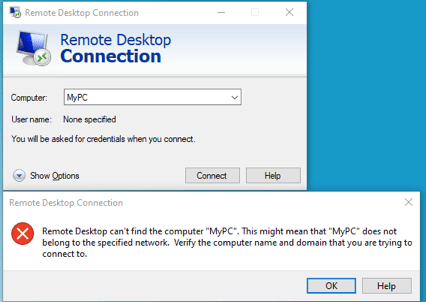
FQDN

Solution:  This could be as a result of many reasons. Here are some possible fix
– First, the right computer-name wasn’t used
– If this fails then the error is DNS related (that is the name you are trying to use is not resolvable). To troubleshoot this, use the nslookup and ping utility to investigate further. Based on your findings, apply a fix 😉

I hope you found this blog post helpful. If you have any questions, please let me know in the comment session.

Rate this post

Thank you for reading this post. Kindly share it with others.

  • Click to share on X (Opens in new window) X
  • Click to share on Reddit (Opens in new window) Reddit
  • Click to share on LinkedIn (Opens in new window) LinkedIn
  • Click to share on Facebook (Opens in new window) Facebook
  • Click to share on Pinterest (Opens in new window) Pinterest
  • Click to share on Tumblr (Opens in new window) Tumblr
  • Click to share on Telegram (Opens in new window) Telegram
  • Click to share on WhatsApp (Opens in new window) WhatsApp
  • Click to share on Pocket (Opens in new window) Pocket
  • Click to share on Mastodon (Opens in new window) Mastodon
  • Click to share on Bluesky (Opens in new window) Bluesky
  • Click to share on Threads (Opens in new window) Threads
  • Click to share on Nextdoor (Opens in new window) Nextdoor
Windows Tags:FQDN, RDP, Remote Desktop, RemoteConnection

Post navigation

Previous Post: Check if Windows Updates were installed via the Registry Editor
Next Post: Disable the sleep mode in Windows to never turn off the display

Related Posts

  • browser
    How to configure a new tab page URL in Microsoft Edge Windows
  • Featured image 2
    How to delete Windows old folder in Windows 11 Windows
  • Retieve BitLocker Recovery Keys from microsoft sql
    Get MBAM BitLocker Recovery Keys from Microsoft SQL Server Windows
  • How to use Netstat.exe to confirm which Program uses or blocks a port
    How to use Netstat.exe to confirm which Program uses or blocks a port Linux
  • HyperV VM disk size increase
    How to Increase Disk Size in Hyper-V Virtualization
  • Groovy
    How to install Groovy on Linux and Windows Configuration Management Tool

More Related Articles

browser How to configure a new tab page URL in Microsoft Edge Windows
Featured image 2 How to delete Windows old folder in Windows 11 Windows
Retieve BitLocker Recovery Keys from microsoft sql Get MBAM BitLocker Recovery Keys from Microsoft SQL Server Windows
How to use Netstat.exe to confirm which Program uses or blocks a port How to use Netstat.exe to confirm which Program uses or blocks a port Linux
HyperV VM disk size increase How to Increase Disk Size in Hyper-V Virtualization
Groovy How to install Groovy on Linux and Windows Configuration Management Tool

Comment (1) on “Remote Desktop can not find the computer FQDN and this might mean that FQDN does not belong to the specified network”

  1. Avatar photo SteveW says:
    01/03/2022 at 8:31 PM

    Sure, obvious first step, but what happens when Windows 10 nslookup resolves the fqdn, but Windows 10 rdp will not? What’s the next steps to resolve the problem? I’ve “ipconfig /flushdns” already. I’ve nothing in my hosts file. It seems as though Windows 10 RDP is using something other than a normal fqdn lookup, sadly.

    Log in to Reply

Leave a Reply Cancel reply

You must be logged in to post a comment.

Microsoft MVP

VEEAMLEGEND

vexpert-badge-stars-5

Virtual Background

GoogleNews

Categories

veeaam100

sysadmin top30a

  • Cross Domain Folders Access
    Cross Domain Folders Access: Reference account is Locked out Windows
  • banner
    How to Fix Python was not found run without arguments to install from the Microsoft Store Windows
  • create a Lenovo USB Recovery key
    Windows 10 Yoga Recovery: Download the files needed to create a Lenovo USB Recovery key Windows
  • Screenshot 2022 04 02 at 23.08.25
    How to stop Docker from automatically starting on Mac Mac
  • remote desktop connection tabs   rdp tabs
    Guide to Remote Desktop Connection Properties for Secure Access Windows
  • mysqlhero
    How to reset MySQL Root password Oracle/MSSQL/MySQL
  • GNS3
    How to Connect GNS3 to the internet on Windows Network | Monitoring
  • awscli56
    Configure AWS Command Line Interface AWS/Azure/OpenShift

Subscribe to Blog via Email

Enter your email address to subscribe to this blog and receive notifications of new posts by email.

Join 1,836 other subscribers
  • RSS - Posts
  • RSS - Comments
  • About
  • Authors
  • Write for us
  • Advertise with us
  • General Terms and Conditions
  • Privacy policy
  • Feedly
  • Telegram
  • Youtube
  • Facebook
  • Instagram
  • LinkedIn
  • Tumblr
  • Pinterest
  • Twitter
  • mastodon

Tags

Active Directory AWS Azure Bitlocker Microsoft Windows PowerShell WDS Windows 10 Windows 11 Windows Server 2016

Copyright © 2025 TechDirectArchive


Loading Comments...
 

You must be logged in to post a comment.