How to encrypt a partition with Cryptsetup


Cryptsetup is a utility used to conveniently set up disk encryption based on the DMCrypt kernel module. These include plain dm-crypt volumes, LUKS volumes, loop-AES, TrueCrypt (including VeraCrypt extension), and BitLocker formats. LUKS is the standard for Linux hard disk encryption. By providing a standard on-disk-format, it does not only facilitate compatibility among distributions but also provides secure management of multiple user passwords. LUKS stores all necessary setup information in the partition header, enabling to transport or migrate data seamlessly. Here are some interesting articles: How to add a new partition to an existing Linux server, ESXI 6.7 ALARM: Seat disk exhaustion on 10, and how to setup up WatchGuard Log and Report Server in a VM.
Cryptsetup utility aids in configuring encrypted filesystems. To begin, you must have the cryptsetup-luks package installed. You can use the fdisk –l or blkid command to get a list of available partitions. For the purpose of this tutorial, I created a new partition called loop2. I will now encrypt our loop2 partition with Cryptsetup.
Before we encrypt a partition with Cryptsetup, ensure you have backed up essential data on that partition. Furthermore, encryption will overwrite any existing data on the partition.
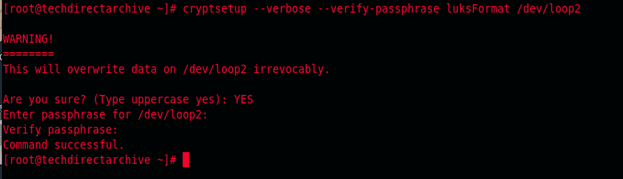
cryptsetup --verbose --verify-passphrase luksFormat /dev/partition-name
To proceed, type YES in block letters. (Pay attention to the warning.) Afterward, you will need to input a password.
cryptsetup luksOpen /dev/partition-name partition-name
This command will prompt you for the password you used for the encryption

Once it is opened, the already encrypted partition is automatically mapped out to dev/mapper/partition-name and a quick delve into the fdisk –l command will confirm just that.

To start using this partition, you will need to format the partition with a filesystem of your choice and then mount it. I used the mkfs command in my own case
mkfs.ext4 /dev/mapper/partition-name

Thats how to encrypt a partition with Cryptsetup. I hope you found this blog post helpful. So, if you have any questions, please let me know in the comment session.


